If you use a portable Mac with an external display, this free app looks like it’d be a lifesaver.
512 Pixels
Inside the M2 Pro Mac mini⇢
As Brian Stucki has discovered, the guts of the most powerful Mac mini ever help explain why the M1 model was mostly empty.
They’ll Leave the Light on For You
The lights at Massachusetts’ Minnechaug Regional High School burn ever bright. They actually never turn off. They can’t turn off. The smart lighting system for the entire building is broken, and it’s stuck in the “on” position. It has apparently been this way for over a year now, and the electric bills are really starting to pile up.
“We are very much aware this is costing taxpayers a significant amount of money,” the school district’s assistant superintendent of finance, Aaron Osborne, told NBC News. “And we have been doing everything we can to get this problem solved.”
That is … wild … but it gets worse:
The school’s entire “green lighting system,” some 7,000 lights, was installed over a decade ago and was supposed to save money, but according to the report, “the software that runs it failed on Aug. 24, 2021” and no one has been able to turn off the lights for the following 17 months. Teachers are adjusting by unscrewing light bulbs at the end of the day and throwing some breakers not connected to vital parts of the school. Dimming the lights to show movies or something projected on a whiteboard has also been difficult: The lights are on full brightness all the time.
According to Lilli DiGrande, News Editor of the student newspaper, the reason behind the lights being on all the time is software that no one knows has access to anymore.
Edward Cenedella, the Director of Facilities and Operations for the Hampden Wilbraham Regional School District, says that the issue is more complicated than just a computer server problem.
When the high school was rebuilt in 2012, an energy conservation software was added which relied on a daylight harvesting system for the lights to use daylight to equalize the light in the room. Cenedella estimates that there are about 7,000 lights in the building, all of which individually send information through wires to a computer which determines how much light to keep that particular one on. This system is owned by a company called 5th Light.
“On occasion, the software would go down and it would somehow get corrupted. We would try to recycle it and eventually everything would come back on,” Cenedella said. “Unfortunately the last time it got corrupted it was unfixable.”
It gets worse again:
Gaining access to the software that runs the lights is one of the main reasons why the lights can’t be adjusted correctly. “[5th Light] no longer has any of that information. They don’t have the software,” Cenedella said. “The old information is proprietary, so they wouldn’t originally give it to us. Now, they say that they don’t have it and that it’s unavailable."
It seems that 5th Light has had several owners in the decade since the installation at Minnechaug Regional High School, and the current company — now named Reflex Lighting — says the only way to resolve the issue to replace the entire system.
Kbase Article of the Week: FAXstf: "Set To Answer" Conflict With America Online⇢
The version of America Online (AOL) originally bundled with the PowerBook 3400 is 3.0D. This version does not properly deal with the situation when another application, such as FAXstf, is set to answer. Upgrading to AOL version 3.0.1 or later will remedy the situation.
The 3400 was a bangin’ machine, but even the best computers of the 90s often fell to badly written AOL software.
It Was Always Going to Be This Way
Today’s embargo day for Apple’s new M2 Pro and M2 Max MacBook Pros, as well as the M2 and M2 Pro Mac mini, but last week David Price wrote a column for Macworld that has been bugging me all weekend.1
Let’s start at the top. After giving a recap of the Apple silicon transition to date, Price writes:
It’s hard to stay excited for two and a half years, especially when the start was so strong. There was a noticeable leap forward once the MacBook Air was released from the constraints of Intel’s underpowered Y-series processors, as noted in our review of the late-2020 model that called out its “dramatically better performance and battery life,” and conceded that “the hype is real.” The same was true for the M1 Mac mini and 13-inch MacBook Pro.
But that progress hasn’t been sustained. There’s nothing wrong with this week’s releases, but they’re incremental speed bumps rather than big steps forward. Perhaps the initial M1 speed bump was exaggerated by the eccentric or overcautious choice of Intel chips towards the end of the companies’ relationship, and like Intel and AMD, big gains only come around once in a generation. Benchmarks will likely show decent-enough gains, but this week’s Mac announcements felt as formulaic as they did during the Intel years.
This is always the case when it comes to processor transitions. When Apple moved from PowerPC to Intel, Apple got to throw around graphics like these: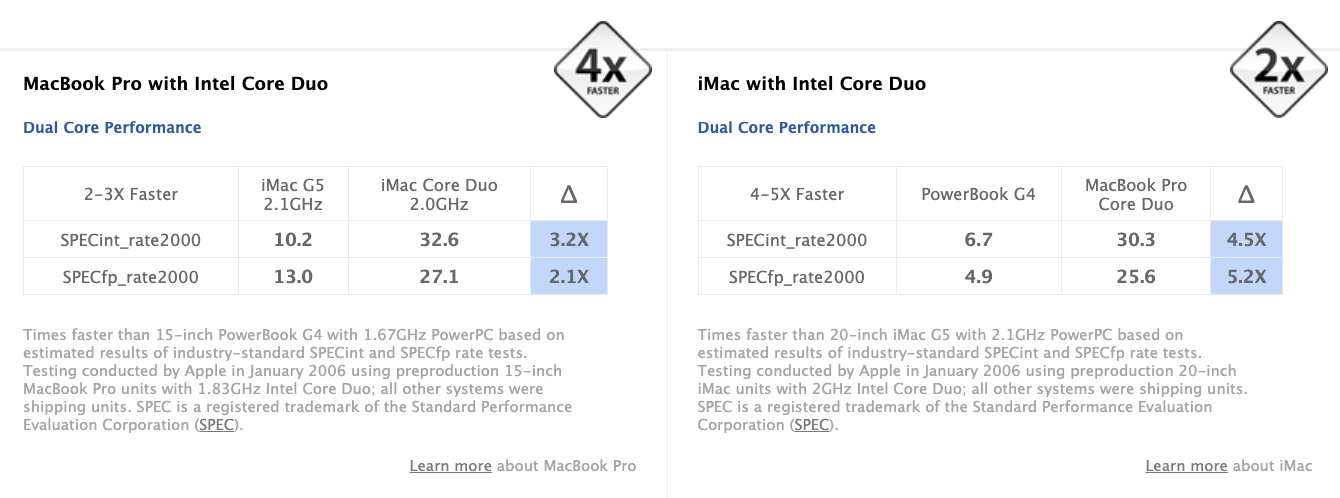
By the time the 2008 iMac and MacBook Pros rolled around, Apple wasn’t able to claim “2x faster” and “4x faster” with a straight face.
To be fair to Price, he’s not the only one with takes like this. Look no further than the description under MKBHD’s review:
It’s an (impressive) bump instead of a quantum leap.
Let’s get back to this Macworld article:
It’s a bit of a giveaway when Apple compares the performance of the M2 Mac mini to the four-year-old Core i7 model rather than the M1 because this year’s gains are much less dramatic. The hoped-for jump to a 3nm manufacturing process hasn’t happened, and as my colleagues discuss in this week’s Macworld podcast, the new MacBook Pro and Mac mini models remain way behind PCs equipped with Nvidia GPUs on gaming performance and features. Apple silicon isn’t a panacea for the Mac’s limitations and was never likely to be.
I agree that Apple comparing the new M2 Mac mini to the old Intel machine is playing to the strengths of the transition, but most people aren’t going to be upgrading from an M1 Mac mini to an M2 model, so I’m willing to forgive it.
(Also, like, dude. Nothing is gonna fix gaming on the Mac.)
What’s harder to forgive is the obsession over process size that has taken over so much tech reporting. I actually blame Intel’s stagnation and inability to move to smaller processes, not to mention that different companies define their processes in different ways.
Did Apple want to be at 3nm for the M2 lineup? Probably, but given that nothing else in the Apple silicon lineup is using a 3nm, it wasn’t likely that the M2 was going to break the mold, especially mid-generation. Rumors had indicated otherwise, but it doesn’t seem like it’s come to pass.
The truth is almost no one in the real world even knows what process sizes are, and the M2 is doing just fine in terms of efficiency and heat output as it is.
Back to Price:
The weight of those expectations is likely to be accentuated when the Mac Pro arrives sometime this year. The latest rumors suggest that it won’t have the M2 Extreme chip as rumored but rather a slightly faster M2 Ultra with a 24-core CPU and 76-core GPU and slots for storage, graphics, media, and networking cards (but not memory). Apple silicon will allow Apple to upgrade it more frequently, but when you go from a $50,000 machine that absolutely trounces everything in its path to one that’s maybe 20 percent faster than the Mac Studio, it’s hard to get all that excited about it.
Even though I am looking forward to the new Mac Pro, rumors about it don’t really impact how I — or anyone else — should feel about the Mac mini or MacBook Pro.
Price goes on:
And while the new Mac Pro will almost certainly be cheaper that the current model, the move to Apple silicon has clearly, and some might say predictably, not resulted in lower prices across the range. Most notably, the M2 Mac mini brings that line closer to its original budget conception, but most Apple silicon Macs have either kept the same price or gone up. The new MacBook Air starts at $200 more than it once did, the 16-inch MacBook Pro is $100 more than its Intel predecessor, and in territories outside the U.S., prices for most models have gone up rather a lot.
Was it always likely that reduced manufacturing costs would fail to translate into lower prices for consumers? Yes. Should we have realized by now that corporations exist to maximize profit, not to make their customers’ lives better? Yes! But does the lack of meaningful price drops undermine one of the biggest hopes of the Apple silicon transition? Also yes.
Apple has always had bonkers margins and inflation is a problem around the world. I’d love for all of these computers to cost less, but only part of that is within Apple’s control. The company may not be writing big checks to Intel anymore, but Apple is now paying for the R&D of these chips and paying TSMC to produce them. Don’t get me wrong; I’d love to see prices come down, but I don’t think Apple silicon was ever going to do that in a notable way.
Next, we see that Price has somehow missed the last few years’ worth of news:
But perhaps the biggest problem with the Apple silicon transition is the fragmented and disorganized way Apple has handled it. While the M1 Mac mini arrived in November 2020, its costlier Intel sibling hung around for more than two years. After the 24-inch iMac arrived in March 2021, the 21.5-inch Intel model stayed on shelves until October. The Mac mini, which was in the first wave of M1 releases, didn’t get the M2 until seven months after the M2 MacBook Air arrived. And after a tease last March, we’re still waiting for the Apple silicon Mac Pro. Altogether you’ve got a recipe for confusion and disappointment.
The move from Intel to Apple silicon was supposed to last “about two years,” in the specific words of Tim Cook. We’re coming up on 31 months since that promise—or 26 if you measure the transition starting from the launch of the first M1 Macs. Apple only just removed the long-in-the-tooth Intel Mac mini from its store and the Mac Pro is still saddled with aging Intel chips.
Here’s quick rundown. We’ve had a global pandemic that derailed massive parts of the international supply chain. Sorry for the spoilers.
It’s not clear why the Pro has been left until last—the wait hardly inspires customers to spend a fortune on such a high-end machine when its components are so obviously outdated—or when its Apple silicon upgrade will finally happen, but the whole process has definitely taken longer than it should.
The Mac Pro was last in the move to Intel, too, according to this random blog post I found:
WWDC 2006, SAN FRANCISCO—August 7, 2006—Apple today unveiled the new Mac Pro, a quad Xeon, 64-bit desktop workstation featuring two new Dual-Core Intel Xeon processors running up to 3.0 GHz and a new system architecture that delivers up to twice the performance of the Power Mac G5 Quad. With advanced performance, greater expansion, higher performance graphics options and unprecedented customization, the newly designed Mac Pro is the ideal system for the most demanding user. The introduction of the Mac Pro marks the completion of a rapid and seamless transition for Apple, with the entire Mac family now using Intel’s latest processors.
The Mac Pro is going last this time for the same reasons it went last in 2006:
- High-end users often have the most trouble when moving to a new architecture, and need to hang on to the old one while waiting for their applications, plug-ins, etc. to be updated.
- High-end systems are built atop technologies found in lower-end models. Just look at the relationship between the M2, M2 Pro and M2 Max. As you move up the line, the systems get more capable. This takes time to develop.
- Apple wants to put its best technology in the hands of as many people as possible. This means working on consumer devices first, then moving upstream.
Price wraps up with this:
All this isn’t to say switching from Intel to Apple silicon hasn’t reaped huge dividends. It was obviously a smart decision, but what started as a “huge leap forward for the Mac” has turned into a slow stroll. As Apple continues to sporadically roll out chips and confuse customers with a mixed-up range of options, it’s getting harder to feel the magic.
Speak for yourself, bud.
-
And not just because the column’s “Different Think” name took years off my life after reading it. ↩︎
Apple Silicon’s Evolution⇢
Howard Oakley writing at The Electric Light Company on how Apple silicon has grown in the move to the M2 family:
Apple silicon CPU cores are grouped in fours, forming a cluster run at the same frequency and sharing cache. M1 Pro and Max chips are unusual in only having half a cluster of Efficiency (E) cores, for which their frequency is managed differently from the full cluster in a base M1 chip. This ensures that background tasks are completed no slower on their two E cores than they would be on a base M1 chip with twice that number.
Increasing the total number of cores for the M2 Pro and Max shouldn’t have been a difficult design choice. Adding more Performance (P) cores would have required a third cluster, greatly increased energy usage and heat production, and resulted in a larger and more expensive chip. E cores are smaller, more frugal in their energy use, and produce less heat. Adding two E cores was probably the least Apple could do to improve the performance of the M2 Pro/Max over those M1 variants.
Sponsor: Unite 4 for macOS⇢
Unite 4 for macOS allows you to turn any website into an app on your Mac. Using a lightweight, WebKit powered browser as a backend, you can easily create isolated, customizable apps from any site.

Unite 4 includes dozens of new features, including support for native notifications, new customization options, and much more. Unite apps also serve as a great alternative for resource hogging Electron apps or half-baked Catalyst apps.
Some examples of apps you could create in mere minutes with Unite:
- A Gmail web client that behaves like a native mail client.
- A status bar app for Apple Music or Overcast
- An isolated workspace for apps that may track you like Facebook
- A Google Meet app that works efficiently without using Chrome
- A fully featured Instagram app that has a resizable window, unlike the M1 version.
- A Robinhood, Figma, or Roam Research app for your desktop.
512 Pixels readers get 20% off this week when you purchase Unite 4 at bzgapps.com/unite512 or when you use the promo code ‘512Pixels’ at checkout.
You can also try Unite for 14 days absolutely free or use it as part of your subscription if you’re a Setapp subscriber!
Mac Power Users #676: Workflows with Kaitlin Salzke⇢
Kaitlin Salzke is an accountant, student and programmer who has built a library of OmniFocus automations. She joins David and Stephen to talk about using Javascript for automation, working on a PC during the week and pushing the boundaries of what macOS can do.
The End of an Era
Sean Herber at The Iconfactory:
Twitterrific has been discontinued.
A sentence that none of us wanted to write, but have long felt would need to be written someday. We didn’t expect to be writing it so soon, though, and certainly not without having had time to notify you that it was coming. We are sorry to say that the app’s sudden and undignified demise is due to an unannounced and undocumented policy change by an increasingly capricious Twitter – a Twitter that we no longer recognize as trustworthy nor want to work with any longer.
Two days ago, @TwitterDev tweeted:
Twitter is enforcing its long-standing API rules. That may result in some apps not working.
This was met with a lot of head scratching, but today we know more, as Karissa Bell at Engadget reports:
In case there was any doubt about Twitter’s intentions in cutting off the developers of third-party apps, the company has quietly updated its developer agreement to make clear that app makers are no longer permitted to create their own clients.
The “restrictions” section of Twitter’s developer agreement was updated Thursday with a clause banning “use or access the Licensed Materials to create or attempt to create a substitute or similar service or product to the Twitter Applications.” The addition is the only substantive change to the 5,000-word agreement.
The change confirms what the makers of many popular Twitter clients have suspected in recent days: that third-party Twitter services are no longer permitted under Elon Musk’s leadership.
Clearly the “long-standing” bit of that tweet was a lie, and just like that, Twitter has greatly harmed numerous developers who have made their living making the Twitter ecosystem better.
Lisa Source Code Released to Mark Machine’s 40th Anniversary⇢
Carina Sweet at The Computer History Museum:
Mountain View, CA – Jan. 19, 2023: The Computer History Museum (CHM), the leading museum exploring the history of computing and its impact on the human experience, today announced the public release and long-term preservation of the source code for the Apple Lisa, including its system and applications software, as part of its Art of Code series. Forty years ago today, Apple, Inc. released the Lisa computer, a milestone in computing history for its innovative use of a graphical user interface (GUI) in a personal computer (PC).
The source code can be downloaded here as a 7.2 MB zipped archive.
Connected #433: The Best Alarm is the Alarm⇢
On this week’s episode of Connected, we covered Apple’s new Macs and the new HomePod, before pouring one out for third-party Twitter clients.
 On Connected Pro, Myke shares a secret about the future CEO of Apple.