512 Pixels

Kbase Article of the Week: Macintosh: Remote Power Up⇢

This week, we’ve got another Q&A-style support article:

I want to remotely power up and remotely reset a Macintosh computer? Are there Apple or third party solutions available?

Depending on the Macintosh model you have, there are different software and hardware solutions available. Many Desktop (examples: Macintosh IIcx, IIci) and PowerBook models are capable of being remotely powered up or restarted.

The document has a lot more detail if you find yourself needing this in 1993.

My Homemade iPad mini Bike Mount

I love bike riding — both on and off the road — but I hate riding in the cold weather, so for several months out of the year my road bike is mounted to a trainer in my garage.

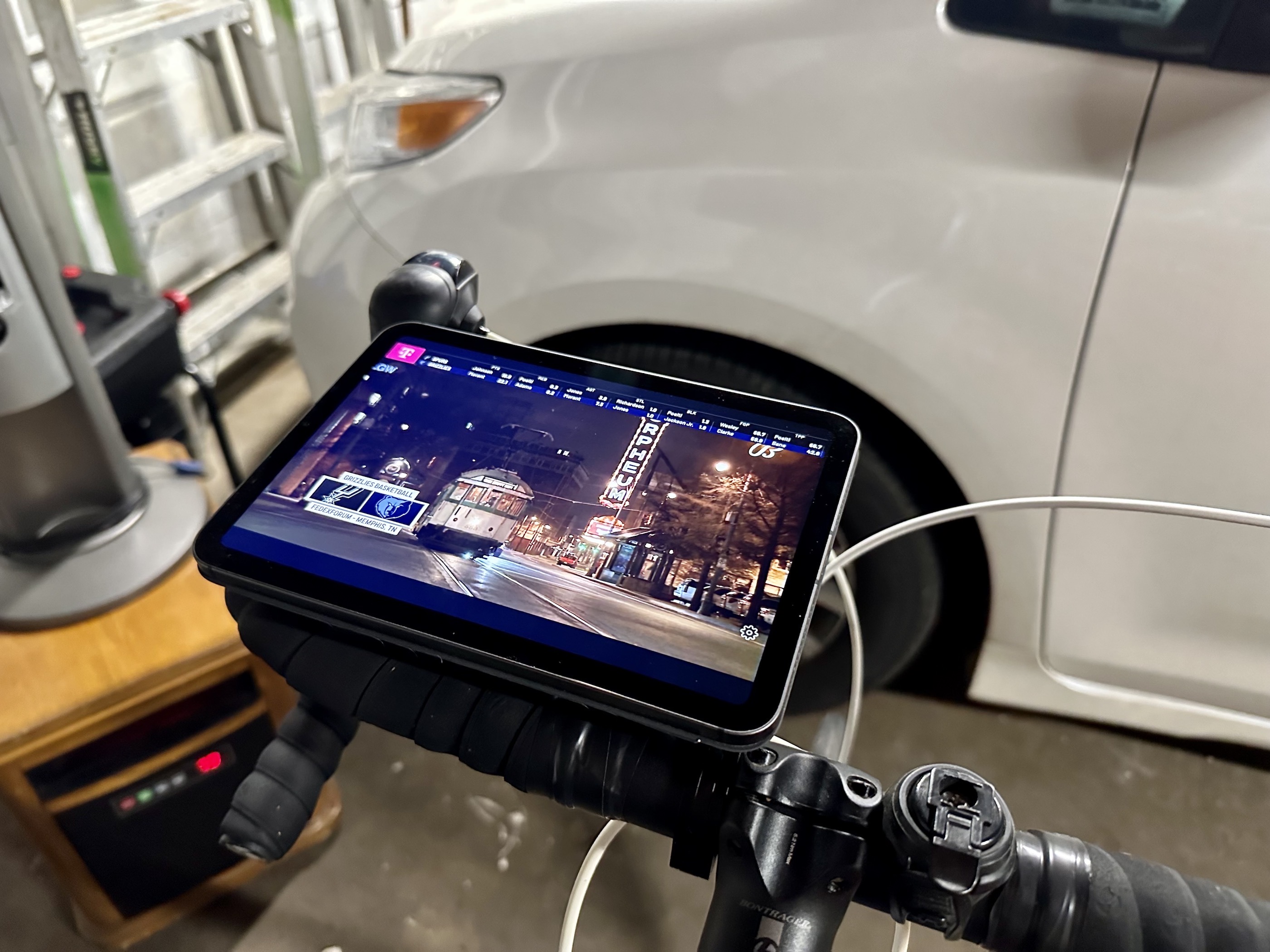
Riding inside is great when it is cold outside, but it’s boring. For years, I would balance my iPad on something in the garage, hoping it wouldn’t tumble to its death, but this year, I came up with something quite a bit more sturdy:

iPad mini on bike

Ok, I know it looks like my iPad mini is just balanced on the handlebars, but the real magic is out of sight. It starts with the Peak Design Out Front Bike Mount, coupled with the company’s universal adapter.

I am a big fan of Peak Design’s mounting system. It uses both magnets and a physical connection to keep things locked down. If I’m out and about on a bike, I have my iPhone 14 Pro in their compatible case, but the universal adapter opens up a lot of possibilities.

To complete my bike setup, I took a Smart Cover and cut the front panel off, sticking the adaptor to the back. This means the Smart Cover is attached securely to the bike. When I go out to the garage, I take my iPad mini and sit it on the the Smart Cover. Its magnets grab the iPad mini and hold it in place quite nicely.

I wouldn’t ride on the street with the iPad mounted this way, but sitting still in the garage, it’s more than secure enough to watch a TV show or basketball game when I get some stationary miles in.

Apple Maps Adds New Parking Features⇢

Joe Rossignol, MacRumors:

In partnership with parking platform SpotHero, Apple Maps now provides parking information for more than 8,000 locations across the U.S. and Canada. Parking availability can be filtered based on EV charging, wheelchair accessibility, and more.

On the iPhone, users can open the Apple Maps app and search for a popular destination such as Madison Square Garden in New York or Scotiabank Arena in Toronto, tap on the “More” button in the place card, tap on the “Parking” option in the menu, and proceed to search for and reserve nearby parking on the SpotHero website without leaving Apple Maps. SpotHero says the feature will also be available on the Mac.

Mac Power Users #674: Workflows with Shawn Blanc⇢

This week on Mac Power Users, I got the chance to catch up with one of the folks I’ve known the longest online:

Shawn Blanc left his job back in 2011 to become a full-time writer. Twelve years later, he’s the mastermind behind sites like The Focus Course and The Sweet Setup and more. Stephen and David ask him about that journey and how he’s grown his operation from a solo venture to a team running multiple projects.

Shawn gave me my first paid gig on the Internet a decade ago when he hired me to write for Tools and Toys. We went on to start The Sweet Setup together. It was a true joy to have him on the show.

Sponsor: The Weather Machine, by Hello Weather⇢

The Weather Machine is a new unified API for weather forecast data. If you need to build weather info into your app, this service will save you a ton of time and complexity.

Weather Machine

You’ll get a single modern interface for the best data providers on Earth. You can write just one integration with modern REST or GraphQL endpoints, and get highly accurate global forecasts from The Weather Company, AccuWeather, AerisWeather and many other sources.

The Weather Machine also makes every provider drop-in compatible with Dark Sky’s API. If you’re already using Dark Sky, you can switch over in minutes!

The Weather Machine is battle-tested in the real world — it was built as the platform that powers the excellent weather app Hello Weather. It handles hundreds of thousands of real-time requests every day, with rock solid availability and performance. Plus, its built-in caching system can cut your data usage up to 50% — with zero configuration required.

With usage-based pricing and no contracts, it’s a breeze to get started. Check out https://weathermachine.io and sign up today for early access.

Using Loopback to Play Audio Through a Pair of Studio Displays

I recently sold my Pro Display XDR and moved to a pair of Studio Displays.

The Studio Display is pretty great, especially with the optional height-adjustable stand. I didn’t use any of the high-end features of the XDR, and after just a few weeks, I’ve fallen in love with this setup, minus some cables that still need tidying:
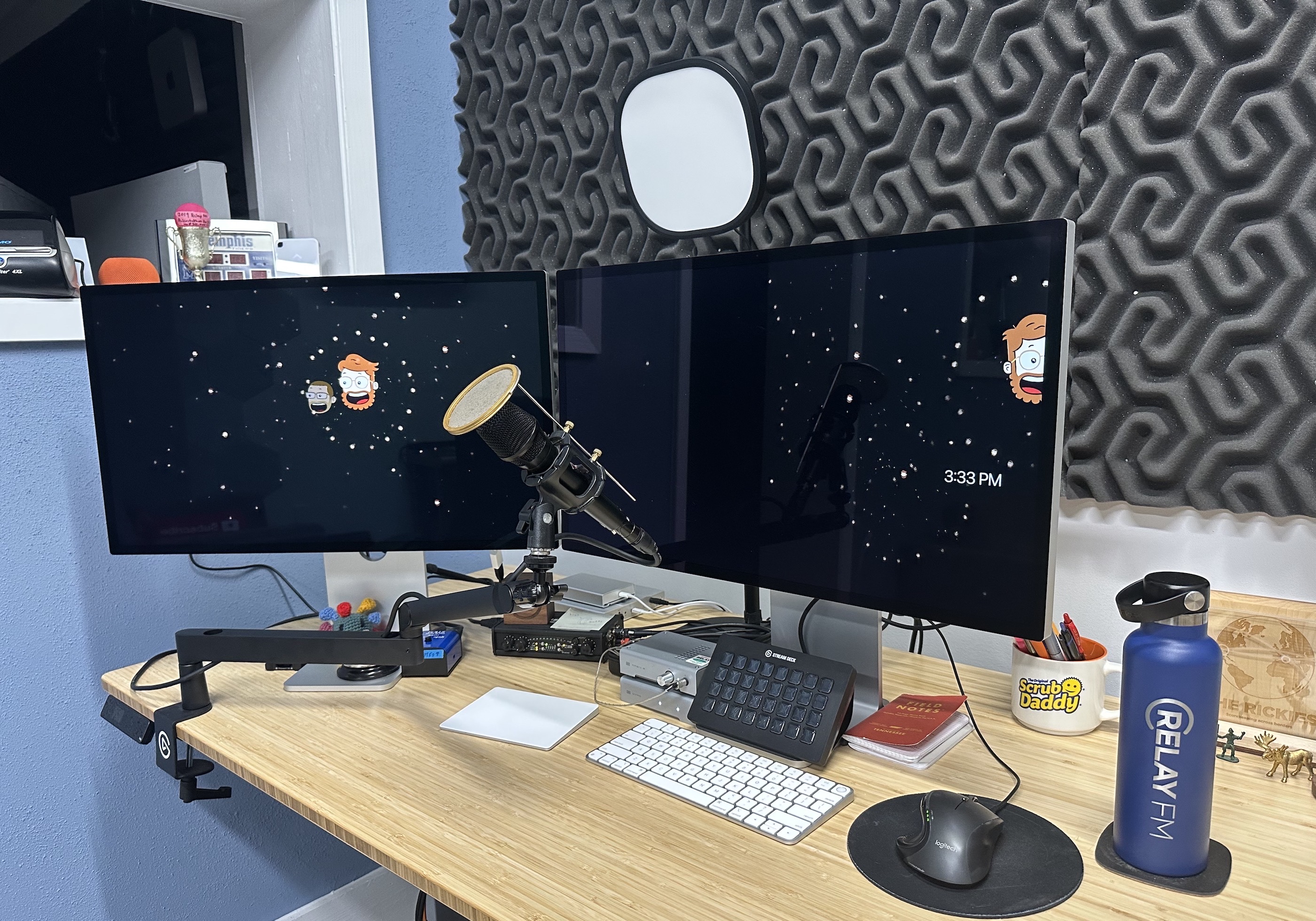
My desk

As the Studio Display comes with a better-than-expected set of internal speakers, this has marked the retirement of the pair of SoundSticks that I’ve been using as my speakers basically forever. As one of them had hot glue holding it together, it felt like it was time.

You know what’s better than one set of Studio Display speakers, though? Having two sets play at the same time. Yesterday, I was wondering how to do this, and then it hit me:

Loopback!

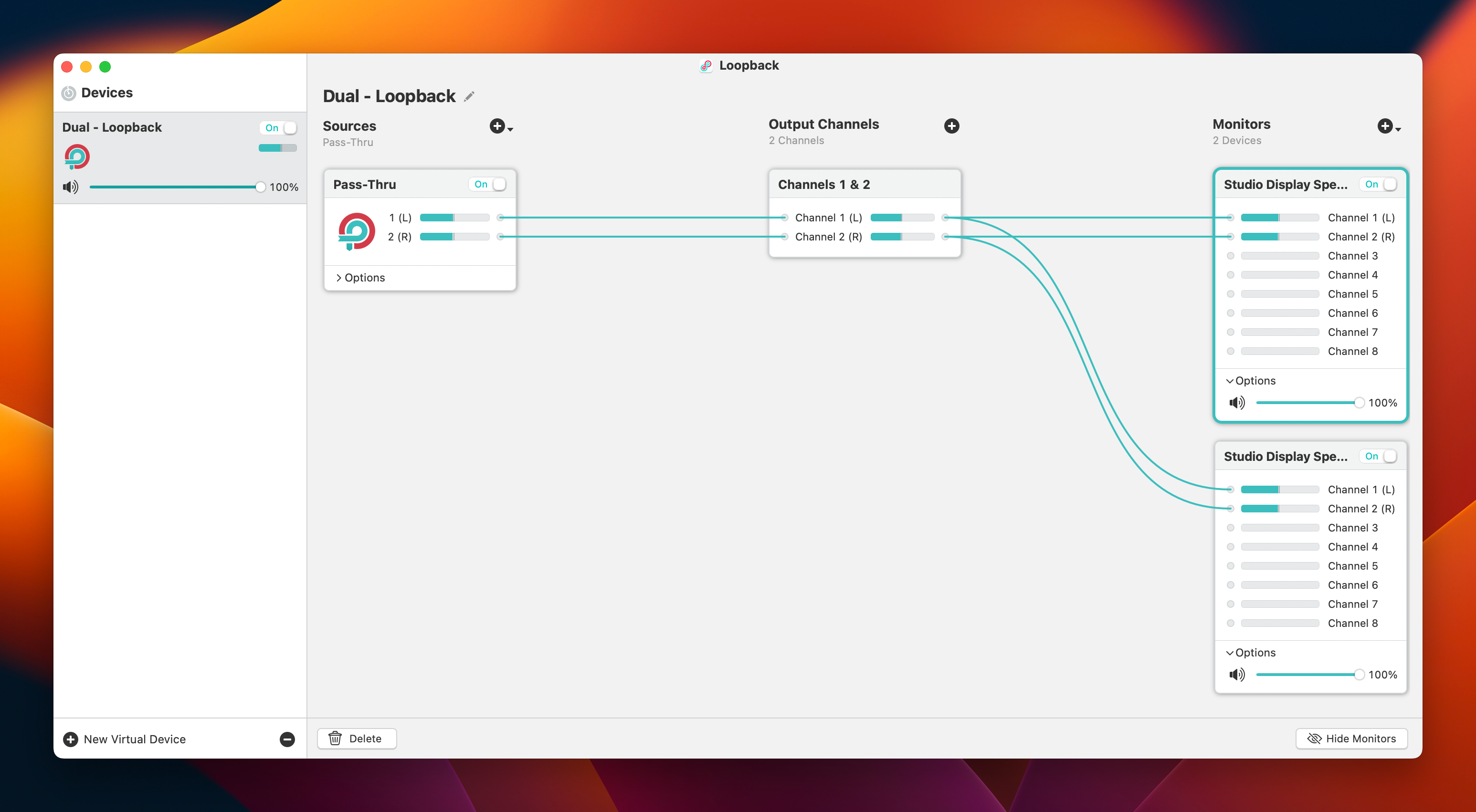
The full extent of what this application can do is far beyond the scope of this blog post, but in just a few minutes, I had all system audio passing through Loopback to both Studio Displays:
Loopback Screenshot

In this setup, the same audio is piped to both displays, so audio on the left channel plays through the left speaker on both displays. This means that the two speakers are playing the exact same thing.

As I sit in front of one display, with the other to my left, this works best for me. However, if I wanted the left display to play just the left channel, and the right one to play just the right, then Loopback would look like this:
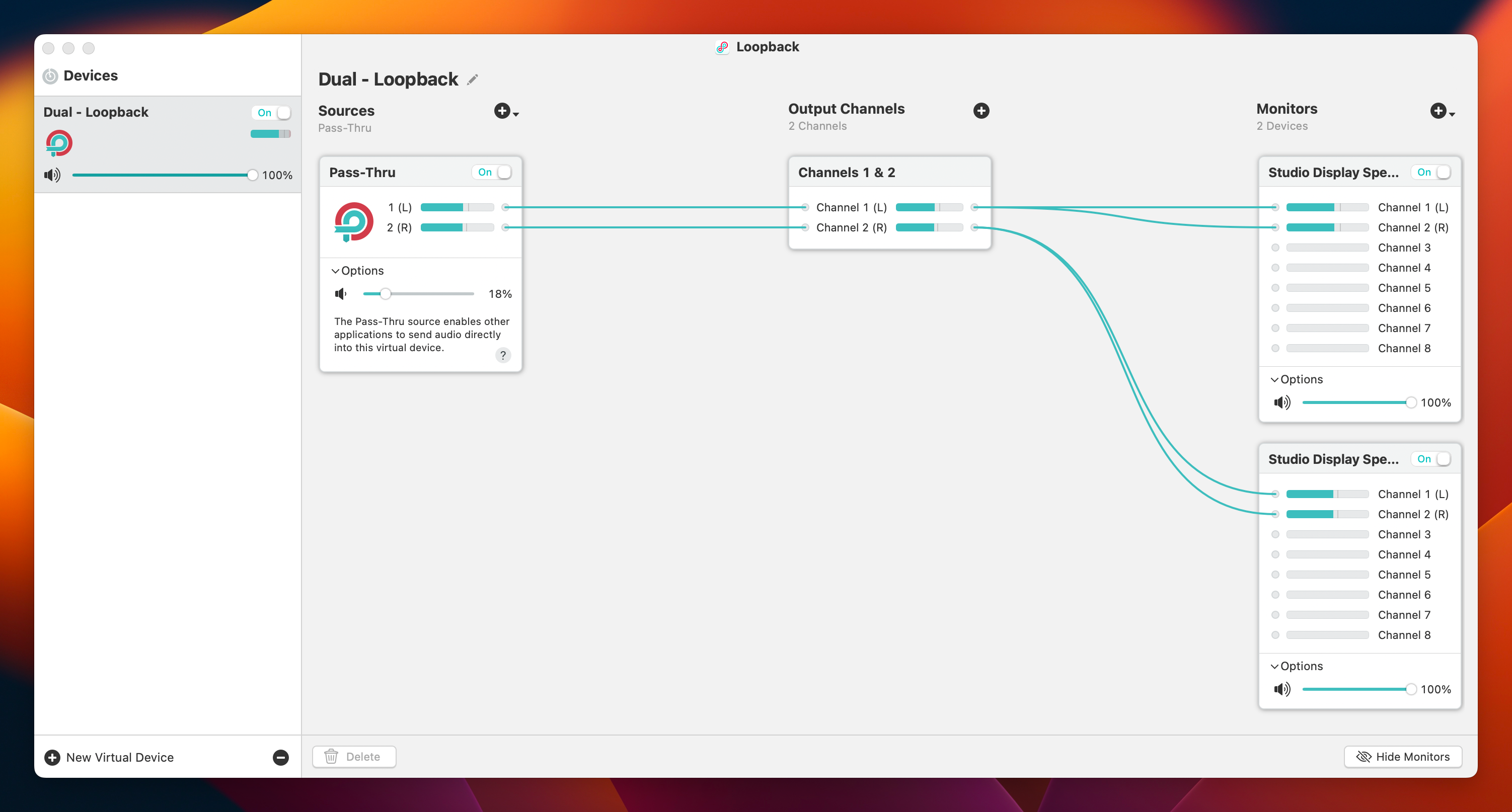
Loopback Screenshot

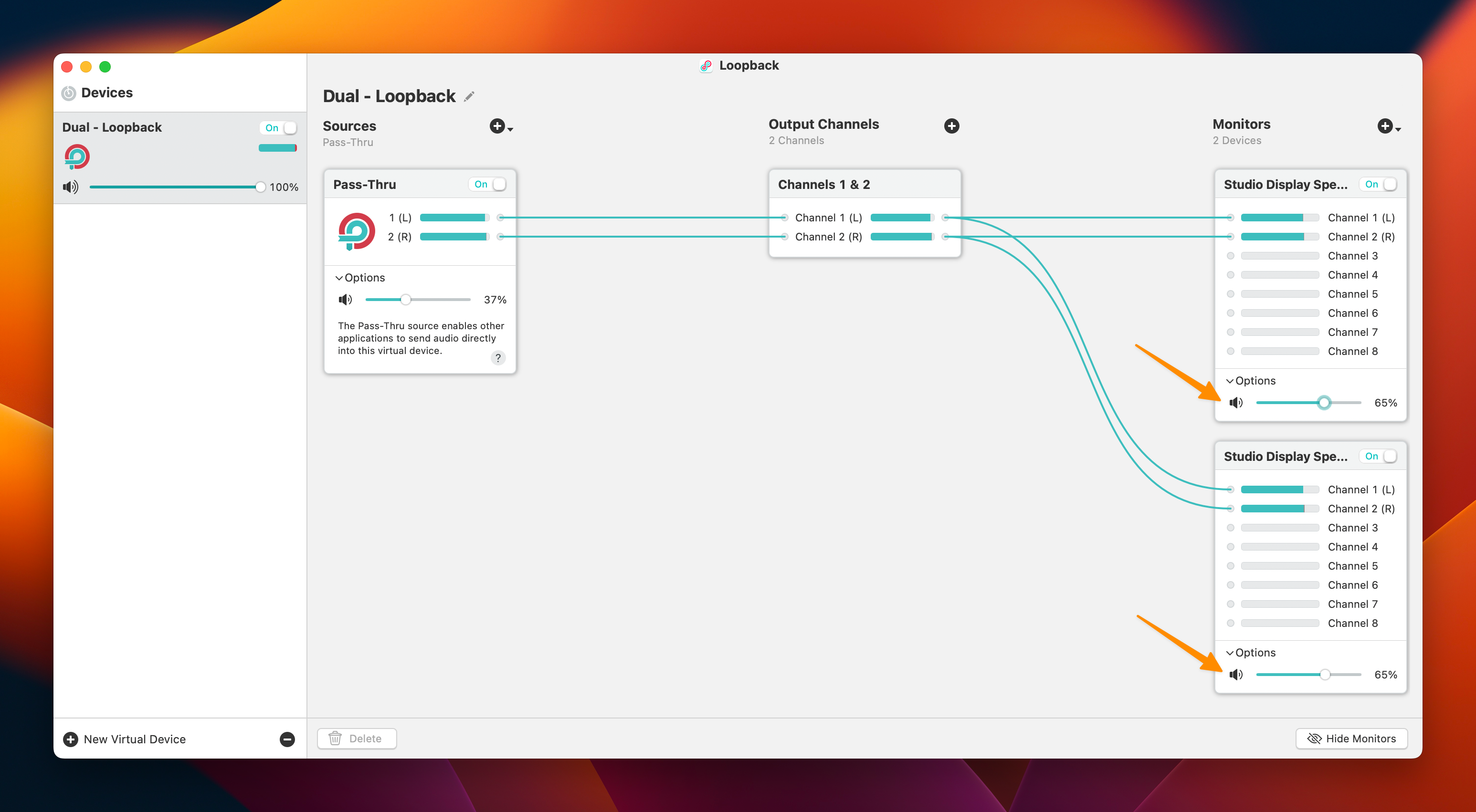
One side effect of this is that a pair of Studio Displays is way louder than one Studio Display. Thankfully, Loopback makes it easy bump down the maximum volume on a per-device basis. Knocking them back to 65% each is working well for me.
Loopback Screenshot

This sort of thing is what makes being a macOS user so much fun.

My Evolving Setup

Last week, I was putting things together for an upcoming episode of Mac Power Users1 and came across a few old posts in which I shared my Apple setups. I thought it would be fun to put them all in one place:

  • October 2009: This was my desk in the first apartment my wife and I lived in after getting married. It was about a year after I started this blog and our oldest son was 11 months old. Now he’s 14.
  • September 2010: That was a very good iPad wallpaper.
  • December 2011: I believe this was my first home screen post over on David Sparks’ site. The images seem lost to time.
  • October 2012: I have no idea why I didn’t take any photos for this one. One star.
  • March 2014: The desk featured in this article was at the last company I worked for. We would launch Relay FM about six months later.
  • September 2014: Sparks’ site does have these images! I look so young.
  • September 2015: After I quit my job to go indie, I split my time between a home office (shown below) and this space, which I rented with my brother’s non-profit.
  • August 2016: This setup was outlined right before I moved into my current studio. This desk was shoved into what was a spare bedroom in our house that is now home to our youngest son.
  • September 2018: I was really excited about this one and I love that photo.
  • March 2020: It’s amazing how little my homescreen has changed over the last three years.

If you want a much more updated accounting of things, check out my Gear & Studio page.


  1. It will be published on Sunday, January 8. ↩︎

Kbase Article of the Week: Use Gigabit Ethernet on Mac⇢

Apple Support:

If your Mac supports it, you can use Gigabit Ethernet, which requires a special Gigabit Ethernet cable.

If you don’t have a Gigabit Ethernet cable, you can still connect to a Gigabit Ethernet network by adjusting the Ethernet speed of your computer.

Amazingly, the ability to manually set network speed is still present in macOS Ventura.

Another Year in the Books

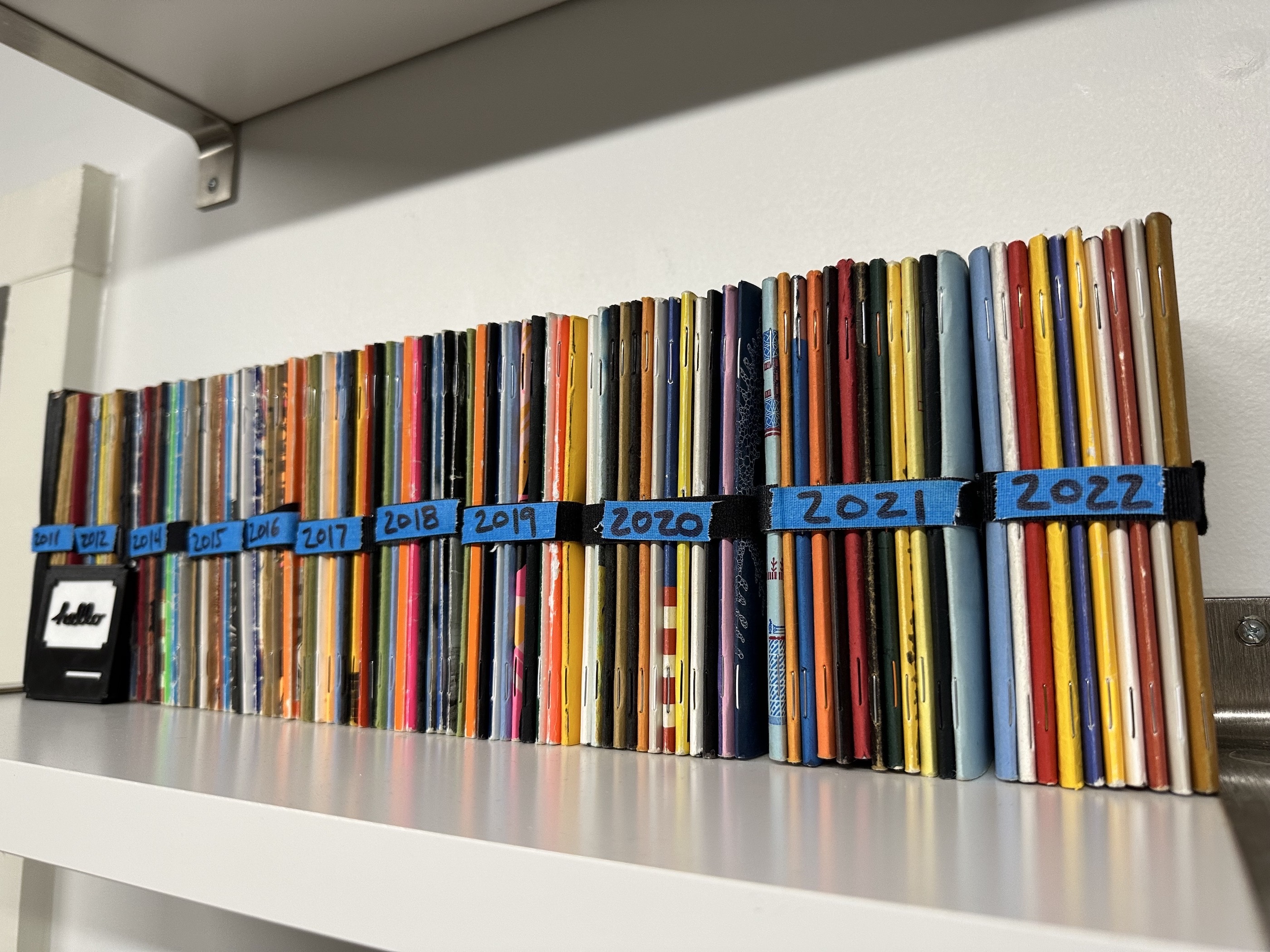
It’s hard to believe it is January again. The new year means I get to put another bundle of used Field Notes on my shelf:

A collection of Field Notes

Long time readers — and viewers — will know that I’ve done this for over a decade, but I carry a notebook with me just about all the time. Their contents range widely and I can’t imagine life without them.

Flipping through my 2022 notebooks, I spotted everything from Podcastathon planning and meeting notes to questions for my therapist and grocery lists. When one gets filled up, I scan it, toss the PDF on Dropbox and put the notebook on the shelf.