
If you’ve wondered why some of us have such complex feelings about NASA’s new rocket, Eric Berger has a great article on the very subject.
512 Pixels
The Problem with a Piecemeal macOS Redesign
Going from the new System Settings to the ancient System Information — née System Profiler — is quite jarring on macOS Ventura:

Also, can we talk about why someone centered all the text and the button that ended the up in the footer of this new settings pane?
Also, also, when is the last time any Mac had anything appear in the “Parallel SCSI” section of System Information other than the default text:
This computer doesn’t contain any Parallel SCSI devices. If you installed Parallel SCSI adapters, make sure they’re seated properly and that any devices connected are powered on, connected properly, and correctly terminated.
Connected #412: It’s Strong! It’s Tough!⇢
Apple has announced an event for September 7th, while also confirming that iPadOS 16 will ship later in the fall. This week, Federico, Myke and Stephen talk through the news, cover the Mac’s inclusion in the Self Service Repair Program and explore a new Twitter client.
On Connected Pro, we each designed our own iPhones. Here’s mine.
Apple Announces September 7 Event
According to invites, some media will be in-person at the Steve Jobs Theatre.
And confirmed: In-person Apple iPhone event on Sept.7 in Cupertino. pic.twitter.com/jgNFifUxwJ
— Joanna Stern (@JoannaStern) August 24, 2022
Apple Confirms iPadOS 16 Delay⇢
It’s been rumored that Apple was going to delay the release of iPadOS 16. Today, that was confirmed to Brian Heater at TechCrunch:
Apple this morning is rolling out iPadOS 16.1 beta to enrolled developer devices. It’s a break from the standard release cadence, which has tied together the tablet operating system with its smartphone counterpart, iOS, since its first release in 2019.
In a comment to TechCrunch, the company notes, “This is an especially big year for iPadOS. As its own platform with features specifically designed for iPad, we have the flexibility to deliver iPadOS on its own schedule. This Fall, iPadOS will ship after iOS, as version 16.1 in a free software update.”
In other words, Apple will be skipping the iPadOS 16.0 release in the fall and going straight to 16.1.
Artemis I Flight Readiness Concludes⇢
The Flight Readiness Review for NASA’s Artemis I mission has concluded, and teams are proceeding toward a two-hour launch window that opens at 8:33 a.m. EDT Monday, August 29, from Kennedy Space Center’s Launch Pad 39B in Florida.
When the giant SLS rocket gets off the ground, it’ll be a huge win for the agency, which has been developing it for over a decade. I can’t wait to see it clear the tower.
Kbase Article of the Week: Identifying Power Adapters for Apple Cinema Display (20-inch DVI), Apple Cinema HD Display (23-inch DVI), and Apple Cinema HD Display (30-inch DVI)⇢
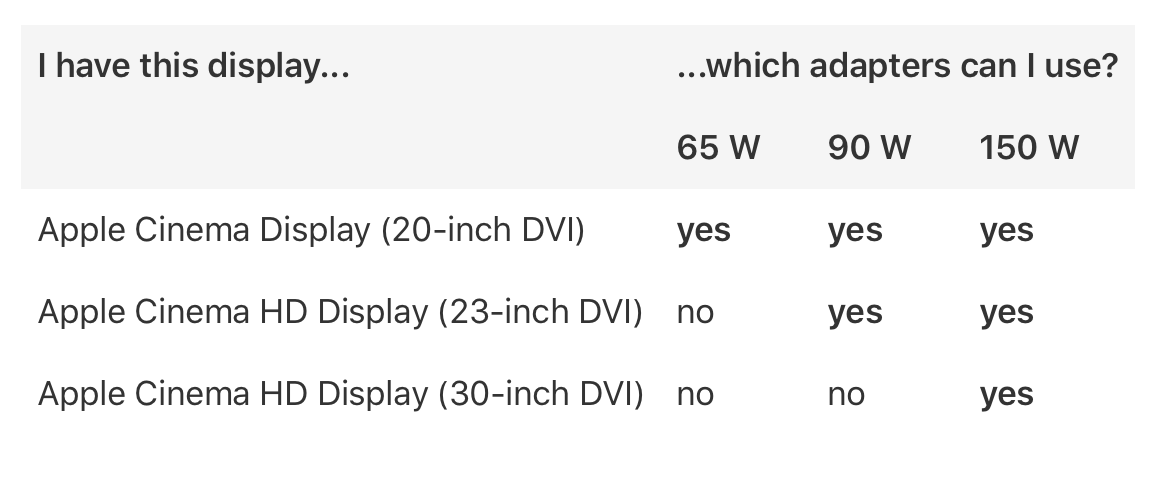
Need to know which power adapter goes with your Apple Cinema Display (20-inch DVI), Apple Cinema HD Display (23-inch DVI), or Apple Cinema HD Display (30-inch DVI)? The following table has your answer!
And what a table it is…
Mac Power Users #654: Data Storage in 2022⇢
This week on Mac Power Users, David and I address storage mediums, syncing services, backup strategies and a lot more.
Apple Announces Self Service Repair for Select Mac Notebooks
Apple announced Self Service Repair will be available tomorrow for MacBook Air and MacBook Pro notebooks with the M1 family of chips, providing repair manuals and genuine Apple parts and tools through the Apple Self Service Repair Store. Self Service Repair for iPhone launched earlier this year and the program will expand to additional countries — beginning in Europe — as well as additional Mac models later this year.
Self Service Repair for MacBook Air and MacBook Pro offers more than a dozen different repair types for each model, including the display, top case with battery, and trackpad, with more to come. Customers who are experienced with the complexities of repairing electronic devices will be able to complete repairs on these Mac notebooks, with access to many of the same parts and tools available to Apple Store locations and Apple Authorized Service Providers.
Jason Snell has more details at Six Colors:
At launch, Apple is supporting some specific repair types, though others will be added as the program goes along. For this first round of Macs, you’ll be able to perform replacements for many items, including the audio board, battery (for MacBook Air), bottom case, display, keycaps, logic board, speaker, top case, Touch ID board, trackpad, fans (for MacBook Pro), MagSafe (for MacBook Pro), and the antenna modules. (Apple says there will be a MacBook Pro battery replacement available in the near future.)
The cost of repair parts varies widely. An audio board replacement might cost $12, and speakers $29, while the logic board for a 32-core GPU MacBook Pro with 32GB of memory and a 1TB hard drive would run more than $1900. However, depending on the part, Apple will buy back the broken part and refurbish it for re-use in another repair, making that $1900+ logic board repair cost a little less than $600. (If Apple doesn’t reimburse you for a part, they’ll still accept it and recycle it if you want to send it back to them.)
Like with the iPhone Self Service Repair Program, users can purchase parts and rent tools from the Self Service Repair Store, which as previously discussed, is managed by CTDI for Apple.
Also like the iPhone Self Service Repair Program, I don’t think most people are going to opt to crack open their Macs when a repair is needed. This is great for those of us with the skills — or bravery — to do so, but if I were still in the Apple-Authorized Service Provider business, I wouldn’t be too worried about this tanking my repair revenue.
I am curious to see what will happen with machines like the iMac and Mac Studio are included in the program, as they are more difficult to open than a notebook. Until then, I’m glad to see this program continue to grow.
Sponsor: Unite 4 for macOS⇢
Unite 4 for macOS allows you to turn any website into an app on your Mac. Using a lightweight, WebKit powered browser as a backend, you can easily create isolated, customizable apps from any site.
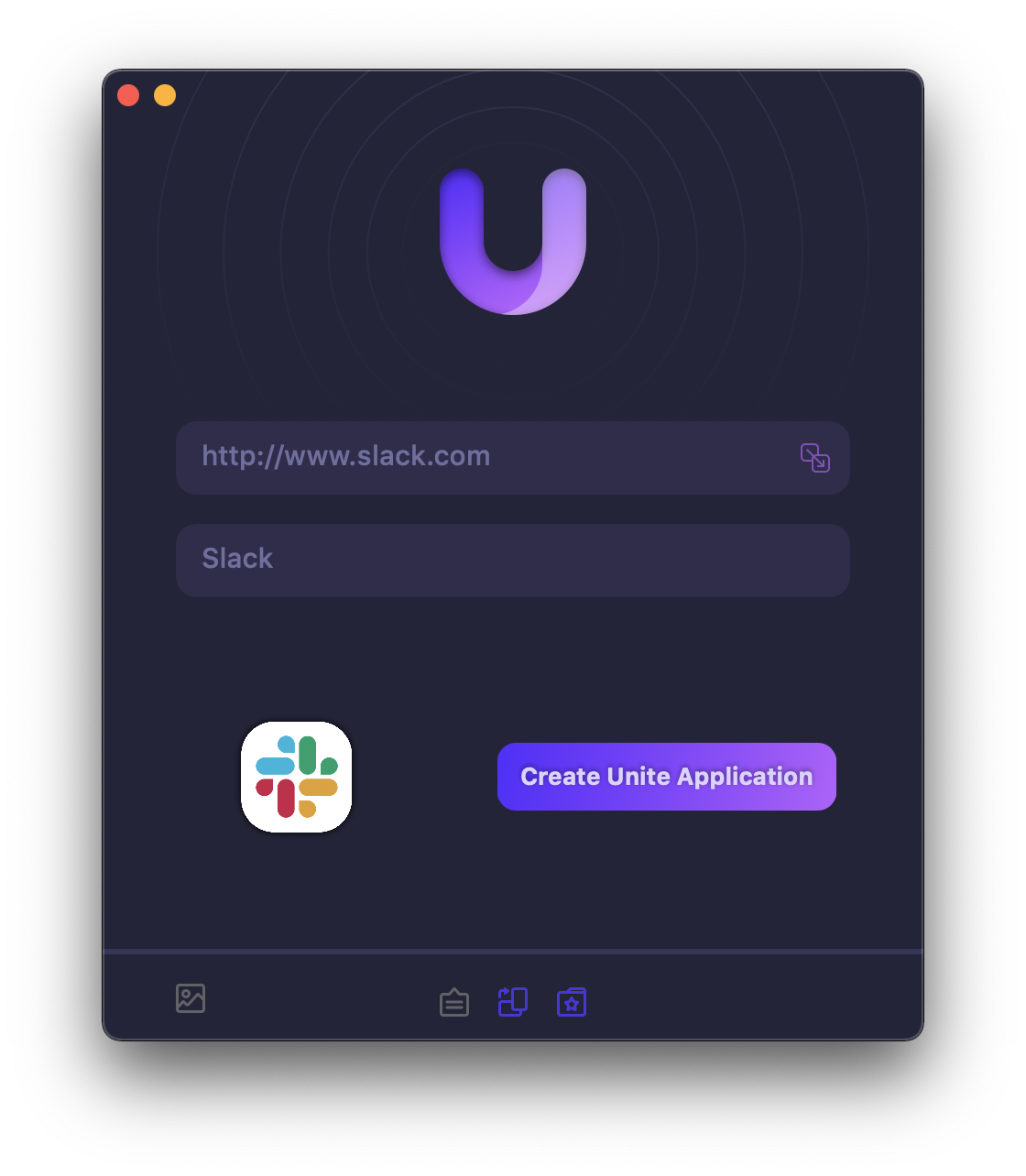
Unite 4 includes dozens of new features, including support for native notifications, new customization options, and much more. Unite apps also serve as a great alternative for resource hogging Electron apps or half-baked Catalyst apps.
Some examples of apps you could create in mere minutes with Unite:
- A Gmail web client that behaves like a native mail client.
- A status bar app for Apple Music or Overcast
- An isolated workspace for apps that may track you like Facebook
- A Google Meet app that works efficiently without using Chrome
- A fully-featured Instagram app that has a resizable window, unlike the M1 version.
- A Robinhood, Figma, or Roam Research app for your desktop.
512 Pixels readers get 20% off this week when you purchase Unite 4 at bzgapps.com/unite512 or when you use the promo code ‘512Pixels’ at checkout.
You can also try Unite for 14 days absolutely free or use it as part of your subscription if you’re a Setapp subscriber!
How Apple Builds Its macOS Apps⇢
WWDC 2019 had a major impact on the UI toolkit landscape: while the venerable AppKit APIs remained available, Apple removed the old Carbon APIs and introduced 2 brand new frameworks: Mac Catalyst and SwiftUI.
Apple sporadically mentioned some apps built with these new UI toolkits. In this article, I try to bring a better overview of Apple’s use of AppKit, Mac Catalyst and SwiftUI in the different versions of macOS, from macOS Mojave to macOS Ventura.
The charts aren’t a huge surprise to me — there is a lot of AppKit still kicking around in macOS. This transition is going to take a long time, both in the third-party ecosystem and within Apple itself.
MarsEdit⇢
My thanks to MarsEdit for sponsoring the site this week. It is a fantastic blog editor for macOS that eschews all the increasingly complicated parts of WordPress. I use here on 512 Pixels — including for this very blog post.