
Apple Demo and 91 Tech has an incredible video out, all about AirPower, Apple’s never-launched wireless charging mat.
512 Pixels
Relay FM Turns Eight
If you had told me eight years ago that we’d be where we are today, with an amazing community of podcasters, listeners and members, it would have sounded like a dream come true.
That’s exactly what it is.

Connected #411: on my phone ;)⇢
The guys react to their original iPhone App Store purchases after discussing Stephen’s M2 MacBook Air review, Federico’s feelings about the betas and Myke’s love of transparent objects.
Janet Jackson Versus XP Laptops⇢
Raymond Chen, writing at The Old New Thing at Microsoft:
A colleague of mine shared a story from Windows XP product support. A major computer manufacturer discovered that playing the music video for Janet Jackson’s “Rhythm Nation” would crash certain models of laptops. I would not have wanted to be in the laboratory that they must have set up to investigate this problem. Not an artistic judgement.
One discovery during the investigation is that playing the music video also crashed some of their competitors’ laptops.
And then they discovered something extremely weird: Playing the music video on one laptop caused a laptop sitting nearby to crash, even though that other laptop wasn’t playing the video!
What’s going on?
The answer — and the fix — are pretty wild.
Kbase Article of the Week: MacBook Air (Original, Late 2008, and Mid 2009) Hinge Quality Program has Ended⇢
Apple Support, in a pretty terse document:
The eligibility period for the MacBook Air (Original, Late 2008, and Mid 2009) Hinge Quality Program has ended.
The eligibility period covering this issue has ended.
I had forgotten about this situation, but I linked to a support article about it back in 2009.
The URL I linked to back then now redirects to the short announcement quoted above, but here is what it said:
Learn what you can do if you experience one or more of these issues with the hinges on your MacBook Air.
- Unable to close lid completely.
- Broken or cracked plastic near one or both of the hinges.
- More than one inch (2.54cm) of free play while opening or closing the lid.
- Lid falls freely into closed position from a 30-degree open position. (From a closed position, open the lid approximately 30 degrees and let go.)
You can take your MacBook Air to an Apple-Authorized Service Provider or Apple Retail Store for evaluation and repair if necessary, even if your product is out of warranty.
If you previously paid for a repair for hinge-related issues that were not caused by accidental damage, you may be eligible for a refund. Contact Apple for more information.
That last bit is important, as Apple had previously been treating failed MacBook Air hinges as if they were cases of accidental damage.
A War of Head Versus Heart: The M2 MacBook Air
I’m a big fan of Death Cab for Cutie. Like most music that has stuck with me, I first came across the band’s work in high school. My buddy Levi drove a first-generation Miata, and one night as we drove around the suburb outside of Memphis that we called home, he popped in a burned CD labeled “DCFC.”
“I think you’re going to like these guys,” he said, turning up the volume. As a somewhat-emo 17 year old, I was hooked.
Their album Plans came out in August 2005, at the start of my sophomore year of college. I wore out those bits on my iPod. To this day, it may be my favorite album of all time. I don’t listen to it often, but when I do, it’s an experience.
One of the singles is the 8th track on the record, named “Crooked Teeth.” Here are the lyrics from the bridge:
I’m a war of head versus heart
And it’s always this way
My head is weak
And my heart always speaks
Before I know what it will say
I’m not sure it is what Ben Gibbard and Chris Walla had in mind when they wrote the song, but this sums up how I feel about the new M2 MacBook Air.

At this point, you know just about everything there is to know about this computer.1 The new design fits with the MacBook Pros Apple introduced last year. The Touch Bar is gone; the Notch is here. MagSafe is back. The M2 probably does thermal throttle, but you won’t ever notice it. It comes in a few colors, but not the ones we all wanted.
There’s no doubt that the MacBook Air is the most important computer Apple makes. Even when Apple tried getting away from it, customers refused to let them.2 It was a stunning fall from grace, but the machine was able to make a rebound. There’s a pretty clear line between Apple rebooting the MacBook Air in 2018 to the machine we have today.
And what a machine it is. The wedge shape may be gone, but everything that made the MacBook Air good back in the day is still here today: performance that will meet the needs of almost everyone, impressive battery life and a portable design that makes it easy to take the notebook anywhere. In a vacuum, the M2 MacBook Air is one of the best Macs Apple has ever made.
But the Air doesn’t exist in a vacuum.
When looking at any product, one has to consider the context of that product. For the M2 MacBook Air, that context is the M1 MacBook Air that is still for sale and the 14-inch MacBook Pro.
If you’re on a budget, you should probably buy the M1 MacBook Air, especially given the fact that the base-level M2 MacBook Air comes with kinda-lame SSD speeds. The M1 Air is a great machine, and while it’s a shame the M2 couldn’t hit the magical price of $999, at least Apple has a good option for those on a budget.
The 14-inch MacBook Pro is a more interesting comparison, and not just because it has been my notebook for the last nine months.3
Back when Apple introduced the USB-C-and-nothing-else MacBook Pros in the fall of 2016, I had my first Something isn’t right here thought when I saw this slide:
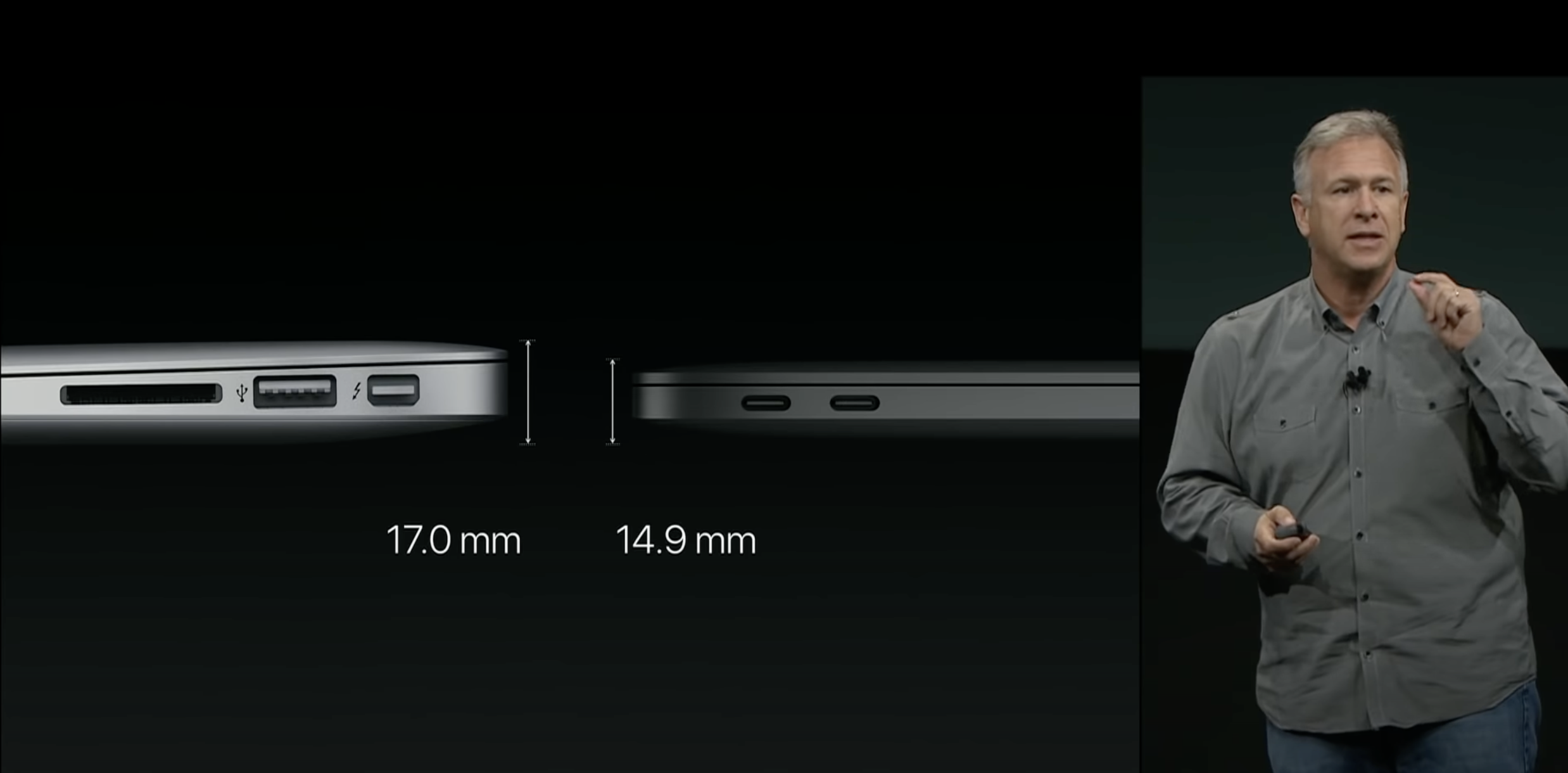
Apple was thrilled that the then-new 13-inch MacBook Pro was thinner than the pre-Retina MacBook Air, had 13% less overall volume and weighed the same three pounds.
With that design, Apple blurred the lines between the MacBook Air and MacBook Pro in a way it hadn’t done before. That decision got reversed last year when the new 14-inch and 16-inch MacBook Pros were introduced. The Pro got thicker, heavier and a lot more capable. Many people fell in love with it, including me. Finally, after five years, Apple was letting the MacBook Pro be a pro notebook again.
The M2 Air, in many ways, is the opposite side of that coin. The design is cut from the same smooth aluminum cloth, and side-by-side, it’s clear that the M2 Air and 2021 MacBook Pros were indeed designed together.
This has made the decision between the MacBook Air and the MacBook Pro easier in a bunch of ways, especially if you are like me and pretend the Touch Bar-laden 13-inch MacBook Pro with M2 isn’t a thing.
If you need something lightweight and thin, the MacBook Air is an excellent choice. On the other hand, if you need more power and more ports, the MacBook Pro is there, ready to meet your needs. They are two divergent paths, and most customers will know which one they should traverse.
This is where we get to the Head Versus Heart of it all. My workflow benefits from the M1 Pro’s extra horsepower, especially when it comes to multi-threaded tasks like encoding MP3s. Logic renders are also faster on the MacBook Pro, and the inclusion of an HDMI port and SD card slot meant that I took most of the dongles out of my backpack months ago.
In my head, I know that the 14-inch MacBook Pro is the right notebook for me and the work that I do when away from my desk. My heart says otherwise.
There’s something about the design of this machine that I can’t escape. The footprint is pretty similar between the two notebooks, but in my backpack, there’s a huge difference. Don’t get me wrong: I am thrilled that the MacBook Pro has beefed up to be a better computer, but I’m drawn to the clean, simple look of the Air. I know the Pro is a better match for my workflows, but the Air can do everything I need — if just a little bit slower. And I don’t care about that speed difference any time I pick up the Air to take it with me. Something about it just clicks with me in a way I didn’t anticipate.
I think my heart is going to win this one.
-
If you have just woken up from a coma or just gotten back from a stay at the South Pole and haven’t seen coverage of this machine, check out Quinn Nelson’s video about it. ↩︎
-
The 12-inch MacBook really did bring a ton of chaos with it: a muddy product line, a bad keyboard and the USB-C-and-nothing-else era we’re just now leaving behind. I know some people loved it, but in hindsight, it’s amazing just how wrong Apple got so much of how it was presented and where it was in the lineup of Mac notebooks at the time. ↩︎
-
I’ve been a desktop-first Mac user for years but have always kept a notebook, for times I want to work away from my desk or am on the road for work. For me, a notebook is a secondary Mac, and I treat it as such, with a subset of the data and workflows present on my Mac Studio being set up on my MacBook Pro. ↩︎
Stephen Colbert on Severance⇢
Sponsor: MarsEdit⇢
MarsEdit 4 is a native Mac interface to WordPress and other blogging systems that focuses on one thing: blogging! As WordPress gets increasingly complicated with an emphasis on BLOCKS and whole-site design, MarsEdit sticks to the classic idea that:
- There would be an editor.
- You could write in it.
- You could publish it to your blog.
I mean just look at how clean it is:
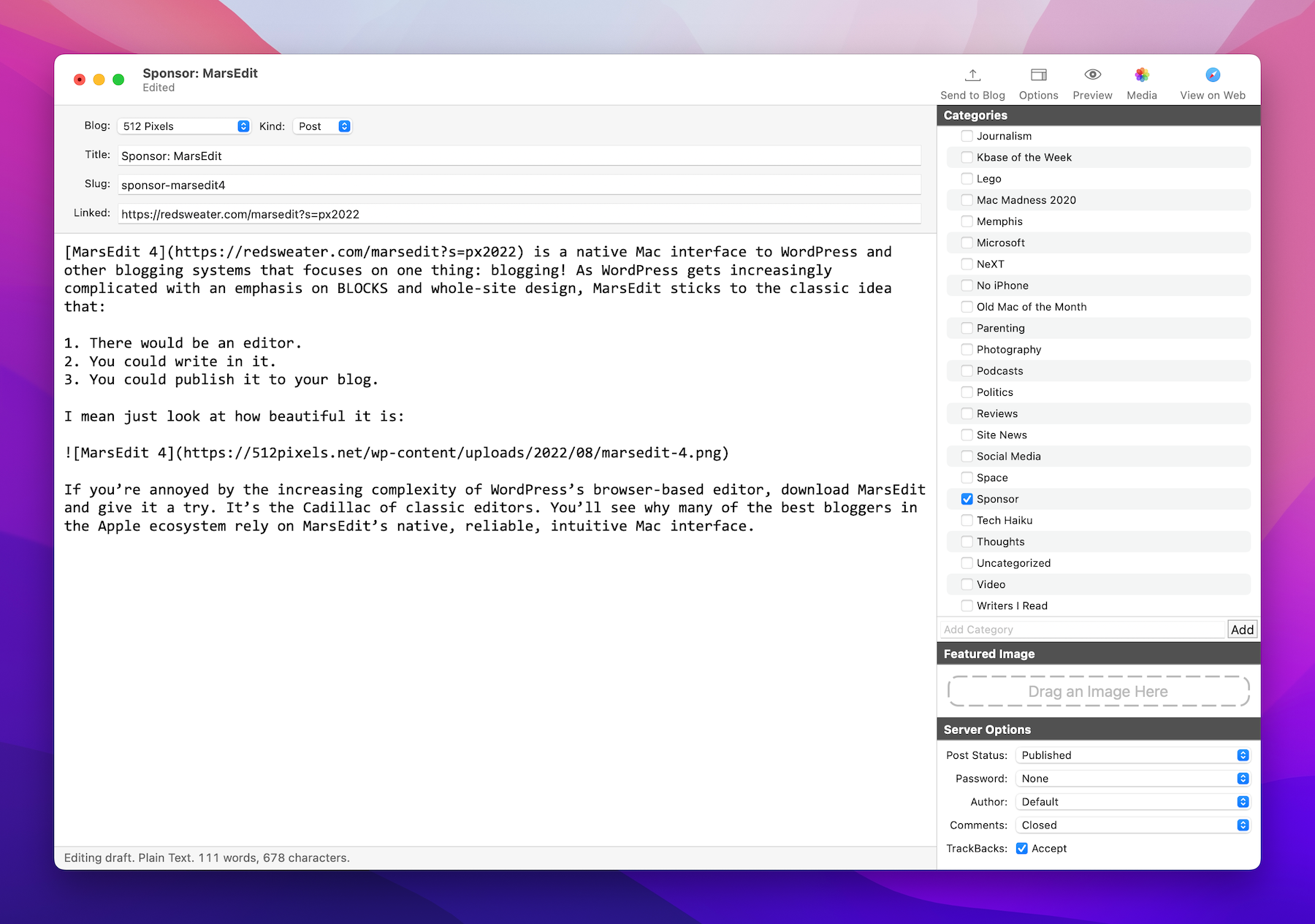
If you’re annoyed by the increasing complexity of WordPress’s browser-based editor, download MarsEdit and give it a try. It’s the Cadillac of classic editors. You’ll see why many of the best bloggers in the Apple ecosystem rely on MarsEdit’s native, reliable, intuitive Mac interface.
Mac Power Users #653: Workflows with Chris Christensen⇢
This week on Mac Power Users, David and I are joined by Chris Christensen. He is a web developer, writer and traveler with roots in 90s Apple. We discuss his work, navigating the world and a lot more.
On More Power Users — the longer and ad-free version of the show — we talk about Chris’ time working on the Newton and eWorld. I loved it.
TextExpander
My thanks to TextExpander for sponsoring 512 Pixels again this week.
The way we work is changing rapidly. Make work happen wherever you are by saying more in less time and with less effort using TextExpander. TextExpander is available on Mac, Windows, Chrome, iPhone, iPad. Learn more and get 20% off by visiting this page.
Network Locations Removed from macOS Ventura⇢
Network Locations is a feature of macOS that, ever since version 10.0, has allowed users to switch between different sets of network configuration preferences in different environments and situations. It’s not visible in the redesigned System Preferences app of macOS Ventura — and Tyler Loch discovered that the disappearance is not an accident. Loch’s Feedback submission to Apple has been marked as “works as currently designed.”
Length of service in macOS is not reason enough to keep any feature around, but I’ve heard from several people who say they still use this feature and are upset that it’s seemingly been terminated. It’s useful in business situations where different networks have different properties. One colleague of mine says he uses the feature to debug network problems without messing up existing settings and to connect to specific devices when visiting a relative’s house.
At first I thought maybe this had just been misplaced in the switch to System Settings,1 but if it really is gone, I agree with Jason that it’s a good opportunity for a third-party utility to shine.
-
Which is a disaster, as this Twitter thread by Niki Tonsky highlights. ↩︎
Dropbox Announces Beta for macOS Monterey Coming in Q4⇢
A public beta for full support of macOS will be available in early Q4. For now, you can still double-click to open files in Finder. Everything else is working as usual.
The “full support” language is in regard to a change Apple made in macOS 12.3 that deprecated the type of kernel extensions used by both Dropbox, Microsoft OneDrive and others. This extension allowed Mac applications to open online-only files from Dropbox as if they were stored locally. For users running macOS 12.3 or later, a workaround is available, but the experience is less than ideal.
When this change was made earlier in the year, Dropbox announced a beta due out in March that would restore the functionality, but according to today’s news, that full public beta won’t be here until the final quarter of 2022.
…at which point macOS Ventura will be out.