And so, on March 25, 2022, I left my “normal” job. I am now officially self-employed.
Hearing John share the news on Reconcilable Differences and ATP was amazing. I couldn’t be happier for John.
And so, on March 25, 2022, I left my “normal” job. I am now officially self-employed.
Hearing John share the news on Reconcilable Differences and ATP was amazing. I couldn’t be happier for John.
Apple has launched its Business Essentials Program. It’s a new service for businesses that offers 24/7 Apple support, device management, iCloud space and more for all one monthly fee per user.
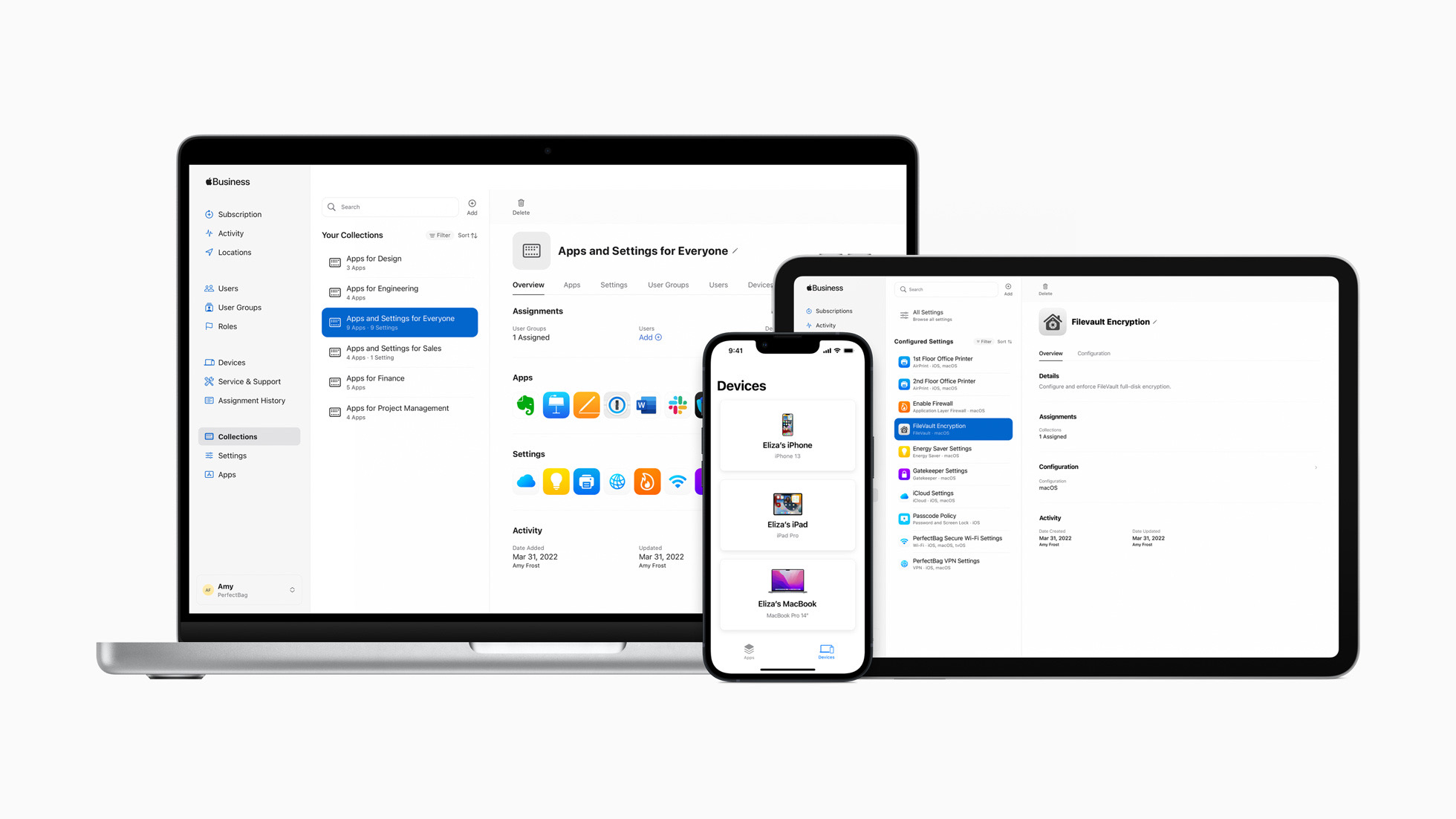
Here’s a bit from the press release:
Apple Business Essentials supports small businesses throughout the entire device management life cycle — from device setup, to device upgrades — while providing strong security, prioritized support, and data storage and backup. The complete solution begins with simple employee onboarding, allowing a small business to easily configure, deploy, and manage Apple products from anywhere. With the Collections feature, groups of apps can be delivered to employees or teams, and settings can be automatically pushed to devices, such as VPN configurations, Wi-Fi passwords, and more.
Back in December, David Sparks and I interviewed Apple’s Jeremy Butcher about the program. As someone who paid his bills by consulting for a long time, I think it’s a very interesting addition to the landscape.
Say what you will about the black MacBook, at least it wasn’t as silly as Apple’s pricing for it’s Mac input devices:
Magic Mouse:
Magic Trackpad:
Magic Keyboard with Touch ID and Numeric Keypad:
Audio Hijack has been a central component of my podcasting setup for years. Today, Rogue Amoeba has launched version 4 of the application, and it is full of great features.
The UI has gotten a nice overhaul, complete with a new light theme, a powerful new sidebar and an always-accessible menu bar application that makes starting a new recording session easier than ever.
Here’s the session I use to record all of my podcasts:
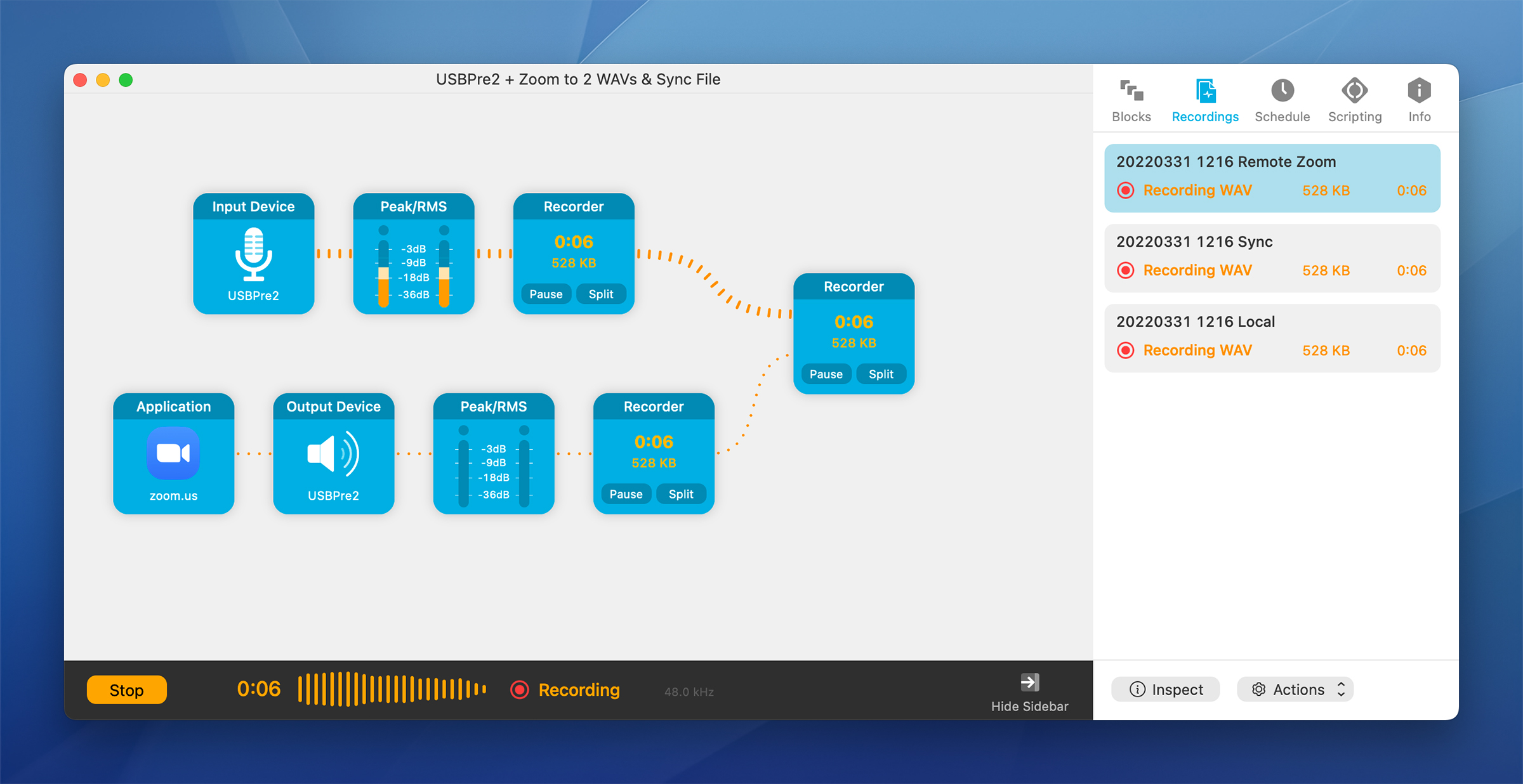
Sessions in Audio Hijack are built with blocks, and version 4 brings several new blocks. These add the ability to mix multiple inputs into one stream, increase audio that is too quiet and even run a simple compressor in-line. In addition to these new blocks, a bunch of existing ones have been updated with additional options and features.
The most exciting part of the update to me is the scripting and Shortcuts support. Session can now be started and stopped via Shortcuts, and much of the app is now scriptable via Javascript. Example scripts are included in the new Scripts section of the Session sidebar. For example, when a recording is stopped, any of these actions can be automatically triggered:
I haven’t had the chance to fully explore what is possible with this system, but any time I use an app multiple times a week, the chance to automate parts of my workflow are welcome. Don’t miss Jason Snell’s post diving into the app’s automation possibilities.
Audio Hijack is the best audio recording tool available for macOS, and I am pumped that it just keeps getting better. The app is $64, with a discounted $29 price available to owners of version 3. If you record audio with a Mac, Audio Hijack should be in your Dock.
Editor’s Note: Rogue Amoeba is an on-going sponsor of 512 Pixels. In fact, they have the sponsorship spot next week. However, they did not pay or even ask me to link to the release of Audio Hijack 4. I asked them to consider sponsoring 512 because I use their applications every single day, which is why I wanted to share my excitement of this new version of Audio Hijack.
From 2006 until 2008, Apple sold one of the coolest Macs ever: the black MacBook.
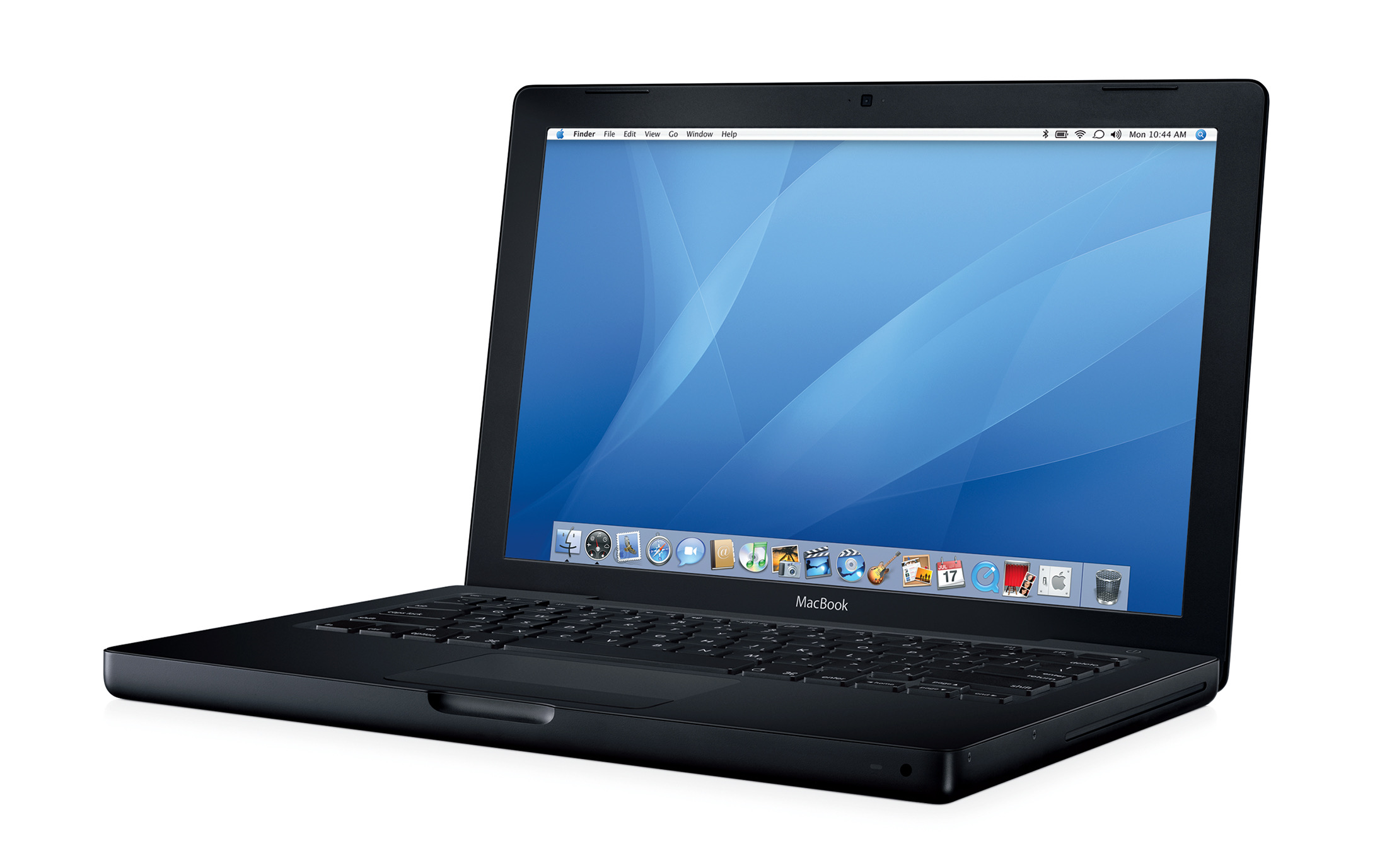
The black MacBook was sold alongside the more popular — and less expensive — white MacBook.
The price difference between the white and black models is often brought up when discussing Apple’s various strategies around product design and pricing. Many people wrongly believe that the extra cost of the black model just got you a nicer-looking laptop, but that’s not completely true.
For every generation of MacBook that it was a part of, the black notebook cost $1,499. This was $200 more expensive than the mid-tier white notebook.
The two machines always shared the same specs when it came to the CPU, RAM and optical drive. However, the black MacBook always came with a larger hard drive for that $200. Here are the specs for the five generations of MacBook:
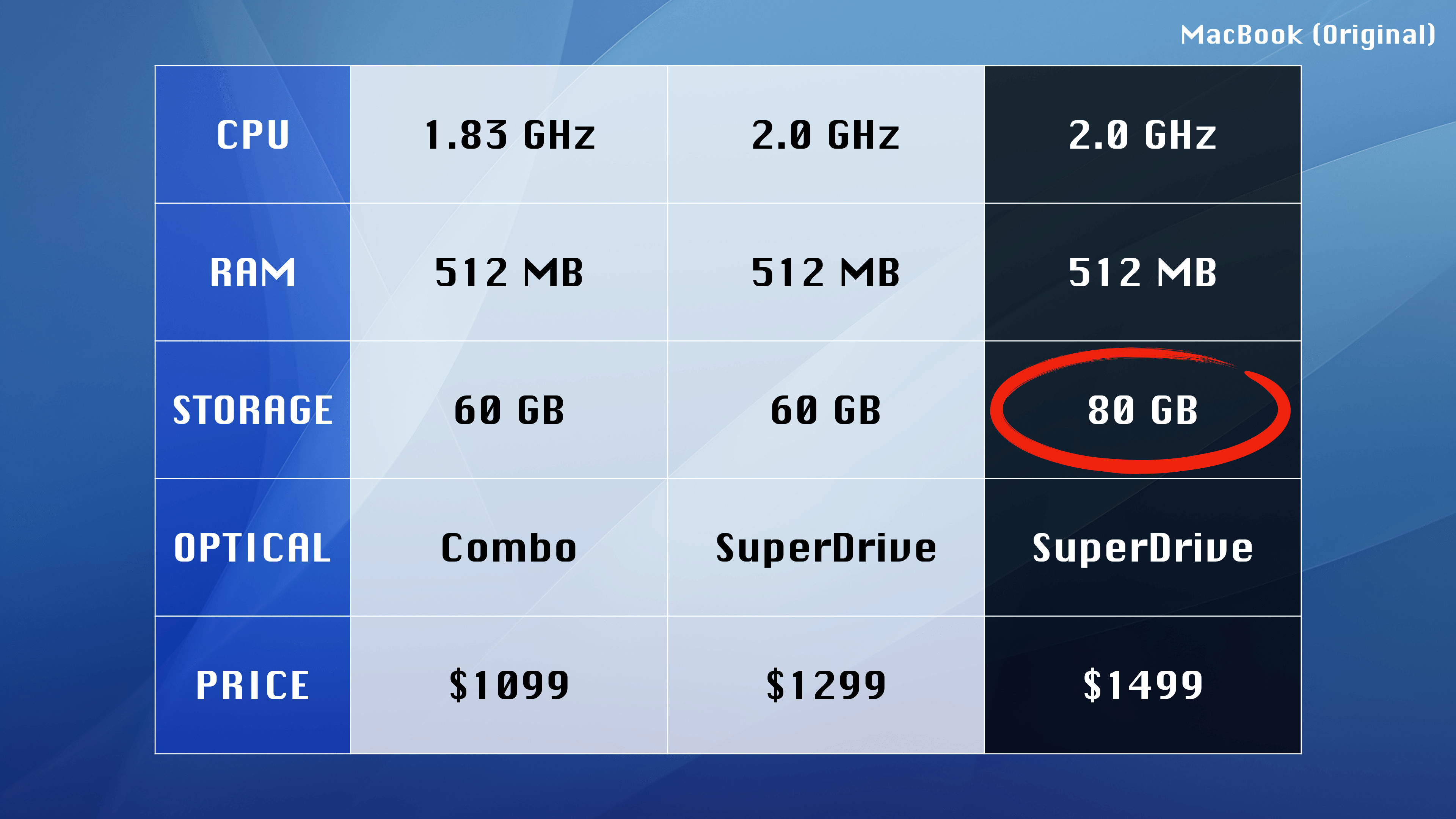
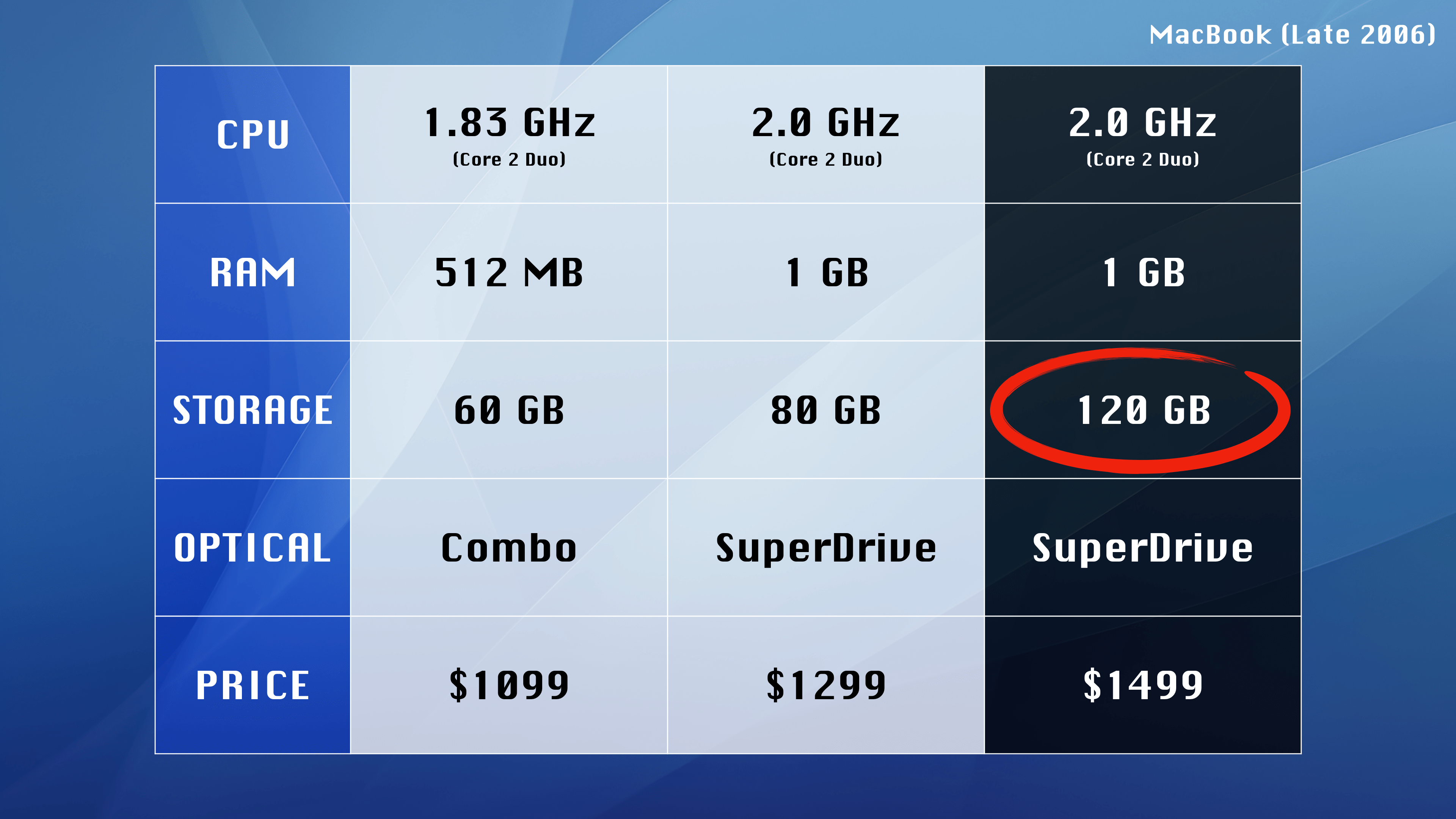
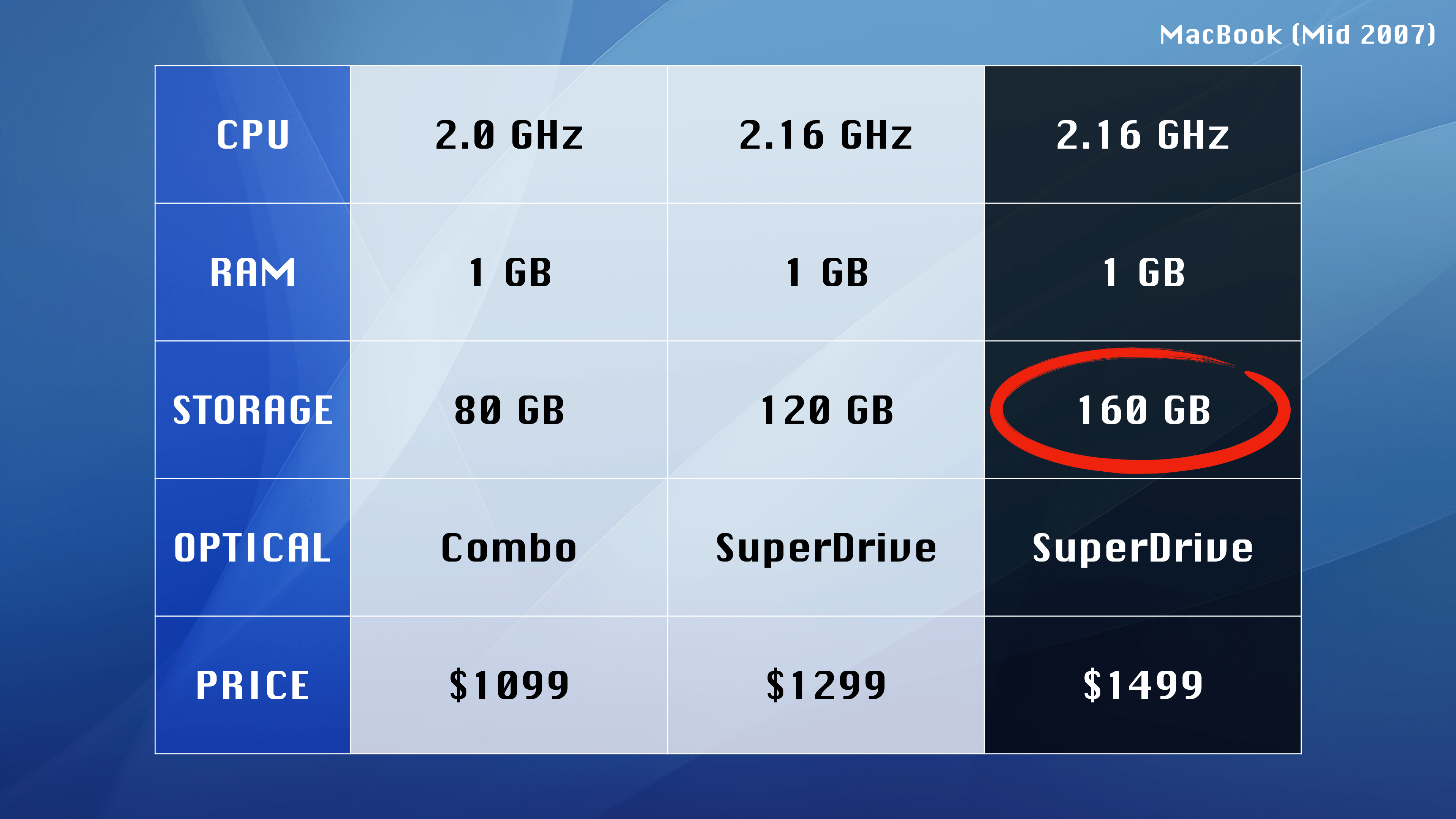
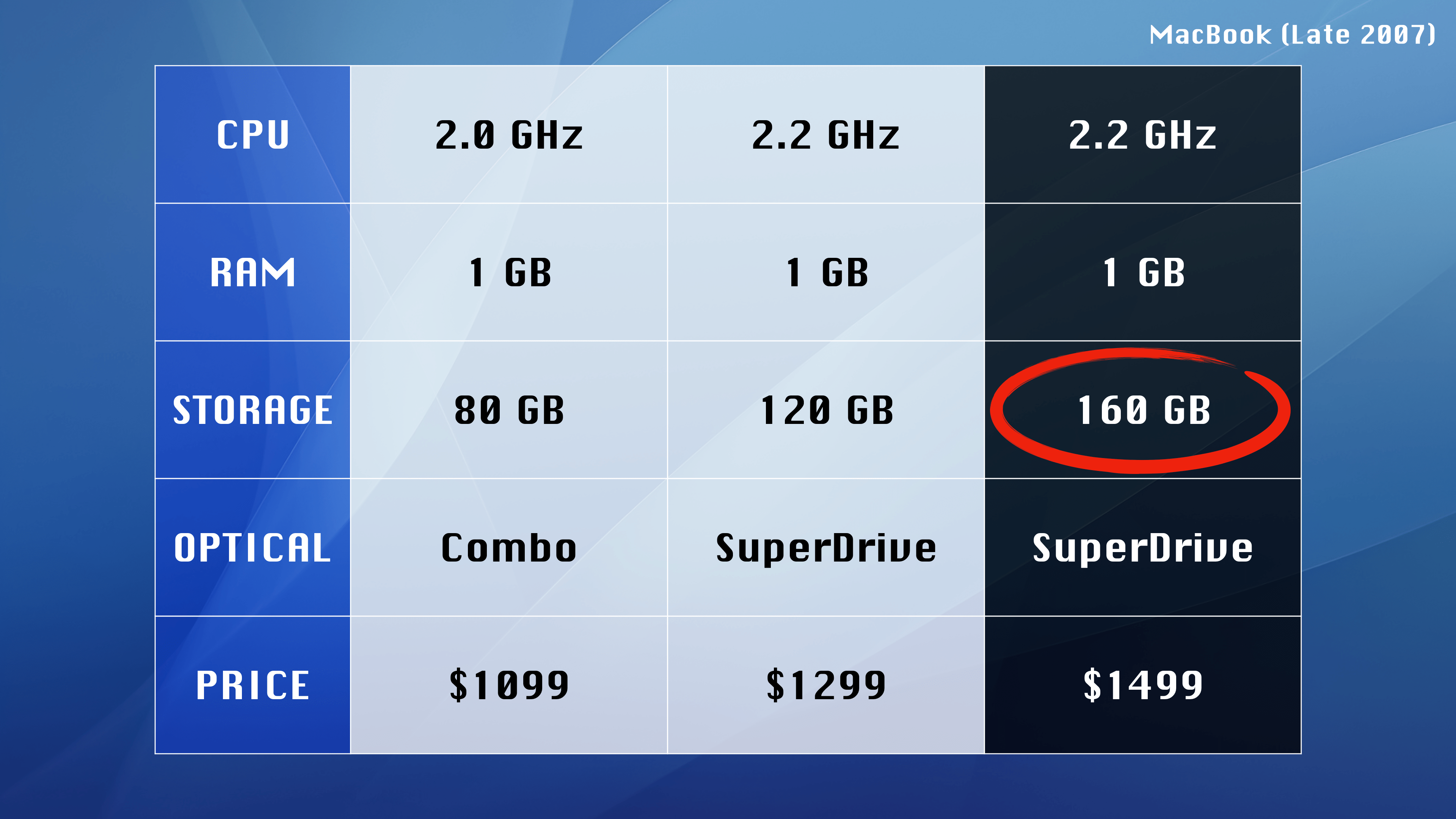
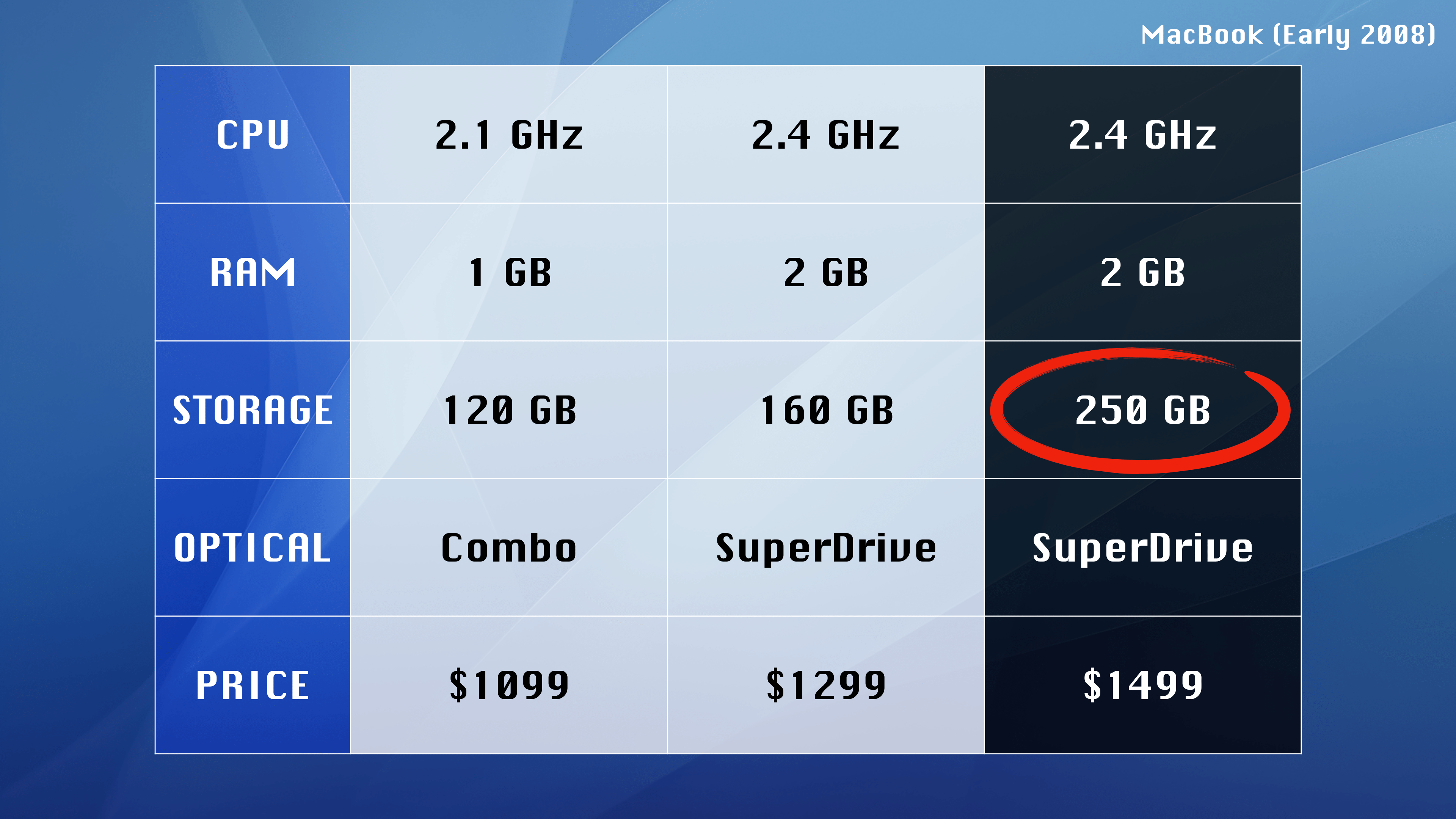
Was this modest storage upgrade worth the $200 premium? Absolutely not; Apple was charging more for the black enclosure because it could. In my mind, the extra storage was just a way to help justify a more expensive purchase.
That said, for many people, having the coolest looking MacBook was enough justification on its own.
This week on the show: clarification about Apple charging more for specific colors on their products, Markdown in Google Docs, the death of Touch ID and a fresh start for the Bill of Rickies.
Like the headline says, the iOS keyboard emoji suggestions suggests two emoji as replacements when you type “Clarus.” The problem is that they are in the wrong order:
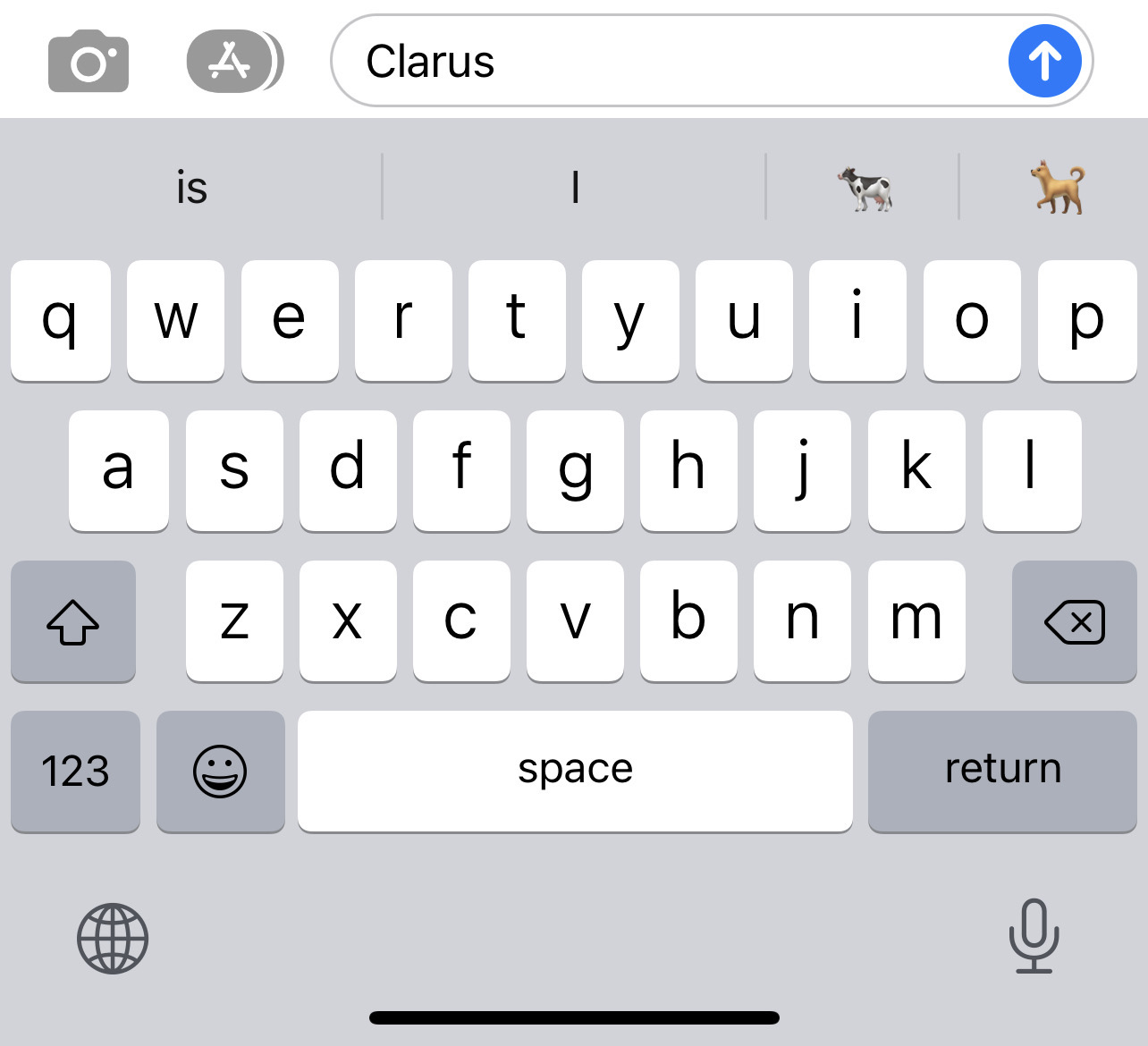
Clarus is a dogcow, not a cowdog. If Apple is going to have this VERY EXCELLENT reference in the keyboard, the details should be right.1
Thanks to Jason Robinson for pointing this terrible bug out.
I’ve filed this as Feedback FB9970338 for Apple to fix.
Update: According to Max Roberts, the emoji are ordered correctly when you search from within the emoji keyboard. Which is just … frustratingly inconsistent.
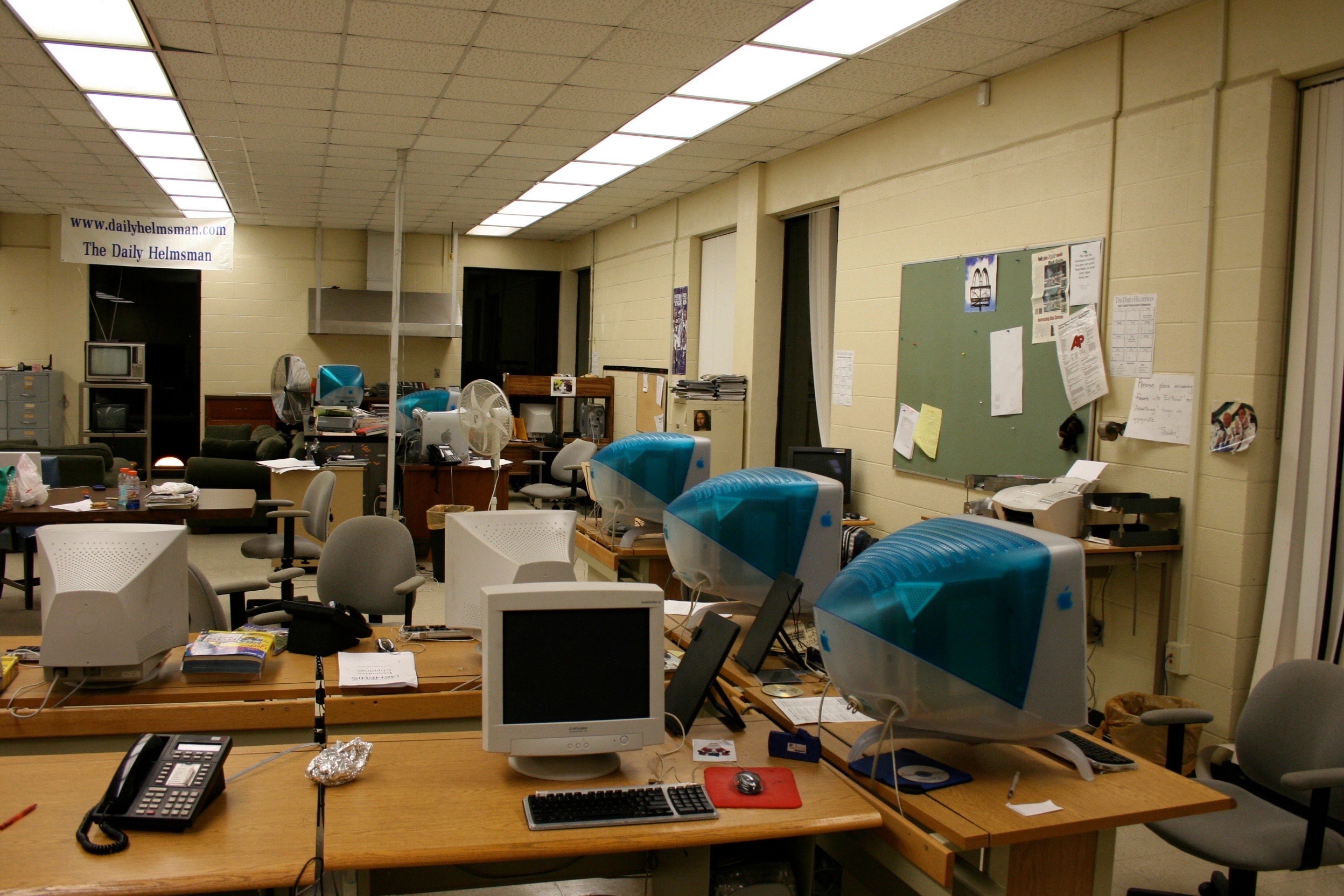
This article provides specific safety tips relating to the new tripod stand used on the Apple Studio Display 21-inch and Apple Studio Display 17-inch displays.
- Lift the display by the indentations on the under-sides near the front of the display. Never lift the display by the tripod stand.
- Likewise, do not adjust the position of the monitor by pulling the stand legs. The tripod stand is subject to damage if mishandled.
- When placing the monitor on a table surface, ensure that all three legs on the tripod stand contact a solid surface. If one of the legs is too close to the table edge, the weight of the monitor could cause the display to fall off the edge.
We had a bunch of these displays at my college newspaper. The stands were … not great.
Want to browse the web quickly, smoothly, and anonymously with no advertising?
Then get the ad blocker made for you – easy to setup, easy to keep up to date and now with best-in-class YouTube ad blocking.
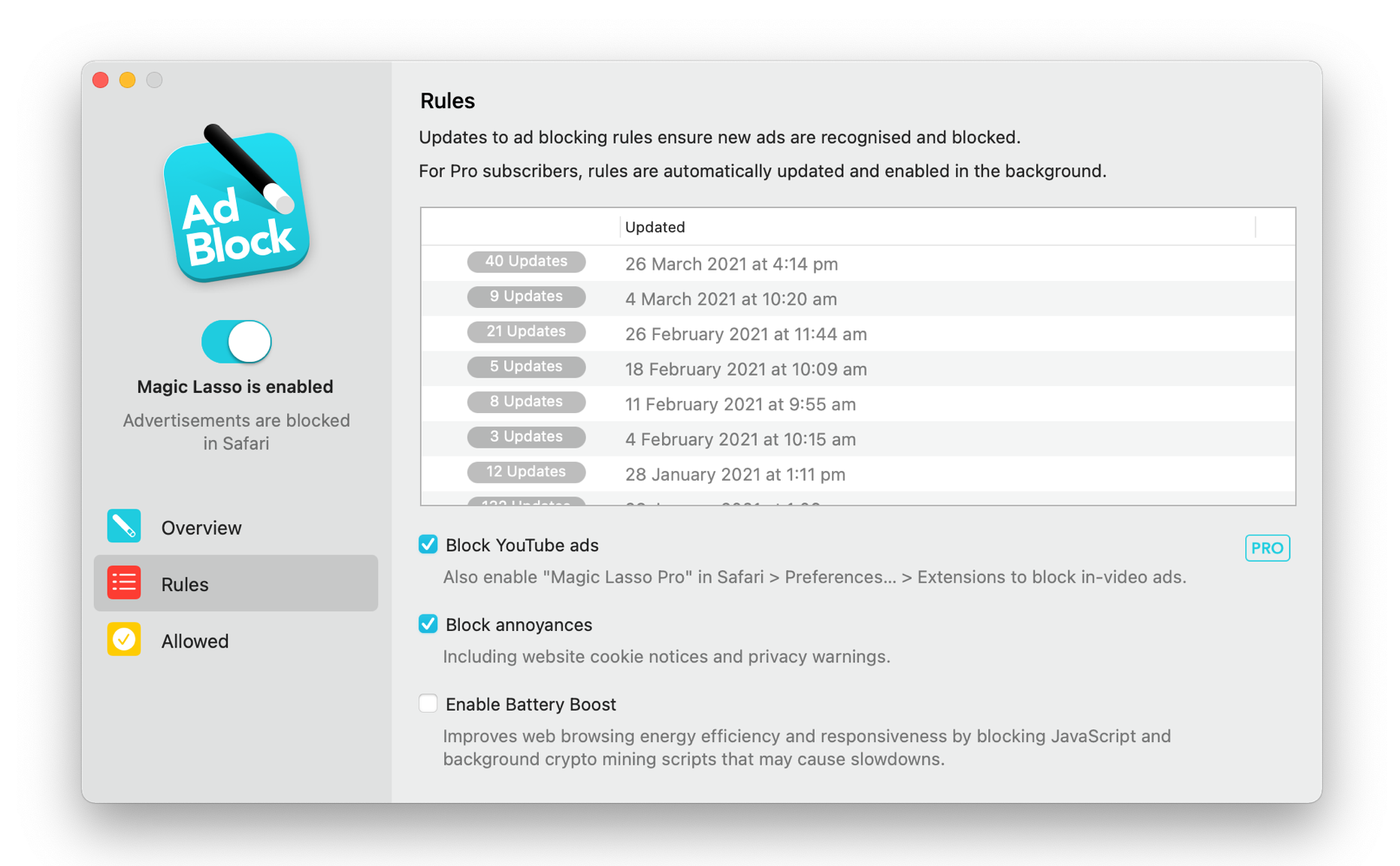
Magic Lasso Adblock is an efficient, high performance ad blocker for your iPhone, iPad and Mac. It simply and easily blocks all intrusive ads, trackers and annoyances in Safari. Just enable to browse in bliss.
Unlike some other ad blockers, Magic Lasso Adblock respects your privacy, doesn’t accept payment from advertisers and is 100% supported by it’s community of users.
Download for free today via the Magic Lasso website, the App Store and Mac App Store.
On this week’s episode of Mac Power Users:
Nick Milo is a creator who is teaching people about Obsidian. This week, he talks with David and Stephen about how he manages his business, creates polished content and, of course, Obsidian and personal knowledge management.
The way we work is changing rapidly. Make work happen wherever you are by saying more in less time and with less effort using TextExpander. TextExpander is available on Mac, Windows, Chrome, iPhone, iPad. 512 Pixels readers get 20% off their first year.
My thanks to TextExpander for sponsoring 512 Pixels this week!