Joe Rossignol at MacRumors:
Apple today reported Mac revenue of $9.17 billion in the fourth quarter of its 2021 fiscal year, which is an all-time quarterly revenue record for Macs. Apple CEO Tim Cook said there was “strong demand” for the M1 MacBook Air in particular.
Jason Snell’s transcript contains the exact quote from Apple CFO Luca Maestri:
For Mac, we set an all-time revenue record of $9.2 billion, despite supply constraints, driven by strong demand for our M1-powered MacBook Air. In fact, our last five quarters for Mac have been the best five quarters ever for the category. iPad performance was also strong with a September quarter revenue record of $8.3 billion, up 21%, in spite of significant supply constraints, as customer demand for the iPad Pro, also powered by M1, was very strong. For both Mac and iPad, we continue to see a combination of high levels of customer satisfaction and first-time buyers. Around half of the customers purchasing Mac and iPad during the quarter were new to that product. And in the most recent surveys of U.S. Consumers from 451 Research, customer satisfaction was 97% for both Mac and iPad.
Q4 didn’t include sales of the new MacBook Pros, but nevertheless, I think it’s telling that Apple singled out the MacBook Air here. It’s a stellar machine, and I would imagine many of those sales went to kids headed back to school. With rumors of an M1 iMac-like redesign coming, I think the Air will continue to be extremely popular.
So popular, in fact, that I think there’s room for a second model.
Right now, the 13-inch M1 MacBook Pro is the odd machine out, with an old design and a decrepit input device known as a Touch Bar. I believe it’s still for sale only to hold down the price point between the Air and 14-inch MacBook Pro.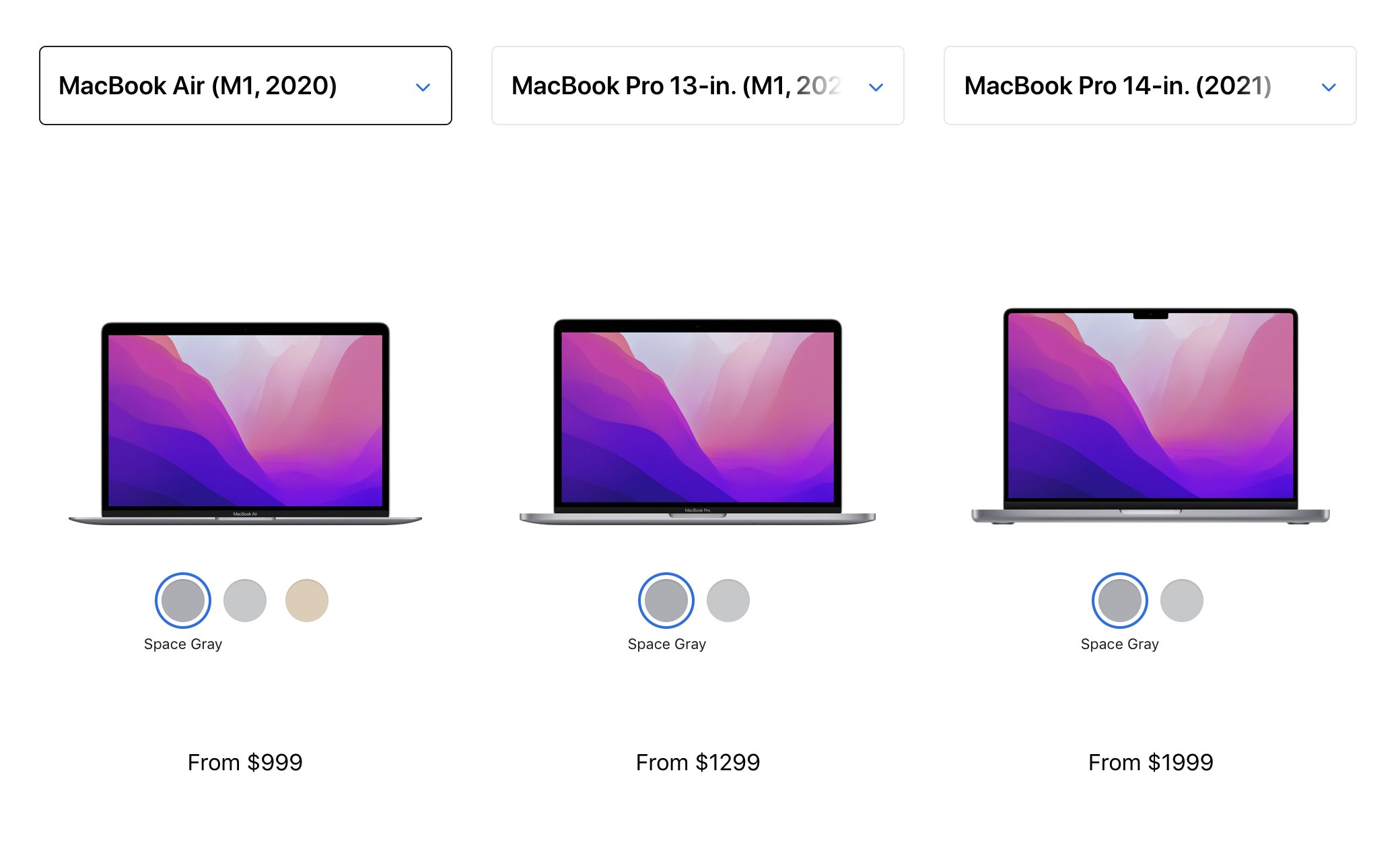
I would like to see Apple replace that 13-inch MacBook Pro with a larger MacBook Air. I could see the lineup looking something like this:
- 13-inch MacBook Air from $999
- 15-inch MacBook Air from $1299
- 14-inch MacBook Pro from $1999
- 16-inch MacBook Pro from $2499
This would give people who want a larger screen but don’t need the power — or the expense — of the MacBook Pro a new option.
Think of it as a modern-day 14-inch iBook. In January 2002, Apple announced the larger consumer notebook and a lot of people flocked to it. It stuck the right balance between size and price for many, as it took the best-in-class iBook design and scaled it up.
“The iBook is the best consumer and education notebook on the market and our most popular portable ever,” said Philip Schiller, vice president of Worldwide Product Marketing. “The new iBook line now offers customers the additional choice of a 14-inch display and is more affordable than ever.”
Sounds like something that would just increase the demand for the MacBook Air.