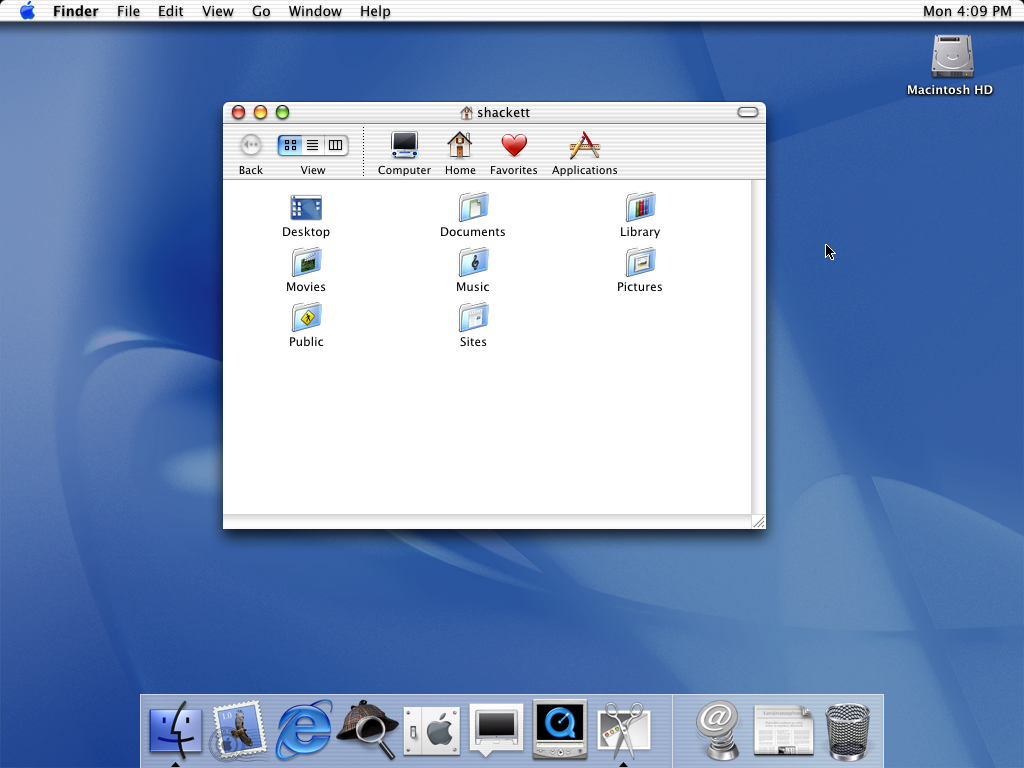
So when we celebrate the 20th anniversary of Mac OS X, it’s important to realize what we’re celebrating. We’re celebrating a software release that was the culmination of Steve Jobs’s return to Apple. We’re celebrating the operating system we still use, two decades later. But we’re also celebrating the foundation of iOS, iPadOS, tvOS, and watchOS.
In that way, this isn’t just the 20th anniversary of Mac OS X 10.0. It’s the 20th anniversary of modern Apple, and the end of the dark days when Apple couldn’t fix its own operating system.
I’ve said it before, but I’ll repeat it here: Apple buying NeXT was the most important tech acquisition of all time.
It’s hard to believe that Mac OS X macOS is two decades old, but it’s true. On March 24, 2001, Apple released the first non-beta version of Mac OS X 10.0:
The release followed years of development that took NeXT’s technology and molded it into an operating system for the Mac. That process took longer than Apple had predicted, and included a false start known as Rhapsody. That’s really a story for a different time, but in short, that operating system strategy left classic Mac OS developers without a way forward for their applications that didn’t require rewriting them, and the community soundly rejected the entire thing.
After a regroup, OS X began to take shape, with a new technology named Carbon that would allow apps written for the Mac to run natively on the new operating system with some tweaks. I truly believe Carbon is the real hero of the OS X transition, as without it, I don’t think it would have been successful.1
However, Aqua grabbed all the attention. First introduced in Developer Preview 3, this new user interface was shockingly different from Platinum in Mac OS. Full of pinstripes and bright blue elements, Aqua was designed to be as friendly and fun as the colorful iMac G3s with which many users would first experience it.
All of that eye candy came at a cost, though. Performance in the early versions of Mac OS X was notoriously bad as the hardware caught up. By the time most users were ready to switch from Mac OS 8 or 9, OS X was in pretty decent shape.
If you want to learn more about Mac OS X, I’ve rounded up some links for you:
Aqua and Bondi: My book on the creation of Mac OS X and the evolution of the iMac G3.
On this week’s MPU, David and I talked about the entire two decade history of our beloved macOS.
Both Rhapsody and Mac OS X included an environment for running Mac OS apps directly, but these “Classic” programs wouldn’t get any of the benefits promised by the new operating system, including preemptive multitasking, protected memory or an update user interface. ↩︎
The SLS has completed a full-length hot fire test and NASA is on the verge of having a new administrator, all while SpaceX continue to move ahead with its Starship testing.
I am fascinated to see what happens with this big rocket drama.
My thanks to our sponsors this week:
Squarespace: Make your next move. Enter offer code LIFTOFF at checkout to get 10% off your first purchase.
In one application, embodiments of the invention describe a wearable electronic device, such as a smartwatch, including a flexible display panel and flexible display module. In this manner, the display area of the smartwatch is not limited to a rigid watch face area. In an embodiment, a smartwatch includes a flexible display panel that is integrated into a flexible watch band. Accordingly, curvature of the flexible display panel in both the watch face area and band may be adjusted to conform to the wrist size of the user… the display area of the flexible display panel can cover more available space on the watch face area and band of the smartwatch.
And here I thought an Apple fitness tracker with no display was a good idea…
Secondly, there’s the case of the amazing retractable keyboard, as reported by Patently Apple:
Today the U.S. Patent and Trademark Office officially granted Apple 3 MacBook patents. One covers the MacBook keyboard having retractable keys that could further slimline the MacBook when the lid is closed. The second covers a new magnetic system that is designed to put the display into sleep mode when it reaches a certain angle as presented in our cover graphic. The third patent covers new selective keyboard backlighting system allowing users to selectively make certain keys brighter than others which is good for gaming and beyond.
Maybe they should just leave the keyboards alone for a bit.
Of course, Apple — and every other large tech company — patents all sorts of things as a defensive measure, and these ideas probably won’t ever make it into real products. In the cases today, I think I’m fine with that.
If you’ve ever wondered about those funny little trucks used to deliver the mail, Stephen and Myke have you covered in this episode. Just be sure to bring a fire extinguisher…
I want to buy — and rebuild — an LLV so bad that it hurts.
iPod nano (5th generation) and iPod nano (4th generation) include the ability to speak the name of selected menus in iPod software using the text-to-speech capability built into or installed into Mac OS X or Windows.
Note: Spoken menus may not be available for all menu items or synced content. Spoken menus will be generated in the language of the system voice that users have installed and configured on their computer. Some voices may not support this feature. Overall sync times will increase when spoken menus are enabled in iTunes. Audio clips for spoken menus will reduce the available capacity for audio and video content on iPod nano.
TextExpander helps you work faster and smarter so you can focus your time on your most important work. With just a few keystrokes, TextExpander keeps you consistent, accurate, and working efficiently.
Speed through emails: expand forms with fill-in-the-blank fields using a quick abbreviation
Time saving power: Use TextExpander’s powerful shortcuts and abbreviations to streamline and speed up everything you type.
Get your message right every time: expand content that corrects your spelling and keeps your language consistent with just a few keystrokes
After several years of development, Apple launched Mac OS X to the world in March 2001. The new operating system was vastly different from what it replaced, and ushered in a new era for Apple. This episode, Stephen and David reflect on two decades of their beloved platform.
For More Power Users, we talked about the initial reactions to OS X we had back in the day.
My thanks to our sponsors for making the episode possible:
TextExpander from Smile: Get 20% off with this link and type more with less effort! Expand short abbreviations into longer bits of text, even fill-ins, with TextExpander from Smile.
The Intrazone, by Microsoft SharePoint: Your bi-weekly conversation and interview podcast about SharePoint, OneDrive and related tech within Microsoft 365.
DEVONthink: Get Organized — Unleash Your Creativity. Use this link for 10% off.
Over the last couple of days, Apple has removed the 512 GB and 1 TB SSD options from the 4K iMac configurator. Now, all 21.5-inch iMacs, including the non-Retina entry model come with a 256 GB SSD as standard, and can only be upgraded to a 1 TB Fusion Drive from the factory.
Apple has let the smaller iMac stagnate for a while now, as it didn’t see an update when the 5K models were updated last year. No one should be buying an iMac right now, but especially a 21.5-inch model.
Unread is an RSS reader for iOS with beautiful typography, comfortable gesture-based navigation, and a variety of color themes. When displaying articles from summary-only feeds, Unread retrieves full article content from the website. You get the full article in Unread without needing to open the website.
Unread syncs with Feed Wrangler, Feedbin, Feedly, Fever, Inoreader, and NewsBlur. Its core functionality is free. To get started, simply download Unread from the App Store.
My thanks to Unread for sponsoring the site this week.
Just two weeks after being discontinued, the iMac Pro has been removed from Apple’s website and is no longer for sale. It was a great computer, but I’m really excited to see what comes next.
…and to add one to my Mac collection in about a decade.
The devices will have an updated processor that is on par with the faster M1 chip in the latest MacBook Air, MacBook Pro and Mac mini. Apple designs these processors itself and typically has them made by Taiwan Semiconductor Manufacturing Co. Apple is also looking to include a Mini-LED screen with at least the larger model, which would be brighter and have improved contrast ratios.
In testing, the new iPad Pros have used a Thunderbolt connector, the same port on the latest Macs with custom Apple processors. The port doesn’t require new chargers, but it would enable connectivity with additional external monitors, hard drives and other peripherals. It’s also faster at syncing data than the USB-C technology used in the current models.
I can count on one hand the times I’ve plugged anything other than a charger into my 2018 iPad Pro. I don’t expect Thunderbolt to really change that, but this is a feature they already support with the Apple silicon Macs, so why not bring it to the iPad Pro? It opens up new opportunities for people who really push their iPad Pro, and it gives the Pro some breathing room to distance it from the USB-C enabled iPad Air.