
This week on Somehow I Manage, Tiff and I re-watch “The Surplus.”
512 Pixels
Peek-a-View⇢
Casey Liss has a new app, named Peek-a-View and the idea for it is brilliant. He writes:
Peek-a-View is, at its core, a read-only photo browser.
It is designed to be safe to hand to anyone, and know that you’re not going to need to worry about the safety of your photos.
[…]
Peek-a-View can be used for other reasons though. Perhaps you’re showing off a series of screenshots to a client. Perhaps you want to share your vacation pictures with a friend, but only your vacation pictures. Peek-a-View also lets you select a particular album to view, thus limiting inquisitive eyes to only the photos you know are safe.
Some of my favorite iOS apps are the ones that solve a single problem, and do it well. Peek-a-View is in that category for me.
A Fix for iPad Multitasking⇢
There’s been a lot of conversation about iPadOS’ somewhat-confusing multitasking system in recent weeks. Ryan Christoffel has put together a possible fix that makes a lot of sense to me:
My proposal for a new multitasking system employs a UI mechanic that already exists across both iPhone and iPad. Without losing any of iPadOS 13’s current functionality, it brings the iPad closer to its iPhone roots again and makes multitasking accessible for the masses.
Context menus are the key to a better multitasking system.
When you long-press an app icon in iOS and iPadOS 13, a context menu appears and provides various options. These menus, I believe, are the perfect home for multitasking controls.
Click through to MacStories to see this in action. I would love for Apple to rip it off.
Connected #280: Peanut Butterpeanut Butterpeanut Butter⇢
This week, on what ended up being a pretty wild episode of the show:
Most of the show document got shredded as a bunch of breaking news took place during recording. iOS 13.4 is bringing a bunch of changes, Mac Catalyst could become more useful and universal apps are coming to the Mac. When not breaking news, Federico shares a sad story, Myke reads a tweet about bread and Stephen struggles with how to edit this episode.
Enjoy!
My thanks to our sponsors:
- Pingdom: Start monitoring your website performance and availability today, and get instant alerts when an outage occurs or a site transaction fails. Use offer code CONNECTED to get 30% off. Offer expires on January 31, 2021.
- Health IQ: Insurance for the Health Conscious. Save up to 41%. Take the quiz now to see if you qualify.
- Boll & Branch: The Softest Organic Sheets & Luxury Bedding. Save $50. Try them for 30 days in a risk free trial.
iOS 13.4⇢
The next version of iOS 13 is going to bring a lot of changes.
Cairo Throw⇢
I’m thinking this would look good as a tapestry in my studio:
The original emoji, Cairo was a typeface designed by Susan Kare in 1984 for the first Macintosh operating system. Taking its name from the hieroglyphics of ancient Egypt, each symbol was drawn by hand using the bitmap grid. A few notable symbols lived on into later operating systems including the cursor and watch.
Kare designed this woven blanket for the Jacquard loom, an early example of computer-controlled machinery, operated with punched cards and invented by Joseph Jacquard in 1801.
Kbase Article of the Week: Product Security Certifications, Validations and Guidance for T2 Firmware⇢
I don’t think anything in this article was written for normal human beings.
Mac Power Users #512: Taming Notifications⇢
This week on Mac Power Users, David and I got into all the dings and badgers going off on our devices all the time:
From messages and emails to sports scores and social media, our devices generate all sorts of notifications. This week, we discuss how to weed the garden and tame the madness.
My thanks to our sponsors:
- Boll & Branch: The Softest Organic Sheets & Luxury Bedding. Save $50. Try them for 30 days in a risk free trial.
- TextExpander from Smile: Get 20% off with this link and type more with less effort! Expand short abbreviations into longer bits of text, even fill-ins, with TextExpander from Smile.
- 1Password: Have you ever forgotten a password? You don’t have to worry about that anymore.
- Squarespace: Make your next move. Enter offer code MPU at checkout to get 10% off your first purchase.
Sponsor: Timing — Automatic Time Tracking for Mac⇢
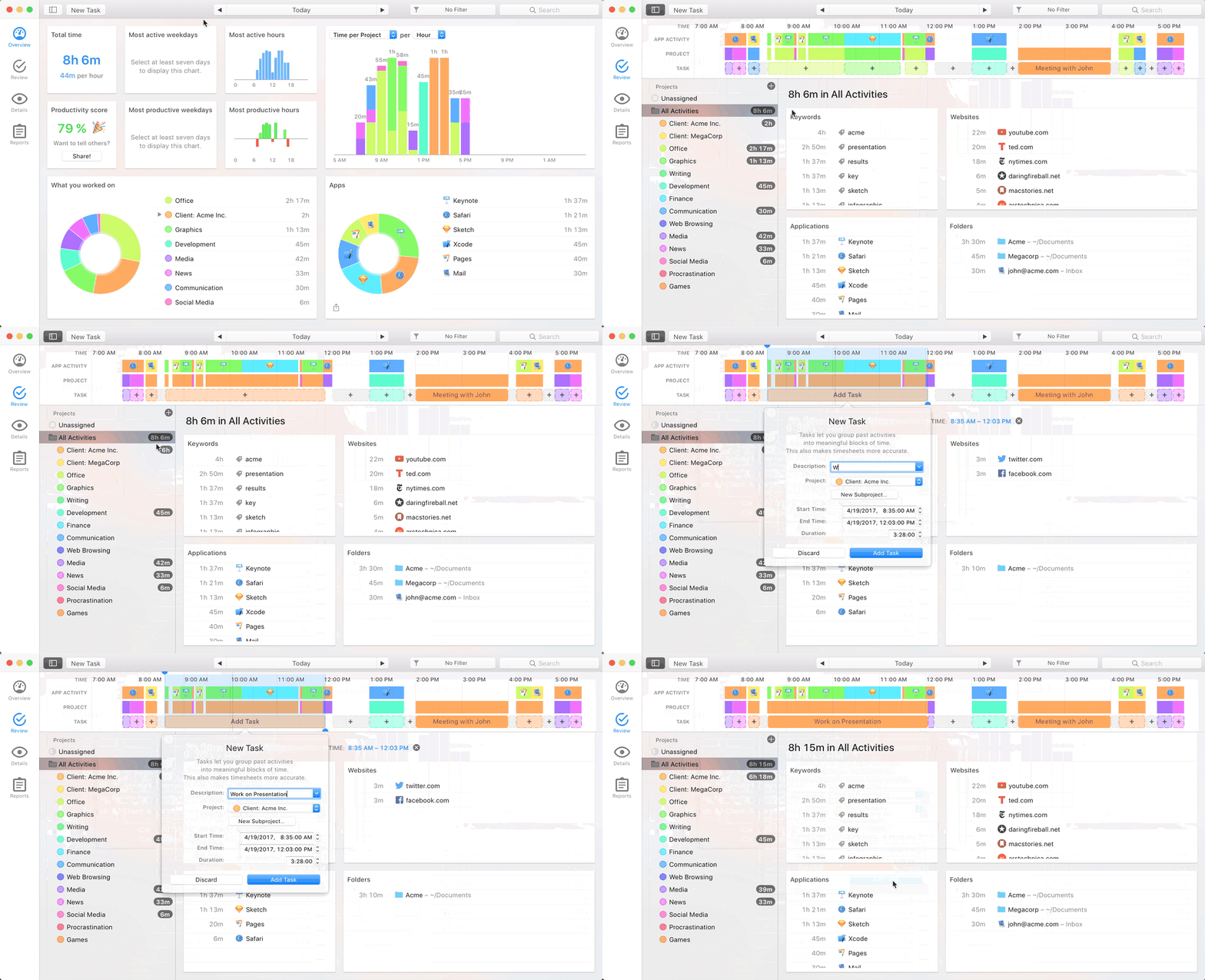
Time is your most precious resource. You need to know how you are spending it. But time tracking sucks. Big Time. (Pun intended.)
Timing fixes that. It automatically tracks which apps, documents and websites you use — without start/stop timers. See how you spend your time, eliminate distracting activities, and improve your client billing.
It’s like Screen Time on steroids.
Timing also offers sync across all your Macs as well as a web app to record time on the go. So, if you need to track time in a meeting, you can do that right from your iPhone!
In addition, Timing offers a set of Siri shortcuts to track time as quickly as possible.
Stop guessing how you spend your time, and focus on doing your best work instead. Download the free 14-day trial today and get 10% off for the first year!
The Six Colors 2019 Apple Report Card⇢
It’s time for our annual look back on Apple’s performance during the past year, as seen through the eyes of writers, editors, developers, podcasters, and other people who spend an awful lot of time thinking about Apple.
It’s always fun to take part in this, and it is always very interesting to read. Snell had over 30,000 words worth of responses to sort through to write this. Dude is the best kind of maniac.
Overcast 2020.1⇢
Marco Arment, writing about the newest version of Overcast, which includes an updated version of Voice Boost and now supports AirPlay 2:
When I wrote the original Voice Boost with only a rudimentary understanding of audio processing, it was a single configuration of Apple’s AudioUnits that applied a fixed set of parameters to all podcasts, regardless of their audio characteristics. It was an effective but blunt tool, relying on aggressive level compression and a strong EQ to make the compression less noticeable.
Since then, I’ve edited over 500 podcasts, learned a lot more about how to master them properly, and developed a much better understanding of audio signal processing.
I’ve been really impressed with this in beta. If you listen to podcasts with just your iPhone speaker, I think you’re going to be surprised how much louder and clearer shows will sound now.
TextExpander⇢
My thanks to TextExpander for sponsoring the site this week. It’s one of my go-to utilities. With it, you can easily insert text snippets in any application from a library of content created by you and your team. Available for Mac, Windows, iPhone, iPad and Chrome. Get 20% off your first year today!