For eight months this year, I used a flip phone. For most of those eight months, I hated myself and everyone else.
I tried — and failed — at this years ago, for all the reasons Kehe writes about in his article.

For eight months this year, I used a flip phone. For most of those eight months, I hated myself and everyone else.
I tried — and failed — at this years ago, for all the reasons Kehe writes about in his article.
China’s latest lunar mission is about to touchdown on the far side of the moon, and New Horizons has completed its flyby of Ultima Thule.
My thanks to our sponsors:
Tim Cook has published a letter to Apple investors1 announcing that the company has revised its guidance for Q1 2019. I generally find this side of Apple’s business far less interesting than its products, but this is worth reading.
In short, the company has announced its revenue will be less than it predicted, due to a bunch of factors, including on-going struggles in China, “foreign exchange headwinds” and multiple constrained products, including the Apple Watch Series 4, iPad Pro, AirPods and the MacBook Air.
Here’s the part that is going to jump out to most people, though:
While Greater China and other emerging markets accounted for the vast majority of the year-over-year iPhone revenue decline, in some developed markets, iPhone upgrades also were not as strong as we thought they would be. While macroeconomic challenges in some markets were a key contributor to this trend, we believe there are other factors broadly impacting our iPhone performance, including consumers adapting to a world with fewer carrier subsidies, US dollar strength-related price increases, and some customers taking advantage of significantly reduced pricing for iPhone battery replacements.
This is pretty serious ammunition for those who believe that the iPhone is too expensive:
That’s a lot of words to say “yeah we priced the iPhone too high.”
— Mike Rundle (@flyosity) January 2, 2019
That’s pretty hard to argue with, and while it’s not the whole story behind this letter, it will be the part most people — including me — resonate with the most.
Jason Snell mentioned how unusual this is:
I can’t remember Apple doing this recently. It means Apple is missing its previous revenue guidance of between $89 and $93 billion—down to $84 billion, which is a miss that’s $5 billion below the lowest end of its previous guidance. That’s a big miss. It means Apple will be down $4 billion from the year-ago holiday quarter.
The quarter isn’t going to be all bad news, as Cook writes:
Our installed base of active devices hit a new all-time high—growing by more than 100 million units in 12 months. There are more Apple devices being used than ever before, and it’s a testament to the ongoing loyalty, satisfaction and engagement of our customers.
He calls out that Apple’s revenue outside of the iPhone business has grown by almost 19 percent year-over-year, and that the Services business continues to blossom.
All in all, this will be Apple’s second-largest quarter ever. There’s plenty of gas in the tank:
To be clear, that’ll still be the second largest Apple quarter ever. Apple is an enormous revenue and profit generator, and will remain so for years to come.
It’s most notable because it’s about iPhone, and also because it apparently took Apple by surprise.
— Jason Snell (@jsnell) January 2, 2019
For the record, I am not a shareholder, and haven’t been since I quit my job as a Mac Genius in 2008. ↩︎
It’s been pretty quiet on my YouTube channel, but I’m kicking off 2019 with something fun: A look at the most beloved notebook in Mac history, the 12-inch PowerBook G4.
This week on Ungeniused, we are ringing in the new year:
Every January 1, New Yorkers count in the new year by dropping a ball. As it turns out, that’s is more complicated than it would seem.
Turns out, that time ball is way heavier than it looks.
My thanks to our sponsor for this episode:
Let’s say you would like to know what week of the year a certain date falls on. FileMaker Pro and ClarisWorks both have a WeekofYear function which returns the number of weeks from January 1 based on a supplied date. If you want to calculate the number of weeks starting at a date other than January 1, as in a fiscal year beginning date, you can use the following calculation given your file contains the field ProjectDate:
Week of Year (calculation, number result) = INT ((ProjectDate - Date (3,1,Year (ProjectDate)))/7)+1
The Date function is where the start date is formed. In this example, the start date is 3/1 of the year of the ProjectDate.
Alex Blumberg interviewed Ron Johnson on Gimlet’s podcast, Without Fail. It’s a super interesting conversation about Johnson’s role in creating Apple’s retail arm, his time at J.C. Penny (and how that didn’t go to planned) as well his new company. It is a fantastic interview and I enjoyed every moment of it.
On this week’s episode of Connected, we reviewed 2018, including our predictions from way back in January, and talked about what news ended up being important in the long run.
My thanks to our sponsors:
Fifty years ago, while aboard Apollo 8, William Anders took what is perhaps the most iconic photo of the 20th century:
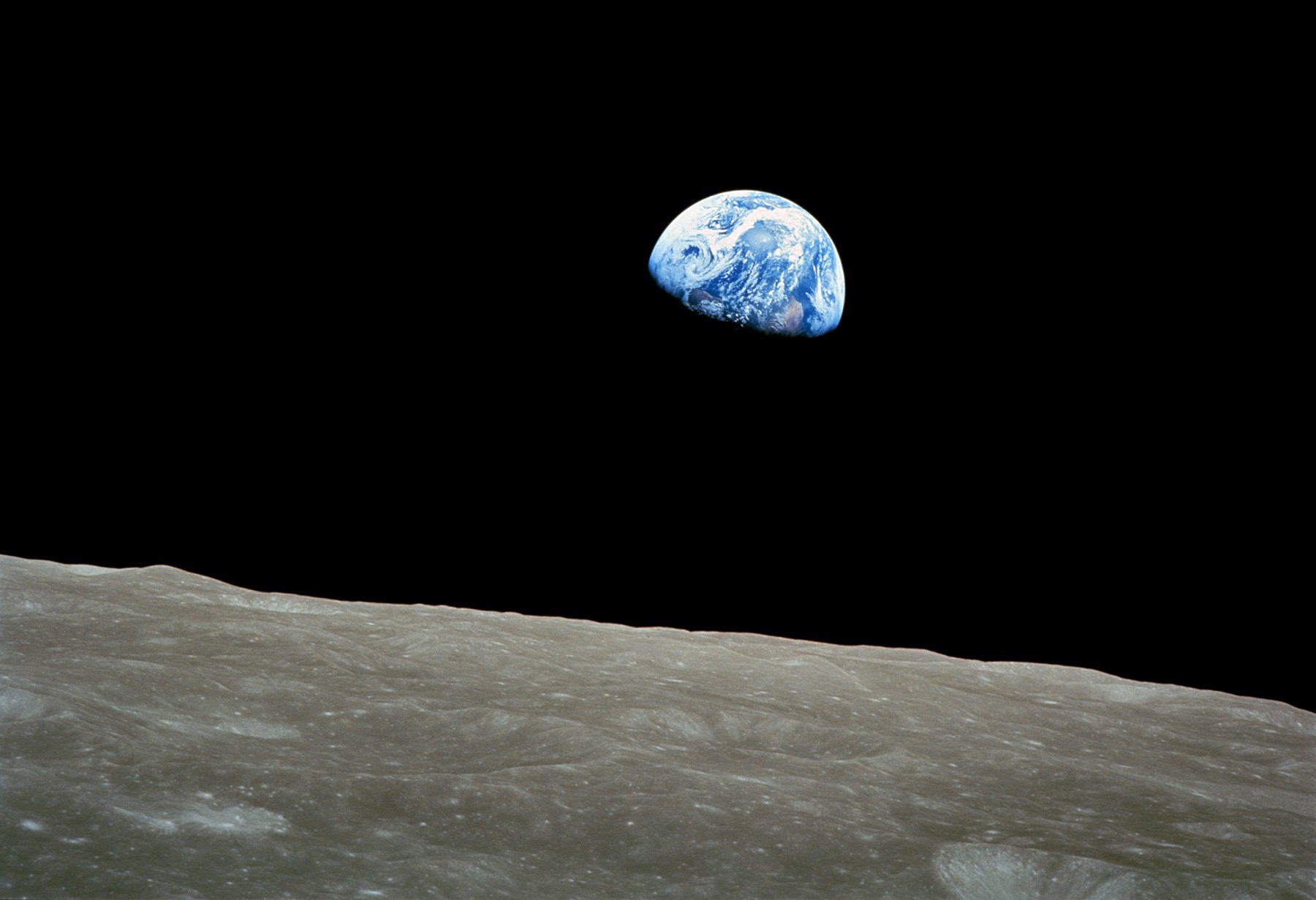
Dubbed Earthrise, it was the first image of our entire planet taken by someone not on it.
Anders has written about the image over on Space.com:
One of my assignments was to photograph the lunar surface to facilitate the evaluation of potential landing sites. I brought a 250 mm lens to bring that alien terrain into better view. On our fourth orbit, the spacecraft was oriented in a different direction. A startling image captivated the three of us.
Earth, 238,900 miles away, ascended above the barren lunar surface. Compelled by that vision, we scrambled for cameras. I deviated from the rigid NASA flight plan. Every photographic exposure had been determined in advance but I had to capture our view with the long lens on color film.
One of those shots became known as “Earthrise.”
Apollo 8 not only gave us the first images of our home suspended in the darkness of space, but proved we could go to the moon. On their way back, the crew provided the world with a message of hope:
William Anders:
We are now approaching lunar sunrise, and for all the people back on Earth, the crew of Apollo 8 has a message that we would like to send to you:
In the beginning God created the heaven and the earth.
And the earth was without form, and void; and darkness was upon the face of the deep. And the Spirit of God moved upon the face of the waters.
And God said, Let there be light: and there was light.
And God saw the light, that it was good: and God divided the light from the darkness.
James Lovell:
And God called the light Day, and the darkness he called Night. And the evening and the morning were the first day.
And God said, Let there be a firmament in the midst of the waters, and let it divide the waters from the waters.
And God made the firmament, and divided the waters which were under the firmament from the waters which were above the firmament: and it was so.
And God called the firmament Heaven. And the evening and the morning were the second day.
Frank Borman:
And God said, Let the waters under the heaven be gathered together unto one place, and let the dry land appear: and it was so.
And God called the dry land Earth; and the gathering together of the waters called the Seas: and God saw that it was good.
And from the crew of Apollo 8, we close with good night, good luck, a Merry Christmas – and God bless all of you, all of you on the good Earth.
On this week’s Upgrade, Jason and Myke are joined by the spirits of Apple’s past, present, and future.
I’ll let you guess which one I played.
This month in my MacStories column, I wrote about something fun:
Apple’s use of magnets in its products go back further than the most recent iPad Pro, with its keyboard and Apple Pencil. Magnets allow Apple to do things without the need of mechanical components, keeping the design of its products clean and streamlined. Here are a few of my favorites over the years.