
On June 10, it will have been five years since Apple first showed off the iteration of the Mac Pro that has come to be known as The Trashcan.
To put that in a little context, it was the same WWDC keynote where iOS 7 and OS X Mavericks were introduced.
Introduction and Release
This section of the keynote wasn’t a full-blown product introduction, but rather a tease of what was to come:
After playing a very exciting video showing off the product, Phil Schiller quipped, “Can’t innovate anymore, my ass,” as he walked across the stage to applause. It was a push back against critics who were saying Apple had gotten lazy and its products stale.
A single look at this computer proved them wrong. The internals were built around what Schiller called a “unified thermal core.” It was all cooled by one large fan at the top. By being so large, Apple could spin it more slowly than the smaller fans found in other Macs, helping keep the machine quiet, even under load.
The machine was powered by Intel Xeons, coupled with all-Flash, PCIe-based storage and ECC RAM. Expansion was external via Thunderbolt 2 and its 20 Gbps throughput; gone were the internal PCI slots that helped defined Apple’s towers for so long..
The big story was on the graphics front. Every Mac Pro shipped with two AMD FirePro workstation GPUs. The Mac Pro could deliver seven teraflops of computing power thanks to those graphic cards and could push 4K external displays.
All of this technology was packed into a tiny chassis that was just an eighth the volume of the previous design. All of the ports were around the back, with labels that illuminated when the machine was turned around.

In October 2013, Apple gave additional details about the Mac Pro.
The machine started at $2999 with:
- 3.7 GHz quad-core Xeon CPU
- 12 GB RAM
- Dual AMD FirePro with 2 GB VRAM
- 256 GB SSD
A maxed out machine cost an eye-popping $10,000.
Beyond the tech, there was a story about the Mac Pro’s assembly. Apple was very proud of the fact that the machine was put together in the United States:
Customer Reaction
Once the machine started shipping at the end of the year, reviews started rolling in.
Dan Frakes at Macworld pointed out that the Mac Pro wasn’t always the fastest Mac in the room:
We published our first benchmarks of our review model, and the results were in some ways surprising: The eight-core 2013 Mac Pro was only 8 percent faster in our Speedmark 9 benchmark suite than a CTO 2013 iMac maxed out with a quad-core 3.5GHz Core i7 processor, a 3TB Fusion Drive, 8GB of RAM, and Nvidia GeForce GTX 780M graphics (a $2699 configuration). In the individual tests that make up our Speedmark benchmark, the iMac actually beat the new Mac Pro in a Finder test, the iMovie test, the iTunes test, the Aperture test, the Parallels test, and the Cinebench OpenGL test. It also beat the Mac Pro in GeekBench 3’s single-core benchmark.
However, the new Mac Pro handily beat the iMac—and every other Mac we’ve ever tested—in our Final Cut Pro X test, the iPhoto test, the HandBrake test, the Photoshop tests, the Cinebench CPU test, the Mathematica test, and several graphics-engine tests. It also crushed most other Macs in GeekBench 3’s multi-core benchmark.
These results came down to the massive multi-threading the Mac Pro was capable of, something that makes the iMac Pro stand out today.
David Girard at Ars Technica wrote this about the Mac Pro’s noise levels:
iFixit reported a ridiculously low noise level of 12dBA for the 4-core 2013 Mac Pro, so I’ll have to go with their measurements—I don’t own anything that can measure below 30dBa. I had to turn off my quiet Lacie 2big external RAID just to get an idea of what kind of noise it makes, and the drives are sitting much farther away. If you’re browsing the Web or doing something that isn’t pushing the CPU or GPUs, it’s almost completely silent. I had two of them on at one point and, because the monitors weren’t on, I didn’t know they weren’t asleep—the new Mac Pro is that quiet.
Anand Lal Shimpi wrote more about how that was possible:
The Mac Pro’s thermal core makes a lot of sense from an area efficiency standpoint as the chances that you have all three processors in the system (Xeon CPU + dual AMD FirePro GPUs) running at max speed at the same time is highly unlikely. By having all three players share one large heatsink Apple can optimize for the most likely usage scenarios where at most one processor is running at close to max TDP.
Unfortunately, that thermal balance is what would ultimately do this design in, but more on that in a minute.

In short, early reviews were all very similar. People were impressed with how much hardware Apple had packed into a small space, but most were skeptical that Thunderbolt 2 would take off as a meaningful way to expand the capabilities of the machine.
Stagnation and GPU Issues
Despite those reservations, the 2013 Mac Pro began to show up in video editing bays, on developers’ desks and behind monitors used by graphic designers, audio engineers and more.
2014 came and went without a revision to the machine, then 2015 did the same. In that time frame, the Retina iMac came out and complicated matters, as Marco Arment wrote:
The 5K Retina iMac is out, and it looks incredible so far on paper — so incredible that I’m seriously considering selling my new Mac Pro to get the Retina iMac instead. In fact, the case for the Mac Pro for anyone but advanced video editors, 3D modelers, and heavy OpenCL users is now weaker than ever.
That comment about OpenCL is an important one. Apple had bet big that executing computational tasks on the GPU was going to be a big deal, but it never really took off on the Mac. Maybe that was due to OpenCL itself, or the high cost of entry to the Mac Pro, but the truth is that the CPU remained the heart of most workflows for high-end Mac users.
As this was going on, Mac Pro customers started complaining of GPU failures. In February 2016, Apple opened a Repair Program for the machine, as Joe Rossignol reported:
Apple today launched a new Repair Extension Program that addresses video issues on some late 2013 Mac Pro models, according to an internal notice obtained by MacRumors.
Apple has determined that graphics cards in some late 2013 Mac Pros, manufactured between February 8, 2015 and April 11, 2015, may cause distorted video, no video, system instability, freezing, restarts, shut downs, or may prevent system start up.
Apple or an Apple Authorized Service Provider will repair eligible Mac Pro models affected by the video issues free of charge until May 30, 2018. Apple lists a turnaround time of about 3-5 days.
Ironically, that date just passed.
Even with the GPU issues, Apple failed to revise the computer in any way. Customers felt stranded without a path forward, and many opted for maxed-out Retina iMacs when their Mac Pros aged out.
A Thermal Corner
Then in April 2017, news broke that Apple was working on a new Mac Pro. John Gruber was there and wrote:
Let’s not beat around the bush. I have great news to share:
Apple is currently hard at work on a “completely rethought” Mac Pro, with a modular design that can accommodate high-end CPUs and big honking hot-running GPUs, and which should make it easier for Apple to update with new components on a regular basis. They’re also working on Apple-branded pro displays to go with them.
Here’s a bit from Apple’s Craig Federighi via TechCrunch:
I think we designed ourselves into a bit of a thermal corner, if you will. We designed a system that we thought with the kind of GPUs that at the time we thought we needed, and that we thought we could well serve with a two GPU architecture… that that was the thermal limit we needed, or the thermal capacity we needed. But workloads didn’t materialize to fit that as broadly as we hoped.
Being able to put larger single GPUs required a different system architecture and more thermal capacity than that system was designed to accommodate. And so it became fairly difficult to adjust. At the same time, so many of our customers were moving to iMac that we saw a path to address many, many more of those that were finding themselves limited by Mac Pro through a next generation iMac. And really put a lot of our energy behind that. While that [upgraded iMac] system is going to be fantastic for a huge number of customers — we want to do more.
That “upgraded iMac” is the iMac Pro, a multi-threaded monster trapped in the expansion-less iMac chassis.
The Present and Future
We now know that the new Mac Pro is a product destined for release in 2019, thanks to a report by Matthew Panzarino, who met with Apple a year after the Mac Round Table event:
After an initial recap in what they’d done over the past year, including MacBooks and the iMac Pro, I was given the day’s first piece of news: the long-awaited Mac Pro update will not arrive before 2019.
When we got the news that it wouldn’t arrive in 2017, there was some implicit messaging that 2018 was not guaranteed either (we were told “not this year,” but not “definitely next year”). This time around, Boger was succinct: the promised Mac Pro will be a 2019 product.
“We want to be transparent and communicate openly with our pro community, so we want them to know that the Mac Pro is a 2019 product. It’s not something for this year.” In addition to transparency for pro customers, there’s also a larger fiscal reason behind it.
“We know that there’s a lot of customers today that are making purchase decisions on the iMac Pro and whether or not they should wait for the Mac Pro,” says Boger.
While I appreciate Apple’s honesty about the process of building the next Mac Pro, there is a frustration around why designing what may essentially be a tower PC is taking so long.
As the world waits for a new Mac Pro, the Trashcan hasn’t gone away.
At the same time as the Mac Round Table, the machine saw a significant price drop. Gone was the 4-core system, with the 6-core and 8-core SKUs coming down in price to hit that $2,999 entry price point. This meant that a maxed out Mac Pro with a 12-core Xeon, 64GB RAM, 1TB flash SSD, and dual AMD FirePro D700 GPUs was now $6,999 instead of $9,599 like before.
As I write this, the Mac Pro is still on Apple’s website, and can still be purchased.
That blows my mind a little. The iMac Pro outscores the Trashcan on Geekbench in both single and multi-core benchmarks.
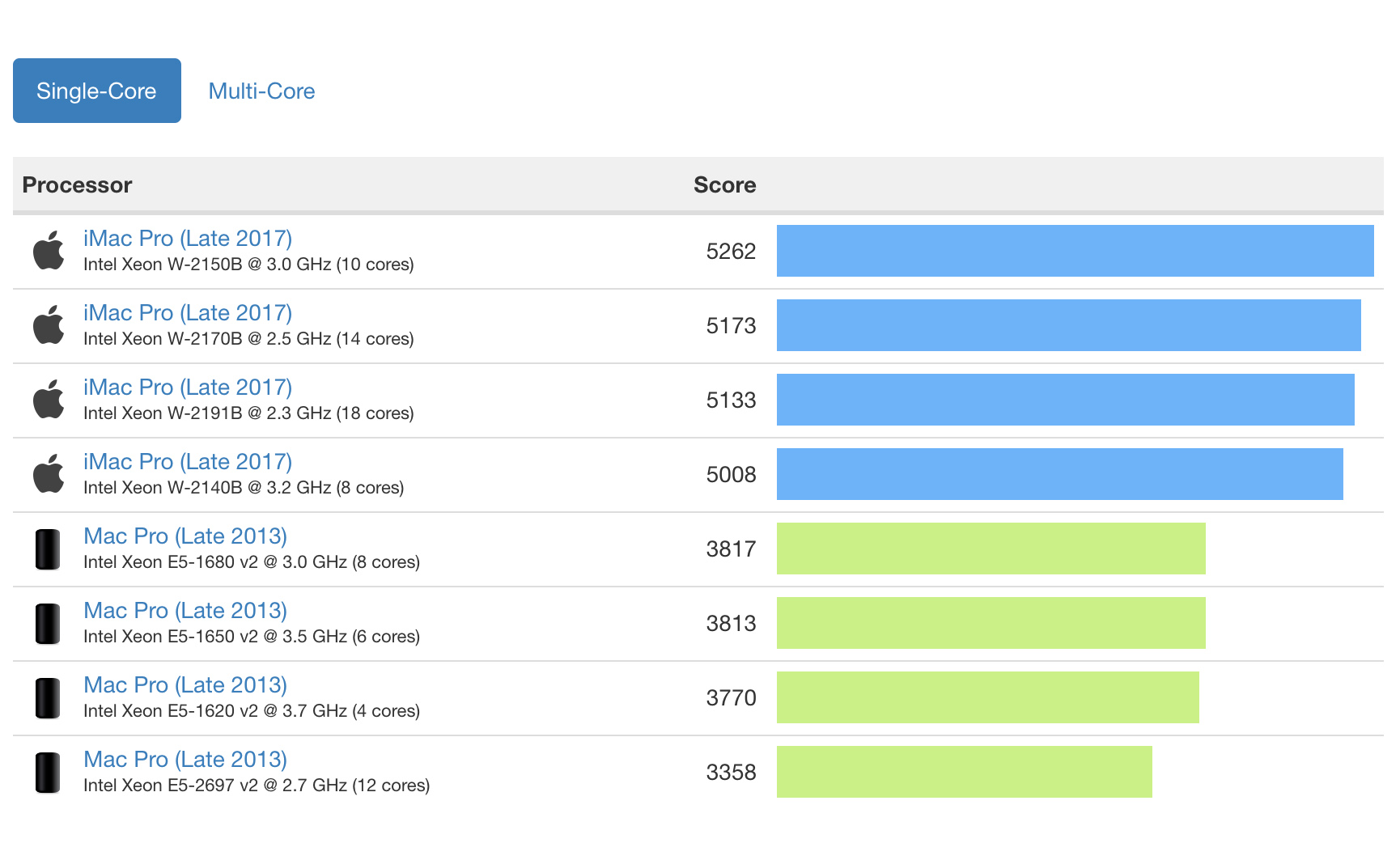
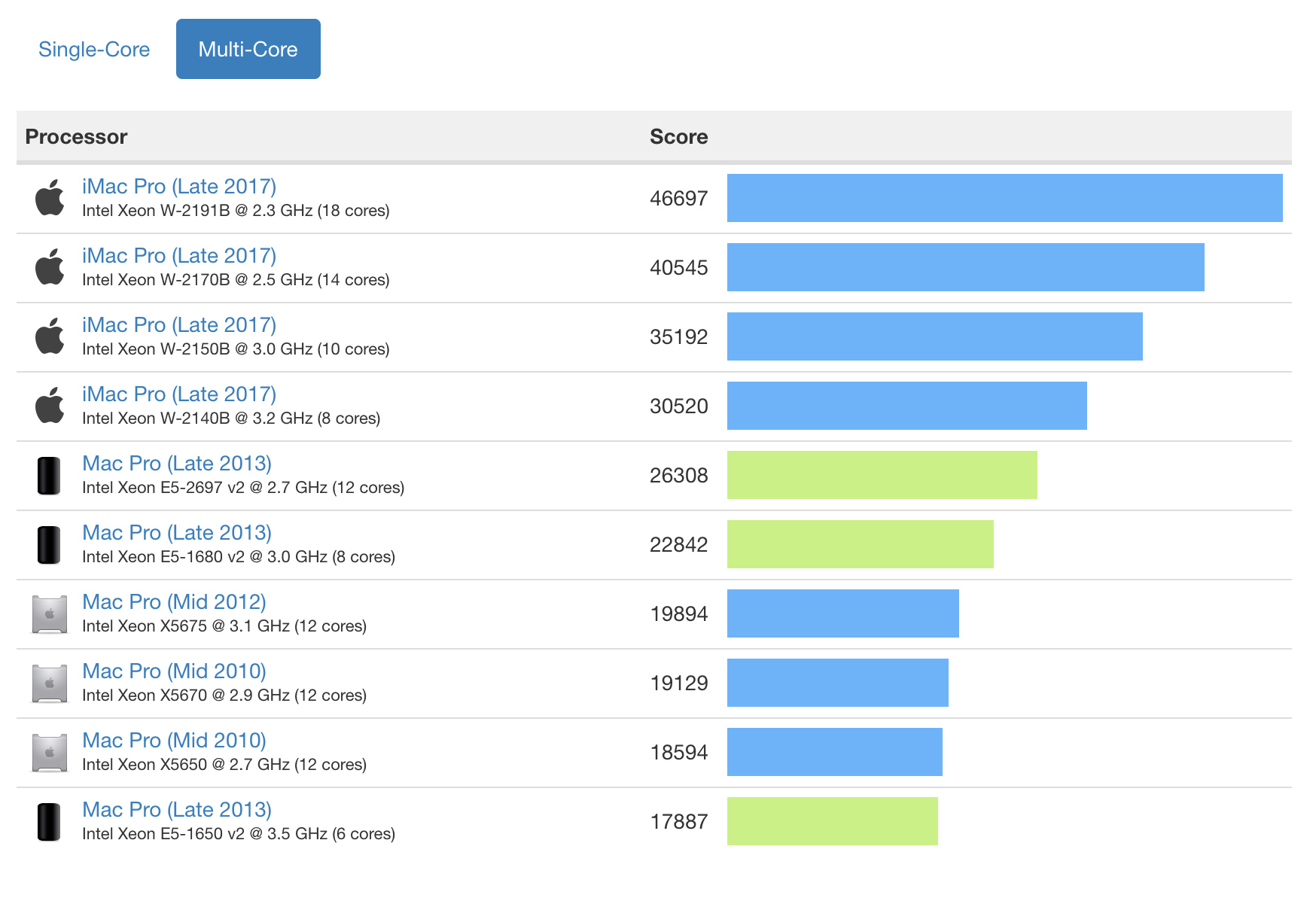
I have to imagine Apple is bleeding money on building this computer today. It has to be on sale still to meet the needs of corporate customers who have standardized on the machine. Maybe there are still customers whose workflows are built around the OpenCL power that still resides under its black aluminum skin. Maybe the Apple.com team lost the password needed to edit that part of the company’s website.
Whatever the case, the 2013 Mac Pro is something pretty uncommon in terms of modern-day Apple: a high-profile failure.
