
512 Pixels
iMazing⇢
My thanks to iMazing for sponsoring 512 Pixels this week. Their app lets you backup your iPhone or iPad then browse and extract content from those backups. Gain full control over your mobile data. Start backing up with iMazing today; backups are free, so take it for a spin.
Wavelength for Micro.blog⇢
We have something really big to announce today. Micro.blog now supports hosting short-form podcasts, also known as microcasts, with a companion iPhone app called Wavelength for recording, editing, and publishing episodes.
[…] Micro.blog is about making short-form content you own as simple to post as a tweet because we believe blogging should be easier. Podcasting should be easier too.
Micro.blog can host the audio files and roll an RSS feed for listeners to subscribe to. I love this idea.
The Molar Mac: Form and Function⇢
This month in my MacStories column, I wrote about what may be the ugliest Mac ever made:
Any nerd in their 20s or 30s probably remembers seeing one those colorful, curvy iMacs in school growing up. Their friendly design and relatively low cost – for a 90s Mac, at least – made them a staple in education for years.
I certainly saw and used my fair share of them in middle and high school, but I also got to experience the iMac G3’s weird older sibling, the Power Macintosh G3 All-in-One.
Yeah, the one that looks kind of like a big tooth.
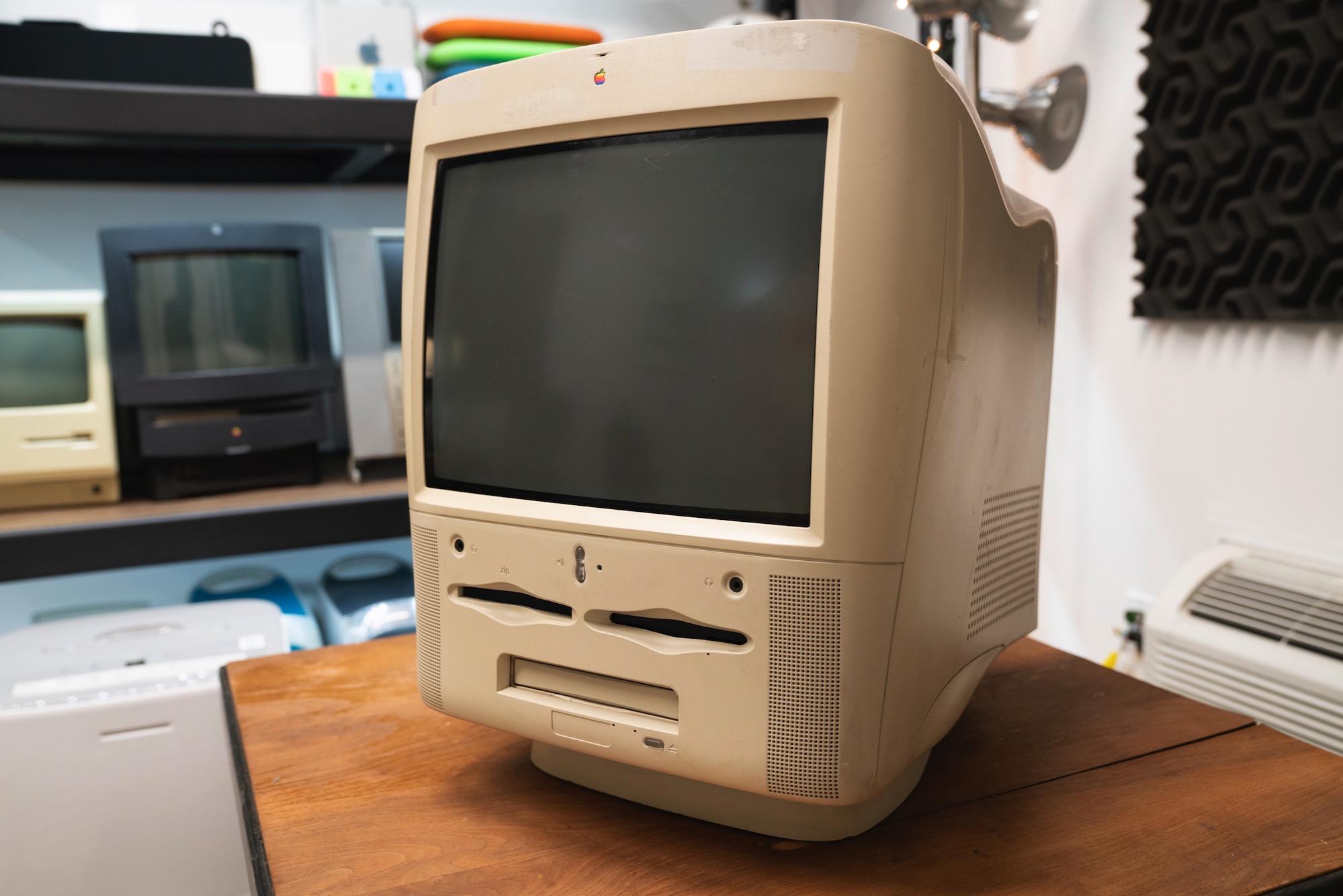
It’s easy to joke about this computer. It wasn’t for sale for very long as it was quickly replaced as the iMac G3 replaced it in the education market, but it is a very interesting model worth remembering.
High Sierra Warning Users of 32-bit Apps⇢
Starting tonight, macOS High Sierra 10.13.4 will warn users when they launch a 32-bit app and prompt them to this support document. This was announced by Apple a while back, as Jason Snell points out at Six Colors:
Mac developers were told at Apple’s developer conference last year that macOS High Sierra would be the “last version of macOS to run 32-bit apps without compromise,” and many of them have been busy updating their apps to be fully 64-bit compatible. Just a couple of months ago BBEdit, one of my favorite Mac apps, updated to 64 bit.
For now, these apps will still run; this warning doesn’t impact the usage of these programs in any way. However, starting with the next major version of macOS, 32-bit apps will run “with compromises,” although Apple hasn’t made it clear what those compromises will be.
Connected #188: A Better Thing Than a No Thing⇢
Apple has launched a (kinda) new iPhone, discussed the Mac Pro and saved the world. Big week.
We also discussed the possible pros an cons of Spotify’s rumored portable music player and trypophobia.
My thanks to our sponsors:
- Warby Parker: Quality eyewear at a fraction of the usual price. Order your FREE Home Try-On kit today
- Casper: The Internet’s favourite mattress. Get $50 off select mattresses with the code ‘CONNECTED’.
- Simple Contacts: Contact lens prescriptions from home: Use offer code CONNECTED for $30 off your contact lenses.
Query #28: Break the Mental Model⇢
Stephen worries about the future of Twitter clients, then Serenity explains the dreaded “Other” label in the iOS storage report.
My thanks to our sponsors:
- Pingdom: Start monitoring your websites and servers today. Use offer code QUERY to get 30% off.
- Simple Contacts: Contact lens prescriptions from home: Use offer code QUERY for $30 off your contact lenses
Liftoff Merchandise⇢
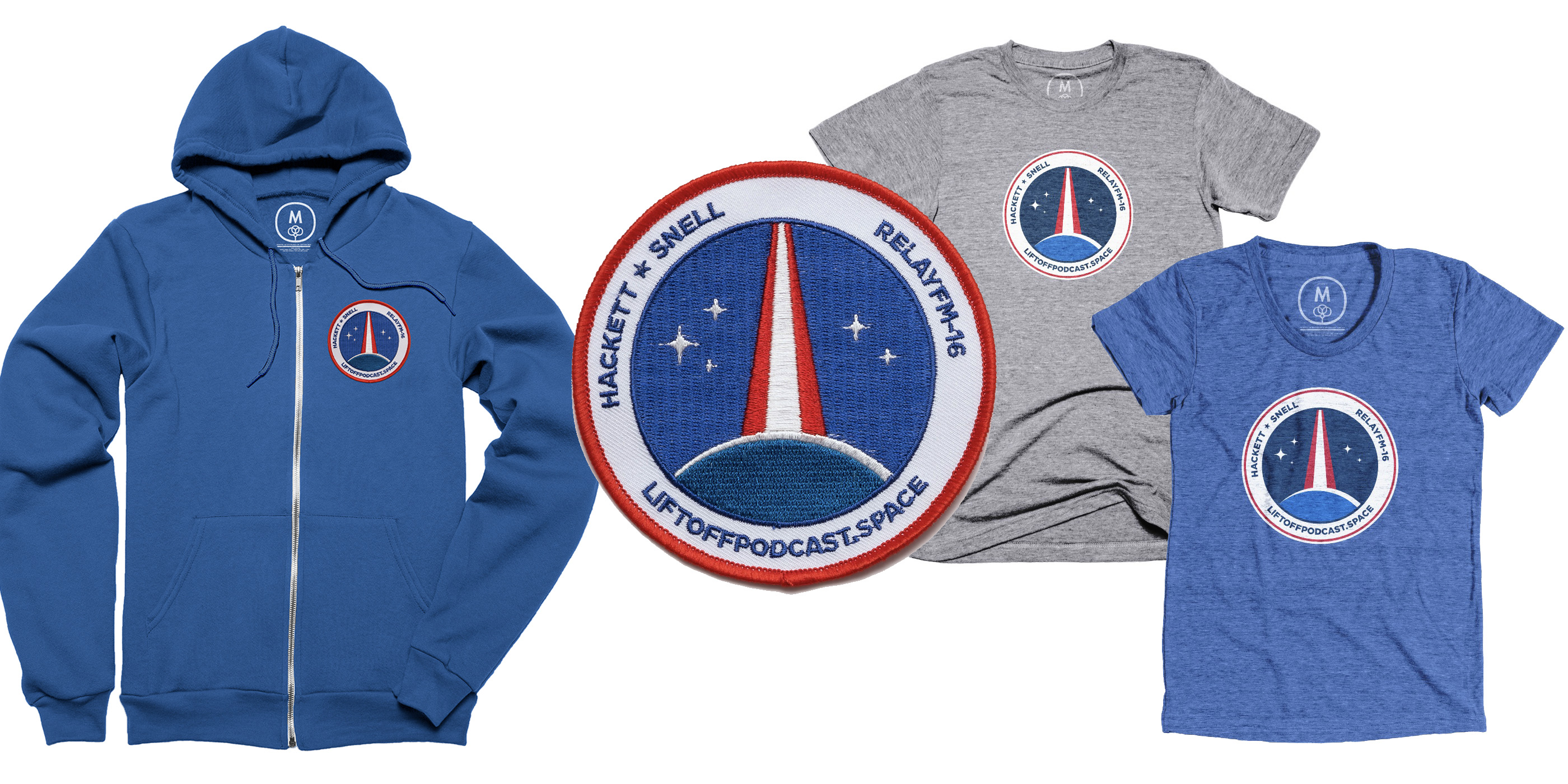
Speaking of Liftoff, I’m super pumped to finally share that we have some Liftoff merchandise up for sale, including t-shirts, a hoodie and A REAL-LIFE MISSION PATCH. The hoodie uses the patch, or you can pick one up on its own to apply to your own jacket or bag:
Liftoff #70: An All-Inclusive Space Hotel⇢
This week on Liftoff, Jason and I are joined by space and technology reporter Swapna Krishna to catch up on a whole bunch of news, including the James Webb Telescope’s latest schedule slip, SpaceX’s recent tangling with NOAA, Commercial Crew changes and more.
My thanks to Squarespace for sponsoring this episode.
Ungeniused #50: Pez⇢
Everyone’s favorite pocketable candy has a long history of making people smile.
This topic is way, way more interesting than I thought it was going to be.
My thanks to our sponsor:
- Squarespace: Make your next move. Enter offer code UNGENIUSED at checkout to get 10% off your first purchase.
Kbase Article of the Week: Forcing a Universal Application to run with Rosetta⇢
Mac OS X applications that can run natively on both Intel processor- and PowerPC processor-based Macs are called Universal applications. Even if you don’t have a Universal version of an application, you can still use it on an Intel processor-based Mac by means of Rosetta, which comes with every Intel-based Mac. Rosetta works behind the scenes to translate an existing, native, non-Universal application (one that was designed to run natively a PowerPC-based Mac, not a Classic application) so that it can run on an Intel-based Mac—all you have to do is double-click the application!
Sometimes, you might have a Universal version of a graphics or Internet application on your Intel processor-based Mac that you want to run via Rosetta instead of running natively. Because some Universal applications may continue to rely on existing plug-ins, you may sometimes need to force a Universal application to run in Rosetta to accommodate the plug-in. Check with your plug-in manufacturer(s) to see if Universal versions are available, too.
Jean-Louis Gassée, on Mac CPU Transitions⇢
Writing in his excellent Monday Note newsletter:
Thinking of future Macs would be simpler if its putative new processors weren’t iOS-compatible, but here we are. That being said, setting aside inopportune claims of courage, Apple is a cautious company, well aware of the risks in trading a relatively simple life of separate Mac and iOS product lines for a complicated hybrid platform. This coming transition will be interesting to watch.