
As a reminder, I have two ongoing pages on the site that I’m really enjoying:
512 Pixels
Sponsor: DEVONthink: Store, Organize, and Work the Smart Way⇢
We’re all dealing with more information than ever, and it’s becoming increasingly complex. You need bulletproof financial documents for audits, collaborative tools for your team, and AI that can actually help.
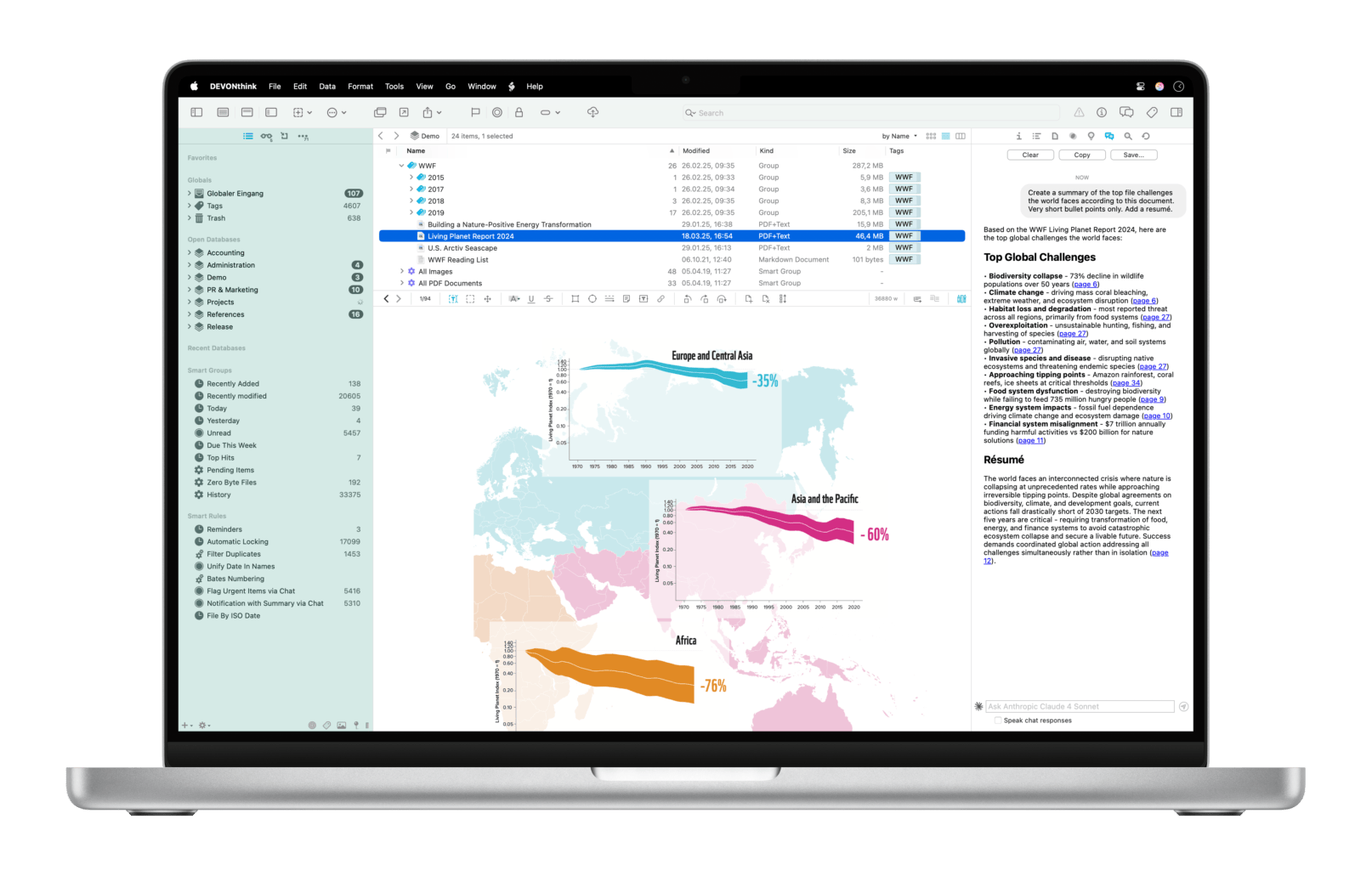 DEVONthink 4.0 Copernicus 1 is here, and it’s designed to work with you, not against you. Its AI integration is incredibly useful — it can analyze your documents, write summaries, suggest tags, and you can even create AI-based automations for specific tasks.
If you keep financial records or other documents that need to be audit-proof, then DEVONthink 4’s new audit features have you covered.
Working with a team? The new web interface lets everyone access shared databases and collaborate instead of just emailing files back and forth. Automatic versioning means you’ll never accidentally lose an important change, and the enhanced automation handles the boring stuff so you don’t have to.
Don’t spend another year fighting with your documents. Download DEVONthink 4.0 Copernicus and see how AI-powered document management can make your work easier.
-
The DEVONtechnologies team named version 4.0 after the Copernicus moon crater and its namesake, astronomer Nicolaus Copernicus, who ultimately changed the way we see and experience the universe. ↩︎
Mac Power Users 807: A Sign of Maturity, with Federico Viticci⇢
Federico joins the show to talk to David and Stephen about his Apple gear, iPadOS 26, running MacStories, and how AI is changing automation tools.
Memphis Light, Gas & Water Made $1 Million Error in xAI’s Billing⇢
For the second time, xAI has fallen behind on its bills to our local utility company. In February 2025, it was reported that the AI company was $400,000 behind and received several cutoff notices.
This time it seems that the error was on the side of MLG&W, per David Royer and April Thompson, reporting for WREG:
xAI’s Colossus data center in Memphis was issued a cutoff notice for a past-due bill by the local utility company in June, a month when it owed nearly $1 million for electricity, gas and water service.
But xAI says the company has paid its bills on time and in full, saying the notices were the result of internal accounting errors on the part of the utility.
Memphis Light Gas & Water confirmed that statement, saying, “xAI is current on its bill. MLGW continues to work with xAI on any billing concerns. There was a routing issue on MLGW’s side that has been corrected.”
The Highs and Lows of macOS Tahoe⇢
Today, the OS Class of 26 graduated to Public Beta, and Jason Snell and I are in lockstep in how we think about Tahoe:
After a month using early builds of macOS Tahoe full time, I can confidently report that this is an upgrade that feels like an upgrade. The additional power of Spotlight and Shortcuts is going to delight a lot of longtime Mac users, and I’m really liking the direction Apple is taking Control Center in the menu bar.
That said, it’s also clear that the Mac is the lowest priority platform when it comes to Apple’s new design language. The beta interface feels messy and unfinished, and worse, it feels like an iOS design that’s been imported without enough consideration for how it should manifest on the Mac. I understand that the iPhone is the top priority, but the Mac deserves a version of this design that fits how the Mac is used. So far, it doesn’t feel like that.
Macintosh: The Design Solution for Engineering & Architecture⇢
Look, YouTube keeps serving me these ancient and weird Apple videos, so I’m going to keep sharing them here.
I mean, when is the last time you saw a lizard standing atop a beige Mac as a plane flies overhead?
Daily HIG⇢
I have a new favorite Mastodon account to follow.
Connected #562: Tech Boomers⇢
This week on the show, Liquid Glass is back in a big way, and we have feelings about it.
Google AI Summaries Leading to Less Traffic to the Web⇢
Athena Chapekis and Anna Lieb at the Pew Research Center, on the effect AI-generated results have had on websites showing up in Google search results:
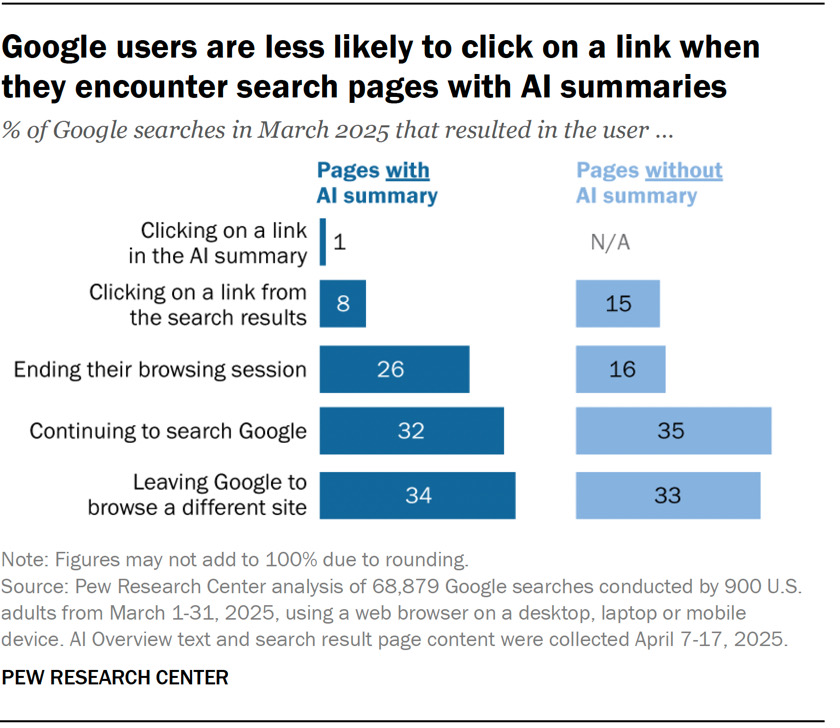
A Pew Research Center report published this spring analyzed data from 900 U.S. adults who agreed to share their online browsing activity. About six-in-ten respondents (58%) conducted at least one Google search in March 2025 that produced an AI-generated summary. Additional analysis found that Google users were less likely to click on result links when visiting search pages with an AI summary compared with those without one. For searches that resulted in an AI-generated summary, users very rarely clicked on the sources cited.
This charts sums things up nicely:
Casey Newton at Platformer reported on this last night:
To Google, those numbers are a sign of success: they show a growing number of satisfied customers, who have been spared the need to browse the web by the AI overview, and who are thus likelier to return to Google (and not, say, ChatGPT) the next time they have a question. (And the company often cites internal statistics showing that people who see AI overviews are more satisfied.)
To publishers, though, they’re reasons for alarm — and job cuts.
Google took issue with the study when I asked the company about it today.
“This study uses a flawed methodology and skewed queryset that is not representative of Search traffic,” the company told me. “We consistently direct billions of clicks to websites daily and have not observed significant drops in aggregate web traffic as is being suggested.”
AppleCare One⇢
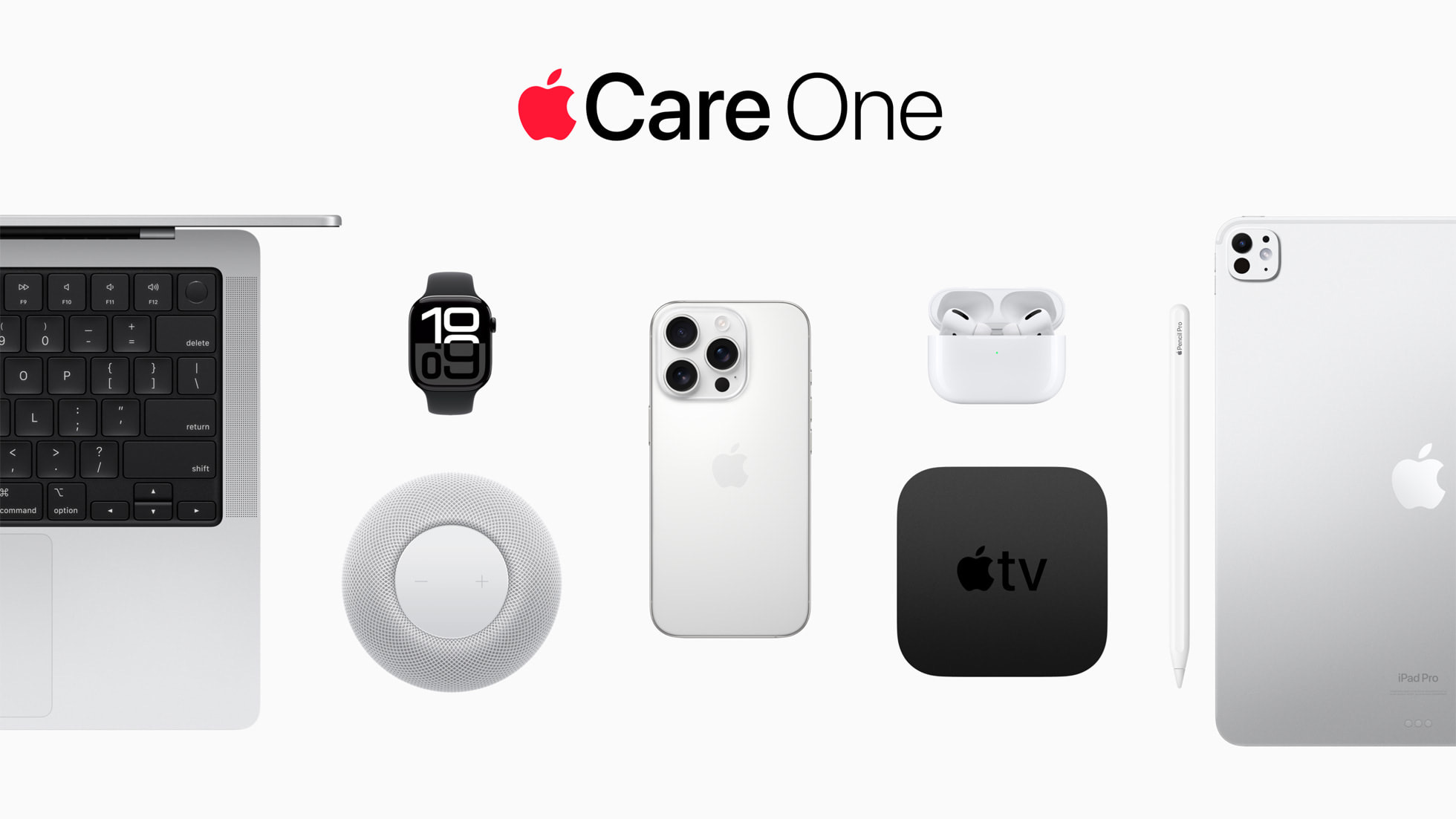
For just $19.99 per month, customers can protect up to three products in one plan, with the option to add more at any time for $5.99 per month for each device. With AppleCare One, customers receive one-stop service and support from Apple experts across all of the Apple products in their plan for simple, affordable peace of mind. Starting tomorrow, customers in the U.S. can sign up for AppleCare One directly on their iPhone, iPad, or Mac, or by visiting their nearest Apple Store.
Currently, I have AppleCare on just two devices:
- iPhone 16 Pro at $13.49/month
- 14-inch MacBook Pro, which I paid for the up-front AppleCare
At this point, if I added anything new, I’d probably opt for this new plan.
This isn’t the only change coming to AppleCare, as noted by Zac Hall:
As part of AppleCare One, Apple is expanding the theft and loss coverage option beyond the iPhone for the first time.
When bundled with AppleCare One, Apple Watch and iPad include AppleCare+ Theft and Loss coverage.
xAI Weeks Away from Firing Up Second Memphis Site
Today, xAI released a statement concerning Colossus 2, its second data center here in Memphis:
“In mid-February we broke ground at our new data center at Tulane in Shelby County, Tennessee. We have begun deploying the initial phase of computing infrastructure.
“This initiative includes the installation of an additional 110,000 NVIDIA GB200 GPUs, powered by a diverse array of energy sources, similar to Colossus. We are building similar redundancies for Colossus 2 that mimics the success we’ve seen at Colossus.
“This includes Tesla Megapacks to provide critical support during peak demand periods, ensuring a stable power supply while safeguarding Shelby County residents from potential blackouts. We expect to power on this facility within the next few weeks. As is the case at Electrolux, we are excited to be a valuable partner to Memphis.”
That diverse array of energy sources includes natural gas turbines that have been stored at a nearby site. These will more than likely be running in Southaven, MS, as Samuel Hardiman reports:
The post from xAI follows the company purchasing what was once a natural gas plant in Southaven, Mississippi last week.
The company also purchased easements for electric transmission lines to head north from Southaven to Colossus 2 in Whitehaven. The old natural gas plant at 2875 Stanton Road is about a mile south of Colossus 2 in Memphis.
The company has stockpiled natural gas turbines at a nearby vacant lot for weeks. The Daily Memphian has observed trailers emblazoned with APR Energy, a firm that provides power solutions to data centers, and trucks from Allied Power, a Louisana company that specializes in the power industry, in Southaven at the vacant lot where xAI has stockpiled energy materials.
On an on-background call with Hardiman, an xAI representative said that the Tennessee Valley Authority and Memphis Light, Gas and Water is only supplying 30 megawatts to the site during the first phase of operation, out of the 170 needed. Future phases will require more power, with reporting in May stating that 1.1 gigawatts of power could be needed once the site is fully up and running. That figure could power 40% of the entire city.
Apple Intelligence News Notification Summaries Are Back⇢
Back in January, Apple disabled Apple Intelligence notification summaries for news app after a string of high-profile incidents of the feature rewriting headlines to be incorrect. With iOS Beta 4, the feature is back, as Chance Miller writes:
When you update to iOS 26 beta 4, you’ll see a new setup flow that allows you to choose to enable notification summaries for the “News & Entertainment” category of apps.
If you choose to enable summaries for News & Entertainment apps, you’ll see a warning in bright red text: “Summarization may change the meaning of original headlines. Verify information.” There is also an option to report concerns with notification summaries directly to Apple.