Siri Speaker Rumored to be in Production

Bloomberg’s Mark Gurman and Alex Webb:

The iPhone-maker has started manufacturing a long-in-the-works Siri-controlled smart speaker, according to people familiar with the matter. Apple could debut the speaker as soon as its annual developer conference in June, but the device will not be ready to ship until later in the year, the people said.

As I said on Connected this week, I expected Apple to push SiriKit at WWDC, and this thing come out besides the new iPhones in the fall. May have gotten that one wrong.

My Mobile Podcasting Setup

EDITOR’S NOTE: This post is now outdated. Visit my gear page for a more current setup.


While it’s a little out of date now, I wrote about my podcasting gear back in 2015. I use this set up every time I sit down at my desk to record a show.

However, Relay FM does an increasing number of shows on the road, at conferences and other events. To record these podcasts, I’ve put together an arsenal of equipment.

Like with my normal setup, I’m not claiming this is the only way to do this sort of work, or even that this is the best way. It’s what works for us.

Mobile setup

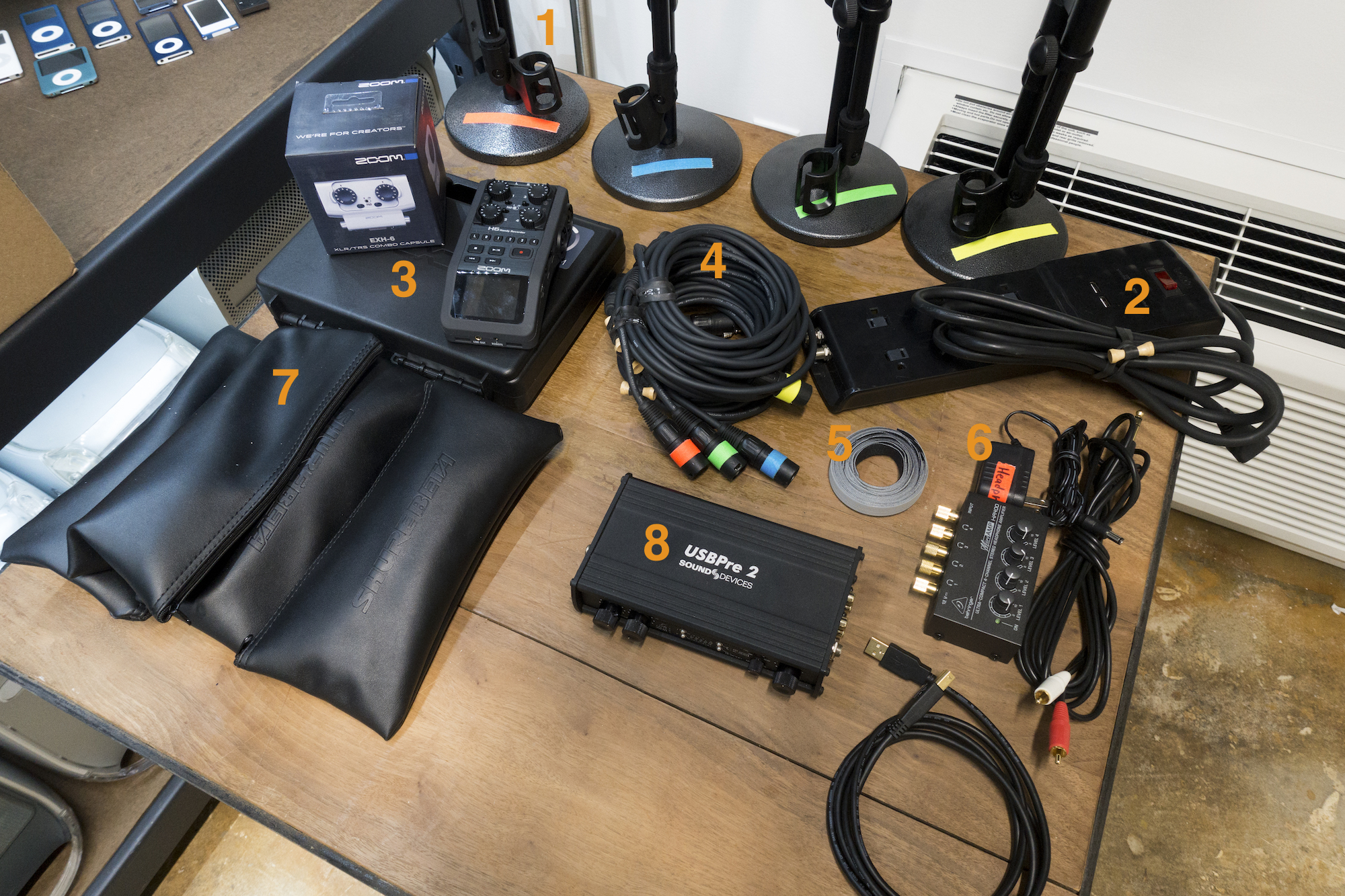
  1. Neewer 8″/20cm Black Iron Base Desk Microphone Stand: These desktop stands are cheap, but the bases are heavy enough to make sure they won’t topple over. Their short height means its easy to get them where you want them, without blocking hosts’ faces from an audience or camera. I have each marked with a color using this brightly colored gaffers tape.
  2. Belkin power strip: I’ve had this one so long I can’t find it on Amazon, but something with a long cable and room for power bricks can save the day. I keep its cable and everything else tidy with BongoTies. They are the best.
  3. The recorder at the heart of my mobile setup is the Zoom H6. It can record four simultaneous tracks onto an SD card, or six with an optional accessory. While the H6 can be used as an interface to track into Logic over USB, I like the simplicity of recording onto an SD card. Volume levels can be seen and changed on the device, which can run of AA batteries or a wall charger over USB.
  4. To keep cable mess under control, I use 10-foot XLR cables. These cables don’t have the most amazing ends on them, but they get the job done time after time for me. I’ve taped the ends to match my mic stands so a host can quickly tell which input belongs to which person at the table during a recording.
  5. I don’t go anywhere without velcro for on-the-job cable management I can quickly undo.
  6. The Behringer Microamp lets up to four people receive stereo headphone feeds if they want, but most of the time, if we are doing something live, hosts don’t want headphones.
  7. The Shure Beta 58A is our live mic of choice. There are better microphones on the market, but these travel well and work for a wide range of voices. Some may find them to be a little on the deeper end of things, but that’s nothing a little EQ can’t fix. We went with the supercardioid model to isolate background and off-axis noise as much as possible, but some bleed is always a problem live if in a small or loud setting.
  8. I use my very expensive, very nice Sound Devices USBPre2 interface to bring audio from the Zoom to my MacBook Pro. The Zoom can record tracks directly into Logic via USB, but this gives me more flexibility. I record tracks onto the SD card in the Zoom, and run from the Zoom to the MacBook Pro as a backup recording and to stream the audio to our Icecast server. This backup recording is flat; I can’t isolate each input into separate tracks, but if the SD card went belly up, I’d have something recorded.

Kbase Article of the Week: QuickTime 2.5: Features and Enhancements

This is one of just a few articles that mentions WWDC:

On Monday April 15, the QuickTime team announced enhancements to QuickTime for video professionals at the National Association of Broadcasters (NAB) conference in Las Vegas. Although announced on 15 April 1996, these updates are still under development and will not be available for distribution until mid May 1996 (WWDC timeframe). QuickTime 2.5 replaces QuickTime 2.1 for Macintosh and provides several performance enhancements as well as bug fixes that primarily impact developers and content authors…

Apple Honors JFK on 100th Anniversary of his Birth

Apple:

At Apple, we share the same vision of leadership through service, courage, innovation, and inclusion that guided John F. Kennedy’s presidency. Together with the JFK Library, we’ve curated a collection of learning materials and activities to help commemorate his centennial year and inspire the next generation of leaders.

The page is full of free content about JFK, including a collection of media in iTunes, speeches and more. Nicely done.

RSS Sponsor: Balance – See Your Money in Your Menubar

Balance is a powerful menubar app for your money built by a team from Apple, Stripe and Ethereum. It was featured in the U.S. Mac App Store when it launched in February.

Securely connect to your accounts

Balance uses Plaid.com, the best API for securely accessing your financial data. It gives the app a read-only token to access your account history.

Quickly check your balances

With one click or keyboard shortcut you can pop open Balance and check all of your accounts. Lock the app with a password or TouchID.

Speedily search through your transactions

As a native app with local data storage, Balance is super fast. Quickly search through all of your downloaded transactions with powerful filters.

Powerful notification engine

Balance is Hazel for money. You can create rules to trigger useful notifications to help you stay on top of your finances.

One subscription, coming to all of Apple’s platforms

The basic plan starts at $4.99 / month. Balance is launching on iOS and watchOS later this year, and is also building a full windowed app for macOS. Early customers will get access to betas for all of these.

Check out Balance on the U.S. Mac App Store today. International support is planned for later this year.

Thinking About Shared iCloud Photo Libraries

I had a very rocky experience with iCloud Photo Library in late 2015:

I imported my photos and uploaded my 70GB photo library to iCloud. Everything went very smoothly, so I turned on iCloud Photo Library on my iPad.

Aaaaaand it all exploded.

Apple Support eventually got me up and running, but it took a while for me to fully trust the system.

The reality is that iCloud Photo Library is pretty great when everything is working smoothly.1 Photos show up on my devices quickly, regardless if I snapped them with my iPhone or imported them from an SD card on my iMac.

My wife has been using it for as long as I have, and she also enjoys the service. We’re both paying iCloud customers at this point, but like every other family using iCloud Photo Library, our sharing system is a bit of a mess.

If I take photos on my “nice camera,” I’ll import the RAW files to my iMac, edit them, then import them into both of our libraries. If either of have an iPhone photo we want to share, we AirDrop it, as Shared Photo Streams downsize images and video:

iCloud Photo Sharing supports JPEG, RAW, PNG, GIF, TIFF, and MP4, as well as special formats you capture with your iPhone, like slo-mo, time-lapse, 4K videos, and Live Photos. You can even share your Memory videos. When shared, photos taken with standard point-and-shoot cameras, SLR cameras, or iOS devices have up to 2048 pixels on the long edge. Panoramic photos can be up to 5400 pixels wide.

iCloud Photo Sharing supports both MP4 and QuickTime video file types, and H.264 and MPEG-4 Video file formats. Videos can be up to five minutes in length and are delivered at up to 720p resolution.

All of this leads to a lot of duplication between our libraries. Google recently introduced powerful new sharing tools, and as the guys on ATP spoke about this week, its time Apple step up to the plate with something new. Here’s Jason Snell on the subject:

My wife and I have wanted to pool our photo libraries for ages now—the alternative is for me to occasionally plug her iPhone into my Mac and import her photos, and for her to ask me to AirDrop photos I’ve taken to her when she wants to post them to Facebook. Google Photos will allow that now—and Apple needs to follow suit.

But, you’re saying to yourself, what if you want to share some but not all photos with a partner? Google’s announcement takes this extra step, letting you specify that certain sorts of photos—for example, photos of specific people—be shared, while others aren’t. While offering an all-or-nothing library sharing feature would be nice, it’s even better if sharing can have some granularity. Google’s headed there now. Will Apple follow?

In thinking about how Apple could add family sharing to iCloud Photo Library, two types of solutions come to mind.

Common Library

In this world, Apple would have a way to have multiple iCloud accounts have access to one big, centralized common photo library.

Users — let’s say a married couple — could both go in, create albums, make edits and more. Both people would have full read/write access to the library.

There are issues with this, of course. Would individuals have their own iCloud Photo Libraries and access to the big shared one? How would Photos.app display this? I think this sort of thing could be confusing, and I bet people would end up with photos in the wrong library pretty easily.

If users didn’t have their own personal libraries, I think many would be frustrated and sharing every single photo and screenshot they take.

In short, I don’t think a big, shared library is the way to go.

Library Access

This solution is what I would prefer. In it, my wife and I would continue to have our own libraries, tied to our own iCloud accounts, just like we do today.

However, we would be able to add each other as viewers to our libraries. Once access has been granted, her library would show up in the top-level of Photos.app as do things like People, Places, Videos, etc. I could tap her library to see all of her content, including albums, collections, etc. If I were to see something I wanted to add to my library, I could select it and tap “Add to My Library.” Doing so would prompt iCloud to add a full-resolution copy of that file to my personal library.

In this world, she would not be able to edit anything in my library, but pull any content from it she wants in hers. This would not take care of the duplication issue, but would be less confusing than having one big library.

WWDC is Coming

Last year, Photos.app and iCloud Photo Library saw a lot of love, but Apple needs to keep its foot on the gas to stay competitive in this space. I hope they do just that on June 5.

  1. It’s still not perfect; I recently had a whole bunch of photos adopt the same description. After some back and forth with Apple, my radar was marked as a duplicate and closed. 

Lauren Kern Named First Editor-in-Chief of Apple News

Politico:

And it’s a move that’s sure to raise eyebrows not just in Silicon Valley, but in Manhattan media circles as well. Morning Media has learned that Apple has given the job — a new position at the Cupertino-based company — to Lauren Kern, one of New York magazine’s most high-ranking editors and a former deputy editor at The New York Times Magazine.

It’s unclear at this point what this position will mean for Apple News, as the company and Kern declined to comment. I assume Apple is building more of editorial organization within Apple News, but how big it will be, and what it will do within the app is unknown, to me at least.

Two things do come to mind though.

First, Apple could be building a news team. I think this is pretty unlikely, but first-party reporting within Apple News could add value to the platform. This team could even generate video for Apple’s Always-Rumored-But-Never-Here TV offering. Getting into reporting can be expensive and risky. Moreover, it just doesn’t seem like a very Apple-like move to me.

What I think is more likely is the second option; this new team could be working to influence coverage seen in Apple News to a greater extent than what is happening now.

Facebook has been under pressure for influencing the top news trends seen by its users, as well as its shifting approach to fighting fake news. If Apple wades into these waters, it will have to deal with these issues at some point.

It’s very tricky business to exercise editorial control over news from outside sources. I’m very curious to see what — if anything — changes in Apple News in the future.

Mossberg Out

Walt Mossberg, in his final weekly column:

We’ve all had a hell of a ride for last few decades, no matter when you got on the roller coaster. It’s been exciting, enriching, transformative. But it’s also been about objects and processes. Soon, after a brief slowdown, the roller coaster will be accelerating faster than ever, only this time it’ll be about actual experiences, with much less emphasis on the way those experiences get made.

This column is thought-provoking and more than a little bittersweet. Our industry is saying goodbye to an icon.