More Apple Retail Changes Coming

This time around, the changes are focused on how the stores interact with business customers:

Apple is planning another shakeup within its retail stores, according to a source who shared the company’s plans with MacRumors. At the end of April, Apple plans to eliminate certain retail positions, including Business Manager, Business Events Lead, Events Coordinator, and Events Lead.

Apple Store Leaders began informing affected employees about the change earlier this week, and many were caught off guard by the sudden sunsetting of specialized positions that have long existed at retail stores.

Ouch.

Sold Out

T.C. Sottek at The Verge, writing on the recent move by Congress in which lawmakers gave ISPs the okay to sell customer data:

The only people who seem to want this are the people who are going to make lots of money from it. (Hint: they work for companies like Comcast, Verizon, and AT&T.) Incidentally, these people and their companies routinely give lots of money to members of Congress.

So here is a list of the lawmakers who voted to betray you, and how much money they received from the telecom industry in their most recent election cycle.

Disgusting.

Kbase Article of the Week: Xserve, Xserve (Slot Load): 180 GB Apple Drive Module May Have Incorrect Label

This week, a rare “we made a mistake” kbase article:

The antistatic shipping bags for small number of 180 GB Apple Drive Modules (ADMs) have a inaccurate label that states: “This drive is for use in an Xserve RAID only. Server Monitor software will not support this drive is installed in an Xserve.”

The solution is pretty simple:

The 180 GB ADM is fully functional in Xserve and Xserve (Slot Load) servers. The statement on the antistatic bag label is incorrect and not a cause for concern.

Xserve Finds New Lease on Life

Brian Stucki, on the MacStadium blog:

Here we are in 2017 and we’re bringing back a second life for the Xserve.

Since Macminicolo merged with MacStadium, we now have more space and many more options for Mac mini, Mac Pro, and 1U servers like the Xserve. While Mac Pro is definitely our focus, I feel like I owe the Xserve fans an update.

Our hosted Mac private clouds are powered by VMware and include unlimited use of vSphere Enterprise (ESXi) 6.x. Since this software can handle any number of server nodes to draw from, we use both Mac Pro and Xserve to build the fleet for customers. This helps us find just the right balance of price and power for any situation.

I really loved the Xserve hardware, and managed my fair share of them back when I was a full-time IT guy. I’m glad to see they are still working hard for customers.

Final 2017 Emoji List

Jeremy “Mr. Emoji” Burge:

After months of work aligning Unicode 10.0 code points with new features in Emoji 5.0, the 2017 emoji list is now final.

These include smileys, people, food, drink, flags, and for the first time: new fantasy characters such as a mermaid, genie, and vampire.

We are today releasing the final version of our sample images for this update. These have been designed in the “Apple style” to picture how these emojis may look when hitting phones later in the year.

Lots of fun stuff in here.

Save the Date

We’re holding a Relay FM meetup at WWDC:

We are hosting a meetup on Monday, June 5th, from 7 – 9:30 PM at the San Jose Museum of Quilts and Textiles.

The event is free and open to all ages. There will be beer, so if you want to drink, you’ll need your ID on you. We aren’t doing a live show this year; this is just a good, old-fashioned social event.

We will have tickets available in early April after Apple’s WWDC lottery is complete.

Click through to get an email when tickets go up next week.

Comparing Night Shift and f.lux

Night Shift and Flux

First released as part of iOS 9.3, Night Shift slowly shifts the color temperature of your screen to be warmer as the evening goes on. Some claim that this may help you sleep better, as blue light is harsher and can disrupt your sleep cycle, but the science is out on that.

I don’t know if it actually doing anything helpful, but I’ve enjoyed Night Shift on my iPhone and iPad over the last year. I often am wrapping up the day one of these two devices pretty close to bedtime, and I find the warmer tones pleasing. It may be the placebo effect, but using up a device without — ahem, watchOS team — is jarring.

With today’s release of macOS Sierra, Apple has added Night Shift to the Mac.

Of course, savvy Mac users have enjoyed a similar effect for years by way of f.lux, a free Mac app that adjusts the color temperature of the Mac’s display based on time. I’ve used it for years, and I find it hard to remember it doesn’t actually ship with a clean install of macOS.

As is the case with any Sherlocked application, f.lux will have a battle on its hands now. However, there are some pretty big differences between the two that may allow f.lux to stick around for many users.

System Requirements

Night Shift is available on the following Macs running macOS 10.12.4 or later:

  • MacBook Air (Mid 2012 or later)
  • MacBook (Early 2015 or later)
  • MacBook Pro (Mid 2012 or later)
  • Mac mini (Late 2012 or later)
  • iMac (Late 2012 or later)
  • Mac Pro (Late 2013)

If you are using an external display, it must be one of these to be work with Night Shift:

  • Apple LED Cinema Display
  • Apple Thunderbolt Display
  • LG UltraFine 5K Display
  • LG UltraFine 4K Display

Update: A bunch of people on Twitter are saying Night Shift works on third-party external displays, so I’m not sure what this is about.

F.lux, on the other hand, can run on a wider range of machines, virtually any external displays and older operating systems. It’s also available for Windows and Linux.

Exceptions

One of my favorite features of f.lux is the ability to disable it based on what application is in the foreground. For example, I have Adobe Photoshop marked as an exception. as f.lux changing the color temperature of my display could cause me problems while editing photographs.

Apple’s Night Shift has no concept of exceptions. If the screen is warmer, it’s warmer for all applications.

Customization & Schedule

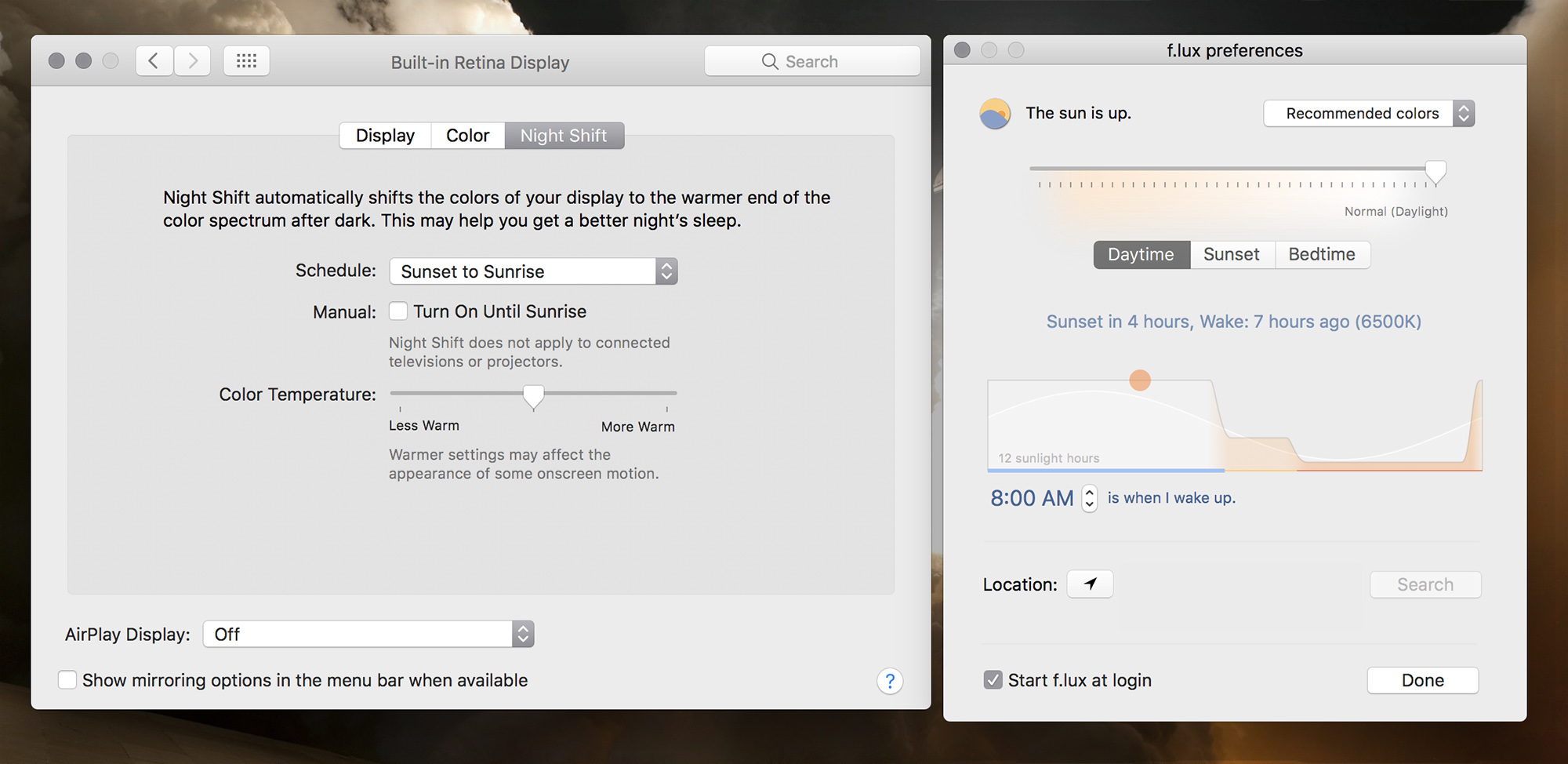
At first glance, f.lux and Night Shift offer pretty similar options. However, f.lux generally gives deeper customization options.

Both Night Shift and f.lux can run automatically between sunset and sunrise, based on your location.1 Both can be manually turned on before the appointed time. F.lux can be disabled for an hour or longer from its menu bar app, while Night Shift can be toggled on and off via Notification Center.

You can adjust the warmth of things manually, for instance, in both, but f.lux also exposes a setting for what the temperature should be during the day.

Wrapping It Up

Night Shift, like many other macOS or iOS features, is much simpler than its third-party competition. It will be fine for millions of users, but for those of us who want more control, f.lux will continue to be a good option.

I’m going to give Night Shift a try, but I bet the ability to set apps to be excluded from the warmer tones will lure me back to f.lux pretty quickly.


  1. Location is set manually in f.lux, making traveling a little annoying at times. I assume macOS will just take care of Night Shift in this regard.