This week on the podcast, we look ahead to Apple’s March 4 event, talk through iOS 26.4 Beta 1, and ponder a world where Apple makes an AI-powered pendant.
NAACP Against xAI’s Southaven Turbines ⇢
Kailynn Johnson, writing for The Memphis Flyer:
The National Association for the Advancement of Colored People (NAACP) called xAI’s plans to construct and operate 41 methane-gas turbines in Southaven a “civil rights issue” as opposed to a permitting one.
The advocacy group asked the Mississippi Department of Environmental Quality (MDEQ) to deny MZX Tech, an affiliate of xAI, to deny the permit for the turbines in question. NAACP sent the letter, signed by Abre’ Conner, director of the NAACP Center for Environmental and Climate Justice, in the wake of a public hearing held by the department as they consider xAI’s permit application.
“It is imperative that the Permit Board disapprove the Permit because both MDEQ and the community must understand the full impact of the MZX Tech and xAI site’s operations on air quality and address that impact as required by the Clean Air Act and Mississippi law,” the letter said.
xAI Ramps Up Turbine Usage in Southaven, Repeating Its Actions in Memphis ⇢
In January, the EPA ruled against xAI in a case in which Elon Musk’s CSAM machine/AI company said that if gas turbines were used in a temporary fashion, they were exempt from regulations.
At the time, I wrote:
Time will tell if the company runs into similar legal issues in the state of Mississippi, where the company is currently operating 18 natural gas turbines just south of the state line, on Stanton Road [in Southaven]. That power is then piped a few miles north to xAI’s second site in Memphis.
It appears that we are on the road to that time, as Evan Simon writes for Floodlight:
Elon Musk’s artificial intelligence company is continuing to fuel its data centers with unpermitted gas turbines, according to a Floodlight visual investigation. Thermal drone footage shows xAI is still burning gas at a facility in Southaven, Miss., despite a recent Environmental Protection Agency (EPA) ruling reiterating that doing so requires a state permit in advance.
State regulators in Mississippi maintain that since the turbines are parked on tractor trailers, they don’t require permits. However, the EPA has long required that such pollution sources be permitted under the Clean Air Act.
Simon goes on:
However, thermal images captured by Floodlight — and analyzed by multiple experts — show more than a dozen unpermitted turbines still spewing pollutants at the plant nearly two weeks after the EPA’s recent ruling.
“That is a violation of the law,” said Bruce Buckheit, a former EPA air enforcement chief, after reviewing Floodlight’s images and EPA regulations.
Those images look a lot like the ones captured in Memphis over the last year or so:

The first and only public hearing in Southaven is tonight, and takes place as xAI is seeking a permit for even more turbines.
Currently, there are two xAI data centers in Memphis itself, with plans for a third in Southaven.
Patrick Anderson is a senior attorney at the Southern Environmental Law Center. He is quoted in Simon’s piece as saying:
[xAI] violated the Clean Air Act the first time, and now they’re gonna copy and paste and do it again. I maybe had some naive hope that the regulators who are most in the day-to-day business of implementing the Clean Air Act in Mississippi would do the right thing.
Sadly, Anderson’s hope turned out to be naive, as Mississippi Department of Environmental Quality responded to Simon:
The turbines currently operating at the Southaven facility are classified as portable/mobile units under state law and therefore remain exempt from air permitting requirements during this temporary period.
Nothing in the EPA’s January 15 rule altered that determination under Mississippi regulations.
The Southern Environmental Law Center is planning to sue xAI over its actions in Southaven, as Eric Hilt writes:
Just south of the Tennessee-Mississippi state line sits dozens of unpermitted gas turbines that power xAI’s Colossus 2 data center while releasing smog-forming pollution, soot, and hazardous chemicals like formaldehyde. The tech company set up the de facto power plant with no permits, no public input, and no notice to nearby communities that will have to deal with the consequences. But now the Southern Environmental Law Center, Earthjustice, and the NAACP are preparing to take xAI to court for flouting federal law and threatening to worsen air pollution problems.
SELC and Earthjustice, on behalf of the Mississippi State Conference of the NAACP and the national NAACP, sent a notice of intent to sue to xAI for the tech company’s ongoing use of unpermitted methane gas turbines to power its massive Colossus 2 data center. The notice letter explains that xAI, a company founded by Elon Musk, is violating the Clean Air Act by installing and operating polluting gas-fired turbines without obtaining any permits. A 60-day notice of intent to sue is a prerequisite to filing a lawsuit under the Clean Air Act.
“xAI has once again built a polluting power plant without any permits and without any notice to nearby communities,” SELC Senior Attorney Patrick Anderson said. “There are no loopholes or exceptions —xAI is breaking the law while leaving local communities to deal with the consequences, and we plan to take them to court.”
My personal feelings about AI in general are complicated, but even some of its biggest fans realize that the environmental impact has to be reckoned with. Hilt outlines some of these impacts:
xAI’s 27 unpermitted turbines have the potential to emit a staggering amount of nitrogen oxides, a type of pollution that causes smog. This would likely make the facility the largest industrial source of NOx in the 11-county Memphis metropolitan area — an area already struggling with problems with smog.
“Our communities are not playgrounds for corporations who are chasing profit over people. xAI’s first data center is already creating pollution for Mississippi’s neighbors in Memphis — a community already suffering from decades of disparity — and now they are polluting in Southaven, Mississippi,” said Abre’ Conner, Director of Environmental and Climate Justice at the NAACP.
Pollution from the turbines powering xAI’s second data center risks worsening air quality problems in the Memphis area, which is already failing to meet national standards for smog. Memphis was recently named an ‘asthma capital’ and both Shelby County, Tennessee, and DeSoto County, Mississippi, received an “F” for ozone pollution from the American Lung Association.
Someone Tell John Ternus This Would Be a Terrible Crime ⇢
I am excited about the possibilities of a low-end MacBook powered by an A-series chip. I think the return of a fun consumer notebook would be good for Apple. There is one terrible disappointment in the most recent reporting about this machine, however. Here’s Mark Gurman:
Like all Macs, this machine — code-named J700 — will feature an aluminum chassis. It’s not plastic, despite the lower price point. To stick with this premium material, Apple developed a new manufacturing process that allows the shells to be forged more quickly. The technique is designed to be both faster and more cost-effective than the one used with Apple’s current laptops.
Apple will market the machine to students and enterprise users and offer it in playful colors, going beyond the muted tones of the MacBook Air and MacBook Pro. Over the past year, Apple has tested options such as light yellow, light green, blue, pink, classic silver and dark gray — though it’s unlikely all of these will ship.
The lack of orange in that last sentence pains me.
Apple Announces Press ‘Experience’ for March 4 ⇢
Earlier today, Apple sent invites to some folks for an event “experience” on March 4, being held in New York, London, and Shanghai. This is in line with some other press events Apple has held over the last several years for smaller announcements that warrant a hands-on approach. As John Voorhees writes, these spring releases tend to be a bit smaller in nature:
With several products rumored to be getting updates in 2026, it’s hard to guess what’s planned, although in the past, Apple has launched or refreshed products like the iPhone 16e, iPads, and the MacBook Air around this time of year.
Hartley Charlton at MacRumors reminds us of what is currently rumored to be nearing release:
The announcement of several new Apple products is believed to be imminent, including the iPhone 17e, MacBook Pro with M5 Pro and M5 Max chips, eighth-generation, iPad Air, 12th-generation iPad, and more. A refreshed Studio Display and an all-new low-cost MacBook with the A18 chip are also possibilities, along with a new Apple TV and HomePod mini.
I suspect we’ll hear from from Mark Gurman and others about what is planned before the 4th rolls around.
Connected 590: Nooooo (Marked as Resolved) ⇢
This week on the podcast, what’s old is new again: some iPhone displays are tinted green, Jony Ive is using aluminum, and Apple is struggling with shipping a more intelligent Siri.
Jony Ive Designed a Car Interior
It’s not every day that supercar news makes it onto the page of tech-centric websites, but the Ferrari Luce has done just that. The upcoming EV has made huge waves due to its interior design:
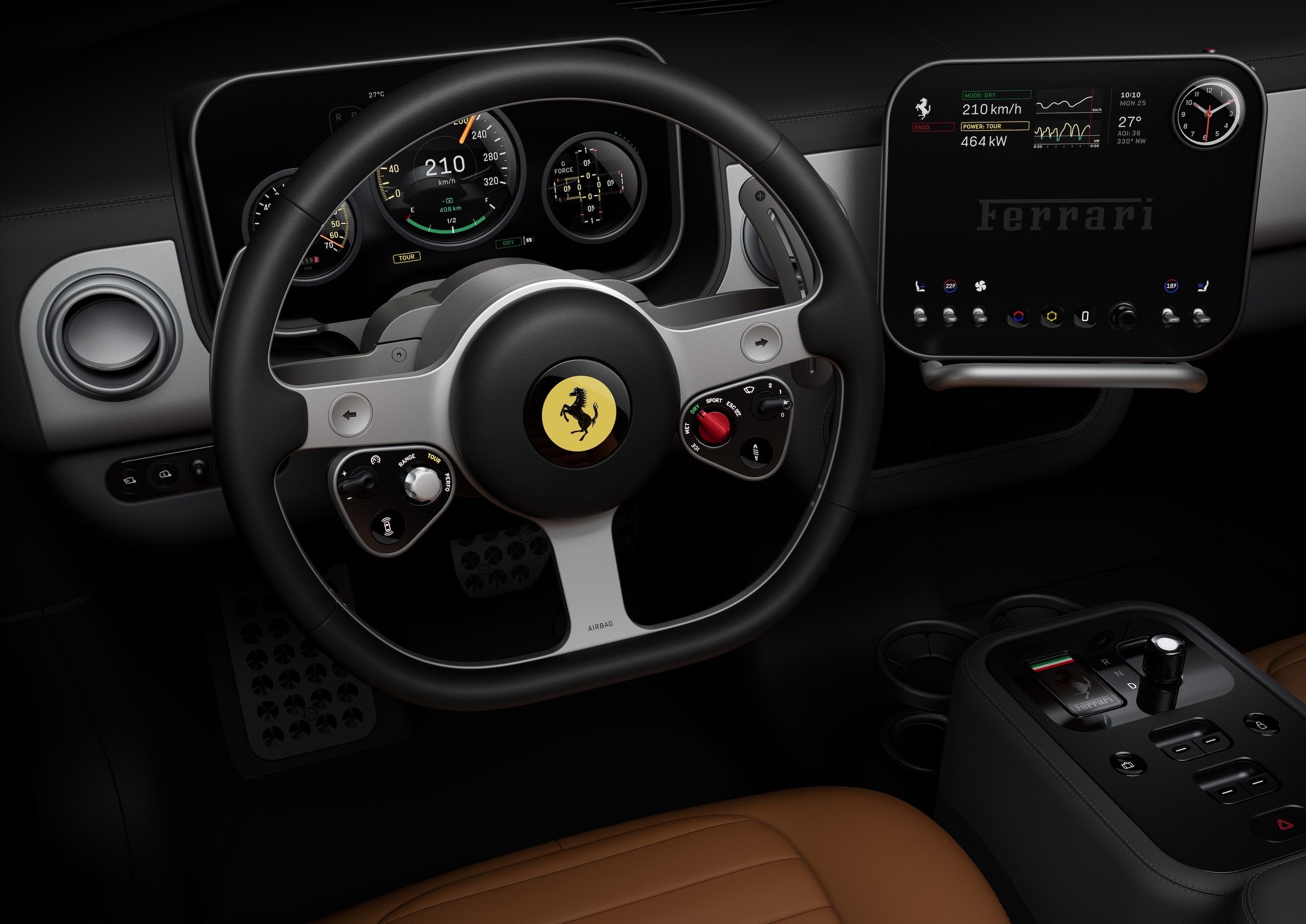
Of course, this cockpit is designed by Jony Ive and his collaborators at LoveFrom. Here’s how Ferrari describes it:
Ferrari has always been ready to innovate. The Ferrari Luce project with Jony Ive, Marc Newson and LoveFrom began with a mutual interest in learning, in understanding the future – and a deep understanding of and appreciation for Ferrari heritage. This work is motivated by excellence, and by creating something extraordinary.
And:
The Ferrari Luce’s interface is designed with clear organisational principles. Controls and displays are grouped functionally, with the most essential commands and feedback directly in front of the driver.
That webpage is worth scrolling through. The precision of the components reminds me of something like the iPhone 4. That’s the same product that came to mind for Tim Stevens:
If you’re familiar with the designs that Apple produced under Ive’s tenure, particularly in the era beginning with the iPhone 4, you’ll feel right at home here. The overall aesthetic is one dominated by squircles and circles, all with absolute, minute perfection and symmetry.
At first blush, it’s a bit clinical, but dig deeper, start poking and prodding, and you’ll see there’s a real sense of charm here. Fun little details and genuinely satisfying tactility begin to reveal themselves. The key, for example, has a yellow panel with an E Ink background. Push the key into the magnetized receiver in the center console, and the yellow on the key dims, moving across to glow through the top of the glass shifter. It’s meant to symbolize a sort of transference of life.
The shifter isn’t the only thing that’s glass. There are 40-odd pieces of Corning Gorilla Glass scattered throughout the cockpit, everything from the shifter surround to the slightly convex lenses in the gauge cluster. What isn’t glass is aluminum, much of it anodized in your choice of three colors: gray, dark gray and rose gold.
Yes, all that sure does sound like I’m writing about a new iPhone and not the latest Ferrari. But where Apple has been pruning every physical control it possibly can from its devices lately, LoveFrom will insert some great tactility in the Luce. The shifter moves through its detents satisfyingly, the air vents open and close with a clear snick and the paddles behind the steering wheel pop with a great feel.
I love the pushback against the Tesla-inspired everything-is-on-a-big-display-and-you’ll-like-it design that has taken over the car industry. I suspect more would-be buyers will struggle with the fact that this is Ferrari’s first all-electric car than they will with the interior design.
Mac Power Users 835: Farewell, Stephen ⇢
My final episode of Mac Power Users was released over the weekend:
David and Stephen celebrate the last seven years of Mac Power Users, reflecting on the topics, episodes, and community that make MPU so special. Then, Stephen Robles joins to accept the baton before his first episode as David’s new cohost.
I couldn’t have asked for a better way to say goodbye to my role on the show.
I am Living Inside an XKCD
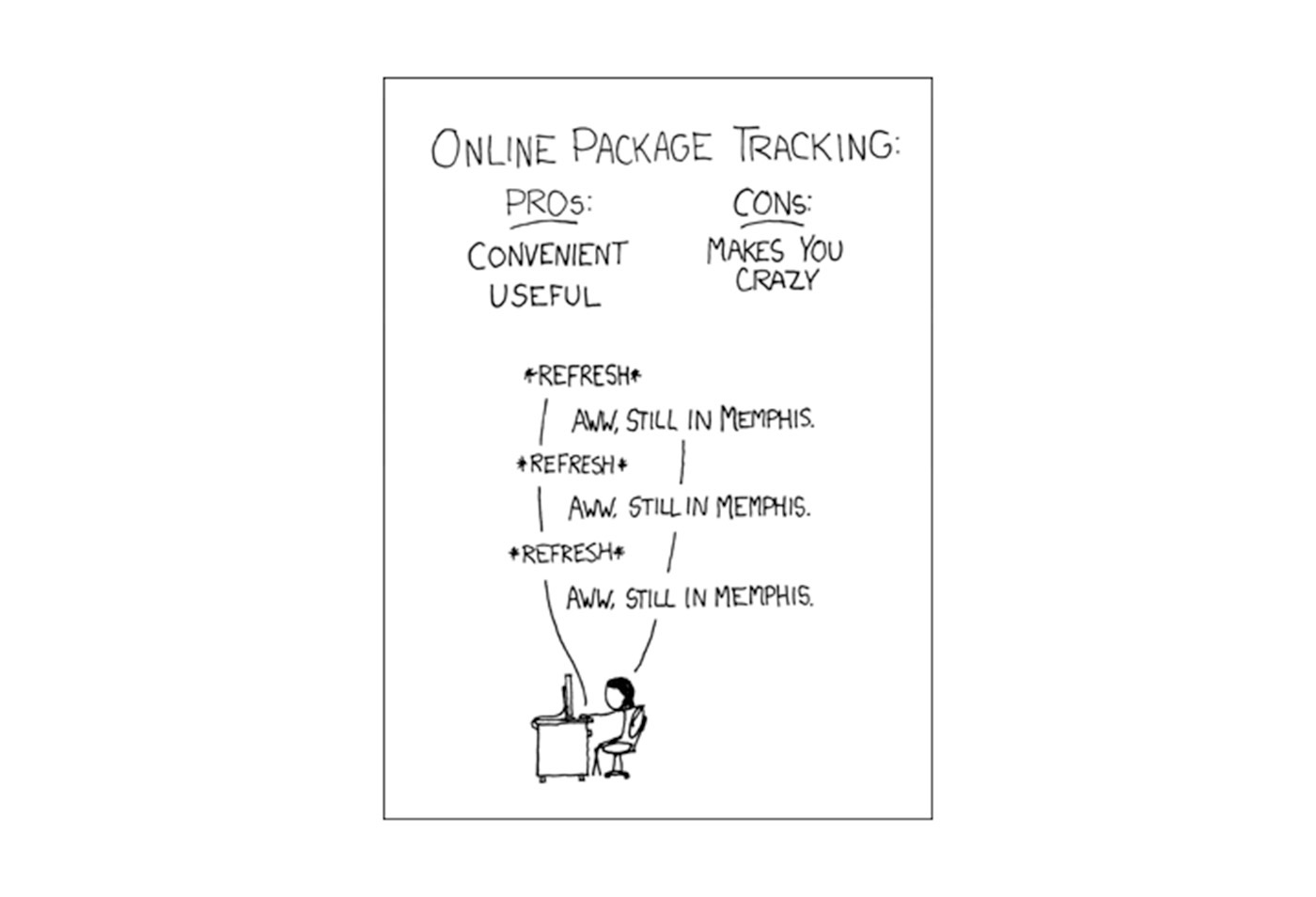
You know how people say there is an XKCD for everything? Number 281 has always been funny to me, given FedEx’s huge presence here:
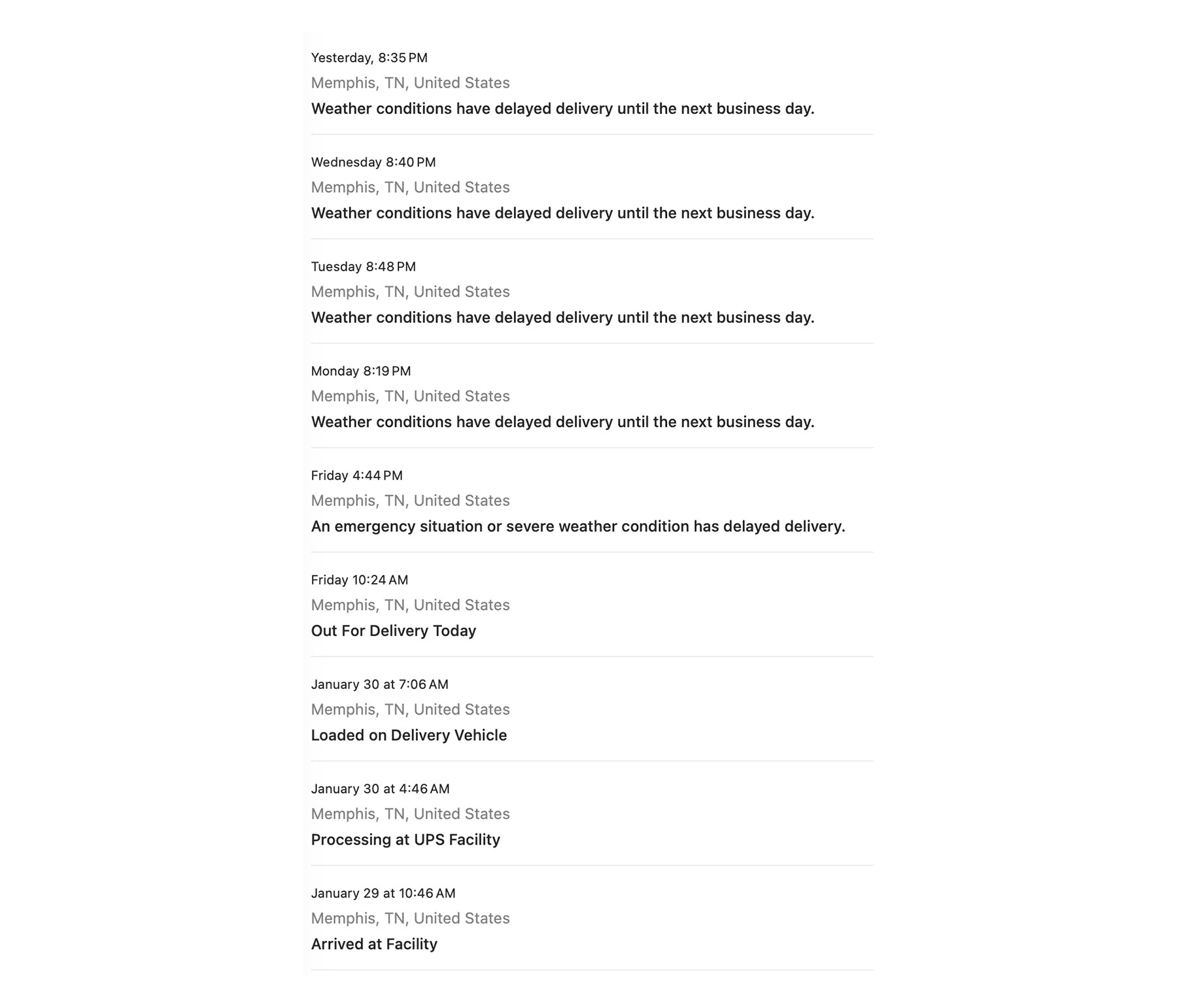
Now the joke is on me, thanks to an ice storm that rolled through two weeks ago:
Connected 589: We Are Men of Each Other… Or Am I Alone in This Silence? 🦞
On this week’s episode of the podcast:
The guys discuss emo AI chatbots and Xcode 26.3, and Stephen tests Myke and Federico to determine which one is a true man of the people.
iPhones in Spaaaaaace ⇢
On Wednesday night, NASA Administrator Jared Isaacman revealed that the Crew-12 and Artemis II astronauts will be allowed to bring iPhones and other modern smartphones into orbit and beyond.
“NASA astronauts will soon fly with the latest smartphones, beginning with Crew-12 and Artemis II,” Isaacman wrote on X. “We are giving our crews the tools to capture special moments for their families and share inspiring images and video with the world.”
NASA astronauts have long captured amazing photos from the space station, but having a smartphone on hand will open up a world of video possibilities. This will likely be especially useful when astronauts are conducting an experiment or looking outside a window and see an interesting, transient phenomenon.
Artemis II Pushed to March to Address Wet Dress Rehearsal Issues
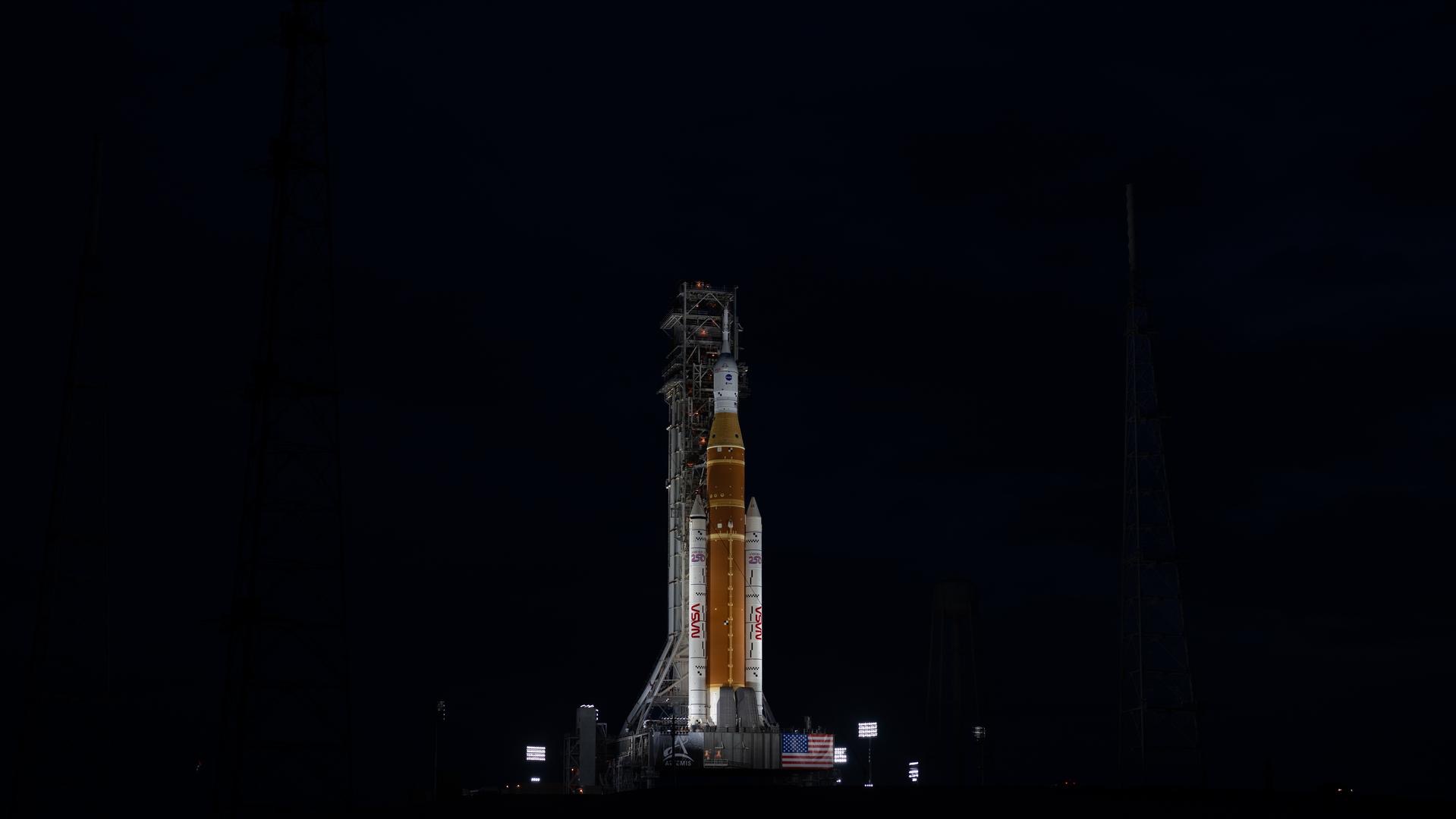
Artemis II is going to be on the ground a little longer. After a two-day “wet dress rehearsal” test in which cryogenic propellant was loaded into the rocket, a liquid hydrogen leak and an issue with a valve crew module hatch led to the launch being scrubbed for now.
“NASA now will target March as the earliest possible launch opportunity for the flight test,” wrote Rachel H. Kraft.
Stephen Clark at Ars Technica reminds us that such issues are exactly why these tests exist:
The practice countdown was designed to identify problems and provide NASA an opportunity to fix them before launch. Most importantly, the test revealed NASA still has not fully resolved recurring hydrogen leaks that delayed the launch of the unpiloted Artemis I test flight by several months in 2022. Artemis I finally launched successfully after engineers revised their hydrogen loading procedures to overcome the leak.