512 Pixels

Connected 32: I Misplaced That Civil War⇢

This week’s show is a fun one:

Stephen, Myke and Federico talk about some Italian history, TeleText’s current state in Sweden and then answer listener questions.

These awesome sponsors made it all possible:

  • Bushel: a cloud-based mobile device management solution for the Mac, iPhone and iPad.
  • PDFPen Scan+, from Smile: The app for mobile scanning and OCR.

More on Apple Retail Watch training⇢

Mark Gurman:

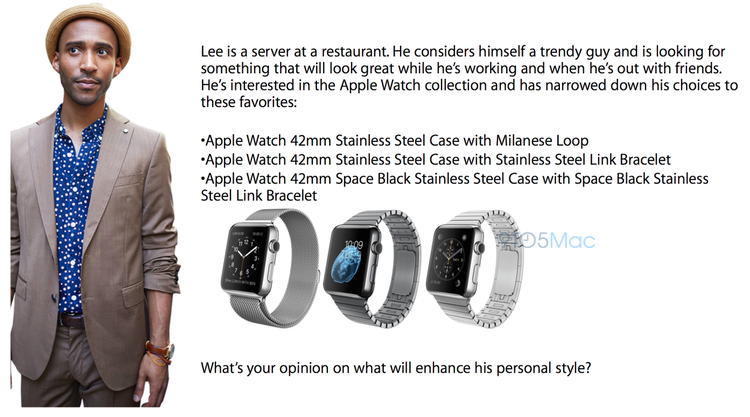
Apple is pushing for retail employees to initiate conversations that build trust, enabling the employee to serve as a valued fashion advisor during the purchase process, similarly to how traditional watches are sold. Apple Watch sales training programs will take place for Apple retail staff over the course of the next two weeks, teaching entirely new sales techniques to encourage iPhone upgrades, assist with gifting, and guide customers in watch and strap choices.

Don’t miss the leaked training image:

oh okay

Our favorite OS X launcher⇢

Joe Caiati, writing for The Sweet Setup:

We wouldn’t consider the OS X app launcher space a crowded one, but there are enough options out there that could make oneself think twice about clicking the download button. After numerous keystrokes and much reflective deliberation, we think that Alfred is the favorite launcher for Mac OS X.

On a backlight Apple Bluetooth keyboard⇢

Joe Rossignol at MacRumors:

A new Apple wireless keyboard featuring backlight keys and a power button has been spotted on the Apple Online Store in Czech Republic and Hungary, with an identical Arabic version appearing on the U.S. storefront. The graphic render shows controls for adjusting the brightness of the backlight added to the F5 and F6 keys, as found on current MacBook models, while the eject key for CDs has been replaced with a power button.

I use the Apple wireless keyboard both at home and work, and have long wanted a backlit version. My guess is that if this is coming, it’s got some tech from the MacBook’s new keyboard in it. If this thing is real, I’ll be picking one up.

RSS Sponsor: HipChat⇢

For far too long, email has been the main medium for communication at work. While email isn’t going away, team communication platforms like HipChat are allowing for more collaborative and productive communication experiences between co-workers.

HipChat combines every communication method you’d ever need—IM, group chat, screen sharing, file sharing, link sharing, video and voice calling—into a single solution. Working remotely, working across time zones, and working with the person right next to you becomes infinitely simpler and more efficient.

Create a chat room for your team or project so you can brainstorm, discuss work, or share files all in one place. Everything in HipChat is archived and searchable by keyword so you go back to a conversation whenever you want. @mentions allow you to bring your co-workers instantly into a conversation so you can get all of the right people involved in the discussion.

Best of all, HipChat is completely free for unlimited users. The Basic plan offers everything you need to get your team started: group chat, IM, file sharing, unlimited users and integrations. And if you’re interested in video chat and screen sharing, HipChat Plus is just $2/user per month.

Get your team on HipChat, sign up for a free account. This post is sponsored via The Syndicate.

The 512 Guide: ‘Which Mac desktop should I buy?’

Apple’s desktop line is far simpler than its notebook one, but there are still many considerations to make before purchasing something like a Mac mini or iMac. The company sells far more laptops than desktops, but for many companies, schools and stay-at-home workers, a desktop can make a lot more sense.

Mac mini

Apple’s smallest desktop machine, the Mac mini, is often heralded by the company as the perfect machine for a first-time Mac owner — it’s designed to be able to drop in to an existing setup of screen, keyboard and mouse and just go.

The base $499 model is the cheapest Mac by $400, and while not the fastest thing on the market, handles OS X Yosemite without any issues.

If you do want more power, the Mac mini is more than capable for even a veteran OS X user, with lots of nice build-to-order options, including a dual-core Core i7 processor, 16GB of RAM and up to a 1TB SSD. A fully loaded Mac mini can cost over $2,000, but sometimes the size (and headless operation) can come in handy. What’s Hot:

  • Small size and quiet operation
  • Flexibility in setup options

What’s Not:

  • No quad-core option for pro users

Who is it for?

Anyone looking for a quiet, capable Mac to replace a PC. The Mac mini also shows up in data centers, media centers and more, due to its small size.

iMac

In my mind, the iMac is the default answer for most anyone looking for a desktop Mac. With a 21.5-inch or 27-inch built-in display, the iMac is the all-in-one for the masses. Thanks to Bluetooth accessories and wireless networking, most users will only need to plug in the power cable to get up and running.

Like the Mac mini, the iMac is very customizable, with near-endless options for RAM and storage options. Generally, the smaller of the two models isn’t as powerful, but like with most Macs, even the base model is more than enough computer for an average user.

What’s Hot:

  • Neat and tidy all-in-one form factor

What’s Not:

  • Screen can’t be reused by another system once the iMac is out of comission
  • The $1,099 model is limited to 8GB of on-board RAM
  • Only the 27-inch model can have its RAM upgraded later

Who is it for?

The iMac is for the masses. It’s comfortable at home, in the classroom and at the office. While the upgradability of these machines in the long-term means being careful what you order, most users will find it a worthwhile trade-off for the iMac’s thin, clean design.

iMac with Retina 5K display

The poorly-named iMac with Retina 5K display is basically a high-end 27-inch iMac with a much better screen. In the future, all iMacs will have such amazing display panels, but for now, the cost of entry starts at $2,499.00.

For that, however, the base Retina iMac comes with a fast CPU and 8GB RAM, which can be upgraded to a mind-blowing 32GB RAM, a quad-core Intel Core i7 processor and a 1TB SSD.

The Retina display isn’t a necessity, but for creative professionals, it gives a level of detail and quality that the other iMacs just can’t deliver.

What’s Hot:

  • That Retina display
  • Everything else that’s great about the iMac

What’s Not:

  • Steep price of entry

Who is it for?

Any creative professional who cares about screen and color quality above all else.

Mac Pro

The Mac Pro sits a the top of the Mac line, putting performance above everything else. It’s a rocket in a world of airplanes; a desert speeder in the land of family sedans.

Starting at $2,999, the Mac Pro can be configured up to $9,599 with these specs:

  • 2.7GHz 12-core with 30MB of L3 cache
  • 64GB (4x16GB) of 1866MHz DDR3 ECC
  • 1TB PCIe-based flash storage
  • Dual AMD FirePro D700 GPUs with 6GB of GDDR5 VRAM each

This isn’t a computer for the living room or home office; it’s a world-class workhorse for audio and video editing.

What’s Hot:

  • Power
  • Power
  • Power

What’s Not:

  • Thunderbolt is still weird in places
  • No external Retina displays … yet

Who is it for?

Video and audio professionals who need as much power as is available from an Apple product.

Inside Apple’s Watch Health Lab⇢

Good Morning America has a behind-the-scenes look at Apple’s health lab:

Apple engineers, managers and developers have been secretly volunteering for the past year in this state-of-the-art lab to participate in rowing, running, yoga and many more fitness activities in order to collect data for the Apple Watch’s inner workings.

I love the hands-on, throw-people-at-the-problem approach used by Apple in this case:

Jeep Chief⇢

I know it’s just a concept, but this Jeep is doing something warm and tingly to my insides.

Isometric moving to Relay FM

My co-founder, Myke Hurley:

When I listen to this show, I am given a completely different point of view to my own, about old and new games, and it really helps me think differently and challenge myself.

We are already lucky enough to have Brianna Wu as part of our great group of hosts on Relay FM, and we are so excited to now welcome Georgia Dow, Maddy Myers and Steve Lubitz as well.

Since adding Rocket to Relay FM, I have developed a great working relationship with Brianna, so having Isometric join us felt like a no-brainer.

Here’s Brianna’s blog post:

Moving to Relay.FM was a unanimous decision for all four members of Isometric. And I don’t want to speak for Maddy, Steve and Georgia - but here is the main reason I voted to move the show.

The biggest factor was Myke Hurley, who I’ve developed an excellent working relationship with for my other podcast, Rocket. I’ve said many times that choosing your business partners well is one of the most important decisions you can make. He’s a man with tremendous integrity, and he’s easy to solve problems with. When things haven’t worked on Rocket, we have open and honest discussions, and make changes.

Simply put, Relay.FM feels like a family to me.

We are thrilled to have Isometric join Relay FM. The show has a unique voice in the gaming space, and the co-hosts are all excellent podcasters and exceptional human beings. This is another great milestone for our network, and we’re excited about further expanding our offerings.

Follow-up on the Watch and the Store⇢

We know a little bit more what Apple’s going to do with the Stores and Apple Watch. Here’s Mark Gurman:

Each Apple Store will be provided with a special-hands on table filled with Apple Watch demo units, as Apple announced at its keynote earlier this month. Most stores will be provided one table with at least 10 surrounding Apple Watch try-on stations, while some Apple Stores will be given more tables to meet demand. Apple Stores will begin setting up the Apple Watch tables on April 9th and 10th during special overnight sessions for employees. Employees will also begin a few hours of more extensive Apple Watch training in the coming days, a follow-up to secretive training some employees received before the Spring Forward event at locations in Cupertino, Los Angeles, Austin, and Atlanta.

Connected 31: They’re My Clapping Phones⇢

On tonight’s episode of the podcast, we talk about Apple Watch apps, Force Touch Trackpads, the Apple Store and Apple’s past (and possible future) moves in television.

Oh, and Teletext.

My thanks to these companies and products for making it possible:

  • lynda.com: An easy and affordable way to help individuals and organizations learn. Free 10-day trial.
  • Igloo: An intranet you’ll actually like, free for up to 10 people.
  • PDFPen 7 for Mac, from Smile: Take control of PDF’s on your Mac.