Google Maps 3.0 for iOS released

Federico Viticci:

For users in the United States and “parts of Canada and Japan”, Google has added lane guidance, a turn-by-turn navigation feature that allows the app to show the lane to stay in or move to; lane guidance is often found on dedicated GPS devices, and it should enable Google Maps to provide drivers with more precise directions.

The update also brings Uber intergration, better location filtering and more.

While Apple’s Maps app rarely gives me issues, the day I can set Google Maps as the default app on my iPhone, I will.

Sponsor: Drafts for iOS

Drafts is a starting point for all text on iPhone and iPad. Drafts launches ready to type and makes it easy to capture an idea, note, todo, status update or any other bits of text. After you have captured that text, the power of Drafts’ actions kicks in. Drafts actions allow you to do almost anything with that text, with a wide variety of customizable actions to integrate with Email, iMessage, Twitter, Facebook, Dropbox, Evernote, Google Drive and any other apps on your device that support integration, like Fantastical and OmniFocus.

  • Don’t lose that great idea because it was too much of a hassle to jot it down.
  • Don’t fumble through your inbox to send an email.
  • Don’t get stuck in your Twitter stream to post a tweet.
  • Try Drafts on your dock for a week, you won’t regret it!

Drafts for iPhone and Drafts for iPad are available now at the App Store!

Woz, on BASIC

Steve Wozniak, on Gizmodo:

In 1967 or 1968, as a senior in high school, our electronics teacher (the best teacher of my life in many teaching regards) arranged for me to go to a company in Sunnyvale (Sylvania) to program a computer because I already knew all the electronics in class at school. Mr. McCollum did this for students with electronics abilities every year, finding local companies with engineers and projects that would let high school students come and and get some experience. I learned and programmed in FORTRAN on this IBM computer.

I first experienced BASIC in high school that same year. We didn’t have a computer in the school but GE, I think, brought in a terminal with modem to promote their time-sharing business. A very few of we bright math students were given some pages of instruction and we wrote some very simple programs in BASIC.

Woz’s work in BASIC changed the world. Without it, Apple would have never made it long enough to build the Mac OS.

via The Loop

Don’t Use It

Well, I have a new favorite Apple support document:

How come I shouldn’t use System 6.0.6 on ANY Macintosh? And why should I use System 6.0.7 only on newer Macintosh computers?

System 6.0.6 has compatibility problems with the new Macintosh computers. System 6.0.6 was pulled from production and replaced by System 6.0.7. There are a few versions of System 6.0.6 floating around that were sent out before the software was pulled from production.

You should use System 6.0.5 (or System 7) on most Macintosh computers made before the Macintosh Classic, Macintosh LC, and Macintosh IIsi. System 6.0.7 has features in it that only benefit newer Macintosh computers. This does not mean that you can’t use System 6.0.7 on older products, it just means that it is not the recommended system.

On the Blue and White Power Mac G3

The first notebook I used full-time was a 1GHz Titanium PowerBook G4, and while I used a bunch of iMac G3s and beige Power Mac G3 in high school, my part-time job at the time came with what I consider to be “my” first Mac — a Blue & White Power Mac G3.
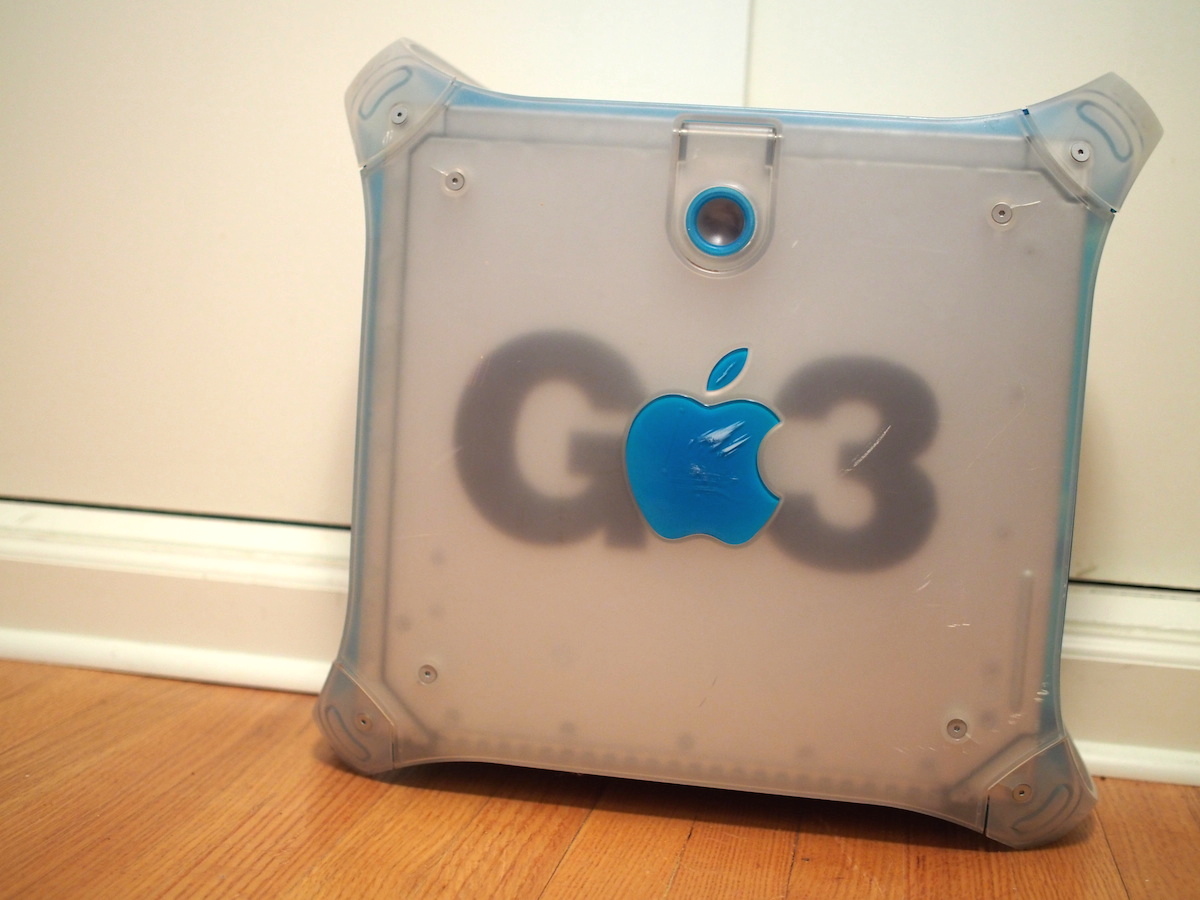
(That’s my exact machine. I just got it back through an extensive set of trades on the Memphis gray market for old Macs.)

The Blue and White is an interesting machine, beyond my attachment to it.

History

Introduced in January 1999 at Macworld, the “Power Mac G3 (Blue and White)” took the design of the iMac and brought it to the professional desktop world.

Of course, 1999 was a weird time for the company. OS 8 was out, and the cat was out of the bag about OS X, but Aqua was still a year away.

Things, however, were looking up. Apple has sold 1.6 million of the out-going beige machine. The new machines, however were designed to be faster, more expandable and better designed.

The processors in the Blue and White were fast (and copper!), the machine had lots of expansion bays, but the inclusion of an ATI Rage 128 video cards and FireWire set the machine apart.

Lastly, the Blue and White was the first Mac to ship with FireWire, leaving behind SCSI forever.

Hardware & Software

More so than the iMac G3, the Blue and White is a transition model. It was the debut machine for FireWire, and brought USB to Apple’s professional lineup. To the chagrin of pro users, however, the company dropped the serial ports, floppy drive and SCSI support found on the out-going machine. This computer also holds the distinction to be the only Mac to ship with both ADB and FireWire.

Most importantly, it was the first Power Mac to ship with the New World ROM.

Inside, the Blue and Whites were packed full of fairly standard parts. Drives connected over IDE, the RAM came in generic modules, and the processor sat on a ZIF socket. With 4 PCI slots, the Blue and White could easily be customized for video and audio work, connecting serial-powered devices and more. The “Gossamer” logic board was based on the beige G3 before it.

Revision A machines, however, had some issues. Here’s a section from the machine’s Wikipedia page:

Early blue and white G3s (“Revision 1” units) had IDE controller problems related to the ATA/33 hard drive controller that made it impossible to connect two hard drives and prevented the use of newer drives. Using newer ATA drives in those units resulted in data transmission errors if the drives were connected to the on-board ATA/33 controller, the severity of the problem varying according to the particular make and model of the drive. Workarounds include replacing motherboards and employing the use of SCSI, Ultra ATA or SATA PCI controller cards. Stable operation can be achieved if the drive can be limited to Multi-Word DMA Mode 2 (disabling UDMA), although this limits throughput to 16 MB/sec. Some hard drives support disabling UDMA in firmware through manufacturer-supplied utilities (generally DOS-based). Alternatively, the transfer mode can be limited to Multi-Word DMA Mode 2 through the use of third-party driver software such as FWB Hard Disk Toolkit.

In late April 1999, the line was speed-bumped by 50 MHz, bringing the high-end model to 450 MHz. These “Revision B” machines shipped with a revised logic board and didn’t experience the nasty IDE controller issues.

(Thankfully, mine’s a 400 MHz Rev. B.)

The 350, 400 and 450 MHz models from the Rev. B series shipped with the same logic board — dubbed “Yikes” that would end up in the first Power Mac G4 machines.

The Blue and White was a huge upgrade in terms of looks. Just look at the previous G3 tower:

The new case was codenamed El Capitan. Its feet and handles were easy to grip, making moving the G3 easier than ever. The front, back and top were bold, showing off the Bondi Blue plastic in a much brighter way than the iMac, and the translucent side panels were enough to make any beige box look dingy.

All of the internals were easy to get to, thanks to the handle and drop-down side:

Here’s Steve Jobs showing off the case for the first time. Don’t miss the “Design is how it works” line.

The opening door was a revolution, and Apple liked showing it off. Compared to the closed and heavily customized Macs of today, the Blue and White seems almost foreign.

The Blue and White isn’t the first Mac that was easy to open, but compared something like the Power Macintosh G3 (Desktop) that preceded it, it’s elegant:


Beyond the functionality, the Blue and White was downright beautiful.

Sometimes, a machine comes along that sets the tone for years to come. Until the 2013 Mac Pro, the G3’s bones remained in place. Just check out the 2002-2004 “Mirror Drive Door” Power Mac G4:

While the Power Mac G5 and Mac Pro ditched the fold-down side, the machines’ shared case design retained the easy-to-reach internals and handles:
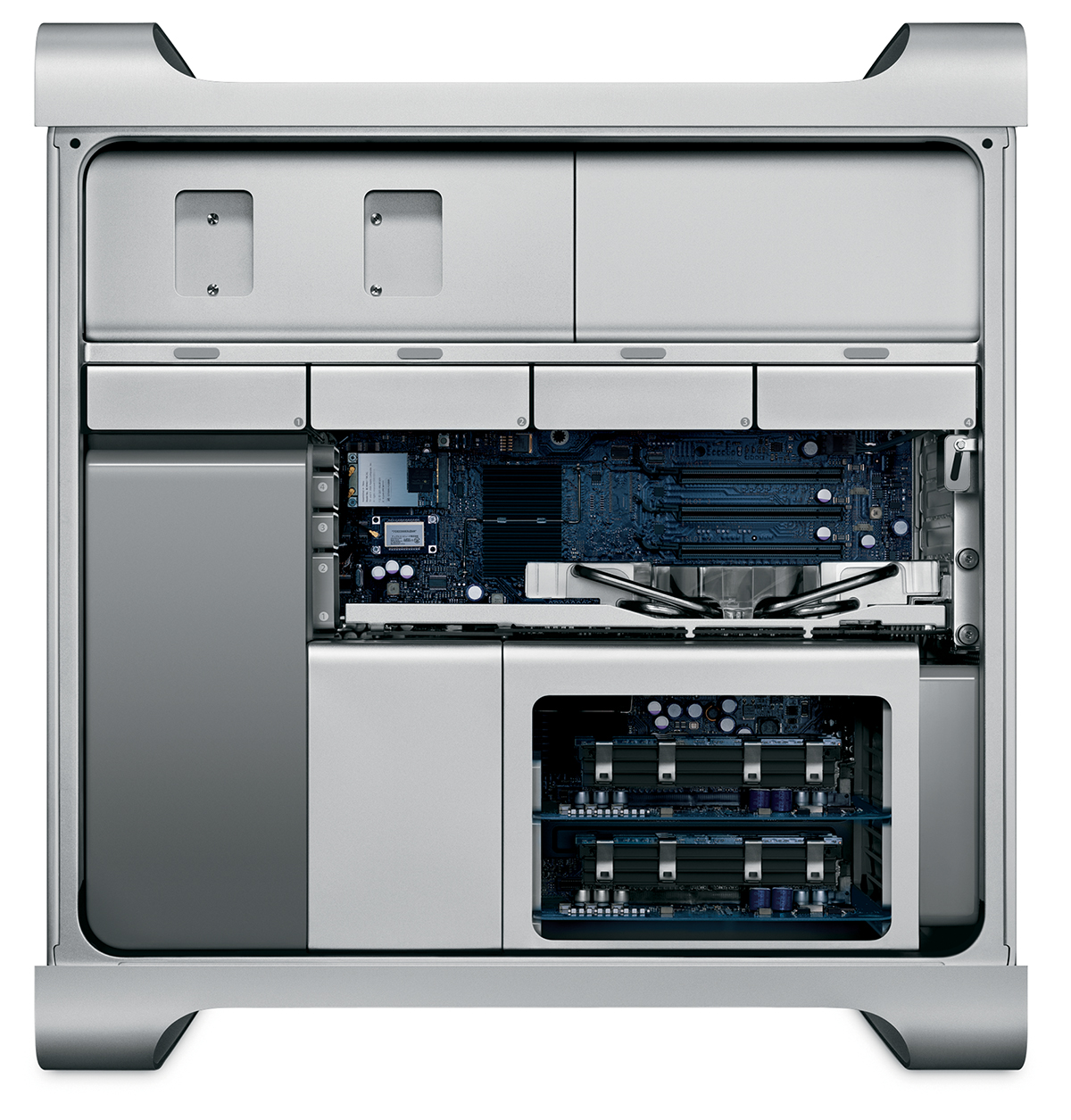
Software wise, the Blue and White has one of the widest ranges of any machine.

Revision A machines came with Mac OS 8.5.1 and Rev. B shipped with 8.6, but all Blue and Whites are capable of running OS X Tiger, thanks to the 1 GB RAM ceiling and FireWire ports.

Beyond its impressive client reach, the Blue and White is important in Apple’s server history, as Steve Jobs used one to demo Mac OS X Server 1.0 for the first time.

The Blue and White gave Apple the power it needed to run the smash up of NeXTSTEP and Mac OS 8. In what may be one my favorite demos ever, Steve Jobs booted a rack of 49 hard drive-less iMacs from a single Power Mac G3.

As future-thinking as it was, except for the most basic of tasks, the G3-powered Blue and White is past its useful lives. Even with overclocking, this machine’s just run out of steam.

Conclusion

In many ways, the Blue and White set the tone for modern Mac towers. Its easy-access door would remain a staple for 14 years, and its inclusion of things like FireWire and Ultra-ATA brought the Power Macintosh into the 21st-century. It holds a special place in the Apple history books, and an important place in my collection.

On Memphis, her people and her basketball

Brian Phillips at Grantland:

So that’s the first lesson I take from Memphis: Memphis will always, and instantly, be weirder than whatever rubric you’re using to help you understand it.

As a life-long, native Memphian I can say that Phillips got the city exactly right after just four days here.

Donald Sterling receives lifetime ban from NBA

ESPN:

Los Angeles Clippers owner Donald Sterling has been banned for life by the NBA in response to racist comments the league says he made in a recorded conversation.

NBA commissioner Adam Silver announced the discipline Tuesday, saying that Sterling has been fined $2.5 million and that the league will attempt to force a sale of the Clippers.

Silver also stated that Sterling cannot attend any NBA games or practices, be present at any Clippers office or facility, or participate in business or player personnel decisions.

A good day to think about this sort of thing. Props to Adam Silver for not putting up with Sterling’s bullshit.

Clear update adds reminders

Clear for iOS and OS X are well-known for being easy and fun to use. Today, both apps have been updated to support reminders. Here’s Realmac’s Dan Counsell on the company blog:

We’ve been busy working away on the next big update to Clear, and today we’re thrilled to announce that Clear with Reminders is now available on the App Store. Set a reminder, and Clear will remind you across all your devices as Clear for Mac also gets this new feature today as well!

Reminders hasn’t cluttered Clear’s interface. Swiping and pinching are still used to navigate lists and add items, but when an item is added, there’s a new tappable link to create a reminder, which brings up a custom date picker:

iOS 7’s default UIDatePicker has issues, and what Realmac is using in Clear is a big improvement. I wouldn’t mind seeing this implementation become standard across iOS apps.

Once a reminder is created, it does exactly what you think it will: send a push notification to your devices at the specified time:

Clear for iOS is $4.99. The Mac app is $9.99. Both are well worth it if you’re looking for a great way to keep up with to-do lists.

Sponsor: FeedPress — RSS Analytics Done Right

Why FeedPress?

With powerful subscriber tracking, white labelled domain name support, integrated newsletter sign-up, and automated publishing to popular social networks such as Twitter, Facebook, and App.net, FeedPress is the publishing tool for bloggers and podcasters looking for a great way to deliver their RSS content to readers and listeners everywhere.

No Data Lock-In

FeedPress includes built-in diagnostic tools, responsive design, multi-feed redirect and push support, integration with popular analytics and publishing tools such as WordPress, Mint, Piwik, and more. Integration with services such as Dropbox and Box.com, allow you to easily export your subscribers, or you can download a compatible JSON file containing all of your data.

With custom host name redirect, you are not beholden to a single platform. If you choose to leave at any time, you may do so. A simple change in redirect is all you need to get up and running again. There’s no need to waste your reader or listener’s time to update their feed with a new URL. We know all too well that this can lead to lost subscribers and pent-up frustration on both ends. Furthermore, you can export any newsletter subscribers that you may have, as well as download a compatible JSON file containing subscriber data collected from your feed.

Support And Migration

Support is available 7 days via email, and with lots of great tutorials, including how you can migrate from FeedBurner, the transition should be easy.

History And Trust

FeedPress now serves more than 30 million requests per month and is trusted by many popular blogs and podcasting networks such as: ESN, Mule Radio, Beautiful Pixels, and The Brooks Review.

FeedPress powers the RSS feed here on 512 Pixels, as well.

Create An Account Today

Sign up today for a free account and use promo code 512Pixels during checkout to get 20% off a premium account. Premium accounts feature even more awesome, such as: podcast analytics, full JSON and file API access, multiple social network publishing with optional URL shortening, feed refresh times of 20 minutes — even without push, display and click-through tracking, and priority support.

FeedPress is everything you wanted to know about your reader and listenership, no matter where they’re situated across the globe.

Apple launches iPhone 5 Sleep/Wake Button Replacement Program

Apple:

Apple has determined that the sleep/wake button mechanism on a small percentage of iPhone 5 models may stop working or work intermittently. iPhone 5 models manufactured through March 2013 may be affected by this issue.

Apple will replace the sleep/wake button mechanism, free of charge, on iPhone 5 models that exhibit this issue and have a qualifying serial number.

Good on Apple — it seems that a lot of people I know have run in to this issue. Taking care of people out of the warranty period is the right thing to do.