
On March 15, the best show since Arrested Development comes back:
512 Pixels
Enriching Lives

As I write this, I’m about ten miles from home. I’m at Shelby Farms, a huge park in the middle of the Memphis Area. I rode here on a paved trail that cuts through the eastern half of the city.
I took the photo above with my iPhone 4S, and am writing this in the iOS WordPress app.
On my ride over, I listened to a podcast, while I had a GPS app tracking my time, mileage and speed.
I got a few text messages, and responded via Siri with my wired headphones, never having to stop and get my phone out of my backpack.
At the ranger station, a girl stopped me and asked for directions somewhere. My iPhone came in handy for her, too.
My point is this: the iPhone might just be a piece of technology, and Apple might just be a company, but days like today would not be as enjoyable without them.
And that’s the point, right? Apple Retail has this line about “Enriching Lives.” I used to think it was cheesy, but right now, it makes a lot of sense to me.
Living With a 17 Year-Old Keyboard
At the office, I use an Apple Extended II keyboard. I use it hooked up via a Griffin iMate, with a LED Cinema Display and 13-inch MacBook Pro.
Built in 1995, my model is still in great shape, with very little discoloring and no damage. The sound it makes is deeper than newly-built mechanical switch-driven keyboards.
The main problem with using an older keyboard on OS X is the lack of media-specific function keys.
Thankfully, Keyboard Maestro is to the rescue. I have all the major keys mapped:
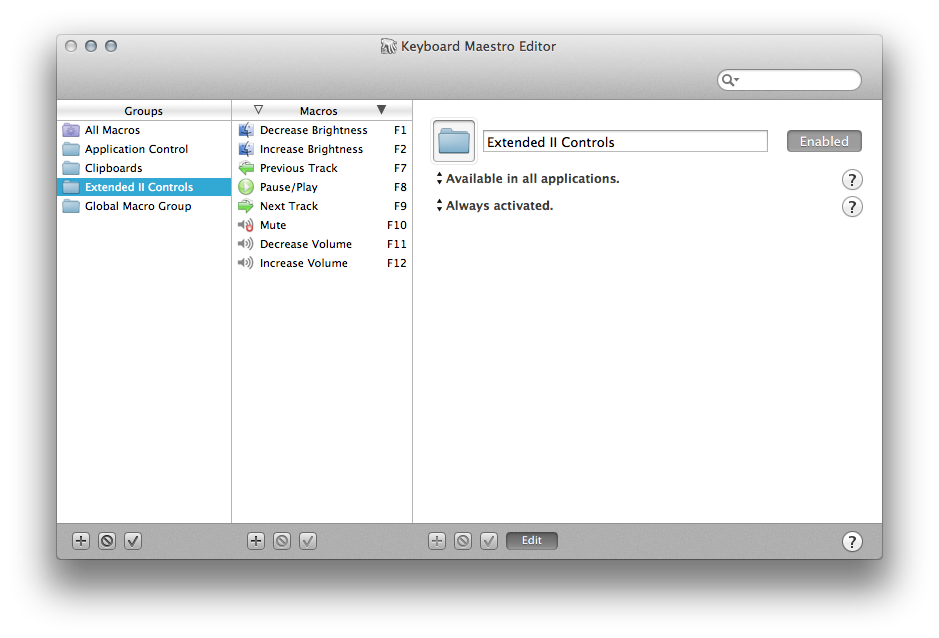
Keyboard Maestro can’t light up the backlit keyboard, but that isn’t an issue. Also, it has a tendency to adjust the brightness on the laptop, not the main display, but again, this isn’t a huge deal, as I don’t adjust the brightness on the Cinema Display very often.
You kids can have your fancy Das Keyboards and Tactile Pros, but my beige aircraft carrier will do me just fine for years to come.
Status: Shipped
Two things shipped today:
- My new 16GB black iPad
- 512 Pixels t-shirts
US readers should get their shirts this week, with international readers a few days later. Except for Federico Viticci, whose shirt is going to take about 10 years to get to Italy.
Farewell, iWork.com
On July 31, the beta services will join iTools, .Mac and MobileMe in the great eWorld in the sky.
More on Linked Lists
I’ve thought a lot about this over the last few days.
Currently, everything on 512 Pixels would be considered a “post” on a DF-style blog. That is, that the headline goes to the permalink for the post itself, not to the linked content.
The most common criticism of this set up is that it seems like I’m double-dipping for page views. (Granted, I’ve gotten a whole two emails about this in 4 years.)
I don’t see this as a viable argument. If you want to go straight to another website that I’ve linked to, doing so is as simple as clicking the link in your RSS reader of choice. No one ever has to view my actual site to get to content I’m linking to. Since I offer all of my content as full-length posts in RSS, no one is getting left out.
As far as Twitter goes, Daring Fireball, The Brooks Review and more auto-tweet links to their site, meaning readers see their site first, then have to click through to the linked site. This is no different than how the 512 Pixels Twitter account works.
To make sure it is easy as possible to pass traffic to the people I’m linking to, my “linked list items” usually follow this pattern:
- Link to source
- Block quote
- My commentary
There’s nothing in here that’s any different than how other people do it, except that the headline for the piece links to itself.
At this point, I am not changing the way the site works. I understand that a majority of people who responded to my survey would like me too, but I don’t think I’m doing anything convoluted by writing the way I do.
Don’t forget, the majority of sites on the Internet work like 512 Pixels. DF-style blogs are only found in our corner of the Internet, but the style just doesn’t feel right for me to implement.
Rare Johnny Cash Photos Surface
‘Bullshit’
Ben Brooks calls Apple out about the AT&T iPhone 4S showing “4G” in the menu bar when running iOS 5.1
I agree with Ben. This leaves a bad taste in my mouth.
On Apple, iPhoto and OpenStreetMap
After my post yesterday on the map tiles in iPhoto for iOS, I heard from several people who have worked with map tiles.
The general consensus is that Apple is using OpenStreetMap data, but has rendered their own tiles.
There is strong evidence that this is what Apple is doing, at least outside of the US.
Furthermore, the OSM Foundation has confirmed Apple is using the group’s information outside the US, but that the data is old, dating from April 2010.
This change in map tiles is yet another chapter in the growing separation between Google and Apple. While no one knows if the iOS Maps app will be replaced in the future, this change, coupled with Apple’s acquisition of several map companies over the past few years sure builds a case for it in my mind.
Discovery
Today, with iOS 5.1, Apple’s added a second gesture to the lock screen.
Previously, getting to the camera required a tap on the camera button, which only appeared after double-clicking the home button.
While that’s not that convoluted, in hindsight it clearly lacked the ease of discovery Apple usually ships features with.
The new gesture, with its ever-present icon is much easier to discover.
Apple’s even taken care of those of us trained for the old way of doing it — tapping the new button makes the screen jump, showing off the movement needed to now launch the camera.
Clever.
iPhoto for iOS Not Using Google Maps [Updated]
Whatever map tiles are in iPhoto for iOS, they don’t look like Google Maps:
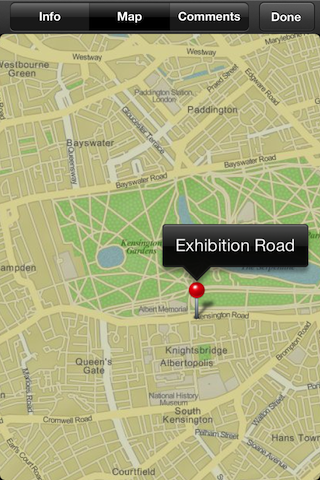
Apple, back in 2009, bought PlaceBase, a mapping company. Rumors have been circulating for years that Apple was developing its own mapping solution. Last year, the company bought C3 Technologies, a group working on 3D map tiles.
The desktop version of iPhoto uses standard Google Maps:
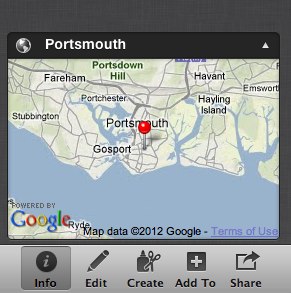
These two images show the same location. The top one — Google Maps, in desktop iPhoto — is more accurate, showing the land correctly, and labeling the golf course a “Recreation Ground,” as it is known today. The second image, from iPhoto on iOS, isn’t as accurate, and has the old name:
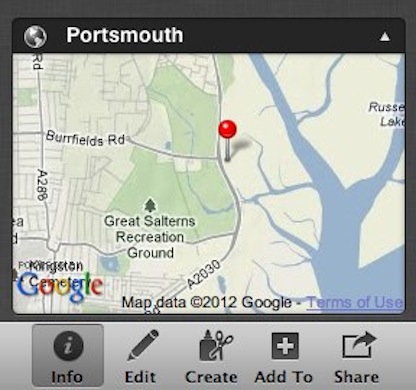
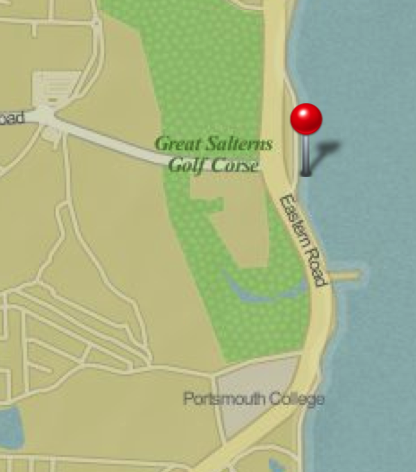
Here’s the same location, from Google Maps online:

Some have suggested that these tiles are from OpenStreetMap, but they don’t look like they are from that source, either. Here’s the above location from OpenStreetMap’s database:
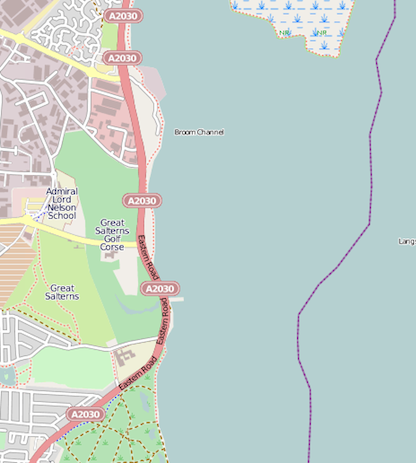 Update 1: The Next Web agrees. Update 2: It seems that this has been confirmed by Holger Eilhard, via The Verge. Update 3: John Gruber:
OK, what I’m hearing now is that Places still uses Google Maps, but the maps in Journals and slideshows are not using Google Maps, and are Apple’s own stuff.
Update 4: More on OpenStreetMap Images via Myke Hurley
Thoughts on Today’s Apple News
iPad: The Hardware
Retina display iPad. Is there anything else to say? I cannot wait to take a look at this thing.
Without changing the case or button layout, Apple has re-defined its tablet offering. It’s all screen, and with four times the pixels, it’s got to be breath-taking.
4G/LTE caught me a little off guard. Historically, LTE chips have been very power hungry. With the new iPad being a tad heavier and thicker than its predecessor, my guess is that while Apple has gotten the power consumption down on these chips, it still had to pack some extra battery in there to make up the difference. I suppose we’ll know when iFixIt tears one down next week.
(For what it’s worth, I will be going Wi-Fi only again. I already pay for Hotspot on my iPhone’s data plan to connect my laptop and iPad 2, and enjoy the flexibility that gives me.)
I’m glad the camera got updated, but with an iPhone 4S in my pocket, and the fact that taking a photo with a tablet feels ridiculous, I’m not sure I’ll use the new optics that much.
iPad: The Software
It all of these hardware events, Apple reminds the world that it views itself as a software company. Apple makes hardware to run its software on. iPhoto is a clear example of this. Clearly, Apple was waiting for this iPad for this software. The demo made it look more powerful than the desktop app.
I hope that iCloud can become the magic sauce here, making it easy to keep albums and more in sync between the OS X and iOS versions. If importing has to take place on both ends (or Photo Stream as we know it today is used), the whole thing will just feel clunky.
After today, iWork and iLife are both present on the Mac and the iPad. (iWeb and iDVD being dead, for all intents and purposes.) It is clear that Apple wants people to be creative on either platform, and with software like this, they can be.
iPad: The Name
I’m glad Apple dropped the number from the name. “iPad” says it all. It isn’t the first time Apple’s done this, either. The iPod was just “iPod” for years, and it did pretty well.
I hope we see Apple do this with the iPhone, too.
The AppleTV
I’m psyched that the AppleTV is still an independent box, and is still just $99. Going to 1080p at the same price point is even sweeter. We’re installing over two dozen of them at work in the next few months, and getting the spec bump at the same price is awesome.
The new UI looks really good in photos. (I’m hoping to update an AppleTV later today.) I really think Apple is inching forward to a place where this thing has more apps/channels on it.
This is the third big UI update to the AppleTV, and I think it shows that Apple is still struggling to get it right. That said, the AppleTV is years ahead of anything put out by other companies. Apple isn’t content to let mediocre work sit stagnant, even if their product is doing well in the market.
That’s how you end up not doing well in the market, after all.
The Rumors
Everything announced today — and more, as usual — has been circulating the web for some time. It’s really lame to not be surprised anymore. I guess the new way to have fun with this is to guess which rumors are accurate.
Wrap-Up
Overall, I think today — as big as it was — was an evolutionary step forward. I am not saying that I am disappointed in today’s announcements, or think Apple missed the boat on any of the features it added. I think the company knocked it out of the park today.
Expecting revolution every year is insane. Besides, that new iPad looks like one hell of an upgrade. I can’t wait to get mine.
Oh, and iTunes 10.6 is out, as is iOS 5.1. And all of those Apple iOS apps listed above? They got updated, too.