512 Pixels

On Linked Lists

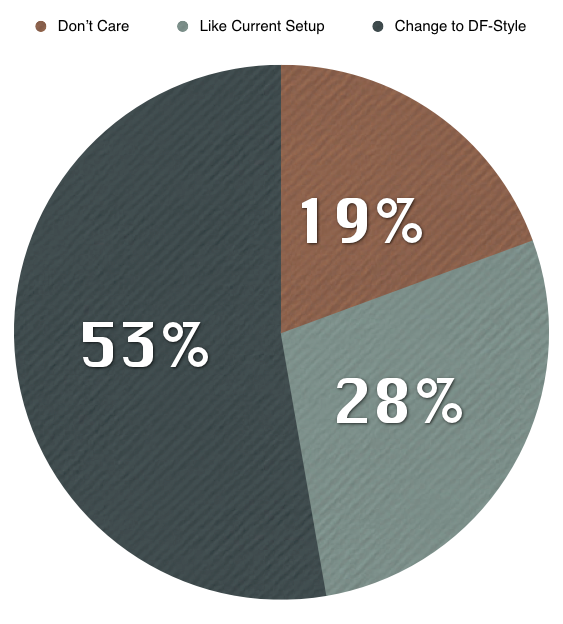
This morning, I posted a survey, asking readers what they thought about linked lists, and the lack of a true, DF-Style list here on 512 Pixels. Here are the results:

I’m in the group that likes things they way they are. I have switched the RSS sponsor links to link-style posts, and will be thinking this subject over in the coming weeks. As always, thanks for reading, no matter how I have things set up.

Adobe Launches Lightroom 4 [Updated]

Michael Muchmore at PCMag:

The new version adds basic video editing and playing, integrated maps that support GPS data, new content-aware auto-fix, more localized adjustment brushes, and integrate book creation tools. Upgraders from any previous version will only pay $79.

The full retail price is now $149.

I switched to Lightroom 3 about 4 months ago, after using Aperture for some time. I mainly did so because Lightroom allows users to keep their photos in simple folders in Finder, while Aperture (and iPhoto) put everything in to a database, making data portability (and possible corruption) a real issue.

Even on my Core i7 MacBook Pro with 8 GB RAM, Aperture 3 was a dog. With a 100 GB database, it was almost unusable at points. Lightroom, however, never feels slow, with the same number of photos.

The first complaint people cite when talking about Lightroom is the lack of an easy way to export photos for iOS. However, since iTunes can sync photos from a folder (or set of folders, to be more accurate), syncing photos isn’t as hard as some people might claim.

In ~/Pictures, I keep a “For iOS” folder, with sub-folders for all by albums. You can unpack this .zip file to see screenshots of my export settings.

Lastly, Adobe offers fantastic RAW support. They’ve has led the way on this, in my opinion, for some time. While I don’t always shoot in RAW (especially as my iPhone 4S is my main camera these days), I know that when I do, I have full control of my files with Lightroom.

Update: Holy cow. It totally seems that Aperture doesn’t require users to store items in the database anymore. Thanks everyone who emailed me — I appreciate the information, but I still don’t think I’ll be switching back.

Sponsor: Denso →

Thanks to Denso for sponsoring the 512 Pixels RSS feed this week.


Denso is a video app for people who don’t know what to watch.

Create personalized video channels by connecting your Twitter, Tumblr, Facebook and Google Reader accounts.

Connect your Instapaper, Readability and Evernote accounts to Denso so you can bookmark videos from around the web to Watch Later.

Browse from our carefully curated list of channels which have an eclectic mix of interesting videos.

See what all the fuss is about. It’s Free on the App Store and the Android Market.

Omni Sync Server out of Beta⇢

The Omni Group:

Howdy, friend-os! Today, I get to do something we’ve been looking forward to for a while now: announce that the Omni Sync Server is coming out of beta.

We’ve had the server up for almost two years now - it launched way back in April of 2010. In that time, the server has been scaled up from a Mac mini here in our offices to a collection of machines in our colocation facility, all working together to help you move your Omni apps’ data back and forth between your OS X and iOS devices, as well as to store backup copies of that data just in case things go totally diggstown and you need them.

I’ve been using the service for OmniFocus as long as I can remember, and very rarely have had issues. The fact that its free is just a perk of using Omni software.

via Ben Brooks

More on “No Compromise”

John Gruber, on Windows 8:

There is no such thing as “no compromise”.

Agreed:

In short, Microsoft doesn’t seem willing to compromise on its vision for Windows 8. Metro is hard to use with a mouse, and Windows is hard to use on a tablet. Microsoft is compromising where it matters the most — the user experience.

Apple is willing to compromise with what features it offers on what platform, for the good of its users.

To Microsoft, the product comes first. Apple puts the customer first.

Using Windows 8 feels like using two different machines, and on a desktop or laptop, one of them doesn’t work very well. That, added to the fact that the “Desktop” environment looks and acts like Windows 7, makes the whole thing even more disappointing. I think most users will just click through to Desktop, ignoring Metro, viewing it as just something in the way. That isn’t good for Microsoft, or its users.

As more of these “Windows 8 is confusing and jarring” comments come in, the more ridiculous the “no compromises” thing will seem.

iPad Usage

Jim Dalrymple:

I use my iPad like an iPad. When I pick up my iPad I don’t think that I’m missing out because I’m not using my Mac. I chose the iPad because it fit the task I’m doing at the time.

I agree with Jim, and think about my iPad in a similar way. Here are some common uses for my iPad:

  • Light email work
  • Reading RSS feeds
  • Checking Twitter
  • Writing short posts for 512 Pixels
  • Gaming
  • Watching TV

I can do all of these things on my MacBook Pro, or even my Mac mini at home. The iPad, however, makes these tasks not only easier, but more enjoyable … especially on the couch, with a beer.

The 10.7.3 Supplemental Update

Apple:

This update resolves an issue when restoring a Mac from a Time Machine backup.

The company recommends it for any user “running 10.7.3 with Time Machine backups.”

It weighs in at 24.55 MB if downloaded at the link above or in Software Update. On my fully-updated MacBook Pro, the update is a measly 38 KB.