512 Pixels

Google Tracking iPhone Users

The Wall Street Journal:

To get around Safari’s default blocking, Google exploited a loophole in the browser’s privacy settings. While Safari does block most tracking, it makes an exception for websites with which a person interacts in some way—for instance, by filling out a form. So Google added coding to some of its ads that made Safari think that a person was submitting an invisible form to Google. Safari would then let Google install a cookie on the phone or computer.

Google turned the service off after being contacted by the WSJ.

When my 3-year-old notices I’ve seen him doing something wrong, he always stops doing it, hoping the whole issue will just go away. Google seems to have the same misconception.

via The Brooks Review

‘We’re Starting To Do Some Things Differently’

John Gruber, on Apple’s private briefings regarding Mountain Lion:

We were sitting in a comfortable hotel suite in Manhattan just over a week ago. I’d been summoned a few days earlier by Apple PR with the offer of a private “product briefing”. I had no idea heading into the meeting what it was about. I had no idea how it would be conducted. This was new territory for me, and I think, for Apple.

[…]

There many new features, I’m told, but today they’re going to focus on telling me about ten of them. This is just like an Apple event, I keep thinking.

On Evernote

I’ve been playing around with Evernote for the first time in years, and I have to say, the app has come a long way. I’m really pleased with it as a place to catch random bits of information in a way I can get to easily from my Mac, iPhone or iPad.

Currently, I have some text notes, a bunch of images and a crapton of PDFs in there. While Evernote won’t replace writing in plaintext/Markdown for me, it is replacing a bunch of folders I had floating around on my Dropbox in a nicely-designed application.

I’ve found my buddy Brett Kelly’s book “Evernote Essentials” to be super helpful. You really should check it out. I’m about a fourth of the way through it, and have already picked up a bunch of tips and tricks.

Motorola and Ice Cream Sandwich

Dante D’Orazio at The Verge:

Motorola has just updated its large chart with its Android 4.0 upgrade plans, including specifics on what part of the upgrade process each phone is at and rough availability dates by region. Unfortunately, it looks like there’s going to be quite a wait ahead, as most of the company’s phones still have a long way to go before they get updated: only the Xoom Family Edition, Atrix 2, Atrix 4G, Photon 4G, Xoom 2, Xoom 2 Media Edition, and the international variants of the RAZR, Xyboard 8.2 and Xyboard 10.1 have estimated release dates, and all of the updates are slated for Q3 of this year (other than the Xoom Family Edition and the RAZR, which are given a Q2 estimate).

Sounds like Motorola really cares about its customers.

Oh, wait.

InVision Prototyping Tool [Sponsor]

Thanks to InVision for sponsoring the 512 Pixels RSS feed this week.


The UI prototyping phase of the design process is crucial to get right. It’s about figuring out how your product will work, and ensuring everyone is aligned before moving into building.

InVision is a web-based prototyping tool that lets you paint an accurate and realistic picture that anyone can understand.

InVision lets you design in your tool of choice. It simply requires .jpg, .png or .gif files. Create them however you want. Take your static files and drop them right into InVision all at once. The bulk uploader makes adding files a snap. Then use the web GUI to draw Hotspots and link them up.

As a special offer for our readers, InVision is offering a 30 day free trial along with a special discount for the first six months.

Design anywhere. Bring it to life with InVision.

Leaving Flickr

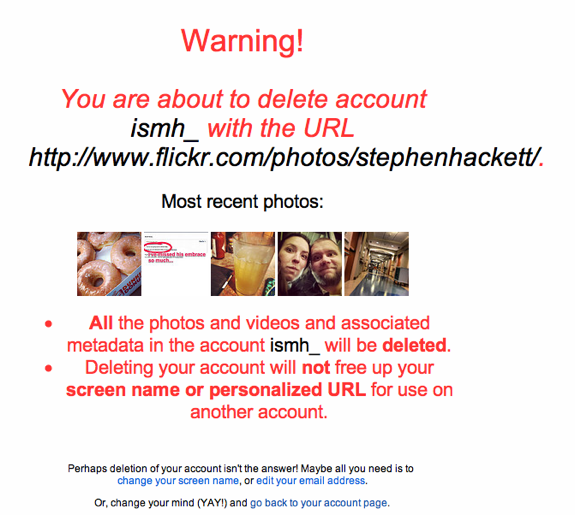
Flickr sad

This morning, I said goodbye to Flickr.

It’s sad, really. For years, I spent tons of time on Flickr. I added photos, wrote comments, joined groups and made friends.

No one I used to interact with is there anymore. I don’t upload large photo sets anymore. I don’t visit groups anymore, or read comments or favorite things.

I’m not sure why any of this happened. Sure, things like Instagram helped drive the stake deeper into Flickr’s heart, but Yahoo’s lack of concern with what is its best product is unsettling at best.

Farewell, friend. You’ll be missed. Sorta.

Google Analytics On The Go

I use Google Analytics to track traffic to (and on) this site. I — like most cool indie hipster bloggers — dislike it, but understand that it is the tracking platform of choice for advertisers, etc., so I stick with it.

I used to use an app called Ego to keep an eye on traffic throughout the day. Ego on the iPhone just shows simple stats — page views, uniques and the like — which is perfect when you just want to monitor things.

Ego, however, feels a little forgotten. While it also supports things like Mint and FeedBurner, the app hasn’t been updated in some time. That always makes me nervous.

The other day, I heard about Audience, an app similar to Ego, but much better looking. It feels like a Windows Phone 7 app, in all of the good ways, like nice typography and fluid transitions. Setting up Google Analytics is quick and painless, as is flipping between different views. It’s simple and fun to use.

It’s now living on my second home screen. Thankfully, the developer says he’s working on a revised icon. I don’t cringe when people ask me why I have an app named “Ego” on my iPhone now.

But Audience and Ego are simple. What if you want more power?

Enter Analytics Pro. At $5.99, it’s a little pricey for an iOS app by some standards, but I don’t have an issue with that, considering the all brings almost all Analytics’ power to iOS. It has graphs, tables and more. It lists referrals, location, browser information and just about everything else Google has on its site. It’s almost too much information.

So, for me, I’ll be bouncing in and out of Audience from now on, with Analytics Pro stashed in a folder, in case I need more information in a big traffic spike. Or if I get bored waiting on someone.

Happy stat checking, nerds.