
David Roth joins David and Stephen to cover NotePlan, an application that combines tasks, events, and notes in some really interesting ways. They discuss how to be more productive using its unique features, and compare it with some other applications.
512 Pixels
The Services Company⇢
Jason Snell noticed something during yesterday’s results call:
Apple’s latest quarterly results were about as boring as you can get while still featuring $21.4 billion in profit and setting an all-time third-quarter record. Most categories were flat, with the exception of a one-time bump in iPad sales (amazing what actually introducing new products can do!) and the continued, relentless increase in Services revenue.
Another quarter, another record-setting total for Apple’s Services line—$24.2 billion in revenue. And yet, the more I looked at that number, the more I started to ask myself some fundamental questions about Apple’s business, today and in the future.
Performa Month: The First Updates
Last time, we took a look at the very first Performa models that rolled off the line. Those machines shipped in the fall of 1992. By 1993, Apple was ready to revise the lineup:
Performa 250
The Performa 200 had been a rebadged Macintosh Classic II, so for the 250, Apple rebadged the Macintosh Color Classic.
The Color Classic would prove to be the last major update to the compact Mac line, and to mark the beginning of the end, Apple got weird.
Internally, the Color Classic was basically an LC II, complete with a Motorola 68030, with the machine built around a color 10-inch CRT, running at 512 x 384 resolution, slightly different from the 512 x 342 resolution previous compact Macs supported.1
However, the display’s weird resolution had a trick up its sleeve: it could be switched into a secondary mode that let it run at 560 x 384. In conjunction with its LC-style PDS card slot, this meant that the Color Classic supported the Apple IIe card. You can see this card in action in this 8-Bit Guy video:
All of this came to the Performa line with the 250. The Color Classic was sold worldwide, but the 250 was seemingly limited to the UK and Australia. Both featured a 16 MHz 68030 processor (on a slower 16-bit data bus like previous machines), 4 MB of RAM, and either a 40 MB, an 80 MB, or a 160 MB hard drive.
Performa 405/410/430
The mid-range Performa wasn’t as big of an update, with Apple replacing the old 400 with three models: the 405, 410, and 430.
These three machines shared the same core specs as the 400 before them:
- 16 MHz Motorola 68030 microprocessor
- 16-bit data bus
- 4 MB RAM standard
- 10 MB support (read more about RAM upgrades in these machines here)
- No FPU
- LC-style PDS slot
- Apple SuperDrive 1.4 MB Floppy Disk Drive
So, what do all of those different model names refer to? Slightly different hard drive specs, with prices that don’t make total sense in hindsight:
Model:HDD Size:Price:40580 MB$1,30041080 MB$1,050430120 MB$1,500
If you were annoyed that the black MacBook’s only tech upgrade was the size of its hard drive, be comforted knowing that you weren’t the first to feel that way.
To clarify that chart a little, I should point out that the Performa 410 replaced the Performa 405 in the fall of 1993. It seems that the only difference between the two models was that the 410 came with 512 KB of VRAM, while the 405 came with 256 KB, but that detail isn’t consistent across the sources I have come across detailing these machines.
(The higher VRAM amount meant a machine could support 256 colors, up from the standard 16.)
Performa 450
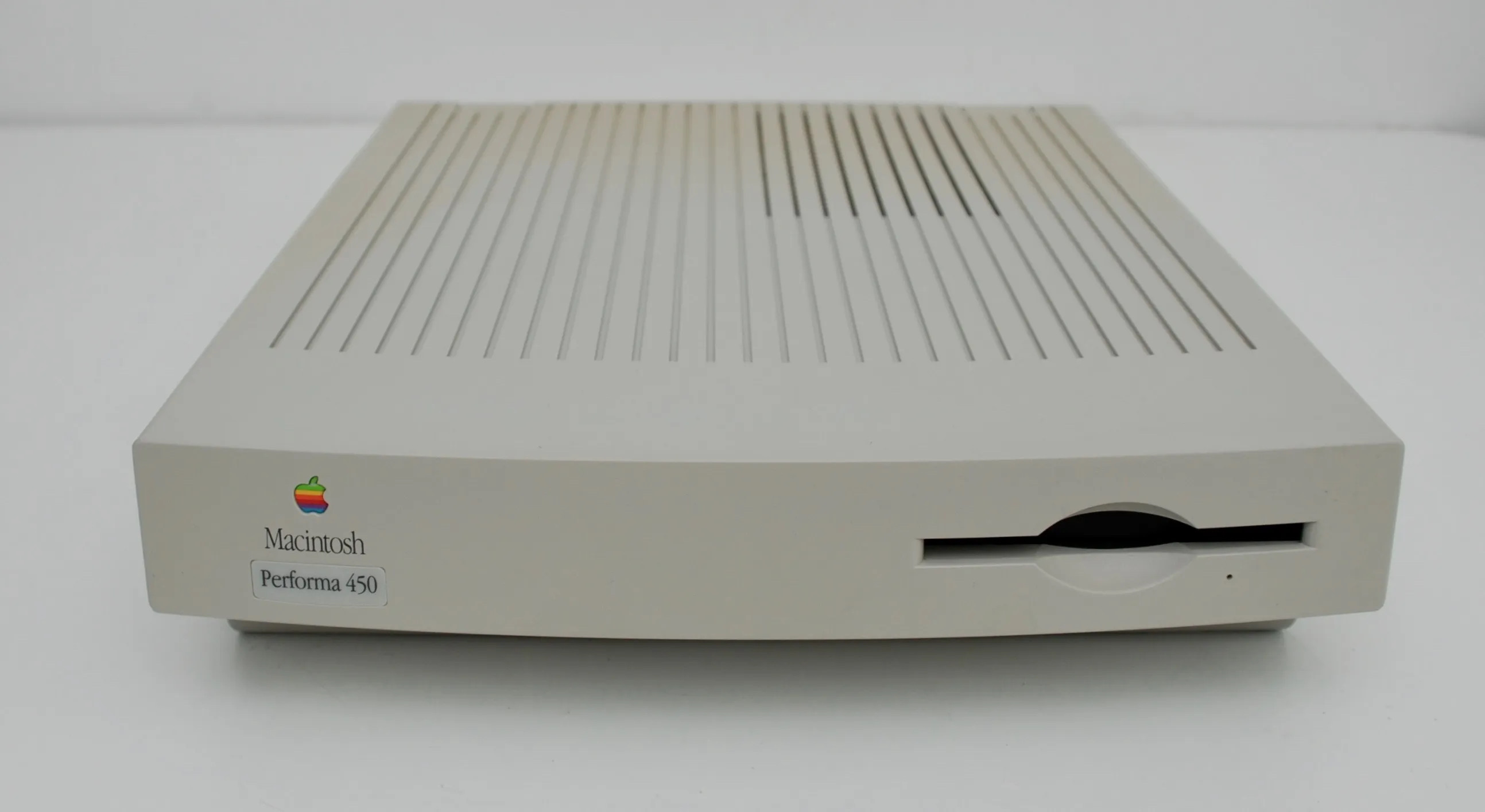 Image via oldcrap.org
Rounding out the February 1993 updates was the Performa 450. Unlike its siblings, the 450 ran at a faster 25 MHz, up from the 16 MHz Motorola 68030 found in the Performas 400, 405, 410, and 430.
There was more to this $1,800 machine than the faster CPU, as this computer was based on the LC III. Russell Ito covered the LC III in the April 1993 edition of MacUser, writing:
When Apple introduced the LC II, it made only one basic change to the original LC: It swapped a 68030 processor for the original’s 68020. The result was - well, an LC with a 68030 processor. The swap made no difference in performance, and except for the option of running virtual memory, there really wasn’t much to be gained from upgrading to the new machine.
With the LC III, however, the story is a little different. Apple has again made a simple chip swap, but it’ s also made another significant change: In addition to having a faster processor, the LC III is the first low-end machine since the SE/30 to sport a 32-bit wide data bus. The result is significantly better performance.
Weirdly, the LC III and Color Classic came out at the same time, so that article covers both machines that would become the Performas that we’re discussing now. I love the artwork that ran with the article:
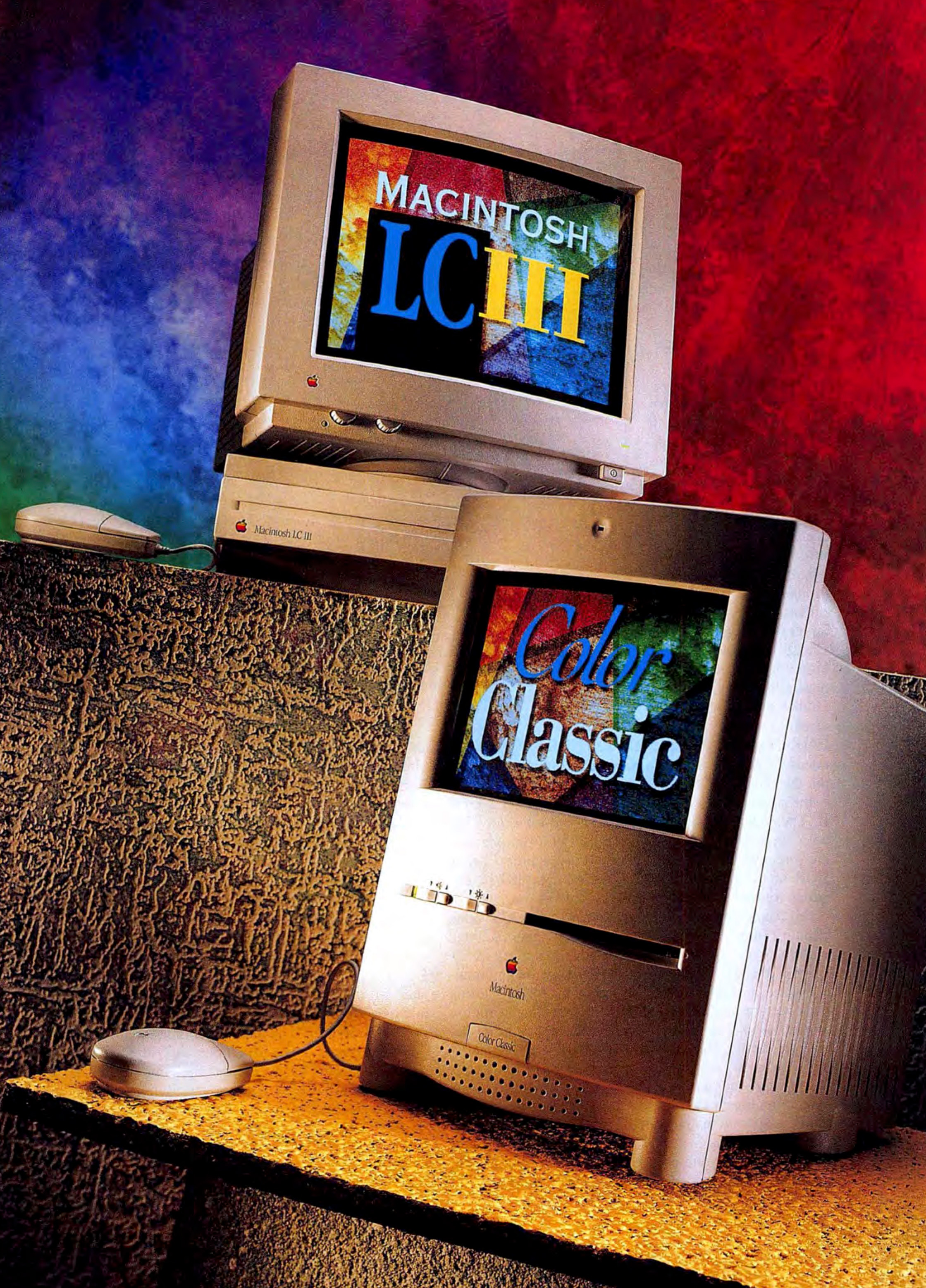
This upgrade also brought a higher RAM ceiling of 36 MB, a standard 512K of VRAM, and an updated LC PDS slot. In practice, the LC III/Performa 450 was twice as fast as the LC II and its related Performa siblings.
That performance came with a cost, as the Performa 450 cost $1,800 at launch.
-
That’s where I got the idea of the name of this very website. ↩︎
Performa Month: The First of a New Line of Macintosh: The 200, 400, 600, & 600CD
In September 1992, the first batch of Macintosh Performas were announced. Last time, I wrote about what Apple hoped to achieve with these computers, so it’s now time to discuss the computers themselves.
In the initial press release about the systems, Apple’s Betty Taylor wrote:
All three Performa models use the powerful Motorola 68030 microprocessor, and share the I/O ports and expansion slots that customers expect to find in other Macintosh family members.
In addition, each Performa features Apple’s SuperDrive, a 3.5" floppy disk drive capable of using disks from Windows, DOS and Apple II computers.
At this point, we need to revisit something that I wrote yesterday… that the Performa line was a bunch of other Macs that Apple tweaked, rebadged, and slapped some third-party software on, all before selling them in big-box stores.
That means talking about individual models can get weird, but that’s what I signed up for when I decided to write this series.
The first three Performa models are perfect examples of this phenomenon:

The Performa 200
By 1992, the compact Mac design was eight years old, but Apple was still churning out all-in-one screens with black-and-white nine-inch screens.
Two years before the Performa line launched, Apple put the Macintosh Classic on sale. It was the first Mac sold for less than $1,000 — coming in at $999 — but to make that possible, Apple cut corners. It had no expansion slot, and a lack of a memory management chip meant that the virtual memory feature in System 7 wasn’t supported. The 8 MHz Motorola 68000 made it no faster than machines first sold years before it.
In October 1991, Apple released the Macintosh Classic II. It cost $1,900 — almost double the original Classic — but was a much better computer, complete with a 16 MHz Motorola 68030 CPU and support for up to 10 MB of memory. Sadly, the Classic II still lacked the expansion slot that SE/30 users had come to know and love and had a 16-bit data bus that put a stranglehold on that sweet, sweet 32-bit CPU.
In 1992, someone at Apple took a Classic II off the shelf, taped a “Performa 200” badge on it, and probably went on vacation for six weeks. The two machines shared identical hardware specs, down to the ROM version. As the Classic II was on sale until September 1993, there were several months that both the Classic II and Performa 200 were both on the market, albeit in different sales channels.
 These are basically the same computer. Both of my examples are pretty rough, sadly.
Apple said the compact design was “an excellent choice for space-conscious families who value its small footprint that fits into tight quarters and can be easily transported from room to room.”
The Performa 200 retailed for a mere $900, making it the cheapest Mac ever at the time of its launch.
Performa 400
The Performa 400 started life as the Macintosh LC II, with basically identical specs beyond the Performa shipping with 512K of video RAM by default, while the LC II could be had with 256K.
The Macintosh LC was the Mac mini of its day. The original LC was announced in October 1990 and was housed in a 3-inch thin chassis designed to sit underneath a CRT. As LowEndMac reports, its $2,500 price tag came with some compromises:
The first Mac crippled from the ground up, the LC (code-named Elsie, Prism, and Pinball) was designed to a new low price point of $2,500 with 2 MB of RAM and a 40 MB hard drive. The LC was the first Mac to run a 32-bit CPU on a 16-bit data bus, making memory access slower than it should be (the LC benchmarks at about 3/4 the performance of the Mac II, even though both use the same 16 MHz 68020 CPU). Although Apple had retired the 68020 chip with the Mac II in January 1990, it reintroduced it with the LC that October.
To add insult to injury, Apple programmed the ASICs to support no more than 10 MB of RAM even if more was installed.
Despite these issues, the LC was a huge hit, and Apple reportedly sold 500,000 units in the first year.
The LC II came along in March 1992, complete with the whole 16-bit data path/32-bit CPU issue, but now with 4 MB of onboard memory instead of the 2 MB found on the original LC. The most significant upgrade was the price — the LC II sold for just $1,400, or about $3,100 in 2024 dollars.
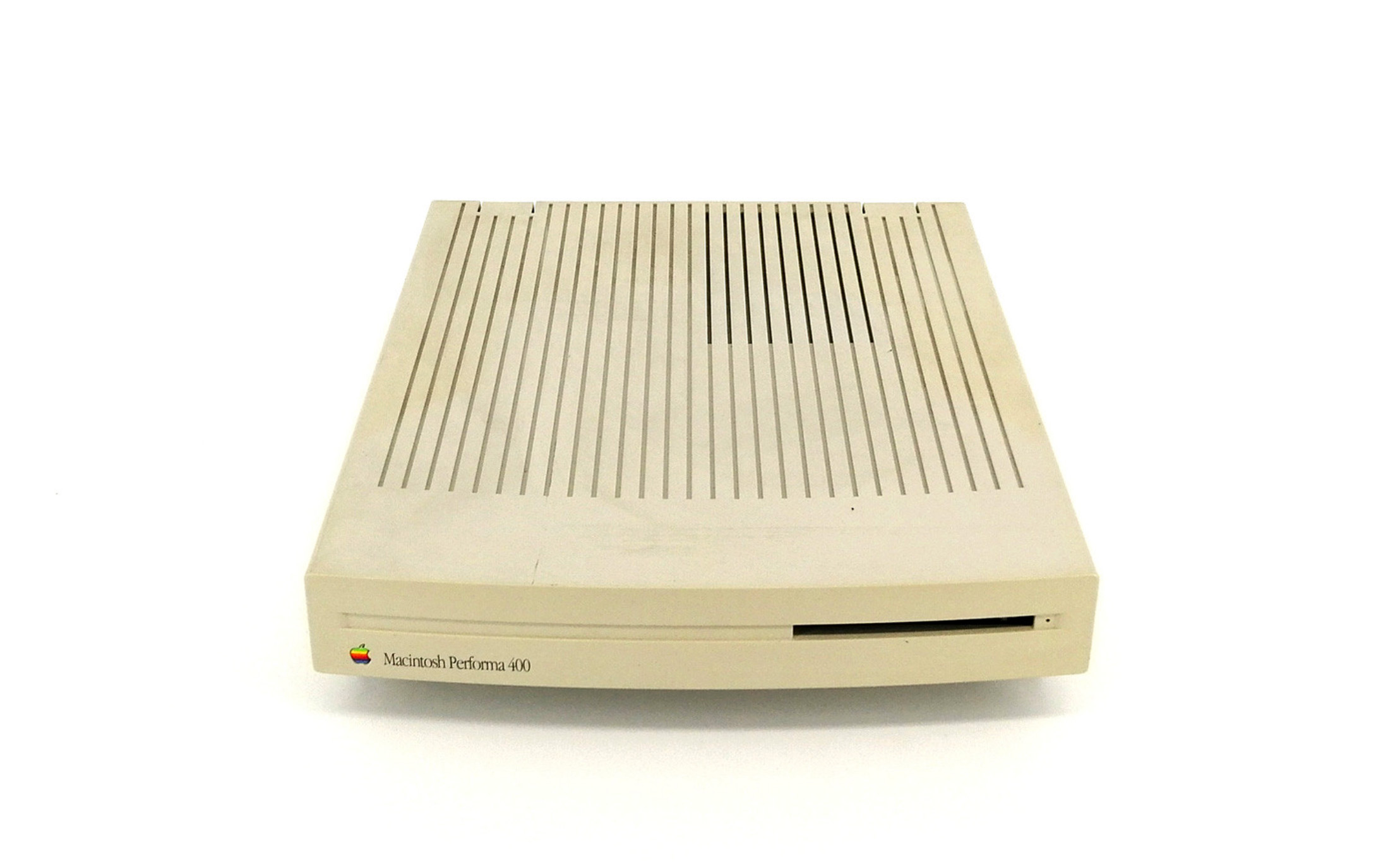 image via HomeComputerMuseum
When it was rebadged as the Performa 400, all of these features remained, and every model was sold with an 80 MB hard drive as standard equipment. As a bonus, Performa 400 machines came with a built-in modem when the LC II did not.
The Performa 400 sold for $1,180, a discount of $220 from the cost of the LC II. Like the LC II, it included on LC PDS slot for expansion.
Performa 600
The top-of-the-line model was the $2,000 Performa 600. Unlike its cheaper siblings, this machine’s starting point is a bit more complicated.
 image via eBay
The 600 was basically a rebadged Macintosh IIvx, which is not a nameplate that brought with it great acclaim, as LowEndMac reports:
The Mac IIvx was an okay computer, but a big “Huh?” for Mac IIci users. Where the LC and LC II had been compromised by using a 32-bit processor on a 16-bit data bus, the IIvx ran a 32 MHz CPU on a 16 MHz bus. This gave it slower performance than the IIci, which was still available (stock IIci tests 30% faster than IIvx; adding 32 KB cache to the IIci bumps this to 60%).
In fact, the old 16 MHz Mac IIx outperformed the IIvx on some benchmarks! Needless to say, most serious Mac users chose the IIci over the IIvx.
The Mac IIvx and its near-twin, the Performa 600, were the first Macs available with a built-in CD-ROM drive and also the first Macs to use a metal case.
(When optioned with that built-in CD-ROM drive, the machine was renamed the “Performa 600CD.” This naming scheme would be used for many, many more computers in the Performa line.)
At this point, things get weird, as we also need to talk about the Macintosh IIvi. The IIvi was based on the IIvx, but lacked an FPU in its default configuration, meaning it was much slower under certain circumstances. The IIvi was not sold in the United States and was on the market for a mere four months.
The Performa 600 used the IIvi’s logic board and therefore also lacked an FPU in its stock form. While IIvi owners may have been willing to plunk down the extra cash for an FPU, I’m not sure Performa shoppers would have been as willing to do so.
History has not been kind to this machine, but it is important to note that it completed the “Good/Better/Best” strategy Apple implemented with these early Performas. All three machines were powered by a 68030, but the Performa 600 was clocked at 32 MHz, twice the speed of the 200 and 400.
It was an interesting option compared to those machines, even if its sibling’s position in the Mac II line was less than great. If you were looking for a Performa and needed maximum modularity, this was the one, as it came with three NuBus slots and one PDS slot.
In true Performa fashion, the 600’s price point of $2,000 was a deal compared to the IIvx’s price of $2,950.
(Tossing in the CD drive cost an additional $500, bringing the 600CD’s price tag to $2,500.)
The key to that price cut was nearly a dozen different CD titles that were bundled with the computer.
In short, the Performa 600 was a weird mashup of two Mac II models stuffed with third-party software.
Performa Displays
As only a single of the original Performas was an all-in-one, most buyers would need to pair their new machine with a display.
Both the 400 and 600 included a DB-15 video port, opening the door to quite a few Apple displays, but the company put the Performa name on two different displays.
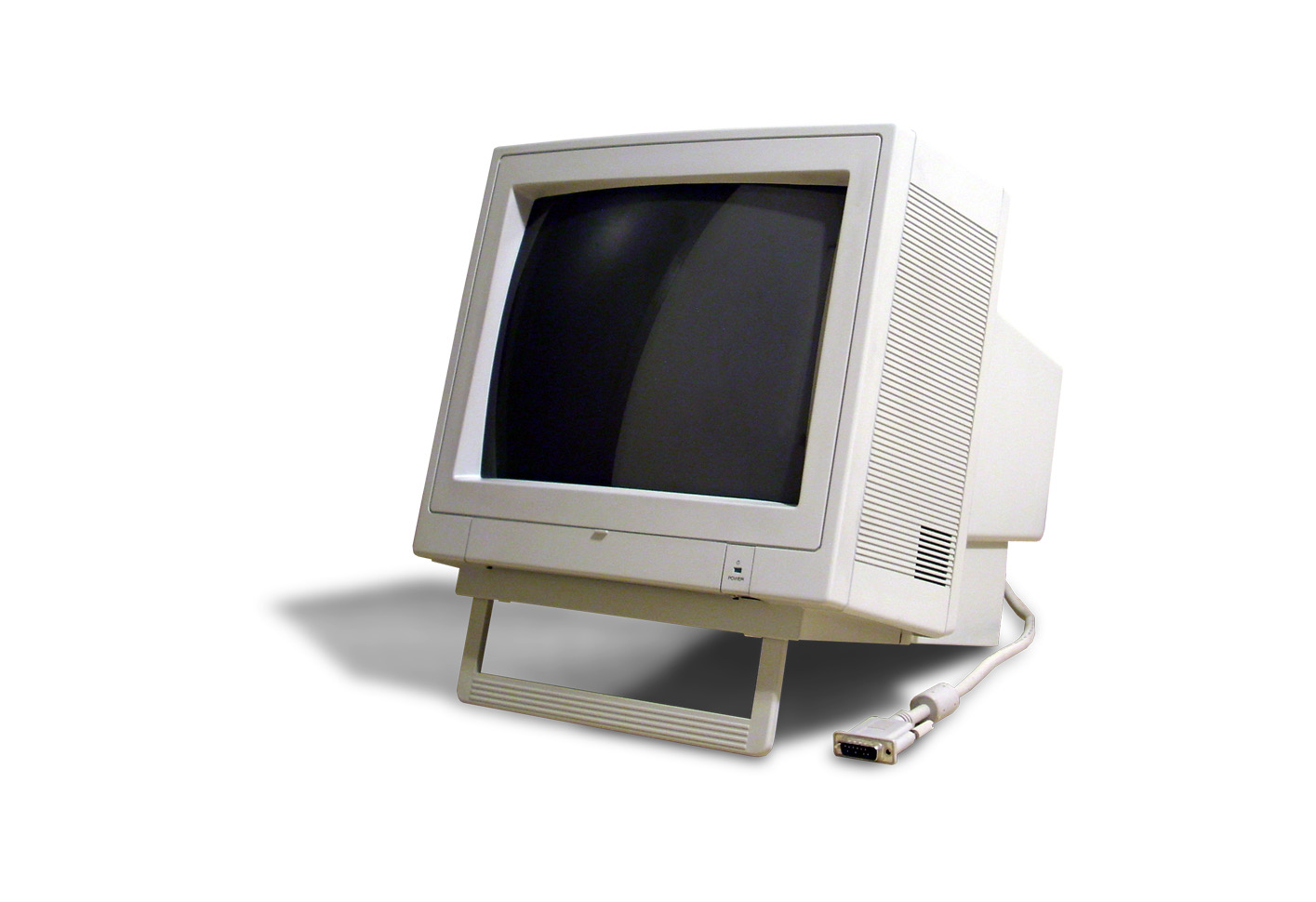
The $305 “Apple Performa Display” was equipped with a 14-inch (13-inch viewable) CRT running at 640 x 480 resolution with a dot pitch of 0.39mm. For $95 more, the “Apple Performa Plus Display” came with the same specs, but an improved dot pitch of 0.29, for a clearer picture.
I’ve never seen either of these in person, but this image from Wikipedia raises questions for me about the strength of the built-in foot:
Creating the Template
The Performa 200, 400, 600, and 600CD set the stage for how the entire line would operate. Computers with very similar (or even identical) specs being sold across various sales channels.
To a degree, the system worked, at least at first. Here’s Andrew Gore, writing for MacWEEK in 1993:
The Macintosh Performas put on quite a show last Christmas, exceeding projected sales. Apple said the new consumer Macs sold so well that it will offer new configurations this spring and may add some new models by year-end.
Keith Fox, general manager of Apple USA’s consumer division, said the Performa 400 was the best seller, garnering 60 percent of the line’s sales. The Performa 600 CD, with 25 percent of total Performa sales, did surprisingly well, he said, considering it was the most expensive of the three consumer Macs. In fact, the CD-ROM-equipped 600 sold so fast that Apple couldn’t keep up with demand, he said.
“The CD phenomenon in the Mac industry is amazing. The CD is the gating factor [in Performa 600 CD shipments],” Fox said.
Only the Performa 200 failed to sell as well as projected, representing about 15 percent of total Performa sales, according to Fox.
The sales figures taught Apple that consumers are more interested in modular Macs than in the compact Classic design, Fox said.
He said Apple will expand the Performa line by adding additional peripherals, such as an external CD-ROM drive, and it will increase the software bundled with systems.
Gore continued:
Fox said that 91 percent of Performa systems are being used in the home, Apple’s target market. The majority of home users (33 percent) bought Performas as an educational machine for their children. Nineteen percent bought them so they could do work at home; 18 percent purchased Performas for home-based businesses; and 8 percent bought them for home management.
Of the home buyers, 62 percent had never owned a computer before. Of the 38 percent who had owned a computer before, 30 percent owned IBM PCs and compatibles.
Next time: the first batch of updated Performas arrive.
Connected #512: The Simple Solution to Traffic⇢
Myke has started a gate, Stephen has launched a new series, and John returns with questions about betas. The guys also share their early impressions of Apple Intelligence.
Welcome to Performa Month
From 1992 to 1997, Apple shipped over 40 Macintosh models wearing a Performa badge. In the years since, the word has become an anathema to many Mac users who were around in that era.1
Throughout August, I will be exploring the world of this computer line in a new series:
And what a confusing world it is!
At its heart, the Performa line is the fruit of badge engineering. This is often found in the car market, perhaps most famously in the Chrysler K-car platform that debuted in 1981. Over 14 years, Chrysler, Dodge, and Plymouth shipped a dizzying array of front-wheel drive cars, all based on the same platform. Features, options, and prices ranged between them, but under the covers, these were all the same car, more or less.
Apple did something similar with the Performa, taking Macs from other lines, tweaking their features, and selling them under the Performa lineup.
In the car world, companies do this sort of work to reach different market segments without needing to create a new product for each type of consumer. In the case of the Performa, Apple wanted to sell computers to reach new users.
The Performa’s Market
Here’s a bit from the company’s press release announcing the new computer line:
Apple Computer, Inc. today introduced a new family of Macintosh computers targeting the consumer marketplace.
Initially available only in the U.S., the new Apple Macintosh Performa series of computers is designed to reach first-time buyers and new users in the home, offering specific solutions for families with school-age children.
It goes on:
“Research suggests more than half of the families in our target market have not yet found a computer solution compelling and flexible enough to meet their needs at home, though many have used a computer either at work or at school,” said Keith Fox, vice president of Consumer Markets for Apple USA.
“With the needs of those customers in mind, we developed the Macintosh Performa. Performa simplifies both the purchase decision and the buying process. We believe the Performa offers the right combination of technology and support to appeal to the estimated 7 million American families which, research tells us, have the buying power but have not yet adopted a PC for their homes.”
To make adopting their first computer easy, Apple shipped Performas as complete systems, complete with their own special edition of System 7.
Performa System Software
The original Performas — which we will discuss next time — shipped with System 7.0.1P. This version of System 7 could run on other Macs, but it came with software created with inexperienced users in mind, including Launcher.
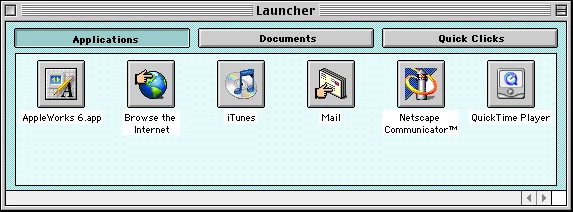
This user interface could be managed on behalf of inexperienced or young users, giving them access to only the applications they needed.
Launcher would wind up shipping in all versions of System 7, Mac OS 8, and Mac OS 9. The screenshot above is from the latest of those releases.
This support document outlines the “progressive changes made to system software versions” for the Performa line. With the advent of Mac OS 8 in 1997, Apple did away with the “P” variants of the operating system. However, Performa hardware would still be bundled with third-party software titles to help keep costs down.
Branding
While the model numbers appended to the Performa name are true nonsense in places, the overall branding of the line was meant to be fun, friendly, and approachable. This video came out in the Mac OS 8 era, but I think it provides a good idea of what Apple was trying to portray to potential customers:
To meet these potential customers where they were, Apple put these machines for sale in big-box stores like Circuit City, Sears, and beyond. This is from a press release outlining the strategy:
“Apple will market the new line through major retailers and not its traditional resellers because some consumers are gun-shy when it comes to computer stores,” Bob Puette, president of Apple USA, said.
“First-time buyers don’t buy in computer stores because they don’t feel comfortable,” he said.
The new computers were pilot-tested for 24 weeks in Sears Roebuck & Co., Silo, Office Depot and OfficeMax, said Keith Fox, vice president of consumer markets for Apple USA. He said the distribution had now been extended to Montgomery Ward, Circuit City, Dayton Hudson, Lechmere, Staples, Tops and Tandy’s Incredible Universe.
Sears said it will offer the Performa line at its Brand Central and Office Center departments at 650 retail stores nationwide.
Despite its sales channel, Apple was insistent that the Performa was a full-blooded Macintosh:
“Performa gives you the full power of Macintosh and the ability to perform any home-based assignment, whether it’s a spreadsheet brought home from the office, a child’s homework or entertainment for the whole family,” said Eric Harslem, vice president for desktop computing.
Welcome to Performa Month
Over the next several weeks, I’ll be winding my way through Performa history. If you want to follow along, I have set up a single page to gather all the posts I’ll publish in this series.
Up next: the Performa 200, 400, and 600/600CD. See you tomorrow!
-
In fact, Jason Snell begged me not to write this series, saying “Those of us who lived it just want to forget. Why won’t you let us forget?”
On the other hand, Chance Miller encouraged this, saying “those of us who weren’t alive then need to be educated.” ↩︎
Unread Arrives on the Mac⇢
John Brayton, the developer behind the excellent RSS client Unread, has launched version 4, and with it, macOS support:
Unread for Mac is now available from the Mac App Store. Unread for Mac incorporates every Unread capability that makes sense on Mac including:
- Beautiful typography
- Color themes
- Great search functionality
- Handling of summary-only feeds
- Syncing via Unread Cloud, Feedbin, Feedly, Fever, Inoreader, and NewsBlur
- The Subscribe in Unread share extension
- The Save to Unread share extension (subscription required)
- Widgets
- Handling of link articles
Unread for Mac is a native Mac app. The user interface is built with AppKit and a touch of SwiftUI. There are some ways in which Unread for Mac goes beyond Unread for iPhone and iPad.
I’ve been using the Mac app for a couple of weeks, and it’s really quite nice, and I love that Brayton went the AppKit route.
Mac Power Users #755: 700 MB of GIFs⇢
On this week’s feedback episode:
David is launching a scholarship program with the Productivity Field Guide, Stephen bought a new e-reader, and they both have spent some time in their Inboxes to bring feedback to the show this week.
Departures #11: Relay 10⇢
Something very special just dropped over at Relay:
Live in London, Myke, Stephen, and Jason host a game of Fortunate Families with a huge group of Relay FM hosts! Additionally, the guys talk about their work with St. Jude and unveil one more thing.
I will write more about Relay’s 10th anniversary soon, but for now, enjoy the show.
macOS Sequoia Now Includes Ability to Move Tasks Between Lists in Reminders More Easily
A month ago, I wrote about the Inspector in Reminders being different on the Mac from the version found in iOS and iPadOS:
The biggest example in my mind is the ability to move a task to a different list. On the iPhone and iPad, it’s super easy, as there’s a drop-down right in the Inspector. Mac users, however, don’t have that UI, and are left to drag and drop tasks between lists.
That’s fine if you know about drag and drop and have a small number of lists. However, it can be error-prone and confusing to many users.
So, dearest Reminders team, please consider adding the List control to the Mac version of Reminders, if not the entire Inspector directly from the mobile — and more useful — version of Reminders.
I filed this as Feedback FB14077154, and I have some good news! In our continued tradition, the Reminders team at Apple have heard our collective cry and have taken action, adding a new control to the Inspector in Reminders on the Mac.
I’m traveling this week, and I owe a huge thank you to Relay Discord member Inuk for this glorious screenshot out of Developer Beta 4 of macOS Sequoia:
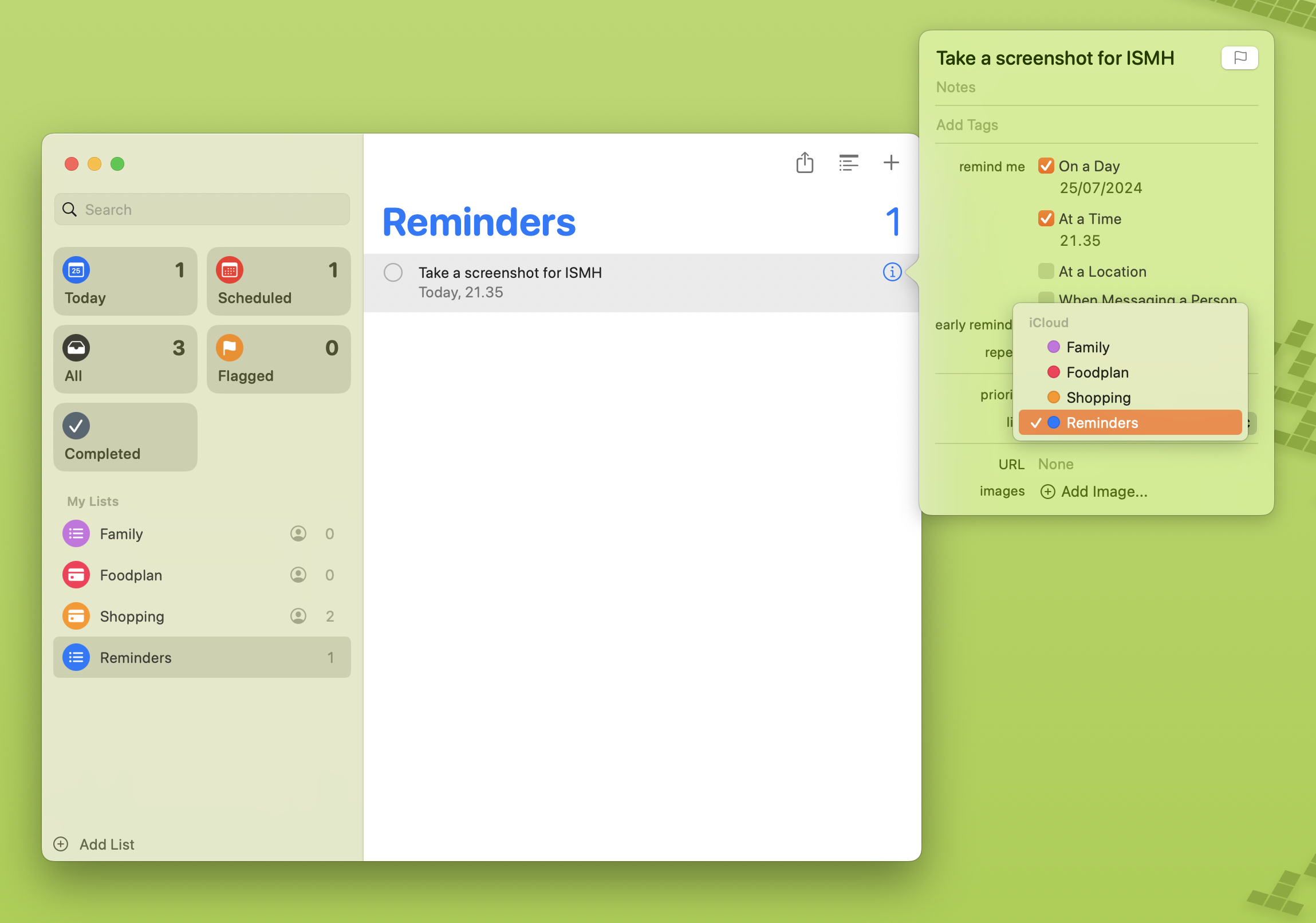
A true :chefs-kiss: moment.
X Reverses Course on Gun Emoji⇢
Wes Davis, writing at The Verge:
Years after Twitter replaced the pistol emoji with a green-and-orange water gun, X has decided to change it back to a regular handgun. An X employee announced the change in a post last week.
The company hasn’t explained the change, but it feels on-brand for Elon Musk’s social network. Twitter originally switched its emoji to display a water gun in 2018, following others like Google and Facebook. (Apple made the switch in 2016; Microsoft was a brief hold-out.)
Davis’ headline is “X replaced the water pistol emoji with a regular gun, for some reason.”
We all know the reason.
Mac Power Users #754: Passwords, Passkeys, & Beyond, with Damien Schreurs⇢
This week on the podcast, Damien Schreurs joins David and I to talk about what makes a good password, the deal with passkeys, and Apple’s upcoming Passwords application.