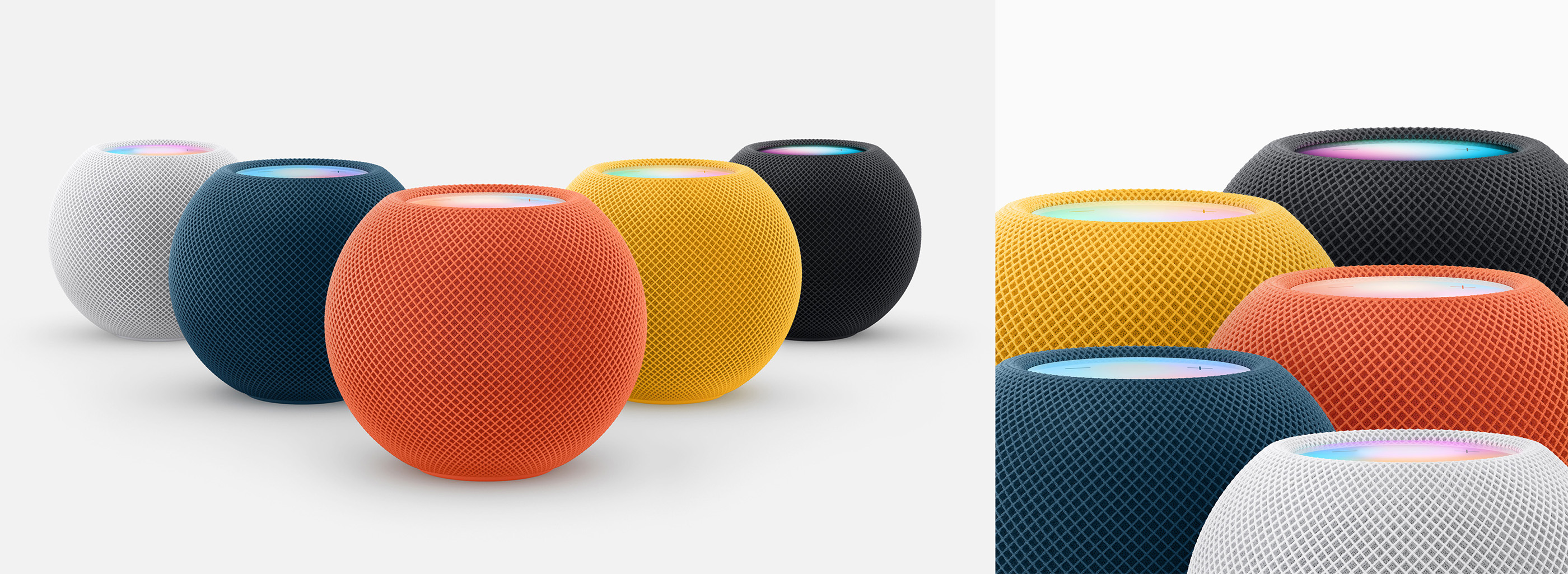
As spotted by Hartley Charlton, Apple has updated its Vintage & Obsolete Products document to include 2017’s iPhone X and 2018’s HomePod.
512 Pixels
Mac Power Users #751: Vision Pro Check-in ⇢
David and Stephen discuss Apple’s youngest platform and where it stands a few months after launch. They share some of their favorite apps and how spatial computing fits into their personal and professional lives.
The 512 Pixels Merch Store ⇢
I’m happy to announce that 512 Pixels now has a permanent merch store over on Cotton Bureau. At launch, I’ve got five shirts for sale. Three of the designs are back from the vault, updated for 2024, with a new 512 Pixels logo shirt and a design celebrating the original iPod1 joining the collection:
These designs are all available on-demand, and ship within a few days. Cotton Bureau is offering free shipping on orders placed before July 11 with the discount code HBDCB11.
Members of 512 Pixels get 10% off their orders. Discount codes were emailed yesterday! For most folks the free shipping code means bigger savings, but the membership discount will stick around after the 11th.
-
Initially, this group of shirts had five options, but after chatting with some friends, I decided to add the 3rd-generation iPod shirt. I was holding onto this design for release later in the year, but we thought it deserved to see light of day now.
Yes, the third-gen is my favorite. ↩︎
The End is Near for the ISS ⇢
Last year, NASA announced plans to deorbit the International Space Station at the end of the decade. We now know much more about the agency’s plans, according to Jeff Foust:
NASA selected SpaceX to develop a spacecraft that will be used to perform the final phases of the deorbiting of the International Space Station around the end of the decade.
NASA announced June 26 it awarded SpaceX a contract valued at up to $843 million to build the United States Deorbit Vehicle (USDV). That contract covers the development of the spacecraft, with NASA to conduct a later procurement for launching the USDV.
Little is known about what the USDV will look like or what its capabilities will be, but it is clear that NASA believes a controlled deorbiting of the station is the safest way to close the chapter on the ISS.
Another Way to Move Reminders ⇢
Dr. Drang, bouncing off my recent post on Reminders:
If you have the Move tool in your Mail toolbar, you can select all the messages you want to move, click on the Move tool, and select the appropriate folder from the drop-down menu. Because the menu is long, this may seem no easier than dragging and dropping, but it is. The key is that once the drop-down menu is active, you can start typing the name of the folder and it will be selected. Boom.
Reminders could add this same Move tool to its toolbar. I guess Reminders doesn’t have a true toolbar because there’s no way to customize it, but it does have a small set of tools up at the top of the window and there’s plenty of room up there for a Move tool.
This is a very elegant solution, and one that comes with a bonus, as Drang points out:
Adding a Move tool to Reminders would be more Mac-like than mimicking what we see on iOS. And it would make the Reminders UI more consistent with Mail. Remember when consistency between apps was thought to be important? That goes back as far as drag and drop.
Connected #508: Six or Seven Websites ⇢
After follow-up topics ranging from iPhone cases to apps for some very specific use cases, Stephen, Myke, and Federico discuss some of the changes in this week’s beta OSes, recent DMA news, Apple’s Beats strategy, and more.
I’m Just a Simple Macintosh User, Asking a Bazillion Dollar Company for a Better Way To Move Tasks Between Lists in Reminders
Every summer, I take some time with Apple’s updated stock apps. Many of them are quite good, and meet the needs for the vast majority of users.
I fully understand that sometimes you and I are not the vast majority of users, and that third-party apps can often better fit our needs.
Every year, I feel the call of Reminders. It looks nice, is integrated with the system in a bunch of fun ways, and unlike my normal app Todoist, is easy to use with Siri.
And every year, there’s a detail that derails my use of Reminders. In 2022, it was the app’s inability to show a badge that reflected what is due Today. Thankfully, Apple fixed that in iOS 16 Beta 3.
Last year, my quest was for better options when it comes to organizing the Today view. I am happy to report that with iOS 18 and macOS Sequoia, users now have the ability to edit the order of the sections within the Today view.
This year, I return with something that has bothered me for a long time: the differences between the Inspectors used in the various versions of Reminders.
The visual differences are striking. On iOS, the Inspector is colorful and easy to use. On the Mac, it’s dreary and full of small controls:
![]()
That’s not my biggest concern here, however. I strongly believe that the Inspector should be the same for both the Mac and iOS in terms of functionality.
The biggest example in my mind is the ability to move a task to a different list. On the iPhone and iPad, it’s super easy, as there’s a drop-down right in the Inspector. Mac users, however, don’t have that UI, and are left to drag and drop tasks between lists.
That’s fine if you know about drag and drop and have a small number of lists. However, it can be error-prone and confusing to many users.
So, dearest Reminders team, please consider adding the List control to the Mac version of Reminders, if not the entire Inspector directly from the mobile — and more useful — version of Reminders.
(This was filed as Feedback FB14077154 the day this blog post was published. It can also be found as FB11779798 from 2022 and FB12336797 from 2023.) Update: This issue was addressed by Apple in Developer Beta 4 of macOS Sequoia!
More on the CD Caddy ⇢
Back in 2021, Ernie Smith wrote about the curious world of CD caddies:
The first time I ever saw a CD-ROM, I had never seen a regular CD before, and I thought that it came in a giant plastic case. To be fair to me, I was in middle school, and I had little experience with them. It was in a library, and the screen did not display anything related to multimedia, but general reference information—stuff like databases, for example. A couple of years later, I got a home computer, along with an audio CD player, and soon enough, a CD-ROM. But I always thought about that caddy, which I never saw on any of the computer equipment I owned. Why did it exist? And why, when CD-ROMs trickled down to my home, wasn’t there one?
The AppleCD Line
I recently finished Harry McCracken’s excellent article about the CD-ROM’s rise in the mid-1990s, and it made me realize that I had never really explored Apple’s early CD hardware.
Depending on how you count things, Apple sold six SCSI CD-ROM drives, from the “AppleCD SC” in March 1988 to the 600e, which was on sale from 1995 to sometime in 1997. Ahem.
The AppleCD SC utilized a CD caddy and could read CD-ROMs at 1x speed. It could handle discs up to 650 MB in size across five formats:
- CD-Audio
- CD-ROM
- HFS
- ProDos
- High Sierra
(We don’t have time to dig into CD formats today, but things were a mess there for a while.)
This drive could be used with a Macintosh with a DB-25 connector or an Apple IIe or IIGS with a SCSI card installed. It came equipped with RCA jacks, a headphone jack, and a volume knob for those who wanted to use it for music playback. It sold for $1,199, or almost $3,200 in today’s money.
A common complaint about the AppleCD SC was the fan, which could ingest dust and interfere with CD playback. Apple removed the fan in later models, per this ancient support document:
Question: The outside of the box of my new AppleCD SC says: APPLE CD ROM/NO FAN. When did Apple stop including the fan? Why?
Answer: Apple stopped including the fan in the AppleCD SC in early 1990. We had found that the fan was drawing an excess amount of dust and other airborne particles into the CD mechanism and depositing them on the optical read head. The fan turned out to be unnecessary, so it was removed completely.
In 1991, Apple released the SC Plus, which was a minor revision to the product. It cost $400 less and supported discs up to 750 MB in size.
I adore how this thing looks:
image via Apple Rescue of Denver
Starting in March 1992, Apple released at least four more models, though I’ve seen other model numbers referenced online:
- AppleCD 150
- AppleCD 300
- AppleCD 300e Plus
- AppleCD 600e
The 300 was covered by Adam Engst at TidBITS in October 1992. The headline feature was the drive’s new speed of 300 Kbps:
The new CD player from Apple sets the standard for others to aim at with its double-speed technology, a speed select switch, a reasonable list price of $599, and support for multi-session PhotoCDs along with three other formats I’m unfamiliar with, CD-ROM XA (which apparently requires some extra hardware to play compressed audio), CD+G, and CD+MIDI. It of course reads all the ISO 9660/High Sierra and Macintosh HFS discs that the old (and still available) AppleCD 150 can read. The drive has an average access time of 295 milliseconds in double-speed mode, in which it can also transfer 300 KB of data per second.
Double-speed technology isn’t new, since NEC has had the CDR-73M out for a while now, but it was plagued with some early problems that NEC only recently fixed. The AppleCD 300 hopes to avoid any such problems with its front-mounted speed select switch, and frankly, I suspect that Apple tested more carefully than NEC anyway, to judge from some of the less than favorable comments I’ve received about NEC.
As you may have expected, the later 600e ran was a “quad-speed” drive, running at 684.4 Kbps, according to this 1995 Apple press release:
In support of its commitment to offer customers cutting-edge multimedia hardware at reasonable prices, Apple Computer, Inc. today unveiled the AppleCD 600e Quad-Speed CD-ROM player. The AppleCD 600e is twice as fast as previous CD- ROM players from Apple, allowing users access to the latest multimedia applications including those with full-screen, full-motion video.
“This is yet another example of Apple’s continued commitment to enriching the user experience, while setting the standard for ease of use and providing a significant price/performance advantage,” said Satjiv S. Chahil, vice president and general manager of Apple’s New Media Group. “The affordable AppleCD 600e, at just US$349 ApplePrice, provides a far richer experience for multimedia consumers for the same price as Apple’s previous double-speed CD- ROM players.”
The AppleCD 600e Quad-Speed external CD-ROM player combines the efficient industrial design, quality and reliability of its award- winning predecessor with twice the performance. At 684.4 Kbps streaming data transfer rate, it is faster than most other quad- speed players currently on the market.
As a nice bonus, the 600e didn’t require a caddy for discs. It had lost all of its Snow White goodness, though:
image via Wikipedia
The service manuals for these models are still kicking around online if you’re looking for more details on this small chapter in Apple hardware history:
‘The Unbearable Sorrow of Apple Weather’ ⇢
Yesterday morning, I got obsessed with the 10-day forecast section of the Apple Weather iOS app—specifically, how it presents each day’s temperature range. I still don’t understand the logic behind it.
The blog post is impressive, but the footnote contains a straight-up murder:
Several readers on Mastodon told me the alignment was fine on their phones and suggested Larger Text/Dynamic Type as the reason the charts on my phone are messed up. They were absolutely right. I bumped up my text size so long ago I’d forgotten all about it, but I should’ve known to look into that before posting. Interestingly, moving my text size down just one tick got all the bar ends to match up. The colors still seem a little off to me, but I’ll need to zoom in and look more carefully.
Of course, this still doesn’t answer the question of how the app is deciding where to put the bars and how to adjust the colors when the text size is large. Nor does it excuse Apple’s Weather team for failing to get the alignment right for all the text sizes they allow. Do they just assume the system will fix everything, or do they throw up their hands and say we far-sighted oldsters can just deal with it?
Sponsor: Magic Lasso Adblock: YouTube Ad Blocker for Safari ⇢
Do you want to block all YouTube ads in Safari on your iPhone, iPad and Mac?
Then download Magic Lasso Adblock – the ad blocker designed for you.
It’s easy to set up, doubles the speed at which Safari loads and now blocks all YouTube ads.
Magic Lasso is an efficient, high performance and native Safari ad blocker. With over 4,000 five star reviews; it’s simply the best ad blocker for your iPhone, iPad and Mac.
![]()
It blocks all intrusive ads, trackers, and annoyances – letting you experience a faster, cleaner, and more secure web browsing experience.
The app also blocks over 10 types of YouTube ads, including all:
- video ads
- pop-up banner ads.
- search ads
- plus many more
Unlike some other ad blockers, Magic Lasso Adblock respects your privacy, doesn’t accept payment from advertisers, and is 100% supported by its community of users.
Join over 300,000 users and download Magic Lasso Adblock from the App Store, Mac App Store or via the Magic Lasso website.
Mac Power Users #750: Our Betas Era (Summer 2024) ⇢
David and I have been running iOS 18, macOS Sequoia, and watchOS 11, so you don’t have to. This week on MPU, we discuss some new features coming to Apple’s platforms later this year.