Apple Increasing Services Prices in U.S. and Beyond

Apple is rolling out increased pricing for several services today, as reported by Joe Rossignol:

In the U.S., these are the first-ever price increases for Apple Arcade and Apple News+ since the services launched in November 2019, while Apple TV+ had its first price increase from $4.99 per month to $6.99 per month in October 2022.

Here are the increases customers in the United States will see:

  • Apple TV+: $6.99/month → $9.99/month
  • Apple Arcade: $4.99/month → $6.99/month
  • Apple News+: $9.99/month → $12.99/month

As a result, the costs of Apple One bundles are also increasing:

  • Individual: $16.95/month → $19.95/month
  • Family: $22.95/month → $25.95/month
  • Premier: $32.95/month → $37.95/month

I really hope no one is paying $12.99/month just for Apple News+.

Sponsor: MarsEdit 5

MarsEdit 5 is a major upgrade to the preeminent Mac app for editing WordPress, Micro.blog, Tumblr, and many other types of blogs.

The new Microposting feature makes it “as easy to post to your own blog as it is to post to Twitter.” When MarsEdit 5 is running on your Mac, just press a configurable global keyboard shortcut, write out your latest thoughts, and instantly publish to your blog.

MarsEdit supports editing posts in rich or plain text, and the latest update is especially great for Markdown fans. Now when you’re writing Markdown in plain text mode, MarsEdit applies live, beautiful syntax highlighting to make it easier to focus separately on the content and style of your posts.

MarsEdit is used by top bloggers to maximize their productivity and enjoyment of blogging. It’s great for pros like John Gruber of Daring Fireball, and yours truly, while also being simple enough to remove the mystery of blogging for everyday folks who just want to share their thoughts with the world.

MarsEdit has a new beta featuring preliminary support for publishing to Mastodon! Now you can use the same app you use to write and publish to your main blog, to write and publish to your Mastodon microblog. Check out the beta at this link

One app, limitless publishing opportunities.

Download MarsEdit today, and see what all the hype is about. It’ll make you a better blogger!

Generative AI Fill in Photoshop Feels Like Magic

A few years ago, I took a Halloween photo that I really like. It’s of my wife Merri, dressed as a hot dog:

Hot dog Merri

I recently wanted to use it as a wallpaper on my iPhone, but its landscape nature didn’t really play nicely with the modern lock screen.1 Then I remembered that Photoshop has a bunch of AI tools, and after some tinkering with its generative fill feature, I had something that worked pretty well:

Hot dog Merri wallpaper

The work isn’t perfect, and if you pixel peep things get a little weird in the new tree line, but given the fact that all of that is out of focus thanks to the original photo, I’m pretty happy with it.

She’s going to kill me when she sees this on the Internet.


  1. After he saw this post, Myke Hurley texted me saying that this would be a great feature for Apple to add the lock screen configurator tools in iOS. He’s totally right about that. 

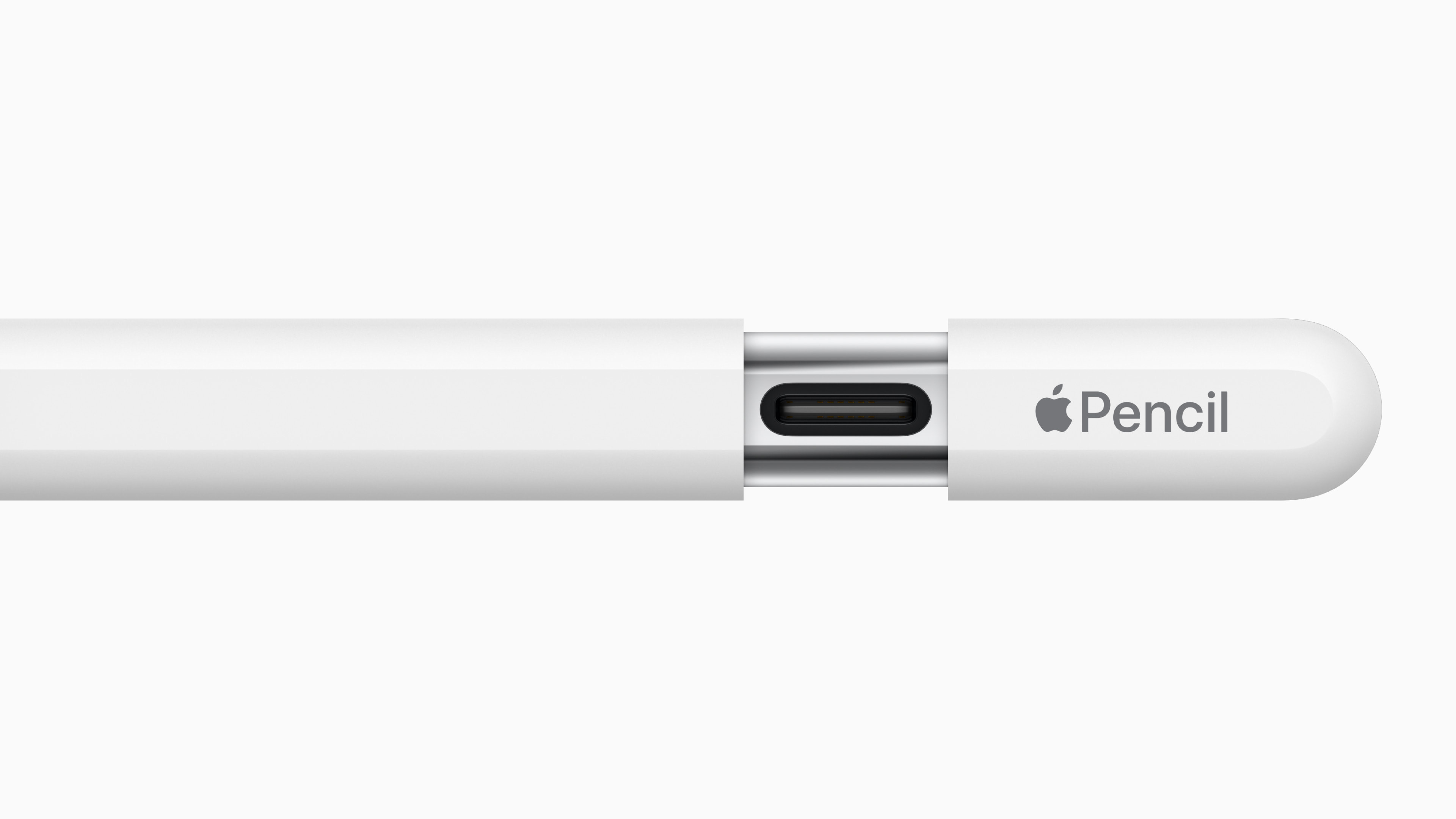
Apple Announces Apple Pencil (USB-C), joining the Apple Pencil (1st generation) and Apple Pencil (2nd generation)

Jokes about the name — and this chart — aside, I think this new $79 Pencil is a nice addition to Apple’s lineup.

Apple Pencil (USB-C)

Dan Moren has the details:

This pencil is clearly designed for use with the tenth-generation iPad: while it attaches magnetically to the long edge of the iPad for storage, it still charges via a physical port. Unlike the old Lightning model, which had a removable (and easily lost) cap hiding its charging and pairing connector, the new Apple Pencil features an innovative sliding design that reveals a USB-C port into which you can plug a cable (which, naturally, is not included). Its design is otherwise very similar to the second-generation Pencil.

At $79, this Pencil is cheaper than both the first-generation model at $99 and the second-generation model at $129. But that’s because it doesn’t have all the features of either of them: it lacks the pressure sensitivity of either of the previous models, as well as the double-tap controls, wireless pairing and charging, and free engraving of the second-generation. However, the new Pencil does support the “hover” feature on M2 iPad Pro models.

As Jason Snell pointed out on Mastodon, it’s weird that this wasn’t available when the 10th generation iPad was launched last year, but I suppose later is better than never.

That Time Apple Gave Mac OS X Jaguar Away to Teachers

Apple PR, 21 years ago today:

Apple today announced its “X for Teachers” program that gives a free copy of Mac OS X version 10.2 “Jaguar” to every K-12 teacher in the U.S. “Jaguar” combines a stable and robust UNIX-based foundation with Macintosh’s legendary ease-of-use to create the world’s most advanced operating system for teaching, learning and administration. The free copy of “Jaguar” is accompanied by free copies of Apple’s Digital Hub applications–iMovie for digital video editing, iPhoto for organizing and sharing digital photos and iTunes for building a digital audio library.

“Getting Jaguar and a training CD for free makes it easy for teachers to move to Mac OS X, so they can spend more time using technology in the classroom and less time making it all work,” said John Couch, Apple’s vice president of Education. “Apple has delivered innovative products to teachers and schools for over 25 years, and Mac OS X is our best ever.”

I bet school IT admins loved this.

‘As If It Were a Swarm of Bees’

Last week on the Six Colors podcast, Dan Moren mentioned a very specific Apple support document that I was able to find via the Wayback Machine:

As if it were a swarm of bees, you should stay away from the SyncServices folder in Mac OS X. Removing or modifying anything in it—or in subfolders within it—may cause unexpected issues. This folder is located in your Application Support folder, in your Library folder, in your Home folder.

Deleting or modifying things in the SyncServices folder may cause unexpected results such as:

  • Duplicate contacts in Address Book or appointments in iCal.
  • Data loss in Address Book or iCal.

Important: Any lost or duplicate data could propagate to other devices and computers via iSync and .Mac sync. This means data could be lost on other computers.

Amazingly, Apple still has documentation published about this subsystem of OS X, which sometimes had a space in its name and sometimes didn’t.

John Siracusa wrote about it in his OS X Tiger review:

Sync Services is a new framework for synchronizing data between applications, devices, and entire machines. Think of it as the publication of the functionality behind iSync to all third-party developers. The iSync application is now just an interface to the public Sync Services engine. In fact, it actually passes off all machine-to-machine syncing to a tab in the newly enhanced .Mac preference pane.

I expect a lot of third party developers to add sync support to their applications. Apple has already expanded the reach of Sync Services among its own applications, adding support for syncing Keychains and Mail accounts, rules, signatures, and mailboxes.

The interface for developers is very nice. They don’t have to worry about many of the ugly details of data syncing: conflict management, change notifications, duplicate data detection, or .Mac connectivity.

That leads to the one sore point. Applications that use Sync Services automatically support .Mac syncing, but there’s apparently no facility for syncing with networked services other than .Mac. It would be nice if the network storage part of Sync Services was also expandable by third parties. But I guess this is yet another way to make the $99-per-year .Mac subscription service more attractive.