
Follow these steps to install MPX Modules in your Mac Pro. MPX Modules must be installed in PCIe expansion slots 1 and 3.
Important: Each PCIe slot is rated a maximum of 75 W; Each 6-pin auxiliary (AUX) connector is rated 75 W, and each 8-pin AUX connector is rated 150 W. Only install PCIe modules that specifically state that they are compliant with the industry standard PCIe specification. Use of noncompliant modules may not keep different input power sources separated, resulting in a possible burn hazard, and may damage the computer.
posts
On the Possibilities of the Apple silicon Mac Pro
Mark Gurman and Ian King have a new report out on Bloomberg about Apple’s plans for machines that will have better performance than the first three machines with Apple silicon:
The current M1 chip inherits a mobile-centric design built around four high-performance processing cores to accelerate tasks like video editing and four power-saving cores that can handle less intensive jobs like web browsing. For its next generation chip targeting MacBook Pro and iMac models, Apple is working on designs with as many as 16 power cores and four efficiency cores, the people said.
Mac Power Users #565: The 2020 Holiday Gift Guide⇢
This week on Mac Power Users, we hosted our annual holiday gift guide for nerds like us.
I spent some money on the air.
My thanks to our sponsors for helping with that:
- 1Password: Have you ever forgotten a password? You don’t have to worry about that anymore.
- Woven: The calendar with the most powerful scheduling tools. Try it free for 21 days.
- Squarespace: Make your next move. Enter offer code MPU at checkout to get 10% off your first purchase.
- Sync Up, a OneDrive podcast: Takes you behind the scenes of OneDrive.
On More Power Users, I shared a story about a recent tech favor I did for a friend that went terribly, terribly wrong.
Sponsor: Unite 4 for macOS⇢
Unite 4 for macOS allows you to turn any website into an app on your Mac. Using a lightweight, WebKit powered browser as a backend, you can easily create isolated, customizable apps from any site.
Unite 4 includes dozens of new features, including support for native notifications, new customization options, and much more. Unite apps also serve as a great alternative for resource hogging Electron apps or half-baked Catalyst apps.
In-App Purchase Now Available via Family Sharing⇢
You can now enable Family Sharing for auto-renewable subscriptions and non-consumable in-app purchases, allowing users to share their purchases with up to five family members.
Apple has a secondary page explaining how this change affects developers and users:
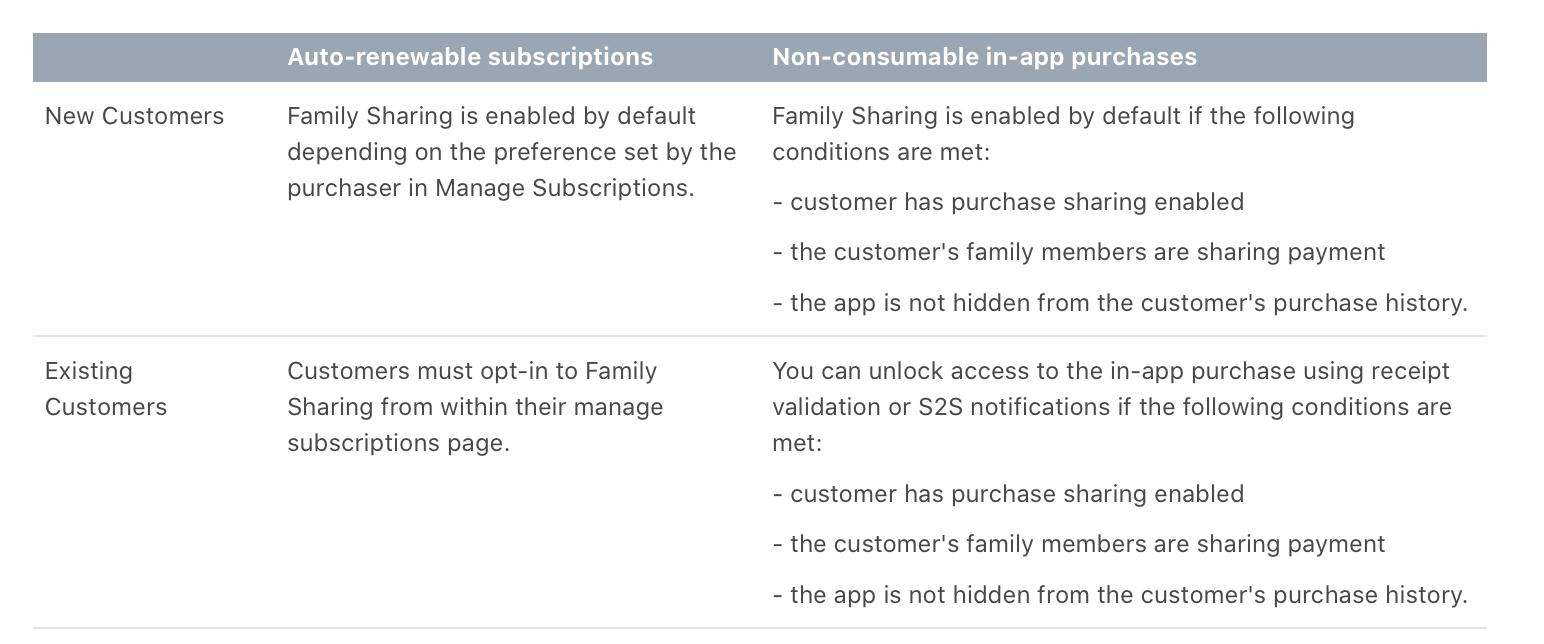
Once a developer turns Family Sharing on for their app, it cannot be turned off.
Inside my Tech Bag⇢
This is the first Twitch stream I’ve put on my YouTube channel. I’m not sure how often I will double-post things, but this video felt like a good one to share:
Connected #323: Artisanal Software Updates⇢
This week on Connected, Apple is handing out awards, Federico has a new iPhone charger on the way, Myke meant to try an app and Stephen tried reinstalling macOS. Oh, and Salesforce bought Slack.
On a very special Connected Pro, Federico talks about a big change in his household.
My thanks to our sponsors this week:
- Pingdom: Start monitoring your website performance and availability today, and get instant alerts when an outage occurs or a site transaction fails. Use offer code CONNECTED to get 30% off. Offer expires on January 31, 2021, and can be used only once.
- StoryWorth: Record your family stories. Get $10 off your first purchase.
Salesforce to Purchase Slack for $27.7 Billion⇢
I assume this means we’ll never see updated emoji or a native Mac app.
Liftoff #138: A Great Acronym, but it’s in Russian⇢
The world is mourning the uncontrolled collapse of the Arecibo observatory, even as China’s Chang’e-5 mission is underway to return lunar samples to Earth, which would be a first since the final Apollo mission. Also: an update on the SLS and Orion and a look at what’s going on at Roscosmos.
Lots of ups and downs this week.
My thanks to our sponsor for this episode:
AWS Adds Mac Instances, Powered by Intel Mac minis⇢
Jeff Barr, on the AWS News Blog:
Powered by Mac mini hardware and the AWS Nitro System, you can use Amazon EC2 Mac instances to build, test, package, and sign Xcode applications for the Apple platform including macOS, iOS, iPadOS, tvOS, watchOS, and Safari. The instances feature an 8th generation, 6-core Intel Core i7 (Coffee Lake) processor running at 3.2 GHz, with Turbo Boost up to 4.6 GHz. There’s 32 GiB of memory and access to other AWS services including Amazon Elastic Block Store (EBS), Amazon FSx for Windows File Server, Amazon Simple Storage Service (S3), AWS Systems Manager, and so forth.
Mac instances run macOS 10.14 (Mojave) and 10.15 (Catalina) and can be accessed via command line (SSH) or remote desktop (VNC). The AMIs (Amazon Machine Images) for EC2 Mac instances are EC2-optimized and include the AWS goodies that you would find on other AWS AMIs: An ENA driver, the AWS Command Line Interface (CLI), the CloudWatch Agent, CloudFormation Helper Scripts, support for AWS Systems Manager, and the ec2-user account. You can use these AMIs as-is, or you can install your own packages and create custom AMIs (the homebrew-aws repo contains the additional packages and documentation on how to do this).
Ungeniused #118: Black Friday⇢
This week on Ungeniused, we talk about the worst day of the year.
Kbase Article of the Week: SCSI Hard Disks: Mounting Without Restarting⇢
I want to mount Apple SCSI hard disks without restarting the system. Is there any way to do this from the System software or any of the included utilities? If not, can you suggest any other utilities that would enable mounting Apple SCSI drives without restarting?
Yes, there are several shareware utilities that allow mounting of SCSI volumes without a restart. They are: SCSI Probe by Robert Polic, SCSI Info by Bob Easterday, and SCSI Tool by Paul Mercer. SCSI Probe is available online.