
Apple CEO Tim Cook is being pressed for information on his collaboration with the Trump administration surrounding tariffs. In a letter sent today, Senator Elizabeth Warren said that Cook’s collaboration with Trump “creates the appearance of impropriety.” This comes after Warren and other senators questioned $1 million donations made by Cook and others to Trump’s inauguration fund in January.
“The circumstances surrounding Apple’s exemptions raise fresh concerns about influence-peddling by huge well-connected corporations, and their ability to gain special favors from President Trump,” Warren wrote.
posts
Connected 549: Lost Daddy Exclusivity⇢
Myke is back from paternity leave and has some hot takes on the last two months of tech news. He and Federico accidentally have the same surprise, while Stephen wonders what Beats could slap its logo on.
Memphis Residents Receiving Mailers Making False Claims About xAI’s Environmental Impact⇢
Kailynn Johnson at The Memphis Flyer:
The mail said the turbines are designed to protect the air with “air quality levels similar to those from a neighborhood gas station. It cited that the Environmental Protection Agency refers to facilities like the xAI plant as “minor contributors” to air quality.
While the group said there are only 15 turbines operating, [Representative Justin] Pearson said this is false.
“Thanks to the Southern Environmental Law Center (SELC), we know the truth – there are actually 35 gas turbines on site,” Pearson said. “The misinformation being sent to our neighbors conveniently leaves out the 20 additional gas turbines xAI failed to report.”
The Future of Tab Bars⇢
Ben McCarthy, writing about what they would like to see in the rumored iOS 19 redesign:
For a long while, I’ve felt that the design of iOS is too top heavy. While our phones seem to grow larger every year, our hands do not and so interface elements are pulled ever further out of reach. It’s a real micro-annoyance to have to shuffle your phone around in your hand to reach the top of the screen to activate a search bar, shuffle your phone back down so you can type comfortably and in doing so you accidentally touch part of the screen that deactivates the search field and you have to start again.
PC Connection’s Computer-Using Raccoons⇢
In the 1980s and 1990s, PC Connection built its brand on a campaign starring folksy small-town critters. They’ll still charm your socks off.
JUST LOOK AT THEM! HOLY MOLY:

Local Man Starts Substack, Creates AI Persona with ChatGPT to Help Run Company, Then Hits on That AI-Generated Person Once ‘She’ Generated Her Own Headshot⇢
That man is Henry Blodget.
Synology to Require Synology-Branded Drives in Some Products⇢
Kevin Purdy, writing at Ars Technica:
Popular NAS-maker Synology has confirmed and slightly clarified a policy that appeared on its German website earlier this week: Its “Plus” tier of devices, starting with the 2025 series, will require Synology-branded hard drives for full compatibility, at least at first.
“Synology-branded drives will be needed for use in the newly announced Plus series, with plans to update the Product Compatibility List as additional drives can be thoroughly vetted in Synology systems,” a Synology representative told Ars by email. “Extensive internal testing has shown that drives that follow a rigorous validation process when paired with Synology systems are at less risk of drive failure and ongoing compatibility issues.”
Corruption is Winning
On Friday’s episode of The Vergecast, there was an exchange that really caught my attention. David Pierce mentioned the photos of all the tech CEOs at Trump’s inauguration in January, to which Nilay Patel replied:
The thing that kills me at that is the expectation they had going into that photo was corruption. Right? Tim Cook is going to personally donate a million dollars to Trump’s library and that will take the DOJ case away from Apple. Naked corruption. That is a nakedly corrupt thought.
Sponsor: Simple Scan: Paper to PDF to Anywhere!⇢
Do you love the Apple Notes document scanner, but would you like more flexibility in sending the scans to email, messages, files, or other apps? Then Simple Scan is for you. Simple Scan is the quick, easy way to scan paper documents to optimized, searchable PDF documents (or images) and send them almost anywhere.
Features include:
- Same great scanning functionality as Apple Notes, but no need to clutter your notes data with one-off scans.
- Creates high-resolution multi-page PDFs from your paper documents.
- PDFs are searchable thanks to automatic Optical Character Recognition (OCR).
- Built for simplicity. Just scan and send – no document library, no overly complicated array of settings
- Send scans via email and messages. Or save to a file, or “Share” to send to other apps via the system share sheet.
- Set up custom destinations with pre-filled recipients for easy “Email to Myself” and other common uses
- Custom file destinations allow configuration of the file name and pre-selection of a destination folder to save the scan
- Save scans directly to Photos.
- Launches fast.
- Never any ads or tracking. Ever.
- Simple pricing. Choose a low-cost annual subscription or a one-time lifetime unlock!
Mac Power Users 793: Accurate, Not Boring⇢
On this feedback episode, David and I revisit iCloud.com access and Advanced Data Protection, both make confessions about recent setup changes, and answer a bunch of listener questions.
‘iOS Access for All’ Updated for iOS 18⇢
Shelly Brisbin has a new update out for her book:
I’m pleased to announced that iOS Access for All (iOS 18 edition) is available now. As usual, there is more information than ever before. The book is fully updated for iOS 18 and the new iPhones and iPads that support it. There will also a new book format available soon, for those who don’t need images.
iOS 18 marks some incremental, but welcome upgrades to accessibility features, and to iOS as a whole. It also brings Apple Intelligence to the latest generation of phones. It’s all included, along with coverage of a number of updates Apple has made to iOS since first releasing iOS 18 last fall.
Reminders for watchOS Deserves a More Useful Complication
As is annual tradition around here, I have a request of the Reminders team. This time, it’s about the watchOS version of the app.
Take a look at these watch faces:
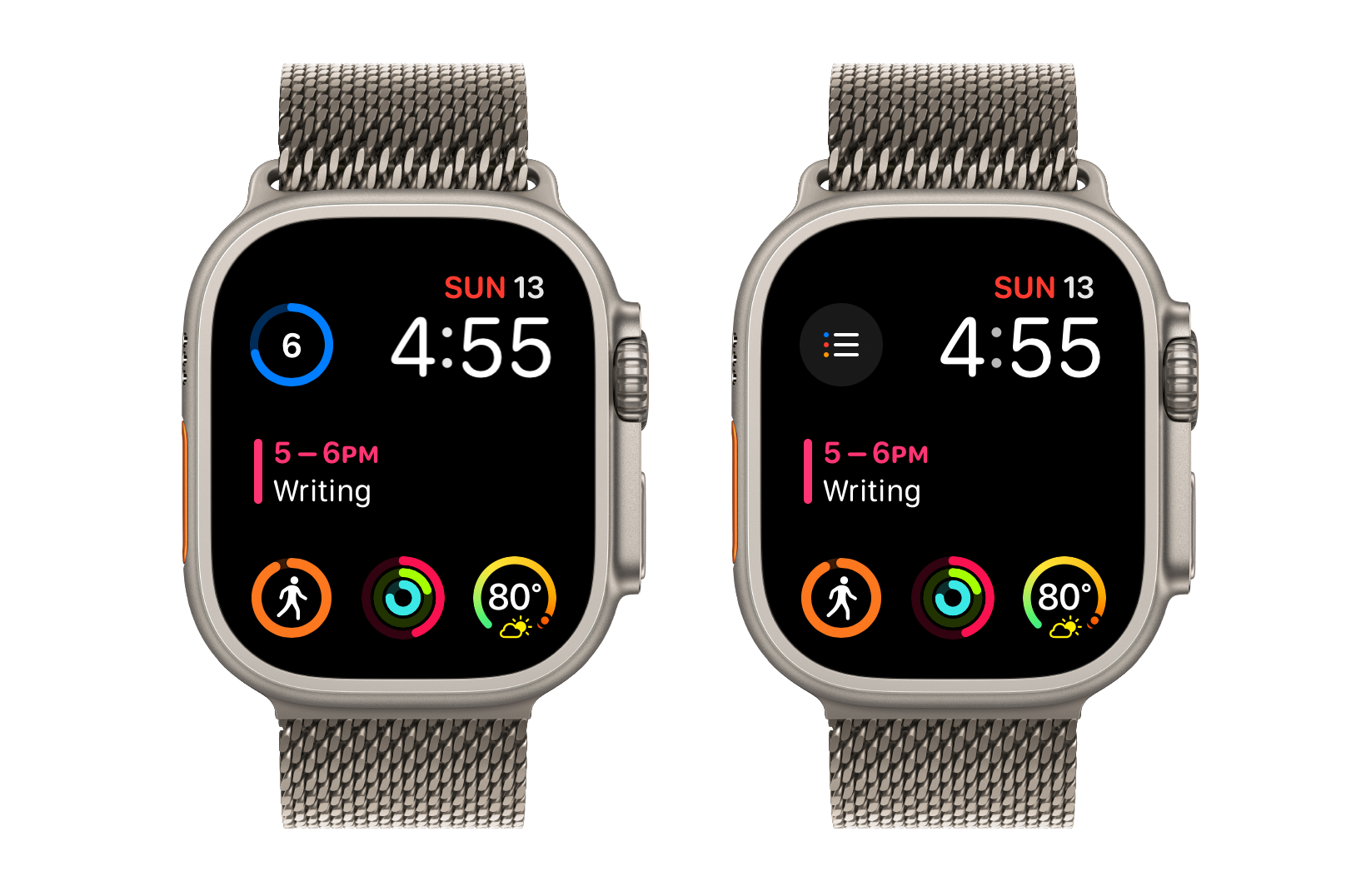
The example on the left includes the GoodTask complication; the one on the right is from Reminders itself. GoodTask’s is much more useful, as it lets me see how many more tasks I have due with a simple glance.