Terry Lucy, on Minimal Computing

On his blog:

I can’t bring myself to download and try new applications before I have mastered what came out of the factory.

[…]

I am sure there will come a time where I need to branch out and download more applications, but for now Chrome, Spotify, Skype, Dropbox, Twitter for Mac and Evernote are doing me just fine.

Terry has realized something great — the Mac comes with enough tools for just about anyone to start using it, right out of the box.
Continue reading ⇢

Welcome to 512 Pixels

I’d like to welcome you to 512 Pixels, my new home online.

I’m proud of what I accomplished at Forkbombr. But I felt now was the time to re-launch my writing, for many reasons.

So, why the name?

The original Macintosh’s screen was 512 pixels across, helping set the standard screen resolution of 72 DPI. The Mac’s GUI paved the way for computers and design as we know them today. Nothing has been untouched since 1984. I want to pay homage to that with my work.

Continue reading ⇢

Thoughts on Windows 8 Developer Preview 1

I’ve been playing with Windows 8 on an HP 6730b, and have collected some thoughts below:

  • While the Installer (at this point) looks like Windows 7, the Setup screens are all Metro. This means lots of solid green and thin text.
  • Setup is simple. It quickly joined my wireless network, which is unlike previous Windows versions.
  • You can create a Local account, or sign in with a Windows Live ID. Doing the latter allows Windows to sync preferences and other information across computers via the cloud. You can “upgrade” to using a Live ID at any time.
  • The new Start menu (interface?) is cool, but sort of overwhelming. I like the “Live Tiles” idea on Windows Phone 7, but the laptop shows so many of them it’s almost too much information.
  • This interface is also cluttered. AND WHY IS THERE SO MUCH GREEN?
  • Clicking “Desktop” from Start will launch … well … the Windows we’ve all come to know over the last few years. While it is probably critical that Microsoft doesn’t go all-Metro at once, it feels very jarring to move and back and forth between the interfaces. It seems that Windows 8 has dual personalities. One is wearing a tie, while the other is going batshit crazy from its first shot of heroin.
  • This leads to some duplication of services. For example, there’s a Metro-based Control Panel, and one in the Desktop environment.
  • Overall, it feels very fast. I’ve only had one crash in my few hours of testing.
  • I wonder how much Metro will be used by desktop and notebook users. My guess is that many will view it as most OS X users view Dashboard: helpful every once in a while, but mostly useless.
  • I really want to see this on a tablet.
  • It took several minutes of looking around to figure out how to shut down the computer.

Continue reading ⇢

On Bringing Metro UI to the Desktop

Brian Klug and Ryan Smith:

For a tablet-focused event I don’t think you will find much disagreement that Microsoft has hit the mark with Metro. Metro feels like it belongs when used with a tablet – it’s smooth, it’s easy to use, it’s gesture-driven, and it’s finger-friendly. Virtually everything Windows Phone 7 did well as a touch screen OS has been ported over to Metro and it shows.

The converse of that is that Metro feels awkward and out of place when used with a mouse and keyboard as a laptop/desktop. It fails to take advantage of the precision of the mouse or the fact that not everything needs to be in size 28 font when sitting down to use a computer. At this moment it feels like trying to use a tablet with a mouse and keyboard, which isn’t far off from what it really is in the first place.

Continue reading ⇢

Will a Tablet Hurt the Kindle Brand?

Iain Broome:

When the iPod was released in 2001, the market for mp3 players was relatively new. It was a huge success for lots of reasons, but one of them was its ability to do one thing well. Sure, it could do a handful of tasks, like hold your contacts or run basic games, but it was primarily an MP3 player. A brilliant MP3 player.

I think you can compare those first few iPod models with the first few Kindles. What the iPod did for music, the Kindle has done for books. It took an untapped market by the scruff of the neck and kicked it up the arse. Or ass, if you prefer. Instead of producing a catch-all media player, Amazon focused on books and built an e-reader that was better than anything that had gone before.

Continue reading ⇢

Three Years

Oldbombr

Three years ago, I launched Forkbombr. Thankfully, I’ve dropped the upper-case B in the name since.

In the time since launch, I’ve published 2,462 posts. As plain text files, that’s right at 3 MB of writing. It’s weird to think about three years of work that way.

Over these last three years, Forkbombr has proven to be more successful than I had ever dreamed it would be. It is still super humbling every time I get a reader email or someone new becomes an RSS subscriber.

Continue reading ⇢

Apple Online Stores in Indonesia and Vietnam Decommissioned

From a new service article:

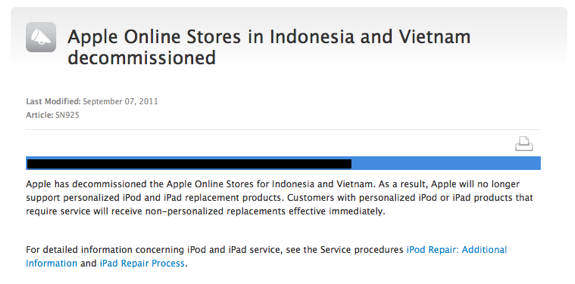
Apple has decommissioned the Apple Online Stores for Indonesia and Vietnam. As a result, Apple will no longer support personalized iPod and iPad replacement products. Customers with personalized iPod or iPad products that require service will receive non-personalized replacements effective immediately.

Screen Shot 2011 09 09 at 4 45 21 PMThanks, Nameless Source!

Continue reading ⇢

YahAOL

Bloomberg:

AOL Inc. Chief Executive Officer Tim Armstrong is talking with advisers to Yahoo! Inc. to gauge its interest in combining the companies after the ouster of CEO Carol Bartz, according to two people familiar with the matter.

I can’t wait to see what quality products will be brought to fruition from this.

Continue reading ⇢

Apple Launches Charitable Matching Program for Employees

Tim Cook, in an email posted by Mac Rumors:

I am very happy to announce that we are kicking off a matching gift program for charitable donations. We are all really inspired by the generosity of our co-workers who give back to the community and this program is going to help that individual giving go even farther.

Starting September 15, when you give money to a non-profit 501(c)(3) organization, Apple will match your gift dollar-for-dollar, up to $10,000 annually. This program will be for full-time employees in the US at first, and we’ll expand it to other parts of the world over time.

Continue reading ⇢