
One of the most satisfying things about having a flip phone back in the day was being able to snap it shut when you were done with a call. You didn’t even have to be hanging up in anger — it was just a cool move.1
One aspect of the iPhone Duo that I am enjoying is akin to this. If I’m working on the inside screen, I want to shut the phone and have it lock, ready to go back in my pocket. This move says, “I’ve done the thing I needed to do, and now it’s time to move on.”
Sadly, the iPhone Duo doesn’t agree; shutting the phone simply transfers whatever is on the inside display to the outer one.
Even after a week, I have not gotten used to this, and have found myself accidentally interacting with the outside display, either as the phone was folding or as I was putting it in my pocket.
Thankfully, Stephen Robles has created a Shortcut that makes the Duo work exactly how my brain says it should:
- If the inner display is on the Home Screen, lock the phone when it closes.
- If the inner display has an app on it, transfer the app to the outer screen and keep the phone unlocked.
The whole Shortcut is really simple:
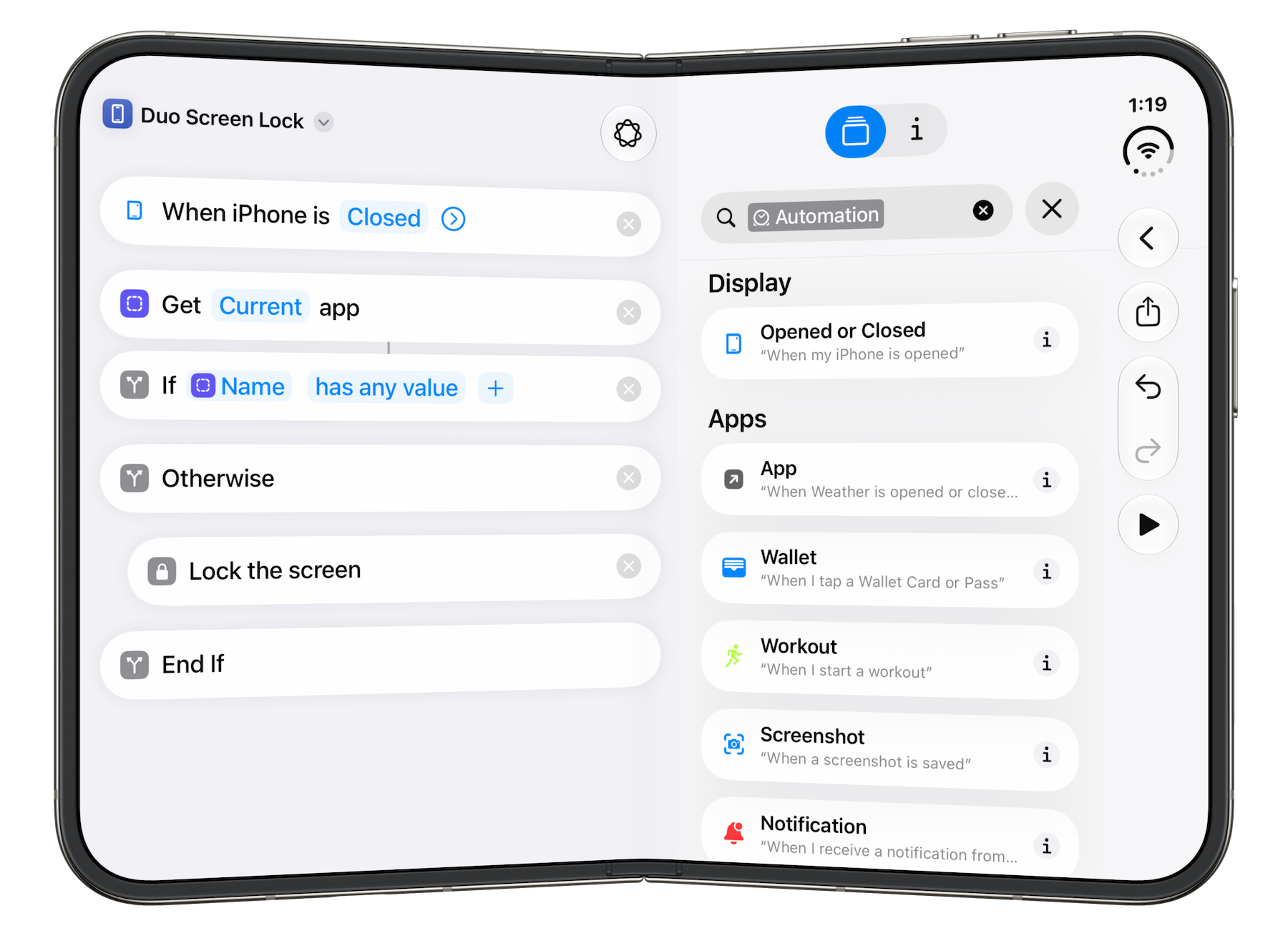
You can download it from Stephen here.
-
This is what passed for rizz in 2005. ↩︎