On That ARM Chip in the iMac Pro⇢

Eric Slivka at MacRumors has rounded up a weekend of tweets from Steve Troughton-Smith, Guilherme Rambo and Jonathan Levin concerning the iMac Pro:

…the upcoming iMac Pro appears to feature an A10 Fusion chip with 512 MB of RAM. While the full functionality of the A10 chip isn’t yet known, it appears the chip will enable support for “Hey Siri” functionality, potentially even when the iMac Pro is turned off.

Continue reading ⇢

HomePod Delayed Until 2018

Apple, in a statement today:

We can’t wait for people to experience HomePod, Apple’s breakthrough wireless speaker for the home, but we need a little more time before it’s ready for our customers. We’ll start shipping in the US, UK and Australia in early 2018.

At WWDC, Apple said that its home speaker would be out “by the end of the year.”

No word on the iMac Pro, but Apple’s website still says “Available December” for that product.

Continue reading ⇢

Apple Begins High Sierra Automatic Rollout

I have heard rumblings that Apple was considering making a bigger push for macOS users to upgrade to High Sierra. At the time, I was very unsure what that meant.

Forcing updates for patch releases, such as 10.13.0 to 10.13.1 is one thing; moving users from Sierra to High Sierra with little input is another thing altogether.

I’ve had this rattling around in the back of my mind, then I spotted this TidBITS article by Adam Engst:

Continue reading ⇢

‘Best Laptop Ever Made’⇢

Marco Arment:

Apple has made many great laptops, but the 15-inch Retina MacBook Pro (2012–2015) is the epitome of usefulness, elegance, practicality, and power for an overall package that still hasn’t been (and may never be) surpassed.

Like me, Marco formerly had a Thunderbolt 3 MacBook Pro and sold it out of frustration. He picked up a 2015 15-inch model, while I returned to a Late 2012 13-inch machine. As he writes, this generation of MacBook Pro is one for the ages:

Continue reading ⇢

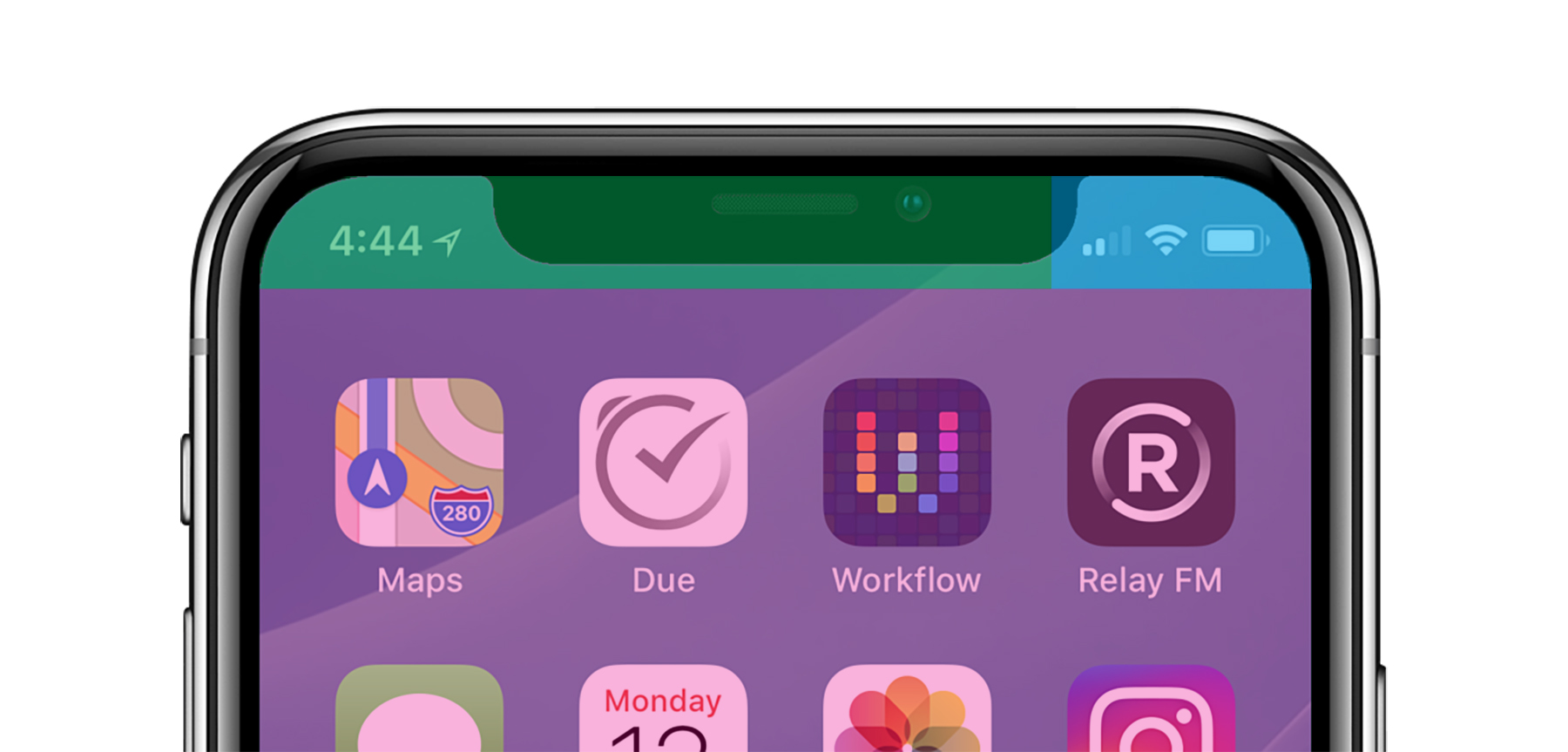
Control Center is in the Wrong Place on the iPhone X

I am convinced that Control Center is in the wrong place on the iPhone X. Here’s a mockup of my iPhone. The touch targets are as follows:

  • Green: Cover Sheet
  • Blue: Control Center
  • Pink: Spotlight

I understand conceptually why Control Center is where it is. Pulling down on the cell signal, Wi-Fi and battery indicators open the controls for those things. I actually like that linking of those two bits of UI.

Continue reading ⇢

Jony Ive, on Apple Park and the iPhone X’s Future⇢

There’s a bunch of nice details about Apple’s new HQ in this in Wallpaper magazine interview, but this bit about the iPhone X jumped out at me:

I wonder, then, if Ive misses the physical click and scroll of the first iPods, that fixed mono-functionality, the obvious working parts, the elegance of the design solution. But I’ve got him all wrong. ‘I’ve always been fascinated by these products that are more general purpose. What I think is remarkable about the iPhone X is that its functionality is so determined by software. And because of the fluid nature of software, this product is going to change and evolve. In 12 months’ time, this object will be able to do things that it can’t now. I think that is extraordinary. I think we will look back on it and see it as a very significant point in terms of the products we have been developing.

Continue reading ⇢

Intel to use Integrated AMD Graphics on Some Chipsets⇢

Peter Bright at Ars, writing about the upcoming 8th-generation H-series chips:

The chip package will contain multiple pieces of silicon: an Intel CPU, a custom-built AMD Radeon GPU, and stacked second-generation High Bandwidth Memory (HBM2). Connecting the GPU and its memory is Intel’s new “Embedded Multi-Die Interconnect Bridge” (EMIB), a high-speed, short-range interconnect that Intel has designed to join different chips within a single package. Intel says that EMIB enables the creation of faster, thinner packages, enabling the multi-chip module to fit into slimline laptop form factors.

Continue reading ⇢

Austin Mann Takes the iPhone X to Guatemala⇢

Austin Mann:

I really like the iPhone X - it’s fresh, it’s fast, it’s beautiful and it’s really fun to shoot with. I’m still adapting to its new interface but the size is right, screen is great for sharing photos on and the improvements on the telephoto lens make it a no-brainer.

For me, I think it’s safe to say this upgrade to iPhone X is most exciting phone upgrade I’ve experienced since switching from my Blackberry 7230 to the original iPhone in 2007.

Continue reading ⇢

Apple Reports Fourth Quarter Results

Apple:

Apple today announced financial results for its fiscal 2017 fourth quarter ended September 30, 2017. The Company posted quarterly revenue of $52.6 billion, an increase of 12 percent from the year-ago quarter, and quarterly earnings per diluted share of $2.07, up 24 percent. International sales accounted for 62 percent of the quarter’s revenue.

“We’re happy to report a very strong finish to a great fiscal 2017, with record fourth quarter revenue, year-over-year growth for all our product categories, and our best quarter ever for Services,” said Tim Cook, Apple’s CEO. “With fantastic new products including iPhone 8 and iPhone 8 Plus, Apple Watch Series 3, and Apple TV 4K joining our product lineup, we’re looking forward to a great holiday season, and with the launch of iPhone X getting underway right now, we couldn’t be more excited as we begin to deliver our vision for the future with this stunning device.”

Continue reading ⇢

macOS High Sierra 10.13.1

There’s a new version of macOS to go along with iOS 11.1 and watchOS 4.1. The update:

  • Adds support for 70 new emoji, including food types, animals, mythical creatures, clothing options, more expressive smiley faces, gender-neutral characters and more.
  • Fixes a bug where Bluetooth appeared as unavailable during Apple Pay transactions.
  • Improves the reliability of Microsoft Exchange message sync in Mail.
  • Fixes an issue where Spotlight does not accept keyboard input.
  • Improves the reliability of SMB printing.
  • Makes Touch ID preferences accessible while logged in as a mobile account on MacBook Pro with Touch Bar.
  • Adds support for unlocking a FileVault-encrypted APFS volume using a recovery keychain file. For details, enter man diskutil in Terminal.

Continue reading ⇢