Neo Network Utility⇢

The folks at DEVONtechnologies have a new free app out for Mac users, and it’s one that may seem familiar in some great ways:

You want to learn more about your Mac’s current network connection or test if a remote server is still alive or already swimming belly-up? Your connection to a server is slow and you want to find out more about what detours your data packages take on their way to their destination? Or you’re on the hotel Wi-Fi and plan to flip out on the poor network speed based on proper empirical data?

You could use the Terminal for all of this, of course, and type ping or traceroute. But there’s a more Mac-like way: Meet our new Neo Network Utility 1.0. It got you covered with a full range of networking tools for retrieving information about your network adapter and diagnosing common network problems. Netstat, Ping, Lookup, Traceroute, Whois, Finger, Port Scan, and Network Speed, they’re all here in a nice and clean user interface.
Continue reading ⇢

Sofa Launches on Vision Pro and Mac⇢

Shawn Hickman’s excellent app Sofa has arrived on two more platforms:

I’m happy to announce that Sofa is now available on the Mac and Vision Pro!

I had originally planned to have Sofa ready for Vision Pro when it launched in February, but I was deep in the middle of working on Sofa 4.0 (which launched in April). During May, I was focused mostly on 4.0 bug fixes and prepping for my trip to WWDC in early June.

Up to this point, you’ve technically be able use Sofa’s iPad app on the Mac and Vision Pro, but this new version of Sofa is built specifically for the Mac and Vision Pro. There is still a lot more work to be done for these apps, especially the Mac, but this is a good improvement over the existing iPad versions.

Continue reading ⇢

Another Way to Move Reminders⇢

Dr. Drang, bouncing off my recent post on Reminders:

If you have the Move tool in your Mail toolbar, you can select all the messages you want to move, click on the Move tool, and select the appropriate folder from the drop-down menu. Because the menu is long, this may seem no easier than dragging and dropping, but it is. The key is that once the drop-down menu is active, you can start typing the name of the folder and it will be selected. Boom.

Reminders could add this same Move tool to its toolbar. I guess Reminders doesn’t have a true toolbar because there’s no way to customize it, but it does have a small set of tools up at the top of the window and there’s plenty of room up there for a Move tool.

Continue reading ⇢

I’m Just a Simple Macintosh User, Asking a Bazillion Dollar Company for a Better Way To Move Tasks Between Lists in Reminders

Every summer, I take some time with Apple’s updated stock apps. Many of them are quite good, and meet the needs for the vast majority of users.

I fully understand that sometimes you and I are not the vast majority of users, and that third-party apps can often better fit our needs.

Every year, I feel the call of Reminders. It looks nice, is integrated with the system in a bunch of fun ways, and unlike my normal app Todoist, is easy to use with Siri.

Continue reading ⇢

‘The Unbearable Sorrow of Apple Weather’⇢

Dr. Drang:

Yesterday morning, I got obsessed with the 10-day forecast section of the Apple Weather iOS app—specifically, how it presents each day’s temperature range. I still don’t understand the logic behind it.

The blog post is impressive, but the footnote contains a straight-up murder:

Several readers on Mastodon told me the alignment was fine on their phones and suggested Larger Text/Dynamic Type as the reason the charts on my phone are messed up. They were absolutely right. I bumped up my text size so long ago I’d forgotten all about it, but I should’ve known to look into that before posting. Interestingly, moving my text size down just one tick got all the bar ends to match up. The colors still seem a little off to me, but I’ll need to zoom in and look more carefully.

Of course, this still doesn’t answer the question of how the app is deciding where to put the bars and how to adjust the colors when the text size is large. Nor does it excuse Apple’s Weather team for failing to get the alignment right for all the text sizes they allow. Do they just assume the system will fix everything, or do they throw up their hands and say we far-sighted oldsters can just deal with it?

Continue reading ⇢

2024 ADA Winners Announced⇢

Apple Newsroom:

“It’s inspiring to see how developers are using our technology to create exceptional apps and games that enhance the lives of users,” said Susan Prescott, Apple’s vice president of Worldwide Developer Relations. “This year’s winners have demonstrated how apps can create powerful and moving experiences — and we’re excited to celebrate their hard work and ingenuity at WWDC this year.”

Seven different categories recognize one app and game each for delight and fun, inclusivity, innovation, interaction, social impact, visuals and graphics, and a new spatial computing category. Winners were chosen from 42 finalists.

Continue reading ⇢

Bartender Sold⇢

Ben Surtees, the original developer behind the excellent macOS utility Bartender, concerning the recent sale of the app:

After the release of Bartender 5, I came to the realization that supporting all the users and maintaining the app at the high standard I expect and you deserve was too much for one person. It required a dedicated team that could provide continuous support, innovate, and keep up with the fast-evolving macOS landscape. This realization led me to make a difficult decision.

Three months ago, I sold Bartender to Applause, a company with the resources and expertise to take the app to new heights. Applause shares my vision for Bartender and is committed to maintaining its core values while bringing in new features and improvements. I truly believe they are the right team to continue the journey and ensure Bartender remains a valuable tool for all of you.

I understand that the transition hasn’t been entirely smooth. Recently, there was a change in the signing certificate for the app, and unfortunately, this change wasn’t communicated properly to you, our loyal users. I apologize for any confusion or concern this may have caused. Please rest assured that Bartender is signed by a valid Apple ID developer and notarized by Apple, which verifies the app to ensure it is free from malware.

Continue reading ⇢

How Craft Built Its visionOS App⇢

Kristof Gruber, Product Engineer at Craft:

Entering a new platform only happens a few times in a developers life. It is a rare and delicious event, when you step in the realm of something genuinely new. If you are fast, you can feel yourself like the explorers in old times. Everything is new, and flexible; the new platform doesn’t yet have established patterns, which gives you plenty of space to experiment.

We, at Craft, already had this chance once, when we started using Mac Catalyst, a wonderful technology, which allowed us to bring our iOS app to the Mac. Since then, we are using a common code base for building all our apps on all the platforms we support: iOS, iPadOS, and macOS. With the introduction of visionOS, we could build on these solid foundations.

Continue reading ⇢

Logitech’s Mouse Software Now Includes ChatGPT Support, Adds Janky ‘ai_overlay_tmp’ Directory to Users’ Home Folders

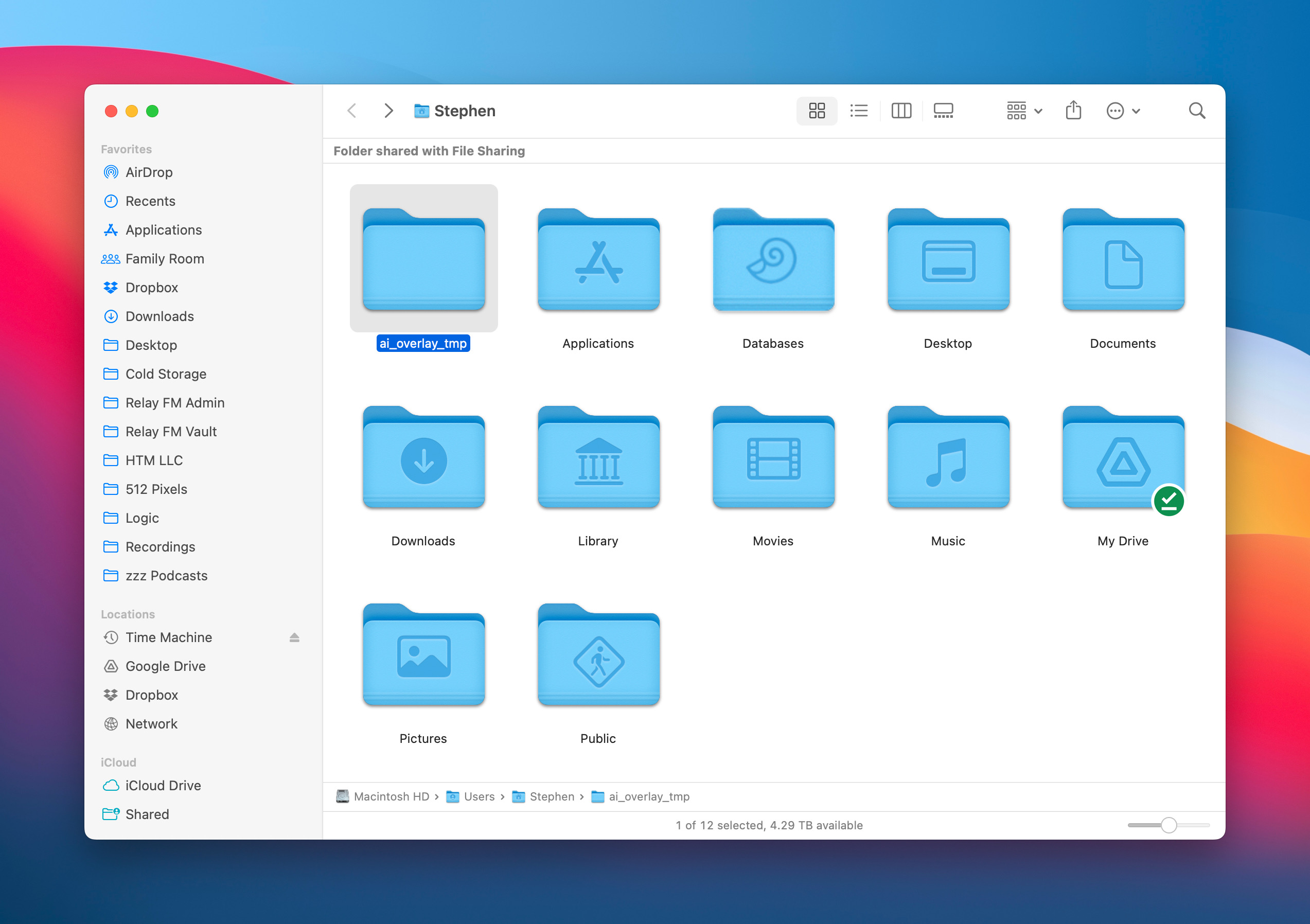
I recently noticed a new folder in the root level of my Home directory, named ai_overlay_tmp:

ai_overlay_tmp

In preparation for a Mac Power Users episode, I’ve been playing with a bunch of AI software, and I assumed something I downloaded generated this folder. I deleted it, just to be frustrated when the folder reappeared on its own.

Adding a new folder to the Home directory is a Cardinal Sin of Mac Programming, so I was on a mission to root out the cause. After some searching online, it seems that this folder was generated by Logi Options+, the software that came with my mouse, the Logitech MX Master 3S. 1

Continue reading ⇢

Widgetsmith 6.2⇢

Earlier today, David and I shipped version 6.2 of Widgetsmith. This release is for both iOS and visionOS, and packs some cool goodies:

Widgetsmith 6.2 brings a brand-new widget type: Background Sounds!

Beyond the standard White and Brown Noises, this release includes sounds from nature, including various intensities of rain, forest sounds for both daytime and nighttime and waves at the beach. These sounds are high quality and uncompressed, creating seamless loops for a rich soundscape. Create an immersive ambiance right from your home screen with the following sounds. All users have access to White Noise and Stream.

Continue reading ⇢