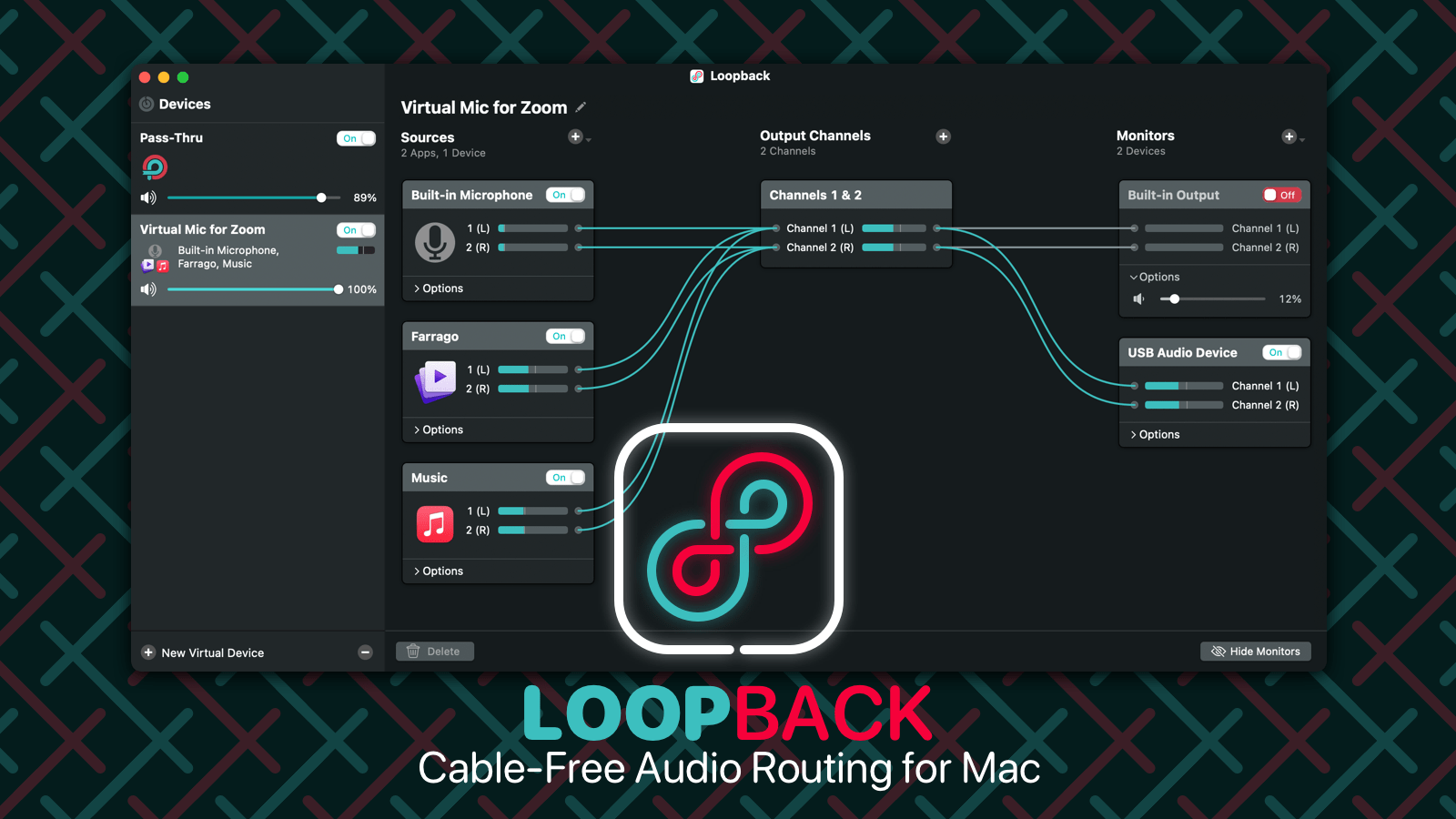
With Loopback, it’s trivial to pass audio from one application to another on your Mac. Need to play a recording into Zoom? Add sound effects into a podcast? Include music in a streamed event? Loopback gives you the power to do just that with just a few clicks. It’s like a high-end mixing board, right inside your Mac.
Loopback creates virtual audio devices, which merge audio from multiple applications and input devices into a single source. These virtual devices appear on your Mac just like a real, physical device, and can be selected for use in any audio app on your Mac. It’s incredibly powerful.
Fortunately, it’s also incredibly easy to use. Loopback’s intuitive wire-based setup makes it easy and obvious to understand exactly how your virtual devices work. Configure, adjust, and experiment, just by clicking and dragging.
Whether you’re a podcaster, a live performer, a tabletop gamer, or even just someone stuck on too many Zoom calls, Loopback can help you.
Check out Loopback today, with a free trial. Through October 15, 512 Pixels readers can save 21% on Loopback (or any of our other fine products) with coupon code PIXELS21.
iOS and iPadOS 15 have arrived, bringing new features to Apple’s mobile devices, including Focus modes, Live Text, new Home screen widgets, Safari extensions and a lot more. David and Stephen discuss their experiences with the beta and outline what’s best in this year’s upgrade.
My thanks to our sponsors:
1Password: Have you ever forgotten a password? You don’t have to worry about that anymore.
Electric: Stop stressing over scattered devices. Get a free pair of Beats Solo3 Wireless Headphones when you schedule a meeting.
Pingdom: Start monitoring your website performance and availability today, and get instant alerts when an outage occurs or a site transaction fails. Use offer code MPU to get 30% off. Offer expires on January 31, 2022, and can be used only once.
Zocdoc: Find the right doctor, right now with Zocdoc. Sign up for free.
Apple has identified an issue where Unlock with Apple Watch may not work with iPhone 13 devices. You might see “Unable to Communicate with Apple Watch” if you try to unlock your iPhone while wearing a face mask, or you might not be able to set up Unlock with Apple Watch.
This issue will be fixed in an upcoming software update. Until the update is available, you can turn off Unlock with Apple Watch and use your passcode to unlock your iPhone 13.
In my series 2001 Revisited, I’m covering Apple’s major announcements from 20 years ago. On September 25, 2001, the company announced the first major update to Mac OS X, and it shipped just four days later.1
Dubbed “Mac OS X v10.1” and code-named “Puma,” this release looked an awful lot like the original version, but brought a lot of refinement and improvements under its very Aqua hood:
Puma was announced by Steve Jobs at Seybold 2001, just two weeks after the events of 9/11, something mentioned at the start of the event. Apparently, Jobs was scheduled to be in Paris and was going to appear on video for the conference, but ended up giving his keynote in person.
Introduction
Jobs opened his keynote saying that Mac OS X was the most important thing going on Apple, and was the first big overhaul of the company’s operating system since the original Macintosh in 1984:
“What we have done is with Mac OS X was what everyone said was impossible. We have married the power and openness of Unix — all open-source — with the elegance and simplicity of the Macintosh and the Macintosh’s extremely powerful and broad applications platform — tens of thousands of applications. We have married these two things together; no one thought it was possible, even some folks at Apple didn’t think it was possible in the first few years, but we’ve managed to do it. And it’s great.
What’s resulted has been the platform we’re going to build on for the next 15-20 years.
Of course, at this point, Mac OS X was still very young. The first release had been out a mere six months, and there was work to do.
Jobs said that the software team didn’t take a vacation after OS X shipped, but kept working to improve the operating system. Four point updates had been released over the Internet, but 10.1 was something much bigger.
Features
Phil Schiller came out to discuss Mac OS X 10.1. He reiterated that Mac OS X was Apple’s platform for the future, and that the company’s embrace of open standards and the Digital Hub were both critical to this future — as were things like the Mac’s graphics and Internet capabilities.
The first feature Schiller spoke about was speed, which is one of the biggest knocks against the original version of Mac OS X. He said that the company had been working on this at every level of the operating system. Here are some stats rattled off in the presentation:
Application launching: 2-3 times faster
Drop-down menus appeared on screen 5 times faster
Resizing windows: 5-10 times faster
Here’s John Siracusa on that last one, which was one of the places where Mac OS X 10.0 often felt the slowest:
Since the release of 10.0, almost every Apple presentation that has mentioned Mac OS X has talked about the need for performance improvements, and has specifically mentioned window resizing as a bullet point, right alongside better hardware support and the need for native applications. It boggles my mind that something as mundane as window resizing was allowed to ship in 10.0 in such a horrendous state that it garnered special mention in every significant review of the OS X—including Apple’s!
The worst window resize performance in 10.0.x was provided by none other than the Finder itself. List view windows, in particular, were so unresponsive as to be nearly useless. Resizing a list view Finder window was one of the first things I tried in 10.1.
I was overjoyed when I saw how responsive it was, even on the G3/400. It’s still nowhere near as fast as outline resizing (in Mac OS 9 or X), but the performance in 10.0.x was so bad that anything close to acceptable performance feels super-fast in 10.1.
Of course, that feeling wears off eventually. But the 10.1 performance is good enough to make list view Finder windows useful again, and that’s something, at least. The resize performance in all the other Finder window views is also improved. The only remaining problem with Finder window resizing is a slight pause before there’s any response (especially on slower systems).
Schiller said the most requested feature had been the ability to move the Dock to the left or right side of the display, unlocking the ability to put the Dock in the correct place, along the right side of the screen.2
Dock icons gained custom contextual commands. For example, a user could control iTunes playback from its icon. This feature is alive and well today.
10.1 also introduced system status icons in the menu bar, making it easy to review things like WiFi network connections, battery life and more. This was a far cry from the menu bar system we have today, but it was a nice way to bring some of the old Control Strip magic to OS X.
Beyond that, System Preferences had been overhauled, file extension support for sharing files had been broadened3 and the open-source components under the hood had all been updated.
The graphics system underneath Aqua had been upgraded, with OpenGL becoming faster and USB printer setup becoming automatic, complete with broad laser printer support.
On the Digital Hub front, iMovie 2 was being bundled with OS X 10.1, and iDVD 2 was announced for an October launch. CD and DVD burning within Finder and iTunes was made much easier with Puma as well. To round this out, DVD Player was introduced, turning the Mac into a DVD player.
AppleScript enjoyed stage time, with Sal Soghoian leading the introduction of AppleScript Studio, which allowed users to explore the language and what it could do.
Pricing
For users hopping aboard the Mac OS X train for the first time, Puma cost $129, the same as the original version. However, for customers who had paid for Mac OS X, Apple charged just $19.95 for the upgrade … at least on paper.
Mac OS X 10.1 was released on September 29th, 2001, but that date depends on your definition of “released.” Update CDs were handed out for free after Apple’s keynote speech at the Seybold publishing conference in San Francisco. People who did not attend Seybold have several ways to get the update. Starting on the 25th, free update CDs are being handed out at Apple stores and some other retail outlets. This free update does not include the developer tools, but those can be downloaded by all ADC online members (free registration required) from Apple’s web site. Finally, owners of Mac OS X 10.0 can order a full update containing a Mac OS 9.2.1 CD, a Mac OS X 10.1 update CD, and a developer tools CD through Apple’s Mac OS X Up-to-Date program at a cost of $19.95 (plus state tax). The 10.1 update is not available for free download.
So, like I said, “released on September 29th,” right? Nothing’s ever simple with Apple these days, it seems. Nevertheless, you can be sure that the 10.1 update, repeatedly called “a free update” by Apple, is finding its way into the hands of Mac OS X users everywhere, despite the distribution and pricing confusion.
Legacy
I’ve heard Puma called the “Apology Release,” and surely the price and features combine to back that up. The truth is that at its release, Mac OS X was still pretty rough around the edges. Puma didn’t smooth them all out, but it shaved down the worst offenders.
However, even that wasn’t enough to move some of the Mac faithful away from the classic Mac OS. Here’s how Siracusa left things:
I wrote at the start of this article that I want to believe in Mac OS X. I want to believe that it will replace Mac OS 9 in a way that improves upon every aspect of the classic Mac OS user experience. Unfortunately, although this may still come to pass, Mac OS X 10.1 is not that version of Mac OS.
But 10.1 improves on 10.0.x in many important ways. Overall system performance shows the biggest improvement, but it is not as drastic as some reports may lead you to believe. Other areas have stagnated. The user interface has not made significant strides since 10.0.x. Many annoying bugs remain, and many features have yet to be implemented.
Should you purchase Mac OS X 10.1? If you already use and enjoy Mac OS X 10.0, you should run out and pick up a free 10.1 upgrade CD at your local retailer as soon as possible. If you tried 10.0.x and found it somewhat lacking, I recommend at least giving 10.1 a try to see if the improvements are enough to push you over the edge. If you are waiting for the point of no return, where Mac OS X is a complete no-brainer upgrade from Mac OS 9, you’ll have to wait a little longer.
Apple’s new version of the OS, Mac OS X 10.1, is what we’ve been waiting for. With improved reliability, dramatic speed boosts, many interface improvements, and a clutch of native software, this release is the first version of OS X that’s truly ready for general use.
Although Mac OS X is still not a feature-for-feature match for Mac OS 9, it’s no longer a step backward (see “Are You Ready for OS X?” June 2001). This version combines much of OS 9’s functionality with a collection of improvements that make upgrading to OS X a serious possibility for even dyed-in-the-wool devotees of the classic Mac OS.
In short, Puma was a big upgrade to the original version of Mac OS X, and while the platform still had a long way to go, 10.1 was a huge step in the right direction.
In our current world of “Announce-at-WWDC-then-Ship-in-the-Fall” release cycles, this blows my mind a little, but the Mac was a much smaller and simpler platform two decades ago. And as discussed later on in the article, you’ll see that even the release date of this update is a little hard to pin down. ↩︎
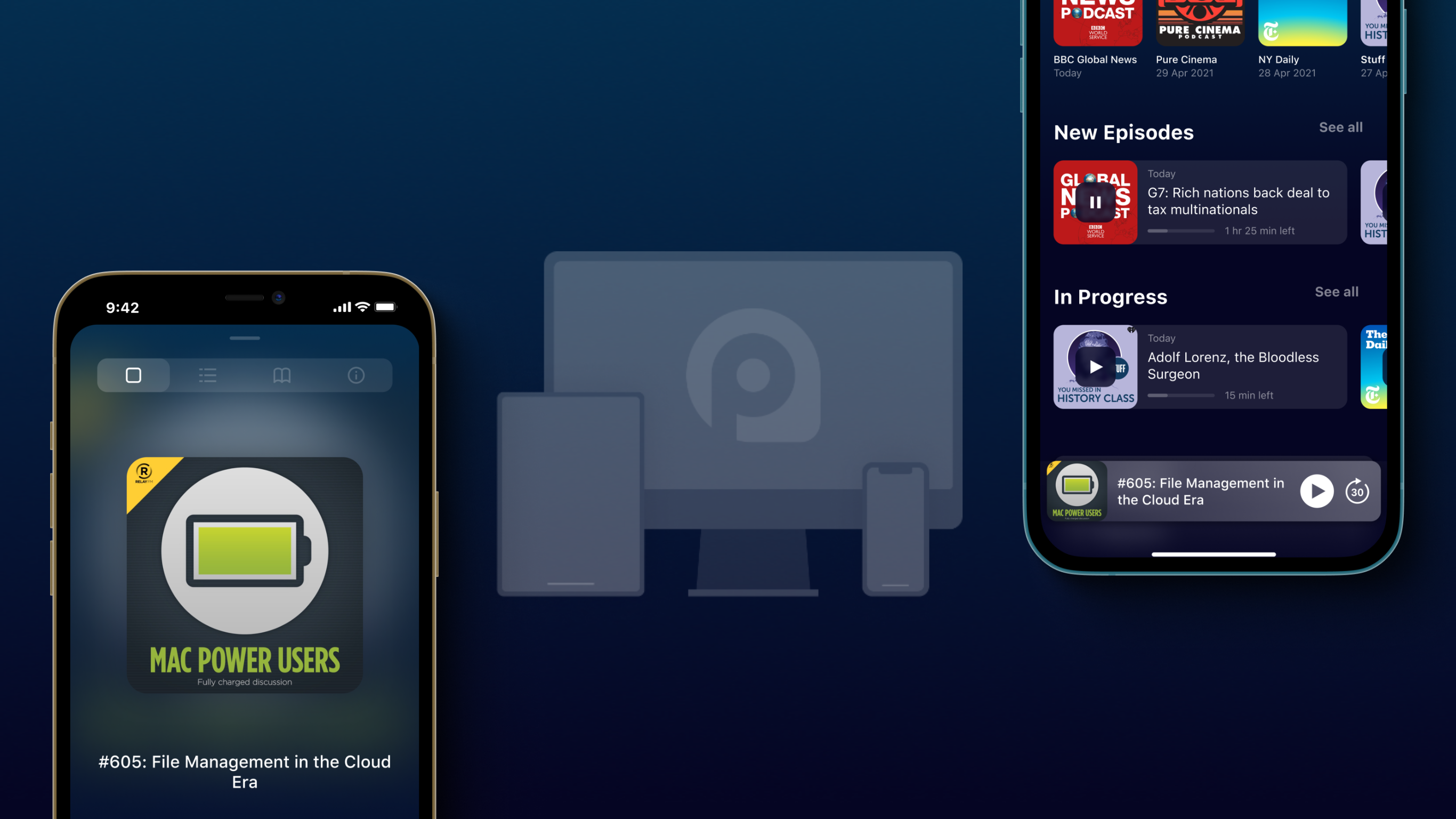
My thanks to Podapp for sponsoring 512 Pixels this week. It is a podcast player that makes listening to podcasts better. It’s coming later this year to iOS, iPadOS, and macOS. Be the first to try it.
Adam Savage and Fon Davis have a video up, looking through the late Grant Imahara’s workshop. I didn’t expect to feel this sad about someone I watched on TV for years, but here we are.
iOS and iPadOS 15 are out, as are reviews for the new iPhones and iPads. This week, Federico tells Stephen and Myke what the new iPad mini is like and what Safari extensions they should check out. Mood boards are also created.
On Connected Pro, Myke and I update Ticci on our Android usage, and he shares about a new problem in his life.
My thanks to our sponsors:
Pingdom: Start monitoring your website performance and availability today, and get instant alerts when an outage occurs or a site transaction fails. Use offer code CONNECTED to get 30% off. Offer expires on January 31, 2022, and can be used only once.
iPod (with Dock Connector) models come with a Dock Connector cover plug.
You insert the cover plug into iPod’s Dock Connector port on the bottom of iPod. This plug protects the connector, and keeps foreign matter out of the opening.
To put iPod in its dock, or to connect the Dock Connector to FireWire cable, remove the plug. iPod will not fit into its dock when the plug is installed.
This week on Liftoff, Jason and I talk through recent NASA reports on its work with AR, VR and how people get sleepy while in a self-driving car. We then get into the breaking news of NASA’s two new mission directorates.
My thanks to our sponsors:
LinkedIn Jobs: Post a job for free by visiting this link.
Privacy: Smarter payments. Get $5 to spend on your first purchase.
Amazon has updated its Paperwhite reader. The new version comes with a larger screen that includes more even, warmer light and USB-C for charging, which is something I wish my Kindle Oasis1 had. The ad-supported version is $139, a $10 increase over the last model. There is a $189 version as well with 32 GB of storage, wireless charging and an auto-dimming screen. If you’re in the market for a Kindle, this looks like a great option.
Podcasts are the future of entertainment and education. Now a fifteen-year-old medium, podcasting has finally realized its full potential — enabling creators to share knowledge independently and own the rights to that content. Listeners have unprecedented access to high-quality, free shows about virtually any interest.
As podcasting has grown, some have foregone user experience and creator freedoms in an attempt to rule podcasting and lock users into a sandbox, moving away from podcasting’s open roots. Podapp is designed to stop this shift.
Podapp is a new podcatcher for iOS, iPadOS, and macOS that respects podcasting’s origins and focuses on new ways to listen. After almost five years of work and it’s launching later this year. Follow along on Twitter for updates and join the beta list to be one of the first to try it.

 To see a lot more of Mac OS X 10.1,