
My thanks to TextSniper for sponsoring 512 Pixels this week. TextSniper is a Mac OCR app that can extract text anywhere on your Mac’s screen and automatically save it to your clipboard so that you can paste it into a live document or anywhere you need it.
512 Pixels
My First Kickstarter: The 2022 Apple Hardware Calendar⇢
Over the last few weeks, I’ve been putting together something I am really, really proud of: The 2022 Apple Hardware Calendar.
The design of the months is really what has me excited. Instead of the usual slew of holidays, this calendar marks some important dates in Apple’s hardware history:
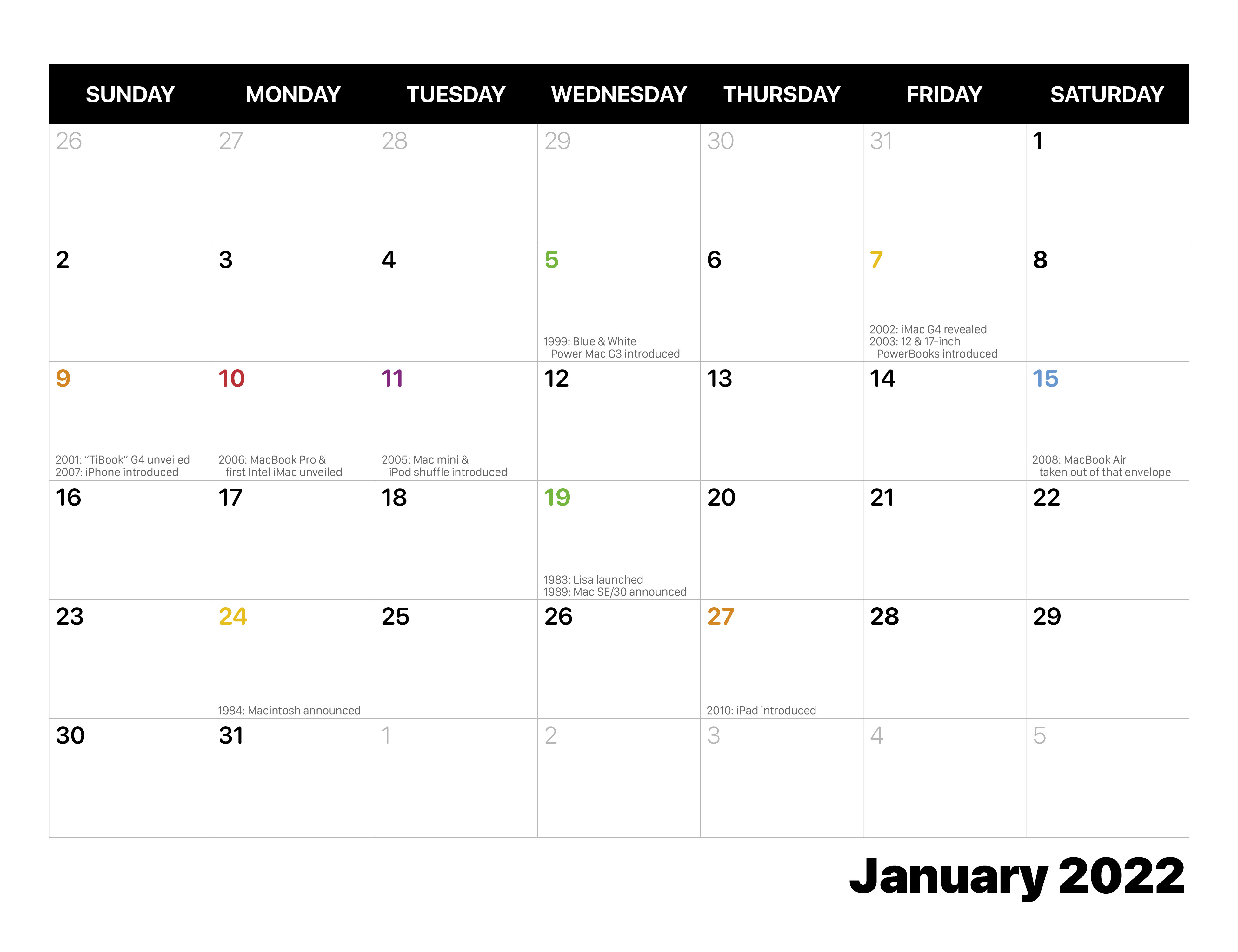 It is up on Kickstarter now, which is a new experience to me. A huge thanks to everyone who helped make this possible: Merri, Myke, Mark, Kathy, Federico, John, Dan and Brad.
And most of all, thank you for your support.
Liftoff #153: Hubble Trouble⇢
This week on Liftoff, Jason and I catch up with several commercial space companies before reviewing footage of Zhurong on Mars and talking about the issues currently plaguing the Hubble Space Telescope.
macOS Monterey Public Beta Launched
I’ve been using Monterey since the first developer beta was released during WWDC and switched to it full-time about a week ago when developer beta 2 was released. I’ll have a lot more to say about Monterey this fall when it’s officially released. However, having already spent a substantial amount of time using the OS for my everyday work, I wanted to share my first impressions with readers who are thinking about trying it too.
If there’s a theme of Apple’s operating-system releases in 2021, it’s platform unification. This development is most significant for macOS, which tended to lag behind iOS in the 2010s, missing out on some or all of the year’s exciting innovations.
Apple has spent the last few years getting the base technology of iOS and macOS back in sync, removing 32-bit software, adding Mac Catalyst and support for iOS apps on Apple silicon, and introducing new cross-platform development technology via SwiftUI. And with macOS Monterey, you can see the fruits of all that labor: The big new features of iOS 15 and iPadOS 15 are also the big new features of macOS Monterey.
Connected #352: A Watched Watch Never Boils⇢
On this episode of Connected, we talk about the Big Mail and Mimestream email clients, then move on to the topics of broken Apple Watches, Safari 15 and Apple’s new Public Betas.
My thanks to our sponsors:
- Memberful: Best-in-class membership software for independent creators, publishers, educators, podcasters, and more. Get started now, no credit card required.
- Hullo: A simple, natural pillow designed for comfort. Try it for 60 days.
- 1Blocker: The Fastest & Most Powerful Blocker for Safari. Get 1 month premium free.
Three Weeks with iOS and iPadOS 15⇢
If you’re thinking about installing a beta this weekend, be sure to check out Federico’s take on them first.
OS X Lion and Mountain Lion Now Downloadable for Free⇢
While macOS is currently on version 11 (otherwise known as Big Sur) and macOS 12 Monterey is coming later this year, there are plenty of folks who use old versions of the Mac operating system. Some people are still using OS X 10.7 Lion and OS X 10.8 Mountain Lion, and until recently, you had to pay Apple $19.99 to get download codes for those OSes. But there’s good news: Apple is now offering Lion and Mountain Lion for free for anyone who wants them.
You can snag Lion here and Mountain Lion here.
Apple’s 2021 Public Beta Program Open⇢
If you want to live on the wild side and check out this fall’s slew of OS releases early, today is your day. (If you’re looking for macOS Monterey, you’ll have to wait a little longer, as it is apparently “coming soon.”)
iPhone 12 Line Passes 100 Million Estimated Sales⇢
Varun Mishra, at Counterpoint Research:
The iPhone 12 series’ cumulative global sales crossed the 100 million units mark in April 2021, according to Counterpoint Research’s mobile handset Market Pulse Service. The series was able to achieve this feat in the seventh month after its launch, which is two months earlier than the iPhone 11 series and almost the same as the iPhone 6 series that helped Apple achieve its first volume super-cycle at the cusp of 4G transition. With the iPhone 12 series, Apple has achieved another volume super-cycle after six generations of iPhones and at the cusp of 5G transition.
In the case of the iPhone 6 series, the strong pent-up demand for larger-screen iPhones drove the sales, while for the iPhone 12 series, the addition of 5G capability and a full OLED screen attracted customers.
While I am sure some people were excited about the new networking possibilities1 with the iPhone 12 lineup, it’s hard to discount the power of a new industrial design.
Kbase Article of the Week: iCal 1.0: Broken Links in iCal Help⇢
When you open iCal Help, the links do not work if Italian or German is selected as the preferred language in System Preferences.
Resize the Help Center window. This workaround resolves the issue. You do not need to repeat this step in the future (unless for some reason you delete the Help Viewer preferences file).
And people say Apple software is buggy today…
Music Widget⇢
Mario Guzman has made something delightful:
A mini player remote for Apple Music.
A take on the classic iTunes widget.
Mac Power Users #594: A Third Alternative⇢
This time on Mac Power Users, David and I dive into listener questions, our experiences with Apple’s current crop of betas and the future of Day One.