
The specs of the original iMac really show how far things have come.
512 Pixels
iMac: Just in Time⇢
Horace Dediu, writing at Asymco:
But the iMac is a historically significant machine. It allowed Apple to start on a new trajectory. It did this by first offering a financial lifeline. Sales of Macs, which were at the time the only source of revenues for Apple, increased from 2.7 million to 3.8 million a year. This at a time when Windows PCs were shipping about 100 million units. That was enough to ensure survival. Today Mac units are five times higher while Windows PCs are about 2.5 times higher. The following graph shows the impact of iMac on the Mac’s trajectory.
The iMac gave Apple the standing it needed to invest in Mac OS X. Without it, the world could be a very different place.
Installing a Floppy Drive in Your 233 MHz iMac
The iMac was famous for leaving the floppy drive behind, but it turns out that the logic board had the header and pins used by other Macs at the time for the drive. Some hardware tinkerers got it working.
More on the iMac Anniversary
If you haven’t read enough iMac G3 stuff, here are some more articles you should check out or send to your read-it-later service of choice:
-
Six Colors: The original iMac: 20 years since Apple changed its fate — Jason Snell writes about the machine’s impact, and covering it for Macworld, which only sent the editor in chief to cover the event.
-
Newsweek: Steve Jobs Unveils the iMac — Steven Levy’s exclusive look at the new machine, from May 1998.
-
WSJ: Apple Introduces iMac, A Fast and Potent PC — Walt Mossberg’s first look at the iMac, in July 1998.
-
The New York Times: Who Said Computers Have to Be Square? — Peter Lewis’ review, also from July 1998.
Twenty Years Ago, Steve Jobs Introduced the iMac G3
Today marks twenty years since Steve Jobs introduced the very first iMac G3.
Apple’s press release for the machine is pretty great:
It’s a good thing there’s no law against a company having a monopoly of good ideas. Otherwise Apple would be in deep yogurt for the ideas that Steve Jobs shared with the crowd at Apple’s Flint Center auditorium Tuesday, May 6.
There was, for instance, his idea that you should get everything you need to explore the internet for just $1,299 — and that “everything” means it should include a 233MHz PowerPC G3 chip that’s faster than any Pentium machine out there; that it should come complete with gobs of RAM, a 4-gigabyte hard disk, modem, 10/100 BASE-T Ethernet support, 24x CD-ROm drive, 15-inch monitor, and surround sound; that it should come bundled with Internet Explorer 4.0, AOL 4.0, Quicken 98 and FileMaker; and that it should be the coolest-looking computer on the planet. That idea is the iMac, the most radical idea in personal computing since the Macintosh.
It goes on:
When Jobs — nattily attired in a suit, for a change — revealed the iMac, the excitement in the audience was a palpable thing. The crowd had been eager to see Apple’s new products — lines snaked all over the DeAnza College campus as people waited for the Flint Center doors to open — but even by the time they groped their way to seats, few had any inkling of the surprise in store for them. And judging by their reaction, “whoa” was a wonderfully apposite word-choice for the ad that Chiat/Day (Apple’s ad agency) created for this product.
Go read the whole thing. It’s a lot of fun.1
The Design
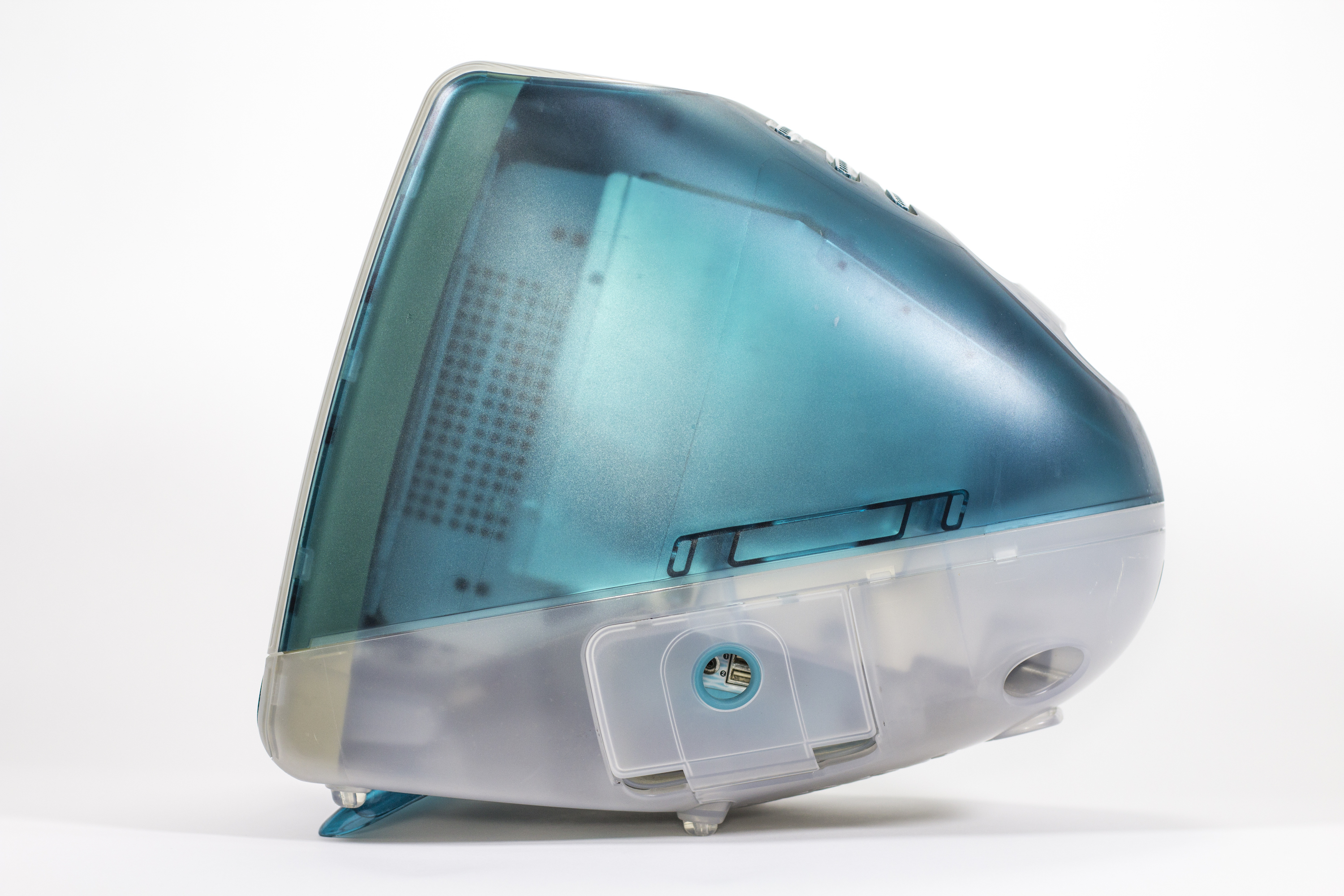
Right away, the machine’s design made waves. In the late 1990s, the entire computer industry was defined by beige boxes. The Mac was not immune to this, which is what made the iMac’s curvy blue lines so exciting.
Here are Andrew Gore and Anita Epler, writing for Macworld in 1998:
It’s hard not to recognize the iMac’s lineage: the all-in-one case, the tiny footprint, even the integrated handle—all suggest the original Macintosh. But this is where the similarities end. Using translucent plastics of “ice” and “Bondi blue” (in homage to the Australian beach), Apple’s industrial-design group created a computer without a single straight line—even the keyboard components are curved. The case allows through just enough light to suggest the outlines of the iMac’s internal works without revealing too much.
Every piece of this system—from cables to key caps—uses translucence, curves, and light to great effect. The round mouse reveals a tracking ball that’s half white and half blue-green—watching the mouse while it’s in motion can be mesmerizing. Adding to the space-age effect, Apple will use holographic stickers for port identifiers, FCC tags, and other labels. A translucent white flip-down foot props up the keyboard, coordinating nicely with the iMac’s aquamarine appendage.
The design may look dated now, but again, it’s important to realize just how big of a deal the design was. Seemingly overnight, consumer electronics started popping up with blue plastic to cash in on the iMac’s fun and approachable design.
The design wasn’t the only new thing about the iMac. While powered by a then-familiar PowerPC G3, the iMac ushered in a new era of computer hardware. Its use of USB ports over Apple’s legacy connectors and its lack of removable storage made many consider the iMac a toy.
Again, Gore and Epler:
Considering all these amenities, the most shocking part of the iMac isn’t what it offers, but what it lacks. The iMac has no floppy drive, which might be forgivable if there were a Zip drive or other removable-media option, but there isn’t.
And most dramatically, this new consumer offering has no SCSI port, no standard serial ports, and no ADB ports. Apple has opted to replace these familiar connections with USB, a high-speed serial architecture that has suffered from slow adoption on the Wintel platform despite its technical advantages (see the sidebar “USB: Ready for Prime Time?”). Currently, no USB devices exist for the Mac.
Read that last line again:
“Currently, no USB devices exist for the Mac.”
If USB had not taken off, Apple would have been in serious trouble with its new consumer machine. Thankfully, the USB ecosystem started to materialize by the time the machine went on sale in August 1998. 2
Those controversial USB ports were joined by a modem, Ethernet jack and a “Mezzanine” slot, which was a very short-lived expansion option that never really took off. Around front was an Infrared port and a set of headphone jacks, a nod to the iMac’s potential in the classroom. FireWire and a VGA port would appear in October 1999.
The Internet
The i prefix has defined Apple product names for two decades, but it started here. Jobs explained in his keynote that the i stood for a whole bunch of things:
- Internet
- Individual
- Instruct
- Inform
- Inspire
The only word that really mattered on that list was the first one. The iMac ran the same Mac OS 8.6 as other Macs at the time, but Apple marketed the iMac as the easiest way to get on the Internet with a very clever campaign:
The iMac’s built-in modem and Ethernet port made it slightly easier to connect to the Internet for the first time, but it wasn’t anything that other Macs of the day couldn’t do. Yet, the iMac became synonymous with the Internet. A bunch of iMac G3s got sold in offices and schools, but a whole lot of them got put in homes as Internet appliances.
The Legacy
The iMac G3 was a big bet. Apple was at the end of a multi-year downward spiral, both in its finances and products. People flocked to the all-in-one. Its colorful, friendly design and low price point made it a hit.
The company sold millions of the machine, breathing new life into the company and the Macintosh, giving Apple the runway to build Mac OS X.
The iMac G3 is a machine I have a lot of experience with, having collected all 13, made a bunch of cool stuff with them and then donated them to The Henry Ford Museum.3 There’s no doubt in my mind that is one of the most important personal computers ever made.
After shipping the original 233 MHz Bondi iMac in August of 1998 for $1,299, Apple spent the next several years refining and upgrading the product. The last iMac G3s can run Mac OS X Tiger and were clocked at up to 700 MHz before being discontinued in March 2003.
Over its lifetime, the iMac G3 came in 13 finishes, added support for wireless networking, video out, FireWire and burning CDs. Storage space started at 4 GB on the original model and topped out at 60 GB on the last model. It saw an incredible rate of evolution, being revised every nine months or so for its entire run:
Today is a special day, and one we should use to celebrate a very special computer. Even if you aren’t an Apple history nerd like me, I think you can appreciate the role the iMac G3 played in saving Apple.

To read a whole lot more about this very important little computer, check out my complete iMac G3 archive. If you want to know more about that time in Apple’s history, including the development of Mac OS X, check out my book on the subject, Aqua and Bondi.
-
There’s a whole article here waiting to be written about how Apple’s corporate communication has evolved over the years. ↩︎
-
One such collection of USB devices were replacement keyboards and mice for the iMac’s … lackluster … input devices. ↩︎
-
I have some cool stuff to talk about concerning the Museum very soon. Stay tuned! ↩︎
Two Decades of iMac⇢
Michael Steeber at 9to5Mac has an incredible roundup of the iMac’s evolution over the last 20 years.
Connected #191: I’m Expecting to Have Problems⇢
This week on Connected, Myke and I chat with John Voorhees about rumored products, dead products and Apple’s Q2 results.
My thanks to our sponsors:
- Squarespace: Make your next move. Enter offer code CONNECTED at checkout to get 10% off your first purchase.
- Freshbooks: Online invoicing made easy.
- StoryWorth: A new way to bring the family together.
Pure Zen⇢
Mark Wilson, writing at Fast Company, has discovered how good System 7 was.
Apple Posts Record Q2 Results⇢
Apple has just published its financial results for Q2 2018. The company posted revenue of $61.1 billion, an increase of 16% from the year-ago quarter. Apple sold 9.1 million iPads, 52.2 million iPhones, and 4.1 million Macs during the quarter.
Revenue, iPhones and iPads were all up year-over-year; the Mac was down a touch. Services is up 31% over this time last year.
Kbase Article of the Week: Locating your PowerBook’s Serial Number⇢
Every single link in this document is a 404.
Gruber, on Marzipan⇢
John Gruber, after reporting that the name “Marzipan” isn’t this project’s real code name, and before saying that he doesn’t expect to see this at WWDC 2018:
I don’t have extensive details, but basically it sounds like a declarative control API. The general idea is that rather than writing classic procedural code to, say, make a button, then configure the button, then position the button inside a view, you instead declare the button and its attributes using some other form. HTML is probably the most easily understood example. In HTML you don’t procedurally create elements like paragraphs, images, and tables — you declare them with tags and attributes in markup. There’s an industry-wide trend toward declaration, perhaps best exemplified by React, that could be influencing Apple in this direction.
WWDC is just a few weeks away, but it sure feels like longer.
The AirPower Problem⇢
Imagine an alternate universe where the AirPower and the wireless charging case for the AirPods weren’t announced until, say, the opening keynote of WWDC this year with same-day availability. Sure, buyers of iPhones and Apple Watches that were released last year would have to suffer through several tedious months of wondering why Apple didn’t make their own charging pad because many of the ones out there right now aren’t very good, but the reaction to its then-immediate availability would have been a classic example of underpromising and overdelivering.
I have no idea why Apple pre-announced this thing.