Reviewers are sad
Shifting colors, burn in too
LG’s bad at screens

Reviewers are sad
Shifting colors, burn in too
LG’s bad at screens
Back in their respective countries, the boys gather around Skype to discuss an Italian mystery, another failing keyboard, the Pixel 2 XL and iPhone X pre-orders.
My thanks to our sponsors for this episode:
This fortnight on Liftoff, my space podcast with Jason Snell:
Blue Origin is firing up its new rocket engine as Bigelow is talking about inflatable lunar stations. Then, the recent LIGO announcement and some background on Project Gemini.
My thanks to our sponsors:
Riccardo Mori has outlined the different futures that could be in store for the Mac mini. It mirrors my thoughts exactly.
Back in 2012, I wrote up what was in my Mac’s menu bar, and I thought five years was long enough, so here we are again:
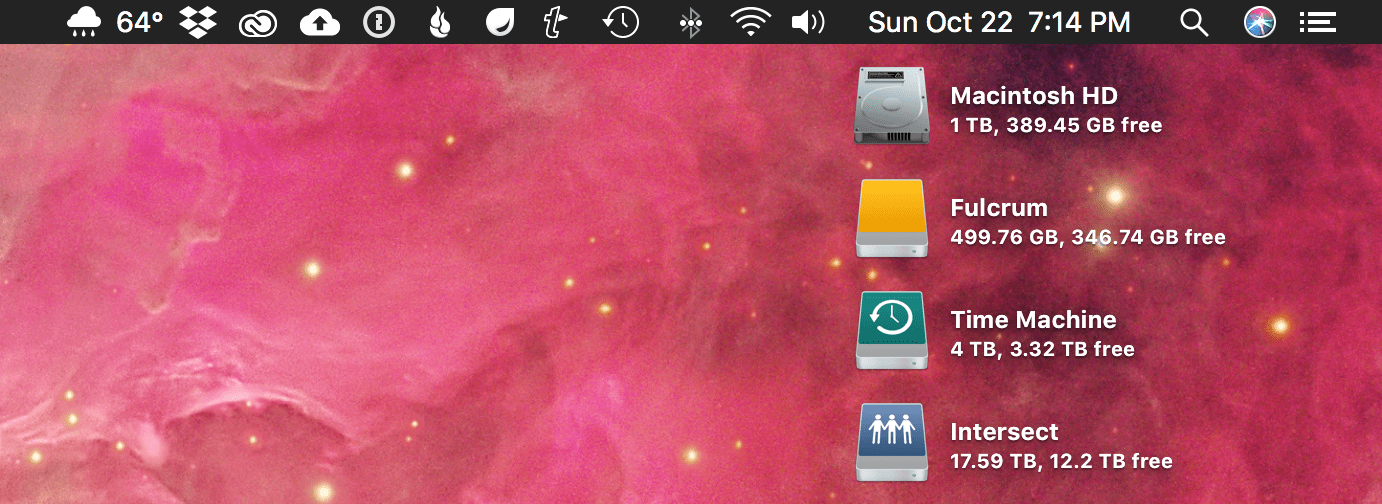
Here’s what’s hogging space on my iMac’s menu bar, from left to right:
Carrot Weather for Mac isn’t quite as polished as its mobile cousin, but I love having quick access to the weather from everywhere on my iMac. A click of the icon brings up current conditions, a five-day forecast and the ability to open a somewhat mediocre radar.
Despite the product’s recent redesign, Dropbox remains critical to how I work. I have tons of shared folders with collaborators for all sorts of projects. There are very few files on my iMac that aren’t on Dropbox.
A necessary evil when you rely on Photoshop, Illustrator and Audition on a regular basis.
This app replaces the old Google Photos Uploader and runs far, far better than the previous app. I don’t sync my Google Drive account with my computer, but I do use this app to backup my photos to Google Photos, even though they are stored in iCloud Photo Library.
I like good passwords, so I use 1Password on all of my devices.
In addition to my Time Machine and off-site backup drives, I have every bit of data on all of my Macs backed up with Backblaze. It lets me sleep better at night knowing my data is somewhere safe, far away from anything that could happen to my house.
This utility lets me share text, images, links and more in a way that I can track the number of opens. As a bonus, images aren’t compressed on Droplr like they are when uploaded to Twitter’s native photo-sharing service. I’ve used Droplr for a long time and am a big fan, but its admittedly a niche product.
Smile’s TextExpander is one of those things that makes my computer feel complete. I have dozens and dozens of custom snippets saved here. Everything from email addresses, common misspellings, strings of code I need on a regular basis and far more are just a few keystrokes away.
I use Time Machine to backup both my iMac’s internal SSD and that “Fulcrum” external SSD to a big 4 TB spinning hard drive.
I use a Magic Keyboard and Magic Trackpad, so this is a must.
Even though my iMac is wired with Ethernet, I leave wireless on for things like AirDrop. This menu bar item lets me keep an eye on that.
When I’m not using my headphones via a USB interface, I listen to music with my iMac’s built-in speakers.
I love having the date and time just a glance away. This takes up a lot of space, but is totally worth it.
I use Alfred instead of Spotlight, but I’m stuck staring at its icon.
This is a recent addition. I turned off Siri’s menu bar item when I upgraded to Sierra last year, but recently have started using for simple things like controlling iTunes. We’ll see if it lasts.
I only really use a handful of Today View widgets; my notifications just stick around forever in there. I wish Apple would re-think this corner of macOS.
I love Bartender, a little Mac app that can hide a bunch of your menubar items behind a single icon. I use it on my 13-inch MacBook Pro, but on my 27-inch iMac, I have plenty of room, and like seeing what everything is doing.
Very often in life, we see things like products, athletic careers and even relationships end way later than they should. When this happens, sometimes the end goes unnoticed and with little fanfare.
Occasionally, things end on a high note, like when an athlete announces their retirement after winning a championship or a band calls it quits after a massive album and tour.
In the world of Apple products, the iPod mini is an example of the latter. It’s perhaps the best example of Apple killing one of its darlings.
Apparently, Apple plans for it to be “an important part” of the Mac product line in the future. TIL.
This week on Query: smart home hubs, cleaning tech products, Wi-Fi password sharing and more.
Astronaut Scott Kelly capped off an impressive career by spending a year aboard the International Space Station. His new memoir is out, and I can’t wait to start it this weekend.
As noted by Zac Hall, this kbase article about prepping your Mac for sale has a surprise step for those of us with Touch Bar Macs:
You can clear any information stored by the Touch Bar before you sell or give away your MacBook Pro.
First, start up from macOS Recovery: Hold down Command-R on your keyboard immediately after pressing the power button to turn on your Mac, or immediately after your Mac begins to restart.
When the macOS Utilities window appears, choose Utilities > Terminal in the menu bar. Type this command in Terminal:
xartutil --erase-allPress Return, type yes when asked if you’re sure, and then press Return again. Finally, choose Terminal > Quit Terminal and proceed to the next step.
When I first saw this, I assumed this has to do with the fingerprint information stored in the Secure Enclave. I rebooted into macOS Recovery, ran the command and rebooted again. After the restart, my Touch ID information had been wiped from the machine:
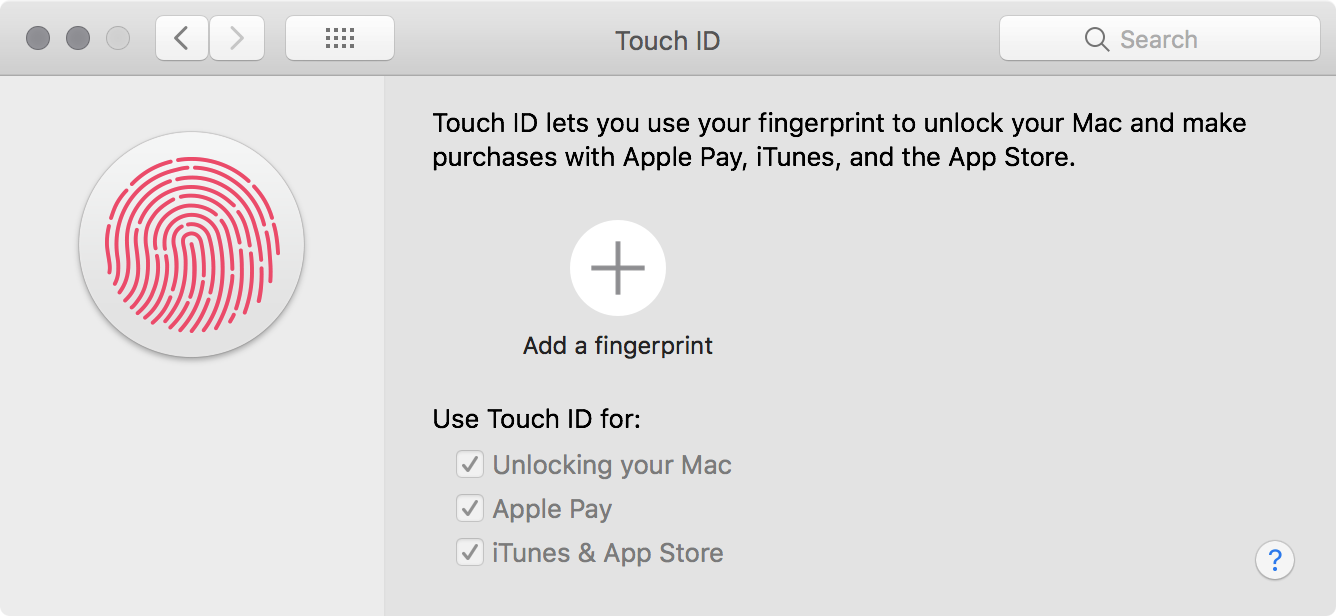
Mystery solved. Add this to the long list of things to get a Mac ready for sale that macOS should handle itself.
Flexibits, the makers of Fantastical, have a new Mac app out for dealing with contacts. It boasts the same easy-to-use, text-driven intelligence that its calendar-based sibling does. The natural language input field at the top of the menu bar app can handle search, creating contacts, editing record information and more.
The app can also serve as a launchpad for contacting someone. The input field can turn “email Jason Snell” into a draft to the man with a spider in his iMac. It builds upon natural language input in a new way that I find clever.
While I do keep a fairly robust contacts database, I almost always start a new conversation with someone within the app I’m going to use for that interaction. Mail pulls from my contacts database as well as their own internal history, and Messages works in a similar fashion. Slack and Skype are already islands all their own.
If you do a lot with contacts at your Mac, it is well worth the cost of admission, which is reduced to $14.99 for launch.
Personally, I would love to see the addition of more CRM-focused information that could sync to my iOS devices. The app’s notes field is a great start, but a way to enter structured data about phone calls and emails to form a paper trail of communication would make it a real winner in my book.
Learn about the power consumption and thermal output of iBook computers.