
Ernie Smith takes a look back at an email client that defined the medium for many.
512 Pixels
iOS 11.2 Bringing (some of) SiriKit to HomePod⇢
As spotted by Ryan Christoffel at MacStories, Apple has quietly announced limited SiriKit support on the upcoming HomePod:
With the intelligence of Siri, users control HomePod through natural voice interaction and can conveniently access iOS apps that support SiriKit Messaging, Lists, and Notes. Siri recognizes SiriKit requests made on HomePod and sends those requests to the user’s iOS device for processing. To prepare your app, make sure that your SiriKit integration is up to date and that you’ve adopted all of the appropriate intents.
This means that the HomePod is more or less a remote speaker for Siri on the iPhone to interact with apps like OmniFocus, Todoist, Evernote or Telegram.
This is different than the handful of Siri tasks the HomePod can handle itself, which includes Homekit support, timers, alarms and more.
While I’m glad to see some progress here, I think that it is time Siri become much more cloud-centric. Alexa and Google Assistant can do the same set of tasks across devices, while Siri still remains very device-centric. Apple has its reasons for this, but its approach could lead to a less-than-ideal user experience.
If your iPhone is off or isn’t connected to the HomePod, setting up a reminder in Todoist via the HomePod won’t work. If Siri’s history plays out here, the first or second time that happens, many users will just give up.
iMac Pro Shows up at Final Cut Pro X Creative Summit⇢
I love my Late 2015 iMac with 5K Retina display, but editing 4K footage in Final Cut Pro X or fixing audio in iZotope RX gives it a run for its money. An iMac Pro would make these tasks much faster.
Hewlett-Packard Historical Archives Destroyed in Fires⇢
Robert Digitale, for The Press Democrat:
The Tubbs fire consumed the collected archives of William Hewlett and David Packard, the tech pioneers who in 1938 formed an electronics company in a Palo Alto garage with $538 in cash.
More than 100 boxes of the two men’s writings, correspondence, speeches and other items were contained in one of two modular buildings that burned to the ground at the Fountaingrove headquarters of Keysight Technologies. Keysight, the world’s largest electronics measurement company, traces its roots to HP and acquired the archives in 2014 when its business was split from Agilent Technologies — itself an HP spinoff.
The Hewlett and Packard collections had been appraised in 2005 at nearly $2 million and were part of a wider company archive valued at $3.3 million. However, those acquainted with the archives and the pioneering company’s impact on the technology world said the losses can’t be represented by a dollar figure.
“A huge piece of American business history is gone,” said Brad Whitworth, who had been an HP international affairs manager with oversight of the archives three decades ago.
A stunning loss to the computer history world.
iPhone X Repair Costs Higher Than Previous Models
I’m glad I ordered AppleCare+ on my iPhone X after seeing this page on Apple.com: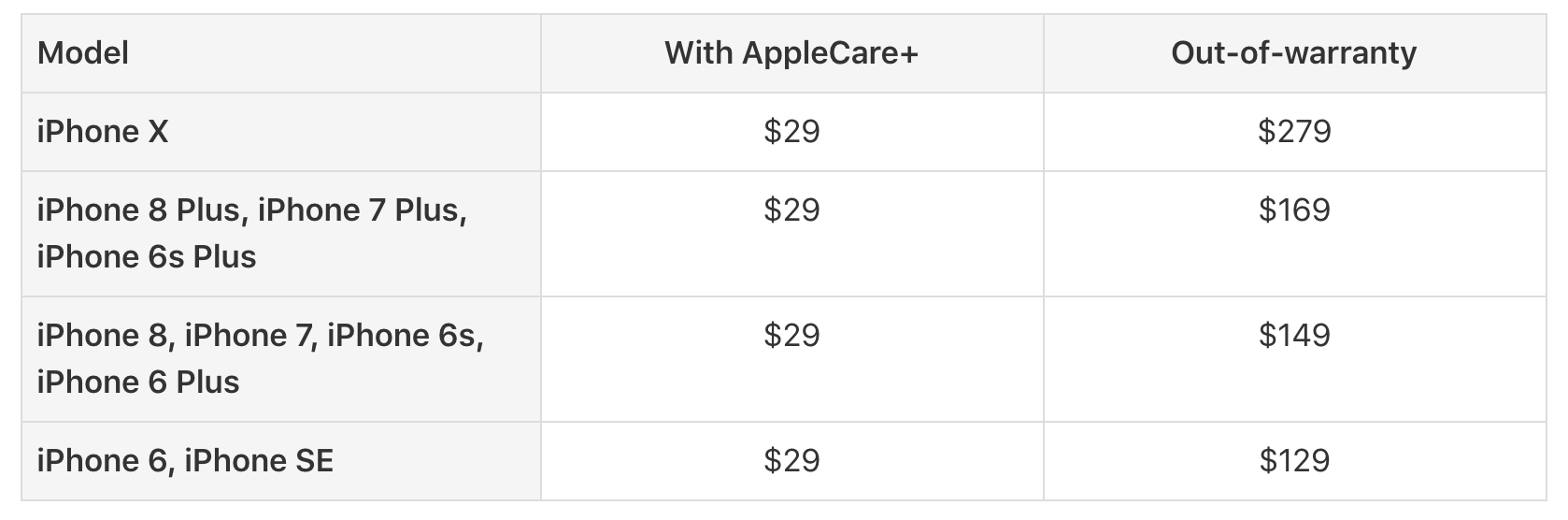
That’s just screen replacement costs. If there’s other accidental damage, including a broken back, the X is very expensive to repair: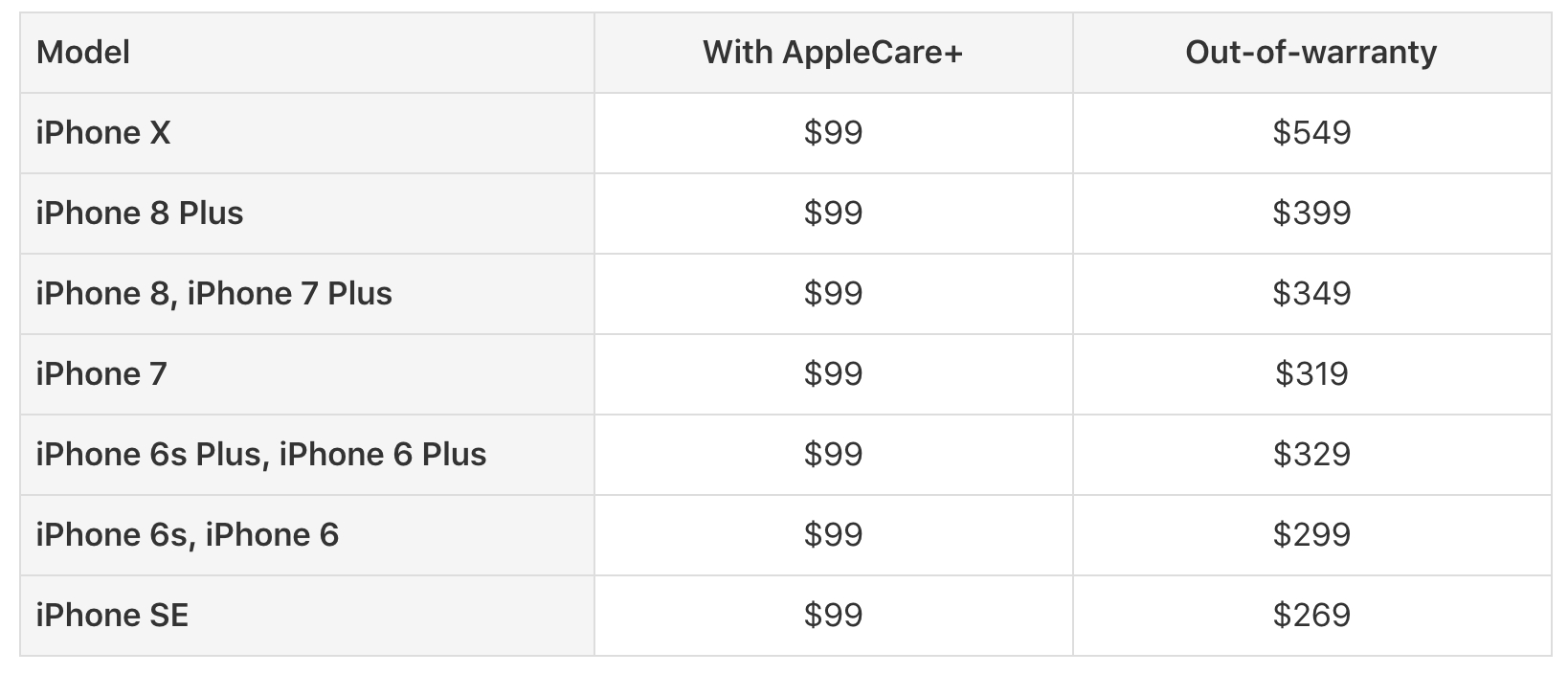
The iPhone X is an expensive phone with expensive parts, so I understand this price increase, but we all should buy AppleCare+. And probably a case.
iPhone X Pre-order Notes
I, like many of you, ordered an iPhone X earlier today. Here are some notes on my experience.
Pre-orders roll around at 2 AM in my time zone. I set an alarm for 1:50 AM and another for 1:52. I even set HomeKit to turn on my lamp at 1:51, but that silently failed.
I successfully ordered an AT&T 256 GB iPhone X in Silver from Apple. I have an in-store pickup scheduled for 8 AM on launch day, November 3. The order process went very smoothly for me. I tapped the Silver iPhone, added AppleCare+, gave the App Store my AT&T phone number and paid with Apple Pay.
I was pretty torn on what color to buy, so I have both the Silver and Space Gray favorited in the Apple Store app. If my iPad had connected to the store before my iPhone, I was going to order the black. As I have the silver, you can correctly guess that I ordered on my iPhone.
According to my email from Apple, my order went through at 2:40 AM. From what I was seeing on Twitter and in the Relay FM Slack, I got in on the early side of things. I saw a bunch of tweets from people saying that the carrier confirmation step was falling over just a few minutes after I ordered.
Other folks are stuck in a weird loop with the upgrade program:
From a friend: “2 messages from Apple this morning. 1. Your order has been cancelled. 2. Your iPhone has been reserved.”
LOL
— Stephen Hackett (@ismh) October 27, 2017
As of this writing, the iPhone X is 5-6 weeks out on the Apple Store, so I think the reports of limited quantities ended up being true.
While my group of nerd friends is not representative of Apple’s customer base at large, almost every Apple nerd I know has ordered or will be ordering an iPhone X. The additional cost hasn’t seemed to slow the enthusiast crowd down all that much.
Angela Ahrendts Profiled by BuzzFeed⇢
Nicole Nguyen at BuzzFeed’s profile is pretty great. This part jumped out at me, naturally:
Ahrendts also made a number of refinements to in-store service. Going to the Apple Store “shouldn’t be like going the dentist,” she said. You can now get a text message when someone at the Genius Bar is available, instead of having to wait around. That bar has also been, in some locations, refashioned into an airy “Grove” with additional seating. Updating the Genius area may be the most visible operations work Ahrendts is doing. Getting a broken iPhone, Mac, or iPad serviced remains a frustrating experience for many.
Apple can make it stores as beautiful as they want, but until it can more effectively manage the many, many customers who show up needing support, the stores will still be frustrating. For what it’s worth, I know my local Apple Store has gotten much better about accommodating walk-in customers with things like broken iPhone screens. However, the last several times I’ve looked to book an appointment, I can’t do it for multiple days. There’s still progress to be made.
Video: Pippin, Apple’s Forgotten Game Console⇢
I wrote about the Pippin several years ago, but recently was sent one by a reader. It’s really incredible to have such a weird piece of Apple history in my collection, and I hope you enjoy learning some more about it:
Query #16: The Good News⇢
This week on Query, Ren and I prepare for the iPhone X launch.
As a quick note, moving forward, we’ll be releasing Query on a fortnightly schedule. See you on November 8th!
Kbase Article of the Week: Mac OS X Update 10.2.8 (G5)⇢
I sometimes forget that the first-gen Power Mac G5s shipped with Jaguar:
The 10.2.8 (G5) Update delivers enhanced functionality and improved reliability for the following applications, services and technologies: AirPort, Bluetooth, LDAP, and FireWire and USB device compatibility.The update also provides updated security services and includes the latest Security Updates
Amazon Key⇢
Ungeniused #36: The Collyer Brothers⇢
This week on Ungeniused, the sad tale of two siblings who lived their entire lives together and died just feet apart from one another.
My thanks to our sponsor:
- Squarespace: Make your next move. Enter offer code UNGENIUSED at checkout to get 10% off your first purchase.