
Yesterday, I sat down for a little Q&A time and finally got to show off my new studio:
512 Pixels
Same As It Ever Was?
I think at the core of a lot of the angst felt in the Mac community right now is the realization that the Mac is no longer the crown jewel of Apple’s product lines.
Of course, this isn’t new. The iPhone took over the grunt work of being Apple’s cash cow years ago.
With that in mind, consider how Apple introduced the iMac G5:
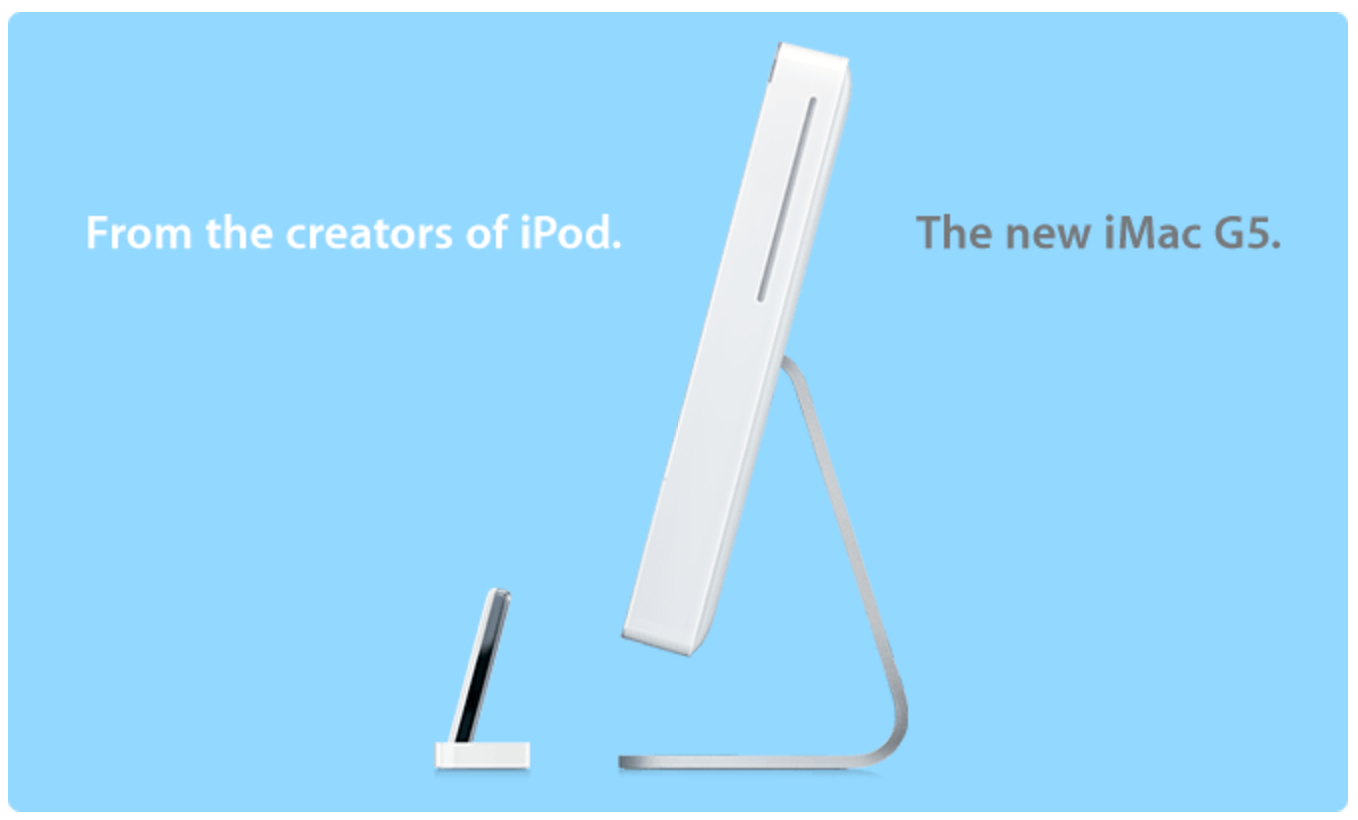
Even the product video opens with shots of an iPod, not the new iMac:
I remember a lot of Mac users being pretty upset over this marketing, and those complaints are echoed today: that Apple is abandoning it’s loyal user base to go after a new, flashier one.
I don’t think that’s the whole truth behind the Mac’s recent woes, but I don’t think was true back in 2004, either.
This campaign highlighted the halo effect, and attempted to increase its impact. People loved the iPod so much that when it was time to get a new computer, they’d walk into an Apple Store and buy a Mac.
The halo effect turned Apple from a computer company to an ecosystem company. We don’t hear the term very much today, because things aren’t as simple as they once were. iPhones work perfectly fine without a Mac or a PC. You can have a MacBook and carry a Samsung phone. You can have an iPad and an iPhone and no Mac at all. The combinations are endless, but the more Apple stuff you have, the better things work together.
As long as that is true, there’ll be a place at the table for the Mac; it just may not be at the head of the table anymore.
The Unicorn iPhone
Over the weekend, a story broke that Apple is working create a next-generation version of Touch ID. At the bottom of the story about it on MacRumors, this paragraph appears:
Kuo’s latest report builds on previous predictions regarding this year’s “10th anniversary” iPhone, which is expected to feature a radical redesign with an embedded home button in an edge-to-edge display, a glass body, and potentially wireless charging. Previous rumors suggesting the iPhone 8 could include advanced biometric features like facial recognition or iris scanning have pointed to the possibility that they could also power augmented reality camera functions.
There’s been a lot of talk about this “10th anniversary” iPhone. If rumors are to be believed, it will mark a huge change to the phone.
Most of it sounds pretty awesome, actually. I’d love a phone with the screen size of my 7 Plus, but in a smaller chassis. The forehead and chin of the iPhone look old compared to some of the design work coming out of Samsung and others. Wireless charging has been around for ages on Android phones, and would be a welcome addition as well.
Part of me looks at the fact that the iPhone 7 uses the same basic case design as found on the 6 and 6S as evidence that they are working hard on something new, and needed to bunt a little bit this year. That doesn’t seem like something Apple would do with their flagship device, but I can see a world in which something didn’t get finished in time and had to be kicked down the road a little bit.
Then there’s this, by John Gruber back in October:
Apple is not going to make a special edition of any product — let alone the iPhone, their most important product — just to mark an anniversary. Don’t tell me about the 20th Anniversary Macintosh 1 — that was a product from the old Apple that was heading toward bankruptcy, and a perfect example of why they shouldn’t do something special to mark something as arbitrary as an anniversary.
While Tim Cook’s Apple is certainly more retrospective than under Steve Jobs, I think Gruber is right. A special anniversary edition of the iPhone would be a huge break from convention.

Whether Apple calls the next iPhone a special edition or not, clearly part of the company’s fanbase is going to be expecting something big. Some will surely be disappointed if the next iPhone doesn’t bring drastic changes with it.
(Just think about the reaction if, that instead of an all-new iPhone 8 later this year, Apple releases a 7S that looks basically like the 7 that looked basically like the 6S that looked basically like the 6…)
My hope is that the next iPhone will feature a new design that will really move the ball forward.2 It won’t fulfill everyone’s wildest dreams, and I’d be willing to bet that it won’t come with a special “Anniversary” label beyond a mention in the keynote.
I expect to see leaks sooner or later to tamp the expectations down, if indeed the hype has gotten out of hand. Remember the months of conversation about the lack of a headphone jack on the 7? A lot of that took place — and was resolved — before the phone was even announced. I suspect 2017 may bring more of the same.
-
Ironically, a lot of that conversation started with an episode of Gruber’s podcast. ↩︎
RSS Sponsor: StickerBook for iMessage⇢
StickerBook is an iMessage app that lets you turn any image into a reusable sticker in iMessage. It is great for sending cute pictures of your kids — or really old Macs — to all of your friends.
StickerBook can add images from almost anywhere. You can add from your photo library, your camera, any system document provider (like iCloud Drive), or even the clipboard.
You can also add a sticker from any app that allows sharing an image with the standard share sheet.
After selecting an image, you can crop it to a shape from a set of predefined shapes in the app (my favorite is that stamp). You can zoom, pan, or rotate the image to get it positioned in the shape just right.
Best of all, you can do all of this right from iMessage so you don’t have to leave the context of your conversations.
You can find out more information about StickerBook here or pick it up on the App Store.
Samsung Breaks Silence on Note 7 Battery Failure⇢
For those who want to get a bit nerdy, here’s what Samsung says was wrong with each battery. For the first battery, Samsung says a design flaw in the upper right corner of the battery made the electrodes prone to bend and, in some cases, led to a breakdown in the separation between positive and negative tabs, causing a short circuit.
With the second battery, which came from a separate supplier, Samsung believes there was nothing wrong with the design itself, but says a manufacturing issue led to a welding defect that prompted that battery to also shortcircuit and ignite.
Whoops.
Viva Amiga⇢
The Amiga is a very interesting story in computer history, and one I don’t know enough about. I’m looking forward to checking out this documentary. via MacRumors
Obama’s Space Legacy⇢
Loren Grush, writing at The Verge, on the mark Obama left on NASA:
In the space community, Obama will undoubtedly be heralded for focusing on stronger partnerships with the private sector. And Obama has made a big commitment to NASA’s Earth Science programs, as well as the agency’s investments in technology development.
But not all of Obama’s decisions for NASA have been met with praise. The Space Shuttle program ended during his administration, and the US has had no way of sending people to space without cooperation from Russia. And NASA has gone through a pivotal transformation in recent years, as a result of Obama. The president shifted NASA’s focus from a return to the Moon to a human mission to Mars.
There are still a lot of questions about what NASA under a Trump administration will look like. If I had to guess, I would say that the Journey to Mars program will be pivoted again, if not canned altogether in favor of a moon mission. Some Republicans really like the moon.
Qualcomm vs. Everybody
Earlier this week, the United States Federal Trade Commission claimed that chip giant Qualcomm forced Apple into using its LTE chipsets, as Aaron Tilley writes at Forbes:
Qualcomm is the dominant supplier of modem chips that enable phones to hook up to cellular networks, but the company also extracts licensing fees for nearly every modern phone in the world. The agency’s complaint, filed in the U.S. District Court in the Northern District of California, said the San Diego-based chipmaker used its dominant position to maintain an illegal monopoly over its phone partners like Apple.
The FTC said Qualcomm established an exclusivity agreement with Apple from 2011 until 2016. Qualcomm provided “billions” in rebates to Apple for the arrangement. But if Apple bought modem chips from another chip supplier during that time, the FTC said Apple would face large penalties by losing out on Qualcomm’s rebate payments.
This year, Apple shipped some iPhone 7s with Intel chips inside, which could possibly fit with this timeline.
Today, Apple has sued Qualcomm for $1 billion, as reported by Anita Balakrishnan at CNBC:
Apple says that Qualcomm has taken “radical steps,” including “withholding nearly $1 billion in payments from Apple as retaliation for responding truthfully to law enforcement agencies investigating them.”
Apple added, “Despite being just one of over a dozen companies who contributed to basic cellular standards, Qualcomm insists on charging Apple at least five times more in payments than all the other cellular patent licensors we have agreements with combined.”
Clearly something is going on here. While this may not be as fun to watch as the Apple/Samsung case was, I think this could prove very interesting, and mean wide-reaching changes across the technology industry.
The Joyous Work⇢
All of us, regardless of party, should throw ourselves into that work — the joyous work of citizenship. Not just when there’s an election, not just when our own narrow interest is at stake, but over the full span of a lifetime.
I’ll be right there with you every step of the way.
And when the arc of progress seems slow, remember: America is not the project of any one person. The single most powerful word in our democracy is the word ‘We.’ ‘We the People.’ ‘We shall overcome.’
Yes, we can.
Video: The Power Mac G4 Cube⇢
Introduced in 2000, the Power Mac G4 Cube is still one of the most distinctive Macs ever sold:
1Writer 2.5 Released⇢
1Writer has been my iOS text editor of choice for a while now. Today, it saw a nice update that adds a lot of nice features, including the ability to import and preview images in Markdown documents.
Ungeniused #17: Concorde⇢
On today’s episode of Ungeniused, Myke and I talk about Concorde, the world’s only supersonic jet designed for everyday air travel.
My thanks to our sponsor:
- Freshbooks: Online invoicing made easy.