Dashboard is a collection of small programs, called “widgets,” that let you quickly do a wide variety of tasks such as checking stock prices, finding weather information, and more.
Note: You can also use widgets in Today view in Notification Center. For more information, see Use Notification Center.
That’s followed by directions on how to turn Dashboard on. I think it’s the end of the road for this part of the OS.
America’s first space shuttle launched on this day 35 years ago as the reusable flying machine, Columbia, lifted off from Kennedy Space Center with John Young and Bob Crippen aboard.
That first mission was a wild one. It marked the first time a new US spacecraft carried a crew on its maiden voyage. Young and Crippen are real heroes.
This week marks the 40th anniversary of the Apple I. It was’t a computer like the way we think of them now; it really was just a hand-built board with some accessories that users had to supply.
I recently got the chance to speak to Kristen Gallerneaux, the Curator of Communications and Information Technology at The Henry Ford Museum. Kristen and her team acquired an Apple I, which can currently be seen in the museum.
Stephen: Kristen, who are you, and what do you do?
Kristen: My name is Kristen Gallerneaux, and I’m the Curator of Communications and Information Technology at The Henry Ford Museum. I take care of things like computers, and also things like radios, televisions, things that have tubes and transistors. Definitely, those are all in my collection.
SH: The Henry Ford Meusem, best I can tell, is really built around American innovation and technology. Is that a fair way to sum your work up?
KG: Yeah, definitely fair. We’re very big on the ideas of innovation and ingenuity and resourcefulness. A lot of people think we’re just a car museum, and we do have a lot of really great cars. We’re obviously invested in automotive history because of our founder, but we have very large collections of technology and design in domestic life and public life, so it’s really a wide range of materials that we have here.
SH: As I was perusing the website looking at the collections, something that struck me (and I’m sort of a self-proclaimed Apple historian) is that I don’t think a lot of people realize just how much of what we have today as far in terms of technology got started on American soil.
KG: Yeah, definitely. One of my favorite moments on the museum floor is when — we have this large case, museum case, full of telephones. There are probably an array of about 50 different telephones in that case. Of course, a lot of them started out from American innovation and development. We have 19th century Bell telephones in there, and it leads all the way up to iPhones. Through those arrays of objects, it’s really interesting because you really get to see the way technology has sort of condensed back down upon itself.
SH: Yeah, I think when you see those big timelines of stuff, it’s sort of mind-blowing that we call what’s in my pocket a phone. It just seems so strange.
KG: It’s a television and it’s a radio —
SH: Exactly!
KG: We actually have a telephone in that same case that’s sitting pretty near the iPhone, and it’s really interesting because it’s a card dialer telephone. It’s an early speed dial telephone that worked off the same principles as something like a hard weaving loom. You know, those big — I know this is an Apple program, but let’s go IBM mainframe for a minute, you know, like an IBM 360 or something that takes punch card technology. There was a telephone that used that, too.
I always tell people we’ve reached the Kodak Brownie moment in computing, which is basically their motto of “You push the button; we do the rest.” Which is to say that a lot of the processes behind technology have really become invisible and mysterious to us, and I think I’m okay with that, actually but it’s interesting to think about once in a while.
SH: We’ve seen the same thing, right, in talking about computers, where we started out with big, mechanical objects. We actually call them machines now, but they were actual, physical machines. Then we moved though the time that I find really fascinating, the time of the high priest and the punch card, where you are removed from your computing experience. You come back and see your results, and that’s really kind of where Apple enters the scene, right?What we’re getting to today is that you guys have one of the last remaining known Apple Is. Tell me a little but about that computer. What was the world like it when it showed up?
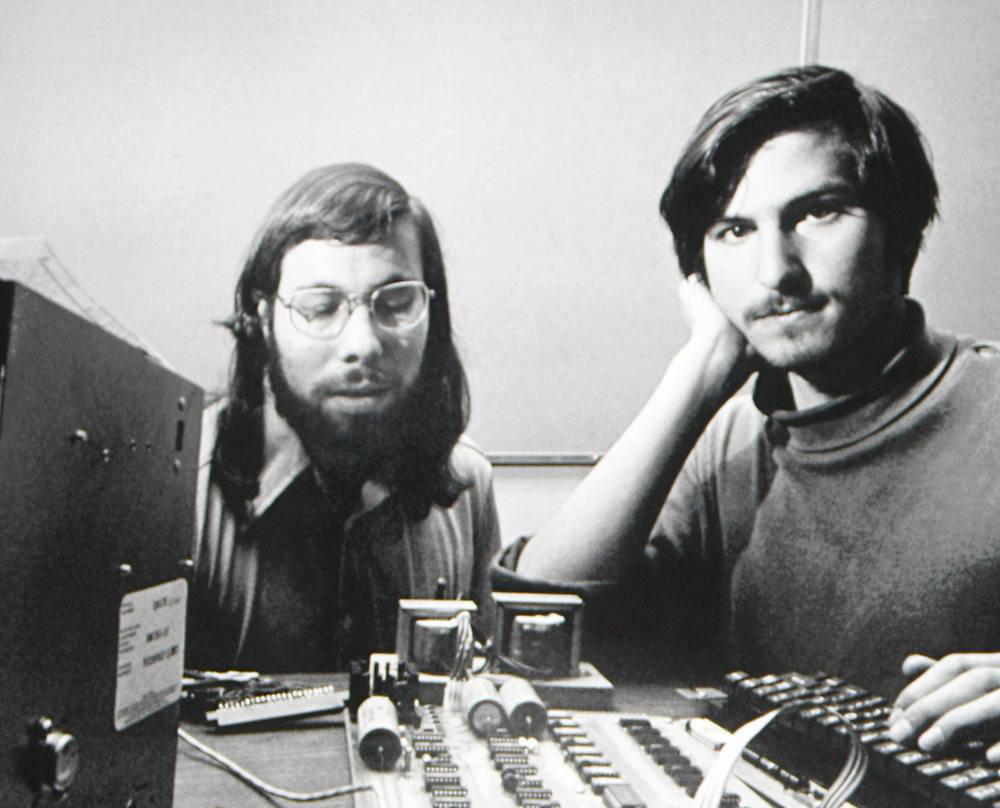
KG: Well, really, it’s interesting to kind of back track for a minute to about a year before it actually came into the world, (to) March 1975, which is the seeds of the beginning of the Homebrew Computer Club, which is where it really got its start in the garage in Menlo Park.
There’s a lot of writing out there on the Web debunking the myth of the garage and Silicon Valley, but Homebrew did actually start in a garage, for the first few meetings at least. Steve Wozniak had a technical problem he was trying to solve, and one of his friends he was working with at Hewlett Packard at the time told him he should really go this meeting. Apparently, he was a very shy guy, and with a bit of cajoling, he did eventually go. When he got there, he was just so inspired by the environment that was there.
I’ve read a lot about how competitive it was and read oral histories and things, and this seems to hold true, and it was out of going to that first meeting that the seeds for the Apple I — sorry, that’s kind of cheesy — were planted. He had developed computers before that, but this is really the beginning of the Apple I.
The Apple I that we have is one of the first 50 that were ever made. There are apparently 200 or so sold, and the locations today of about 46 of those 200 are known. What’s really special about ours is that is that’s one of the of the first 50 Apple Is that were ever sold, and out of that batch of the first 50, about nine of that batch are known to work. And ours works; it’s completely unmodified. It has all of its original chips; fully operational. I know this because I actually — this is a great perk of the job — I actually got to learn how to program BASIC on it.
SH: Very cool. For people who aren’t familiar with it, this is not really a computer in the sense that we think about one now, right? This is really just a board.
KG: Exactly. When you bought at Apple I computer, really what you were buying was the motherboard. You had to buy a monitor, you had to buy a keyboard, you even had to buy a power supply for the thing.
The first few Apple Is that were sold were actually didn’t even come with a tape drive interface. The benefit of this tape drive interface was that you didn’t have to type in the BASIC program from scratch. You could load it in from memory off this tape, because you couldn’t just flick this thing on and just interact with or play a video game or whatever. It was a very barebones thing.
There’s a funny story about Paul Terrell, who was the owner of The Byte Shop, where these computers were first sold. He was really disappointed when Steve Jobs showed up with this cardboard box full of Apple I motherboards, and was like, “I paid you guys to sell me computers. What are these?” Really, they were kind of a naked object in their own way — they didn’t even have a case, but there’s something really kind of special in that.
That’s one of the reasons why we really love our Apple I and why we went to bat for getting this thing here. You can see its working. Its exposed; it’s not hidden in a case.
SH: Right. I saw one in Atlanta a few years ago, and I was really struck by that: there’s nothing else there. Everything else has been … not really stripped away, because it hasn’t existed yet, compared to something like the Apple II, which of course, there are stories about Steve Jobs running around yelling about the creases in the plastic. (They) put it in a case and had a keyboard built in.I’ve got an Apple II here on my desk, and even though it is an antique in every way, it still sort of looks like a computer. It’s approachable, and I think that’s one of the things that made Apple in particular so fascinating. They moved very quickly from this Apple I into something that was more consumer-friendly, and of course, the rest is history. What do you think the legacy of the Apple I is today?
KG: It’s really hard as a museum curator to really put your fist down on a table really hard to get back to saying something like “No, this is the first and this is really the beginning of something,” (but) this is the beginning of a company that defines most — I don’t know what the percentages are of people who own smartphones, but a large percentage of those people are Apple users.
A colleague of mine (I’ll use his words here, because he may say it better than me) talked the other day about how really creeps into our lives. When the iPad was released, for example, we thought, “What are we going to do with this? What is the use of a tablet?” But now, you go and pick up your morning coffee and you’re signing with your finger on a Square-enabled tablet and it’s quite often an iPad. It’s just everywhere, and as a company, Steve Wozniak and Steve Jobs, in tandem, worked together to really innovate and be this excellent duo.
In terms of history, we talk about the Myth of the Lone Genius. People hunched over their workshop tables, poking around all night. Certainly, Wozniak did that with getting BASIC to work on the Apple I; certainly Steve Jobs probably stayed up at night about those creases in the plastic on the Apple II. Really, it’s through the coalescence of people and collaboration, and that’s evident through the history of Apple.
SH: I think that’s exactly how I view it as well. It’s maybe not so much about this one particular computer — as fascinating as it is — but it’s the story that it kicks off. The idea that I think is very much at the heart of Apple: that technology can be approachable by anyone, and to do so, it has to be well designed.
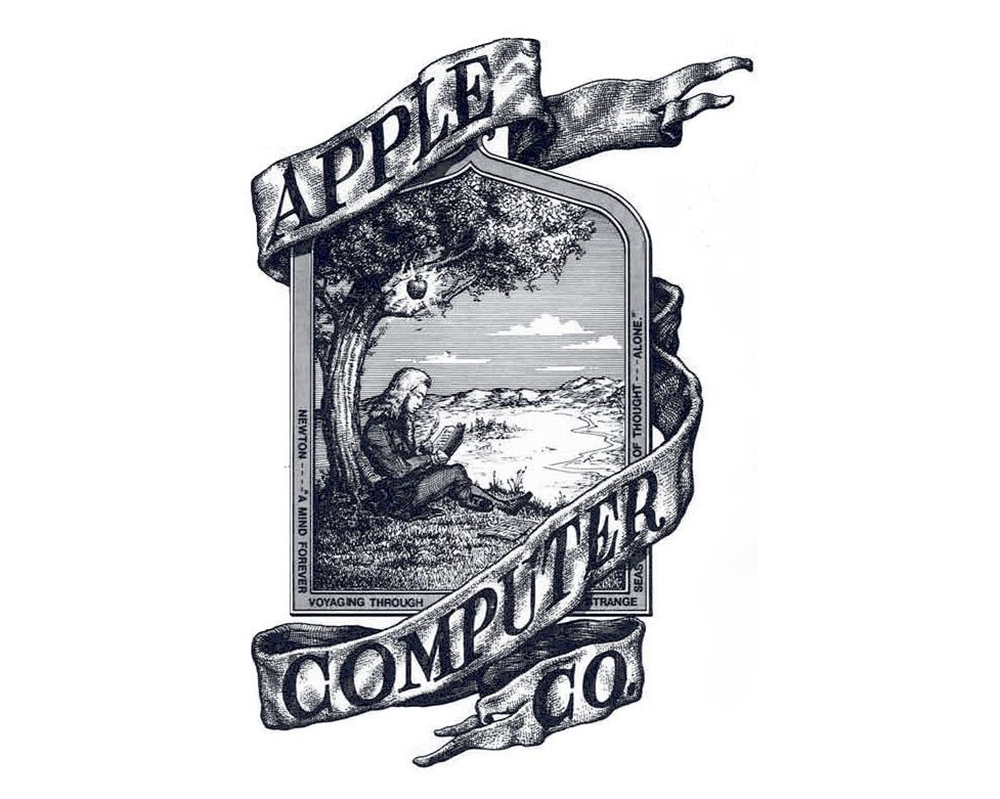
KG: It’s very much a collective experience. It’s kind of funny; the original logo for Apple, if you’ve ever looked at it, you can search this on the Internet. It’s this very old-school sort of pen and ink drawing of Newton sitting under an apple tree. The quote that sort of runs around the image is:
A mind forever voyaging through strange seas of thought … alone.
… which is a Wordsworth quote. It’s interesting because we think of using the Internet they way use the Internet or the technology is sort of cutting us off from the world, but it also has this very connected sort of approach. It sounds very simplistic, but the power of this, and the Apple I is very much rooted in that history.
SH: Absolutely. What are the plans for y’alls Apple I?
KG: It’s going to be out temporarily on view from April 11th to the end of the month, so that’s April 30th. After that time, it will go away for a while. We really wanted to get it out to celebrate the 40th anniversary of the Apple I, which is April 11.
Over the next few years, we’re building out a large Communications and Information Technology exhibit that will open sometime around 2019. So, it’s a ways off, but there are other ways to learn about the Apple I even though it’s not on the museum floor. We do a lot of things with our television show and I’m always writing blogs when it’s appropriate and posting videos and things like this. But it will be on the floor permanently, eventually.
SH: Very cool. I know just in preparing for this and talking today, I’ve learned a lot about it. We’ll have all those links for people to go check out. Thanks so much for your time today!
Another in a slew of recent anniversaries, the computer that started it all turns 40 today. The Apple I isn’t a computer the way we think about computers now; your $666 got you a logic board. You had to bring a power supply, keyboard, display and tape drive to make it usable.
While this BASIC-running machine seems incredibly simple today, it sparked the personal computer revolution. It showed that computing didn’t have to involve punch cards and machines you couldn’t actually see or touch. While it was a hobbyist device and the Apple II would turn the corner toward the consumer market, we owe a lot to this little logic board.
If you waited until the last minute to finish your taxes this year, it’s not too late to make it right. Getting W-2s, receipts and more in order can be a pain and blah blah if you need help, get in touch with Andrew.
While this isn’t the first time the company has landed a spent rocket stage, doing it at sea (as opposed to at Cape Canaveral in Florida) should work in SpaceX’s favor in their quest to lessen the cost of future flights by reusing these vehicles. Landing at sea also means the company should be able to recover rockets from a wider range of mission types and launch locations.
SpaceX isn’t the only company racing to build a reusable rocket. Jeff Bezos’ Blue Origin just flew the same rocket for the third time. That is an impressive feat, but it’s important to remember that Blue Origin’s flights are suborbital And squarely within the confines of R&D. SpaceX’s primary objective today was to fly supplies to the International Space Station; the test landing was secondary to the paying work of taking equipment and food to low-Earth orbit.
Differences aside, both companies are well on their way to reusable rockets, which will allow for cheaper and safer travel to space. The future is here, and it’s on the back of rockets that can be used, refurbished and launched again.
The other day, I published this image, which was Apple’s approach to the Mac product line for several years after Steve Jobs came back:
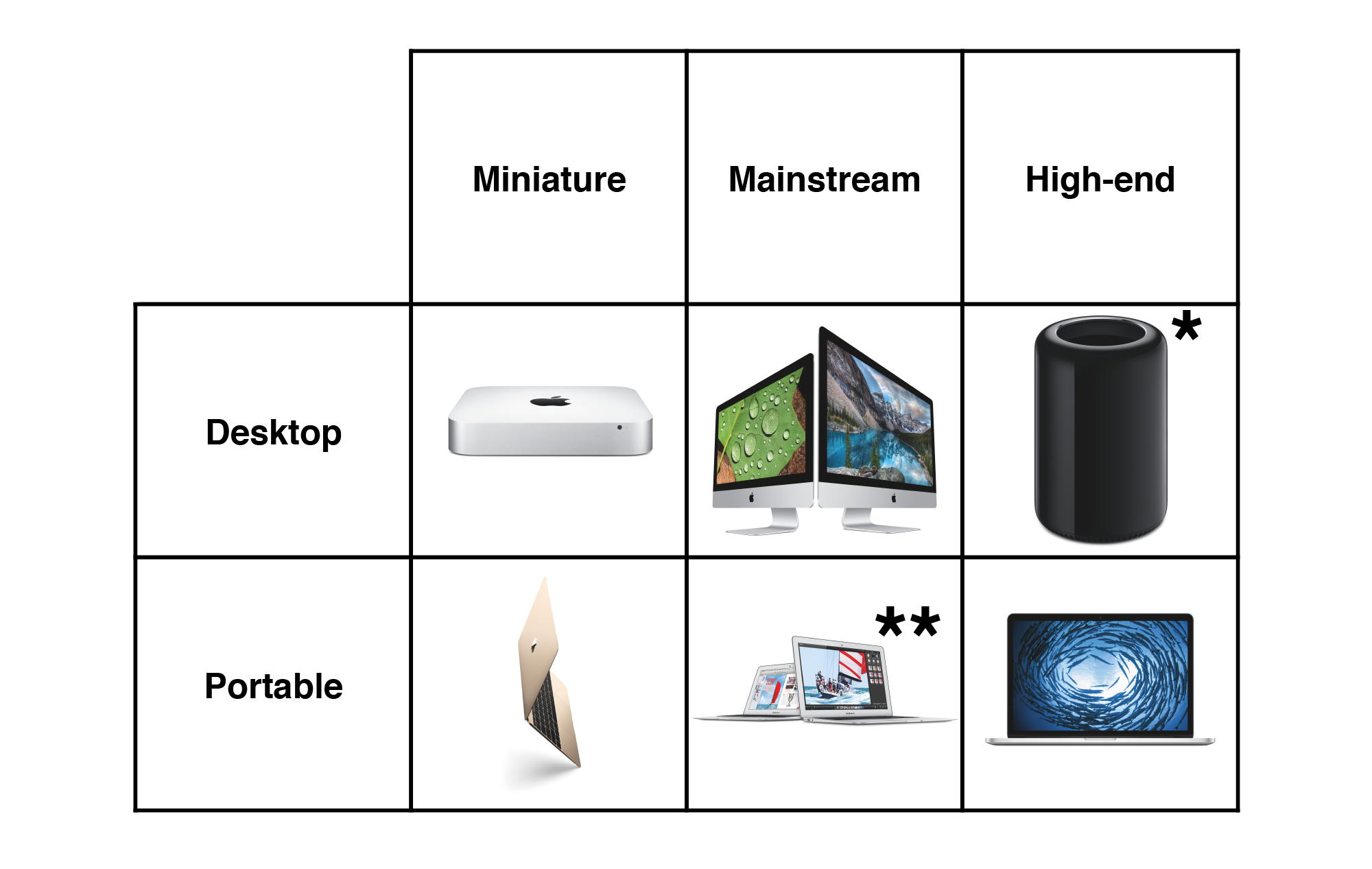
Of course, that isn’t how things are shaped now. A couple of readers wrote in suggesting something along these lines, which had been rattling around in my brain as well:
At first pass, I though this Grid of 6 explained the Mac lineup pretty well, but it really breaks down in the details.
(We’ll get to those asterisks in a few moments.)
In broad strokes, I think this reflects what Apple is doing with the Mac. There are three products in both the desktop and portable lines.
Within each family, there are variations on the products — the two sizes of MacBook Air, iMac and MacBook Pro — but for the most part, things have their place.
The categories are where things get more interesting. This approach loses the old “Consumer” and “Professional” labels, blurring the lines a little bit more into what I’ve clumsily named “Miniature,” “Mainstream” and “High-end.”
The categories aren’t perfect, though. This is where the Grid of 6 breaks down. As I wrote in that piece the other day, this is most evident with the iMac, which can span from a rather mediocre machine for a home office all the way to being the heart of an audio or video studio. The Mac Pro earns an asterisk for still being considered the high-end desktop machine, even though the 5K iMac is nipping at its heels.
Then there’s the MacBook Air, which I’d bet money on going away at some point in the next year. As the MacBook gets faster and the 13-inch MacBook Pro gets thinner and lighter, the Air will simply get squeezed out of the product line altogether.
That’s the problem with grids like this today. Apple’s product lines are just too complex and too nuanced to sketch out on the back of a napkin.
I’m not convinced this is a problem for the company, though. When Jobs came back, he had to tell the story that Apple was on top of its game, and a large part of that story was straightening out the mess the Mac line had become. With four main computers, it was easy to understand what Apple had for sale.
Today, the world is more complicated, and consumers want more options. Some want the most powerful notebook possible, while others value lightness and thinness above all other things. There’s a Mac for almost everyone now, and that’s a good thing, even if it’s a little harder to capture in a simple graphic.
Cassie is pure SnowWhite. What computers would it look good with? Perhaps a Mac SE or Apple IIgs, but even those strike me as a little too sharp-edged and hard. A computer to go with Cassie would have to be soft, like Esslinger’s other designs of the period.
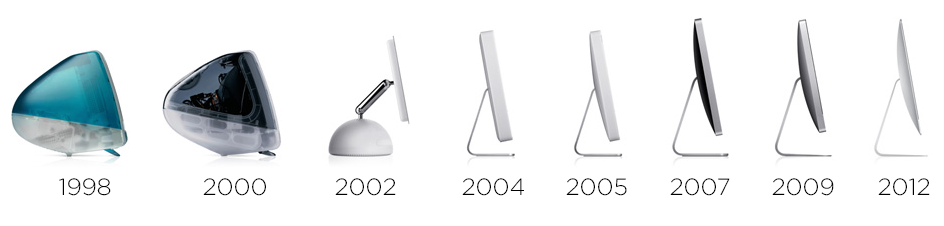
Since its groundbreaking introduction in 1998, the iMac has been at the heart of the Macintosh line. Even as notebooks have consumed most of the market, the iMac holds its ground, outlasting the PowerMac and having a heritage richer than that of the Mac mini. While the 12-inch Retina MacBook may be a wonder of engineering, the iMac is still the spiritual leader of the Mac family.
It wasn’t always this way. While the iMac helped bring Apple back from the brink in the late 1990s, it was just one machine. For years, it was easy to understand the iMac’s place in Apple’s grid of products: it was the consumer desktop machine:
Of course, things have changed over the last 18 years, and not just in regards to the technology packed inside the ever-thinning iMac.
The Grid of 4 is no more. The Mac mini was introduced below the iMac, making the Mac more affordable than ever. On the high-end, the PowerMac and Mac Pro towers are gone, replaced by the current Mac Pro that is more marginalized than ever.
This has led to the iMac’s territory spreading out, making it the de facto choice for more and more desktop users.
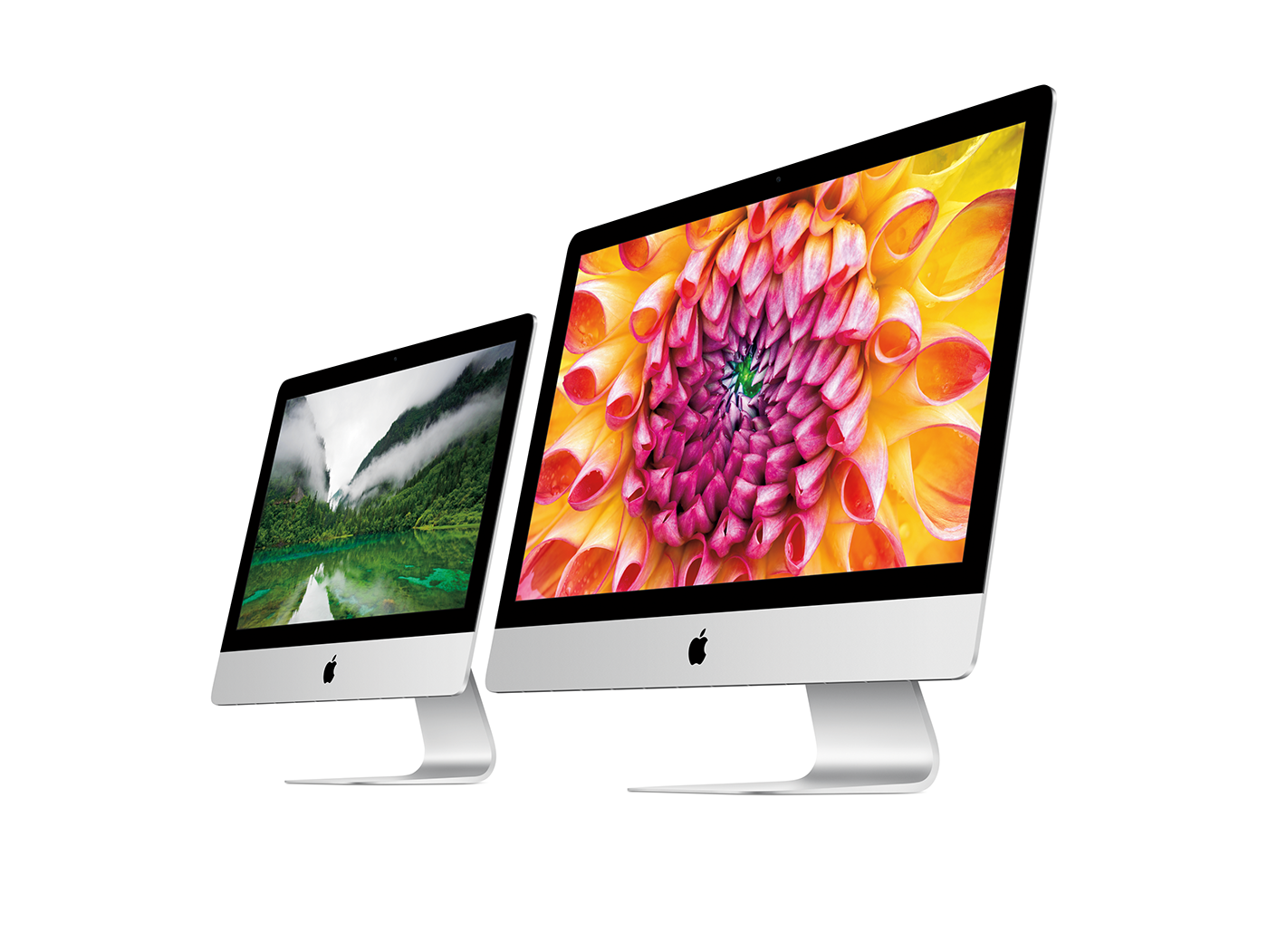
The low-end, $1099 iMac is fine for home users and schools. It’s not a speed demon with that slow spinning hard drive, but it gets the job done. Way upstream is the $2,299 27-inch iMac with Retina 5K display. There was a time where to do any audio or video work, you had to buy a tower; that’s simply not the case anymore with this monster.
This spreading out has left the iMac carrying the weight of the desktop Mac experience on its shoulders. Apple has to have an offering for the masses, while pushing the entire line forward at the high-end. While that’s not necessarily a bad thing, it has led to some weird decisions, like the use of notebook components and slow hard drives on some models.
It also makes me wonder where Apple could take the machine in the future. Any future iMac will need to continue to meet the need of all of its users, from the budget-minded consumer, all the way up to the audio and video editors who are using them these days.
There are some obvious things that need to be done, like moving away from 5400 RPM drives and eventually the Fusion Drive, once SSD prices fall far enough.
I’d also like to see the company bring back the ability to upgrade the RAM in 21.5-inch model. With the redesign in 2012, the iMac’s RAM sockets are locked away, unreachable except on the 27-inch models. For a machine that can be used (and is supported by OS X) for longer than ever, it’s a shame that users can’t upgrade them down the road.
While I expect the “screen and foot” design to remain basically the same for the life of the iMac, reducing the size of the black bezel and aluminum chin would help modernize things a good bit. If you squint a little, the current design looks like the original aluminum iMacs from 2007.
In our increasingly mobile world, there may be some who think the iMac is built around a dated idea, doomed to go the way of the dodo. While that may be the case, I don’t think it’s going anywhere anytime in the foreseeable future. It’s served Apple and users well for 18 years, and is the company’s longest-running nameplate. I think it’s got plenty of life left in it.

 SH: Right.
  SH: I think that’s exactly how I view it as well. It’s maybe not so much about this one particular computer — as fascinating as it is — but it’s the story that it kicks off. The idea that I think is very much at the heart of Apple: that technology can be approachable by anyone, and to do so, it has to be well designed.
 SH: Absolutely. What are the plans for y’alls Apple I?
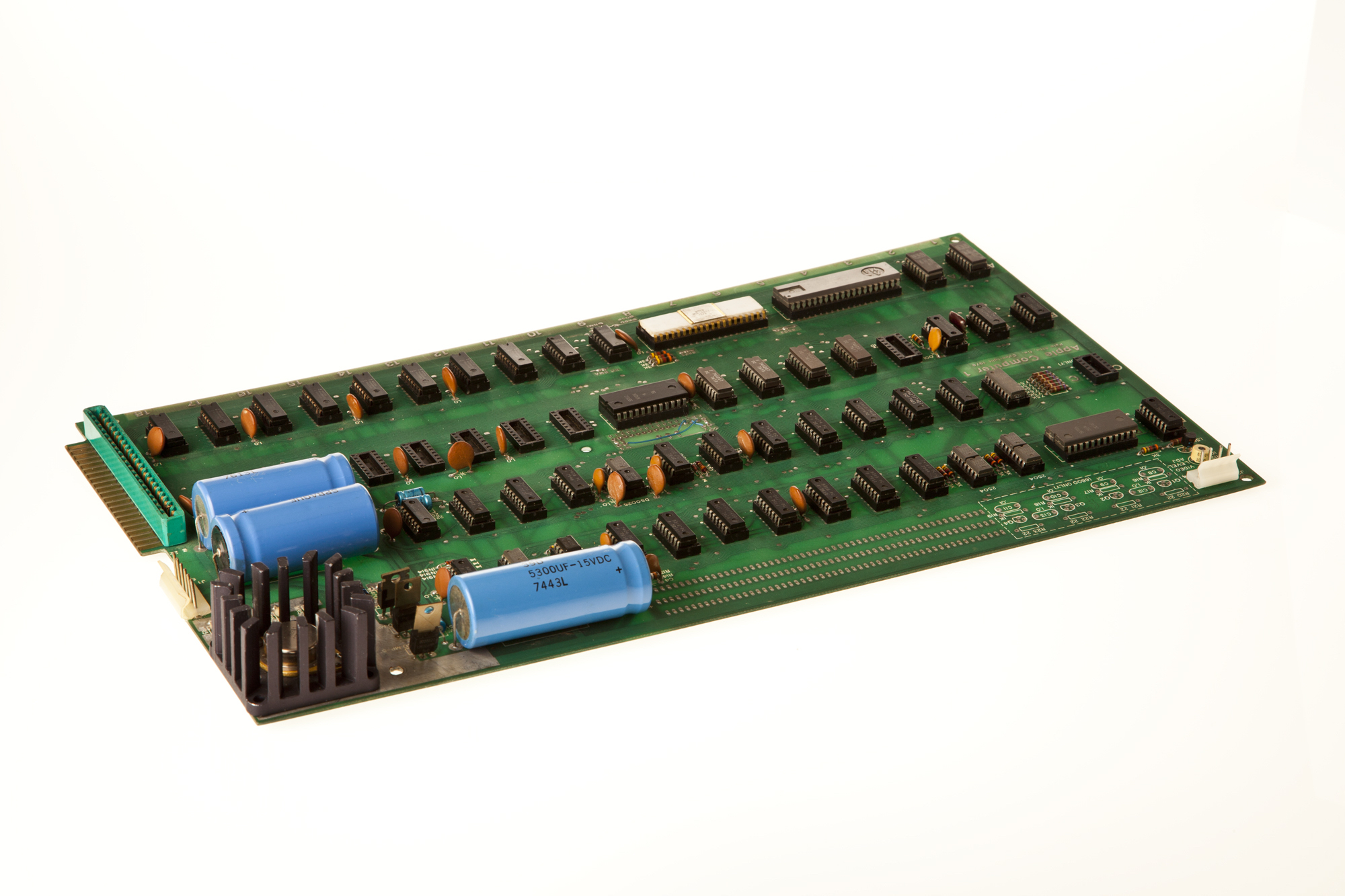 Image via