
I haven’t thought about AOL in a long time, but it is still around, apparently:
512 Pixels
Mac Power Users 779: An AirPods Launcher⇢
In this feedback episode, David and I discuss AI-powered dictation solutions, the safety features built into many Apple products, and some listener feedback.
Drafts’ New Year’s Sale⇢
If you’re starting the new year off looking at new tools, Drafts Pro is half off for the first year right now. Drafts is the fastest and most flexible way to get something out of your head and into you computer.
Connected #534: The Rickies (January 2025)⇢
It is time to name a new Annual Chairman, so the guys judge their 2024 predictions and make a new round of guesses for what 2025 may bring to the Apple faithful.
Dell, Dell Pro, & Dell Pro Max⇢
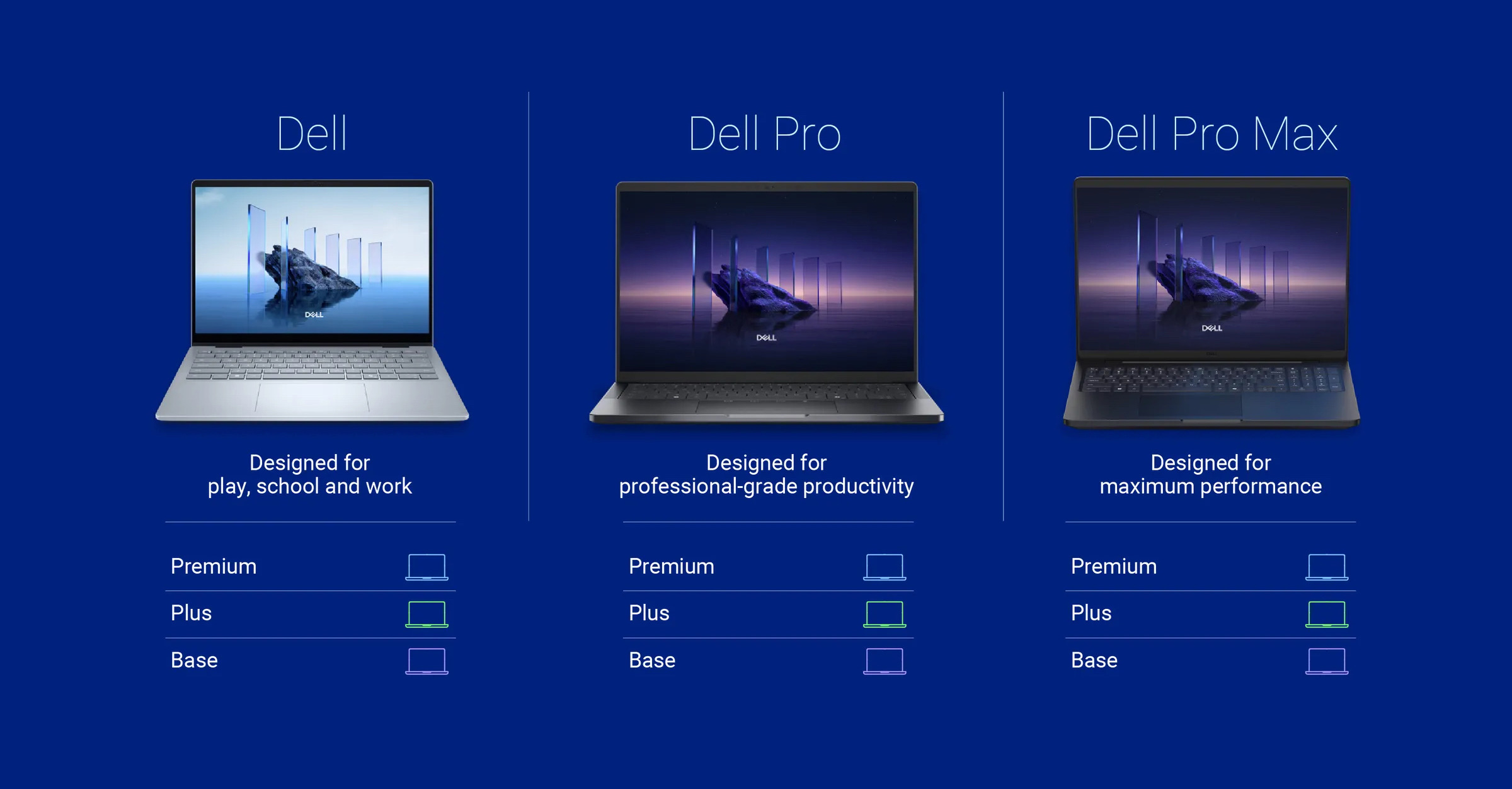
I double checked; today is not April 1.
Sponsor: Magic Lasso Adblock: YouTube Ad Blocker for Safari⇢
Do you want to block all YouTube ads in Safari on your iPhone, iPad and Mac?
Then download Magic Lasso Adblock – the ad blocker designed for you.

As an efficient, high performance and native Safari ad blocker, Magic Lasso blocks all intrusive ads, trackers and annoyances – delivering a faster, cleaner and more secure web browsing experience.
Magic Lasso Adblock is easy to setup, doubles the speed at which Safari loads and also blocks all YouTube ads; including all:
- video ads
- pop up banner ads
- search ads
- plus many more
With over 5,000 five star reviews; it’s simply the best ad blocker for your iPhone, iPad and Mac.
And unlike some other ad blockers, Magic Lasso Adblock respects your privacy, doesn’t accept payment from advertisers and is 100% supported by its community of users.
So, join over 350,000 users and download Magic Lasso Adblock from the App Store, Mac App Store or via the Magic Lasso website.
Mac Power Users 778: Exploring the Task Management Environment⇢
This week on Mac Power Users, David and I discuss the task managers we tried in 2024, and what we are currently using to get things done at work and beyond.
Oral History of Bertrand Serlet⇢
I haven’t gotten very far into this interview yet, but Serlet’s history and career should be more widely known than it is.
The Story Behind the Initial Iteration of the Mac OS X Dock
On January 5, 2000, Steve Jobs unveiled the Aqua user interface for the very first time. Stylistically, it was a bold departure from what had come before, and was no doubt created with the iMac G3 in mind.
The changes were more than skin deep, and no where was the influence of NeXT’s software more evident than the Dock, a place for users to stash documents, an easy way to launch applications, and generally anchor the user interface to the bottom or side of the screen.
Here’s how Steve Jobs described the Dock when it was introduced back in 1988:
The dock — It turns out that, when you’re running applications, things can get lost. These icons can get hidden and you might want to read your mail at a moment’s notice. So we allow you to take any icon and take it over to any one of these dock positions and it’ll snap in and dock. And the minute it docks, nothing can go in front of it. And so it’s a place to always have the applications that you use handy. You can customize it any way you want to, and nothing will ever keep these things from being a glance away. That’s what the dock’s all about. And if you decide that you need to use that right part of the screen for an awfully big window, and you don’t want to undock things, you can just slide it down and everything, but the little logo will go off the screen.
If that sounds familiar, it should, but the Dock in Mac OS X didn’t come straight over from what was then known as OPENSTEP. Instead, a friend of mine at Apple was hired to write it. Here’s James Thomson, writing about that 2000 event:
Towards the end of the presentation, [Steve] showed off the Dock. You all know the Dock, it’s been at the bottom of your Mac screen for what feels like forever (if you keep it in the correct location, anyway).
The version he showed was quite different to what actually ended up shipping, with square boxes around the icons, and an actual “Dock” folder in your user’s home folder that contained aliases to the items stored.
I should know – I had spent the previous 18 months or so as the main engineer working away on it. At that very moment, I was watching from a cubicle in Apple Cork, in Ireland. For the second time in my short Apple career, I said a quiet prayer to the gods of demos, hoping that things didn’t break. For context, I was in my twenties at this point and scared witless.
The rest of the story is priceless.
A Brief Overview of the Pocket 8086; or, How I Learned to Stop Worrying and Love Windows 3.0 in Real Mode
Editor’s Note: This is a guest post written by my buddy Kevin, and is the first in a series covering a weird and wonderful corner of retrocomputing.
I’m Kevin Lipe, 512 Pixels’ somewhat-official MS-DOS correspondent. Long time reader; second-time guest post.
I’ve only ever written for this site about software that’s as old as I am, and this series will be no exception.
Stephen and I have been friends for a very long time (ask him about buying forkbombr.net from me for two slices of pizza in 2008), and for most of that time, I’ve been obsessed with retrocomputing in all its various forms and fashions.
So naturally when the Book 8088 first started appearing in articles, I was intrigued. When its successor machine, the Pocket 8086, launched last year, I immediately texted Stephen: you have to let me review this thing.
He doesn’t always indulge my bad ideas, but for whatever reason, this one got the green light.
Just soak this thing in:

Why the Pocket 8086, though? Why should you — presumably mostly Mac users with a strong appreciation of the platform’s legendary past — care about a Chinese laptop version of a PC/XT made from scavenged chips and netbook parts? Why does it matter?
I often feel like computers, as tools for thought, went wrong somewhere. Steve Jobs’ comment that the Mac was supposed to be a “bicycle for the mind” resonates with me still: these things are supposed to help us do things and make things, things like create art, balance our budgets, run our businesses, communicate–things that have an impact on the world beyond ourselves. Or not! They’re supposed to make us more of what we are. It’s hard to feel that way about a Windows 11 PC, for sure, though I’m admittedly a Windows guy these days. The iPhone and iPad still feel a somewhat magical, but the further these technologies develop, the less they feel like tools for thought and the more they feel like subscription revenue generators.
In this, the first part of our little miniseries about the Pocket 8086, we’ll look at the device itself. Who is this thing for? Is it any good at the things it’s trying to be good at?
After exploring these topics, we’ll then set up the rest of our MS-DOS journey together.
What is This Thing?
The small computer sitting on my desk is one of a series:
- The Book 8088
- The Hand 386
- The Pocket 8086
- The Pocket 386
The exact lineage of these machines is a little murky and hard to follow due to the devices’ origins in the Chinese retrocomputing scene, but I’ll try to summarize as best I can:
They are all recreations of a past hardware in form factors that weren’t possible when the hardware was current. They are PC/XT compatible (or more capable in the case of the 386 machines) but they look like the netbooks we all loved so much circa 2009.
The exception here is the Hand 386, the form factor of which is, frankly, bonkers.
The rest all follow the formula of the beloved original Asus Eee PC: tiny screen, little keyboard, but a real PC, portable but a little bit thicc.
The only difference is that instead of running a custom hobbled Linux distro or Windows Vista on an Atom processor, these machines have hardware that hasn’t been current since the late 1980s. They are throwbacks to an earlier time (weapons for a more civilized age, maybe) when even a basic, bare-bones PC was thousands of dollars and only ran one application at a time.1
A Sidebar on the PC/XT
What is a PC/XT, anyway? The IBM Personal Computer, the Model 5150, was released in 1981. It had an 8088 processor, its RAM was expandable to 640kb, one or two floppy drives, a cassette port, and initially, no hard drive option.
By 1983, IBM felt it was time for a little refresh, and so released the PC/XT, for “eXtended Technology.” I wouldn’t say the technology extended very far, but the changes did result in a more usable system.
The XT’s improvements over the original PC were as follows:
- 10MB hard drive as standard equipment
- Eight expansion slots instead of the original five
- No cassette port
- fewer, higher-density RAM chips
The XT was, by all accounts, a very successful upgrade, especially when taken along with PC-DOS 2.0, which added a bunch of stuff nobody really uses like subdirectories and device drivers.
(Stephen and Quinn Nelson covered a lot of this in the final handful of episodes of their excellent podcast, Flashback.)
Ok, Back to These Weird Little Notebooks
The original Book 8088 was almost exactly what it sounds like: a notebook version of an 8088-based PC, with an NEC V20 processor featuring the same 8-bit data bus as the original IBM PC, CGA graphics, and an optional OPL3-based sound card. It ran a pirated open-source XT BIOS, and came with a bunch of abandonware, and certainly made waves on the little corners of Mastodon I inhabit where old computers are more popular than new ones.
But it was half-baked at best, with Compact Flash in place of a hard disk, a USB port that isn’t really a USB port, and a few other glaring flaws, but still: it was exactly what it was trying to be, and a small community of folks fell in love with it.
I don’t have any experience with the Hand 386, but it seems to be more of the same, just in a somewhat less sensical form factor, and it hinted at the future of the series, headed towards more capable hardware that could run an even wider array of old software.
People liked the Book 8088, but it had its problems. The Hand 386 was the same way. And so, a new generation of the hardware appeared: the Pocket 8086 and its 32-bit twin, the Pocket 386. Smaller than the Book 8088, but maintaining the laptop/clamshell form factor that’s been standard for laptops since the late 80’s, the Pocket 8086 is a more powerful, more polished version of the Book 8088, with a fully 16-bit processor (still an NEC, the V30 in this case) and VGA-capable graphics.
The Specs
The Pocket 8086 measures 4 5/16" by 8 1/4" and is an inch and a quarter thick with the lid closed. Mine’s made of translucent plastic, but it’s also available in a smoked translucent grey a la those special edition Nintendo 64’s that the kid down the street had but you didn’t.2
Inside is a 16:9 screen and possibly the smallest and worst netbook keyboard I’ve ever seen or attempted to use. It’s functional, though, and in place of the Windows key is a TURBO button, which more computers should have.

The machine has two speakers, some LED indicators… it’s a small but essentially normal laptop.
What’s less than normal is the hardware, and the ports.
The processor is an NEC V30, a pin-compatible but faster NEC version of the 8086, though the motherboard is compatible with the 8088/V20 as well if you move a jumper.
It’s got 768kb of RAM, an OPL3-compatible sound card, a 512MB CompactFlash card in place of a hard drive, a USB port that really only works with storage devices that are formatted to be readable by DOS, headers for a parallel port, serial port, PS/2 port, VGA output, and an 8-bit ISA expansion slot.
 Mmmm, ports.
(The port dongles come in the box with the machine.)

There’s also a 3.5mm audio line out jack; take that iPhone 7.
The display’s built in controls are accessible with the function key, so pressing Fn+F4 brings up display settings like brightness and contrast, and also allows switching between the display’s native aspect ratio and the VGA chip’s native 4:3 ratio.
It boots pretty quickly, because it’s just (“just”) booting DOS and it’s doing it from a solid state device. No nostalgic gravel-rattling-in-a-box hard drive sounds, no floppy disks to flip. A single beep and you’re at a C:\> prompt, as God intended.
WTF is an NEC V30?
The processor here is interesting, and I can only figure that whoever is manufacturing these devices found a cache of salvaged devices powered by them. Wikipedia, of course, has a good summary of what these things are. NEC sold them directly to consumers as a drop-in replacement to make your computer faster, similar to something like the Zip Chip in the Apple II world.
There are also V20-specific extensions to the 8086 instruction set that make the chip even more performant. Given that the name of the game in PC compatibles is being nothing that a “normal” PC doesn’t do, it’s unlikely that there’s much DOS software outside of custom domain-specific tools that specifically targets these extensions, but it’s cool to know that they’re there, and the chip still performs faster than an 8086 on many of the same operations.
Apparently they were also used in a bunch of Irem arcade games and the incredibly-named Bandai WonderSwan.
Is it a Good Computer?
…this is probably the real question, right? And the answer is: it depends on what you mean by good and on what you mean by computer.
…But is it a Good Computer?
Maybe what you mean is, I like to do stuff on computers, and I like to have a decent computer on which to do stuff. Ignore the fact that this one runs DOS and maybe Windows 3 (again, more on this in a bit), or assume that these are the software tools that you specifically intend to use. Is it successful as a computer on which you can do stuff?
Kinda.
Keyboards are the primary way I interact with computers. I’m a writer with a day job at a big company, and I spend almost all my time on a computer writing something or reading something (lotta PowerPoint in there as well, but I’d prefer not to discuss it).
This one is technically a functioning keyboard. When you type on it, the keys that you press do appear to be directly connected to the letters that appear on the screen.
Sadly, that’s about the nicest thing I can say about it; it’s too small, the layout is weird, the keys feel both too hard to press and like they’re about to break if you breathe on them wrong, and it’s generally a pain to use.
While the keyboard works, the “PS/2 mouse emulation” that is supposed to be able to make the cursor move around on the screen using the function keys does not work. I tried several times in the Windows environment that ships on the thing but it never seemed to do anything at all.
Admittedly, I don’t have a PS/2 mouse around anymore, so using the external port may be totally fine — but the documentation makes a big deal out of the PS/2 mouse emulation and as far as I can tell it’s completely non-functional.
The screen is not the worst laptop screen I’ve ever seen, but that’s because I’ve used old Thinkpads a lot, and I also had an original 800 x 480 Eee PC 701. (So did Stephen. We were Eee Bros.)
The panel gets the job done, and the ability to switch between aspect ratios is useful (and, truth be told, if I played more DOS games it would probably be essential).
It boots quickly as DOS generally does. The battery life is surprisingly good, but then again it’s a pairing of old computer hardware with new battery technology, so it probably should be. I’ve used the thing several hours without having to charge it and I can’t imagine one would want to use this for more than several hours at a time.
…But is it a Good (Retro)computer?
Maybe what you mean when you ask if it’s a good computer is something more like this: is it a good computer to do “old computer” stuff on? How good is it as a retrocomputer?
The answer to this question is: it’s pretty good! It’s fast, because of the CompactFlash storage. It’s compatible with a shockingly wide range of software, even up through Windows 3.0 (though Windows 2 might be the sweet spot if you really must have a GUI, or something like GEM).
If you use it with an external monitor, keyboard, and mouse, it would probably be a very good tool for running old DOS applications and games. The catch is this: if you’re using an external keyboard, mouse, and monitor, you might as well just run whatever you’re trying to run in DOSBox-X and have access to a web browser while you’re doing it.
The Pocket 8086, then, finds itself in a weird niche: it’s a neat little computer for running old software in a portable way, but if you’re only worried about the software you might as well just use an emulator, and if you’re only worried about the hardware, you might as well use the real deal and join the crowd on r/retrobattlestations.
It does, however, offer one advantage over using real-deal old hardware, especially floppy disks: the CF card is easily removable, and just about anything will read the FAT partition, making data transfer very easy.
In the past when I’ve cooked up some plot to use an old machine as a “minimal writing environment,” there’s always been some Rube Goldberg scheme of hopping across machines from different eras to get files on and off the thing. (The worst example of this was getting things from a PowerBook 180 running System 7 into a Windows XP world, something I tried during college for a while.) The fact that I can just pop the CF card out of the Pocket 8086 and into a card reader, dragging and dropping files and programs off the thing, is a major ease of use improvement.
That said, IDE-to-CF adapters are all over the place for retro machines along with other Flash-based disk replacements and emulators. This experience is not really exclusive to the Pocket 8086, convenient though it may be.
What Comes on It?
Computers mean nothing without software. The appeal of a machine like this is that it runs what a similarly-equipped PC-XT(ish) machine would have been able to run, so what comes on the Pocket 8086 and how well does it work?
For one thing, there’s no way any of this software is actually legitimately allowed to be sold pre-installed on this computer. The OS is MS-DOS, version 6.22, and it also includes Windows 3.0. Theoretically a V30-equipped system will run Windows 3.1, but I can’t imagine it’d be worth the trouble.
There are a few applications pre-loaded on the thing, including Borland Turbo C and Turbo BASIC, and the Windows installation seems to work fine (other than the aforementioned lack of functioning mouse emulation). I’d imagine everyone buying this knows exactly what they want to actually use it for: a cherished collection of games they love, a favorite word processor ( WordPerfect 5.1, of course), or something else. I don’t think the pre-installed software is really the point of the thing, other than to give users a starting place.
Windows: Keeping it Real (Mode) Goes Wrong
One of the things about the 8086 (and thus the V20/V30) is that it doesn’t have the protected mode of the later 80286 and beyond processors in the x86 family, but only works one way: real mode.
In real mode, the 8086 and its brethren could address a megabyte of memory directly, with no concept of multitasking or virtual memory, concepts used by operating systems to protect running processes from clobbering each others’ data while multitasking. Everything running on the computer could access every location within the computer’s memory. If you used the classic Mac OS and remember how frequently it crashed while showing a literal bomb on the screen, you know exactly how well this form of multitasking works.
In the more advanced protected mode, the processor has built-in mechanisms for managing memory such that processes can be, well, protected from each other. Multitasking becomes more tenable at the hardware level; certain rules about memory access become much easier to enforce within the processor itself. In the x86 world, this hardware debuted with the 80286 and the IBM PC/AT in 1984-85. But that’s not where we are with this little laptop; we’re firmly in 1978 with the original 8086 and its 20-bit segmented addressing.
By the time Windows 3.0 came out, this was already outdated technology, and I’d imagine that if Microsoft had felt they could get away with ditching it for Windows 3 without alienating too many users of existing PCs, they would have. But what good would Microsoft be if not for ridiculous levels of backwards compatibility?
That said, my real assumption is that it just has Windows on it so one can say “it has Windows on it.” Vogons has a great thread about what can actually run in real mode Windows; it’s not much, though you could cobble together a reasonable set of installed tools. I can’t think of a real reason one would prefer to work in this environment over DOS given the limitations of this particular crazy flavor of Windows.
The Question Without an Answer
There’s really just one thing I wanted to answer about the Pocket 8086, and it’s the one thing that’s eluded me as I’ve been pulling together thoughts and notes for this series: who is this thing for? I think there are three possible audiences for the Pocket 8086 who would actually find something here that they enjoy and/or appreciate using.
The gamers. The Pocket 8086 is well-spec’d to run classic games. Sierra games, Lemmings, even Wolfenstein 3D will run on it, and if you just want to have a little DOS laptop to load up with games and play, why not? In this case, for most games, the keyboard wouldn’t really be as big of a factor, either, because you wouldn’t really be trying to type on it, but rather only using whatever controls the game called for. You could even connect a joystick to the serial port (or parallel, I guess, though I don’t know how common those were). The “meh” display could be an issue for retrogaming enthusiasts, but I also think the portability and the “oh, that’s cool” factor of the fact that that the Pocket 8086 exists at all could be selling points.
Retrocomputing obsessives. This is, clearly, me. I like this thing even though it’s pretty bad at being a usable computer for any real length of time due to the God-awful keyboard. The fact is, it’s a little DOS computer built as though it’s a modern laptop. That’s cool!
Retrocomputing obsessives… in China. This Vogons.org thread, if you have time to read all the way through it, has some real insights into the creator(s) of the Book 8088 and what went into it: a very specific set of circumstances in China that led to the convergence of its retrocomputing scene with its wildly diverse electronics recycling and manufacturing infrastructure, combined with a guy who is really into this stuff and wanted to make something cool. Cultural differences aside, I think they fact that this thing is available in the States seems like more of a happy accident than anything, and probably was never the original intent behind the creation of this line of machines. That said, I’m glad it escaped into the wider world (this is where someone who isn’t me would make a tasteless COVID/lab leak joke, but you’ll have to supply your own, reader).
So What?
I think I explored the system itself pretty thoroughly here, though there may be some aspects of the hardware that I’m overlooking but is considered critical by somebody else out there, and I’m sure they’ll send Stephen an email about it, not me.
There are two more things I want to explore with the Pocket 8086 in this series: what happens if you try to use it for ““real”” ““work””? And what might we learn about computer productivity, tools for thought, and permacomputing from such an intentionally obsolescent device? Those will be coming soon, as soon as I write them.
It’ll take a while, because I keep having to stretch my hands out from this horrible keyboard, and WordStar ate my files a couple of times. What, do I look like George R. R. Martin?
Don’t answer that.
-
To be fair, Macs at the time mostly only ran one application at a time, too, as the PC/XT came out before the 128k Mac, to say nothing of MultiFinder. ↩︎
-
I didn’t expect a childhood trauma to be brought up when working on this article with Kevin, but here we are. —Stephen ↩︎
Apple TV+ Offering Free Viewing January 3-5⇢
Apple TV+ is ringing in the New Year by offering an all-access pass to customers all around the world. Enjoy Apple TV+ for free the first weekend of 2025 (January 3 through January 5), Apple TV+ will be free on any device where Apple TV+ is available. All you need is an Apple ID to see what all the buzz is about.
Over the holidays, a lot of family members praised Apple TV+ when talking about media, and rightfully so. Apple TV+ has some really, really good shows and movies, and the hit rate is pretty high for me.
Mac Power Users #777: Setup Nostalgia⇢
On this week’s Mac Power Users, it’s MPU Holiday Special time! David and I reflect on our college Macs and how influential they would end up being on each of us.