
If you’ve always wanted a PDF of the installation guide, but couldn’t find one, today is your day.
512 Pixels
From Mac OS 7.6 to Rhapsody
In 1997 — just after the company bought NeXT — Apple showed off its plans to move from Mac OS to Rhapsody, the code name given to the work that would ultimately birth Mac OS X.
In March 1997, Apple executives outlined this plan and its benefits. Now in 2011, it’s obvious that Steve Jobs’ vision would indeed become the driving force for the Mac OS for years to come.
Massachusetts Attorney General has ID Stolen, Investigating iTunes With Official Power
Massachusetts Attorney General Martha Coakley said on Tuesday that her office would be inquiring into long-standing complaints about fraudulent purchases that leverage Apple’s popular online music store.
In a lunchtime address to business and technology leaders in Massachusetts, Coakley said she was a victim of identity theft in recent months, and that her stolen credit card information was used to make fraudulent iTunes purchases.
Seems like a perfectly reasonable use of state resources.1
via The Loop
-
Wait, nope. I lied. ↩︎
Going Back
Neven Mrgan, on iOS app design:
A Back button labeled “Back” is never a good option.
Board may ‘webOS’ HP CEO
‘Computer Nerd Publications’
The Value of App Store Descriptions
I haven’t played this game, but I’m willing to, just based on this:
GoatUp is easily the best goat-related platform game on iOS.
‘Talon-Hand Gestures’
Thomas Brand explains why he’s gone back to Snow Leopard from Lion.
Congressional Millionaires
President Obama continued laying what may be more groundwork for his re-election campaign Monday, including a new tax proposal. He calls it the “Buffett rule”: a new tax on people making more than $1million a year, who currently pay a much lower rate than an average middle-class American. The president, in fact, proposed this rule to a group of people with a lot of millionaires in it.
The number of Americans who are millionaires is pretty low — about 1 percent of the population. Members of Congress who are millionaires? Nearly 50 percent.
How to Return the "Bounce Message" Feature to OS X Lion Mail
In previous versions of OS X, Apple’s Mail app included a feature named Bounce. This allowed users to send email back to the sender, making it look like the address wasn’t valid. Here’s what a bounced message looks like. I sent myself an email (from my Mobile account to my email address for this site), then bounced it back:
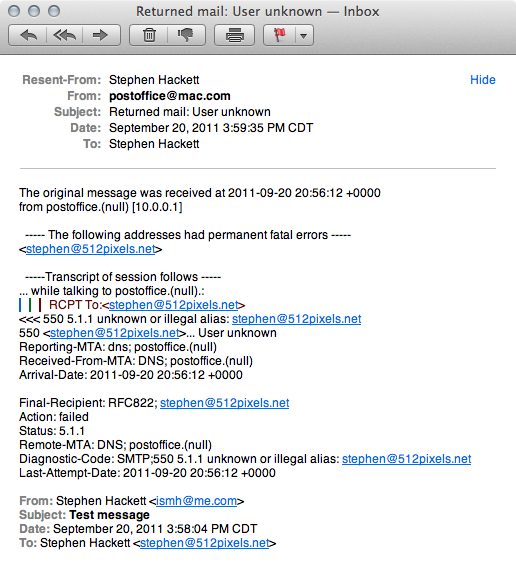
It was great for spam and emails from the mother-in-law.
Sadly, in Lion, this feature was removed from Mail. Thankfully, with a little AppleScrip work, its functionality can be restored.
- Download this .zip file, containing an Automator document.
- Open it in Automator after un-zipping it.
- From the File menu, select Duplicate To…. Save the new file as a Service.
- At the top of the new document, set the options to no input and Mail.app, so it looks like this:

Hit Save, and name the service something like “Bounce Message.”
Now, in Mail, when a message is selected, there will be a new option in Services under the Mail menu:
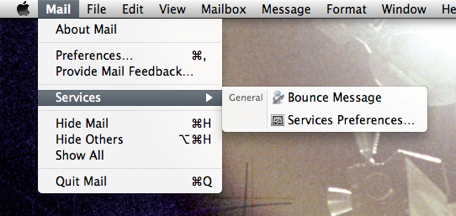
Selecting that item will bounce the message to the sender and delete it from the Inbox.
Some have reported that messages deleted this way don’t stay deleted, and jump back into the Inbox after Mail restarts, but I haven’t seen this firsthand.
Happy bouncing.
Apple Donates First-Generation iPads to Teach for America
The Capture Form
As I’ve discussed before, I’m a pretty heavy-duty user of OmniFocus.
Recently, however, I’ve noticed some gaps in my system of managing tasks. Mainly, I struggle getting tasks from “real-life” things into OmniFocus. Tasks that start on my Mac (from Mail, Safari, etc.) are easy to send to the Inbox.
Sadly, most of the time, these “real-life” events are meetings. Say what you will about them, but the reality is that in my day job, meetings are a necessary evil.
I don’t like taking my MacBook Pro to meetings to take notes or capture tasks. I find it distracting, and it can create a barrier between me and other meeting participants.
About a month ago, I started taking my current Field Notes notebook into meetings with me, but I found that I need more space to take notes, and often, tasks get lost among the notes and other things that live in there.
So, I’ve made a form. (Well, I swiped Shawn’s design and re-worked it a bit.)
The single sheet — which I’ve dubbed the “Capture Form” — includes space for four things:
- Reference Information: Info I need to know to put the meeting in context.
- Meeting Notes
- Action Items for Others
- Action Items for Me
I can take the form with me to a meeting, take notes, capture action items, and file them away later in OmniFocus. I have a binder on my desk of past forms, which will (over time) create a nice archive of past meetings and events.
You can download the Capture Form as a PDF. (right-click to download)
Update: I’ve created an alternative version(right-click to download) with an expanded Notes section and no Reference Information section.
Update #2: If you want a TextExpander version of the form, check out this post.