MarsEdit⇢

My thanks to Red Sweater Software for sponsoring 512 Pixels this week with their excellent Mac app for editing WordPress, Micro.blog and many other types of blogs.

MarsEdit supports editing posts in rich or plain text, and includes a preview window that updates instantly to show your writing exactly as it will appear on your blog. Are you a Markdown fan? MarsEdit can preview and automatically convert your Markdown to HTML as needed before publishing.
Continue reading ⇢

Bloomberg: M2 Macs in Testing⇢

None of this should really be a surprise, but the most interesting machine in Gurman’s article, to me at least, is the Mac mini, which he says is in testing:

A Mac mini with an M2 chip, codenamed J473. This machine will have the same specifications as the MacBook Air. There’s also an “M2 Pro” variation, codenamed J474, in testing.

Apple is also testing a Mac mini with an M1 Pro chip, the same processor used in the entry-level 14-inch and 16-inch MacBook Pros today. That machine is codenamed J374. The company has tested an M1 Max version of the Mac mini as well, but the new Mac Studio may make these machines redundant.

Continue reading ⇢

A Tour of Apple’s External (LCD) Displays

With the 2022 Apple Studio Display, the company has returned to the display business in a big way. To celebrate, I thought we could walk through the history of Apple’s standalone flat displays.

1984: Apple IIc Flat Panel Display

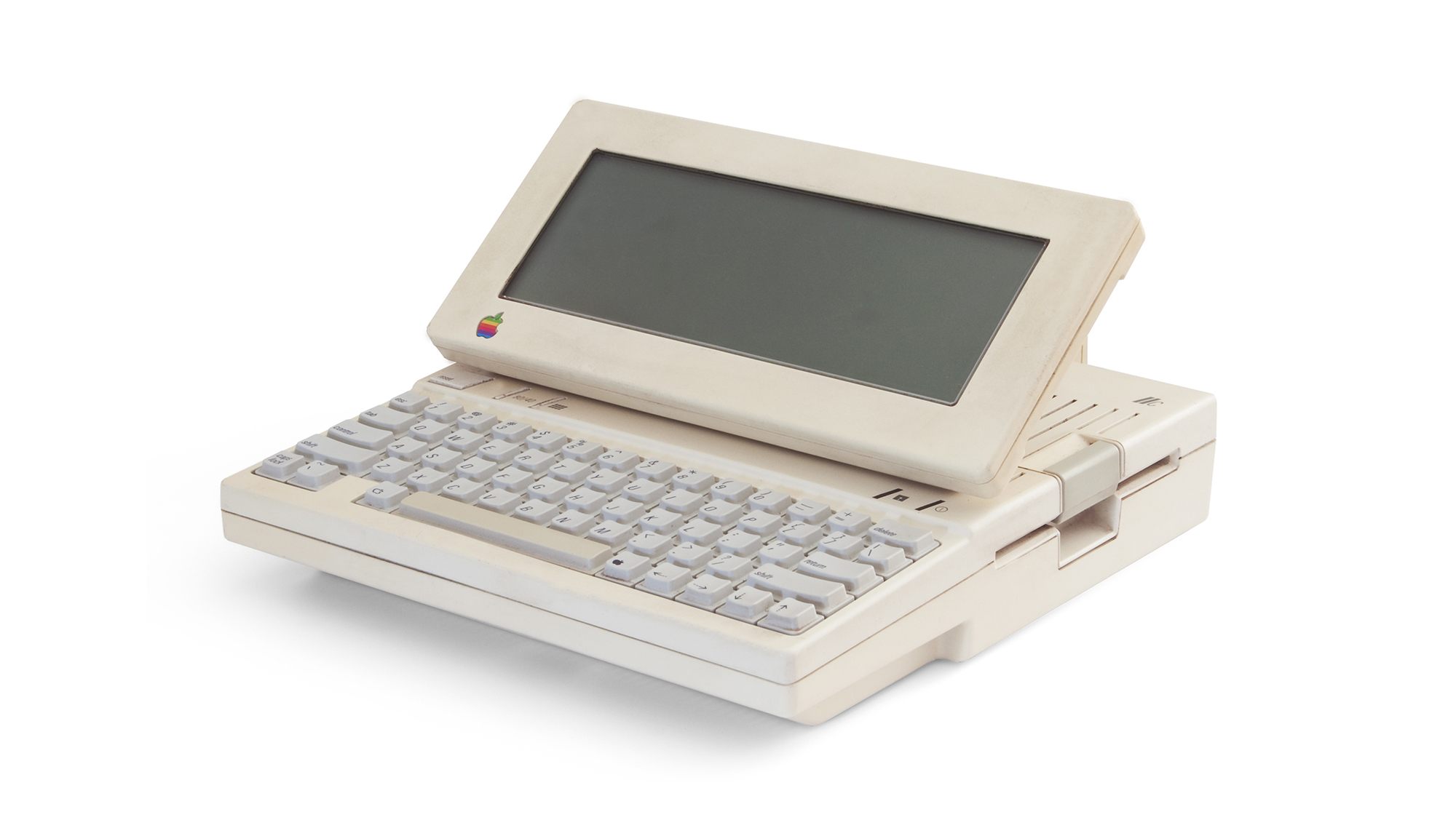
In April 1984, Apple introduced a 1-bit, 7-inch LCD for use with the somewhat-portable Apple IIc:

Apple IIc Flat Panel Display

With a resolution of 560 x 192, it provided an 80-column text mode and hi-res graphic support, but things were a bit … squished, as you can see in these photos. At $595, it didn’t sell very well, with estimates putting the number made at just about 10,000 units.

Continue reading ⇢

Snell, on Apple’s Baseball Offering⇢

Jason Snell likes baseball. I don’t, and sometimes he teases me about it. That said, his impressions of Apple’s new “Friday Night Baseball” was a really interesting read. I particularly like how he thinks the whole thing could become much more interactive:

Every single viewer is watching on a smart device of some kind. How about letting us customize what stats we see on screen? What about alternate camera views or a natural-sound-only audio stream featuring crowd noise and mic’ed up players? What about alternate broadcasts entirely, with audio from statheads or scouts or umpires or former players talking about a different game aspect? What about something I’m not even thinking of here?

Literally anything is possible. I realize all of it would take work to build. I even understand why it’s not available on week one and might not even be available this season. But the fact remains that Apple, an incredibly innovative technology company, debuted baseball games that it’s streaming internationally exclusively via Internet-connected devices… and the broadcast itself is as flat as a pancake, a vanilla video stream with no digital extras.

Continue reading ⇢

Kbase Article of the Week: iTunes Store: Can‘t Publish a Podcast⇢

Apple Support, back in 2012:

Sometimes the iTunes Store can’t publish certain podcasts. If you’ve submitted a podcast using the “Publish a Podcast” page but haven’t seen it published yet, sit tight. The iTunes team reviews each podcast submission. Depending on demand, it may take a week or two before the podcast gets published.

Additionally, here are some other reasons why a podcast might not get published:

  • The podcast’s RSS feed was not available.
  • The podcast’s RSS feed timed out.
  • The podcast’s RSS feed could not be validated.

Continue reading ⇢

Apple Podcasts Connect Adds ‘Followers’ Metrics⇢

Apple:

All creators can now view metrics for Followers in Apple Podcasts Connect.

From the Analytics tab, you can view followers per show and measure followers across shows.

After selecting a show, you can quickly view the number of New Followers netted over the last week, month, 60 days, and all time. You can also see Time Listened as a precent of those following and not following the show.

By navigating to the Trends menu, you can view a graph of followers over time and the number of followers gained or lost on a specific day or during a specified range.

Continue reading ⇢

Sponsor: MarsEdit⇢

MarsEdit is a Mac app for editing WordPress, Micro.blog and many other types of blogs.

Eliminate the friction of blogging with MarsEdit. Its native Mac interface makes writing, publishing, and editing your blog as delightful as everything else you do on your Mac.

MarsEdit supports editing posts in rich or plain text, and includes a preview window that updates instantly to show your writing exactly as it will appear on your blog. Are you a Markdown fan? MarsEdit can preview and automatically convert your Markdown to HTML as needed before publishing.

Continue reading ⇢

Mac Power Users #635: Workflows with Allison Sheridan⇢

Allison Sheridan has been a Mac user since the very beginning and has been talking about Apple and its products since late 2005. She joins us on this week’s episode of MPU to talk about her experience with the platform, her use of diagramming in blog posts and much, much more.

On More Power Users, the longer and ad-free version of the show, I talked David through my initial impressions of my new Mac Studio.

Continue reading ⇢

The Windows 95 Launch Video⇢

My pal Florence Ion, writing at Gizmodo:

I want to thank whatever stars aligned that surfaced this video of the Windows 95 launch event in my algorithm. While clips from the presentation have floated around online for decades, the full 90-minute keynote has been harder to track down. Uploaded this week by the angels over at the Blue OS Museum YouTube account, the complete presentation is an absolute time capsule of technology culture as it existed on Aug. 24, 1995. It also features some incredibly cringe moments, most of which stem from Jay Leno’s cheesy and problematic joke-telling.

Continue reading ⇢