
Although the Apple website has not been updated with any new info, Siri is proudly proclaiming that WWDC 2016 will indeed be held in San Francisco from June 13th to June 17th. Although Siri didn’t explicitly say, it is almost certain that WWDC will once again be held at Moscone West, simply because it’s the best choice of venue for an event like this in San Francisco.
posts
RSS Sponsor: Argentum Camera app⇢
Argentum Camera is a black & white camera app built from scratch with street photographers in mind. Free of any excess settings it lets you take high quality black & white images with one tap. No complicated adjustments, no need for post-processing, no selfies.
Argentum processes the images in real time applying one of the six filters, each inspired by an iconic photographer, such as Ansel Adams, Henri Cartier-Bresson or Irving Penn. You can further adjust the tones by changing EV compensation or light up the scene using a torch mode. The adaptive layout of the interface places the shutter button under your thumb in landscape mode making Argentum easier to handle on larger iPhones. The whole experience is built to be seamless, so you can stop focusing on the camera and start focusing on capturing the moments you witness.
Behind the Scenes at The Pen Addict 200
This weekend, I traveled to Atlanta to help produce Episode 200 of The Pen Addict podcast, live in front of an audience at The Atlanta Pen Show.
Obviously, the setup for this was more complicated than what we normally use to record a show like this, so I thought it would be fun to share how we did it.
Here’s a timelapse of everyone helping set the room up, courtesy of Doug Beal:
Aurora Borealis from space⇢
This new 4K view of the Aurora Borealis is courtesy of the International Space Station. We live on an amazing planet.
Imprint⇢
My friend Matt Alexander has renamed and rebranded his company, Need, to Imprint. In addition to Imprint’s stunning website, the team has launched a new iOS app.
I’ve been a long-time fan of Matt’s work, and I know how hard he and his coworkers have toiled over this rebranding. Matt cares about the details. Imprint is fantastic, and I’m excited they can finally share it.
Apple History: Nine notebooks worth remembering⇢
This month in my column over on iMore:
Apple’s been making notebooks almost as long as the Mac has been around: Here are nine models in its storied history that I think are worth knowing about.
I had a lot of fun putting this one together.
Amazon unveils the Kindle Oasis⇢
I’m a long-time Kindle hoarder user, and when word broke that a new one was around the corner, I was excited to see how Amazon would improve the Voyage.
The answer? A new $290 high-end Kindle that doesn’t seem to earn the price tag.
It uses the same 6-inch 300 DPI display found on the Voyage, but it’s a lot brighter now. Battery life seems crazypants good, thanks to the mandatory leather-clad battery case. The case is removable, thankfully, and acts more or less like the iPhone battery case Apple put out a few months ago.
Kbase Article of the Week: OS X El Capitan: Get quick info with Dashboard⇢
Here’s the skinny on Dashboard in the current version of OS X:
Dashboard is a collection of small programs, called “widgets,” that let you quickly do a wide variety of tasks such as checking stock prices, finding weather information, and more.
Note: You can also use widgets in Today view in Notification Center. For more information, see Use Notification Center.
That’s followed by directions on how to turn Dashboard on. I think it’s the end of the road for this part of the OS.
Today marks 35 years since first shuttle launch⇢
Justin Ray, writing for Spaceflight Now:
America’s first space shuttle launched on this day 35 years ago as the reusable flying machine, Columbia, lifted off from Kennedy Space Center with John Young and Bob Crippen aboard.
That first mission was a wild one. It marked the first time a new US spacecraft carried a crew on its maiden voyage. Young and Crippen are real heroes.
Connected #86: A Tangerine in my Trunk⇢
In addition to the interview I posted this morning, we spoke more about Myke’s iPad setup and Federico’s use of Telegram on this week’s Connected.
My thanks to our sponsors this week:
An interview with Kristen Gallerneaux, on the The Henry Ford Museum’s working Apple I
This week marks the 40th anniversary of the Apple I. It was’t a computer like the way we think of them now; it really was just a hand-built board with some accessories that users had to supply.
I recently got the chance to speak to Kristen Gallerneaux, the Curator of Communications and Information Technology at The Henry Ford Museum. Kristen and her team acquired an Apple I, which can currently be seen in the museum.
Apple I turns 40
Another in a slew of recent anniversaries, the computer that started it all turns 40 today. The Apple I isn’t a computer the way we think about computers now; your $666 got you a logic board. You had to bring a power supply, keyboard, display and tape drive to make it usable.
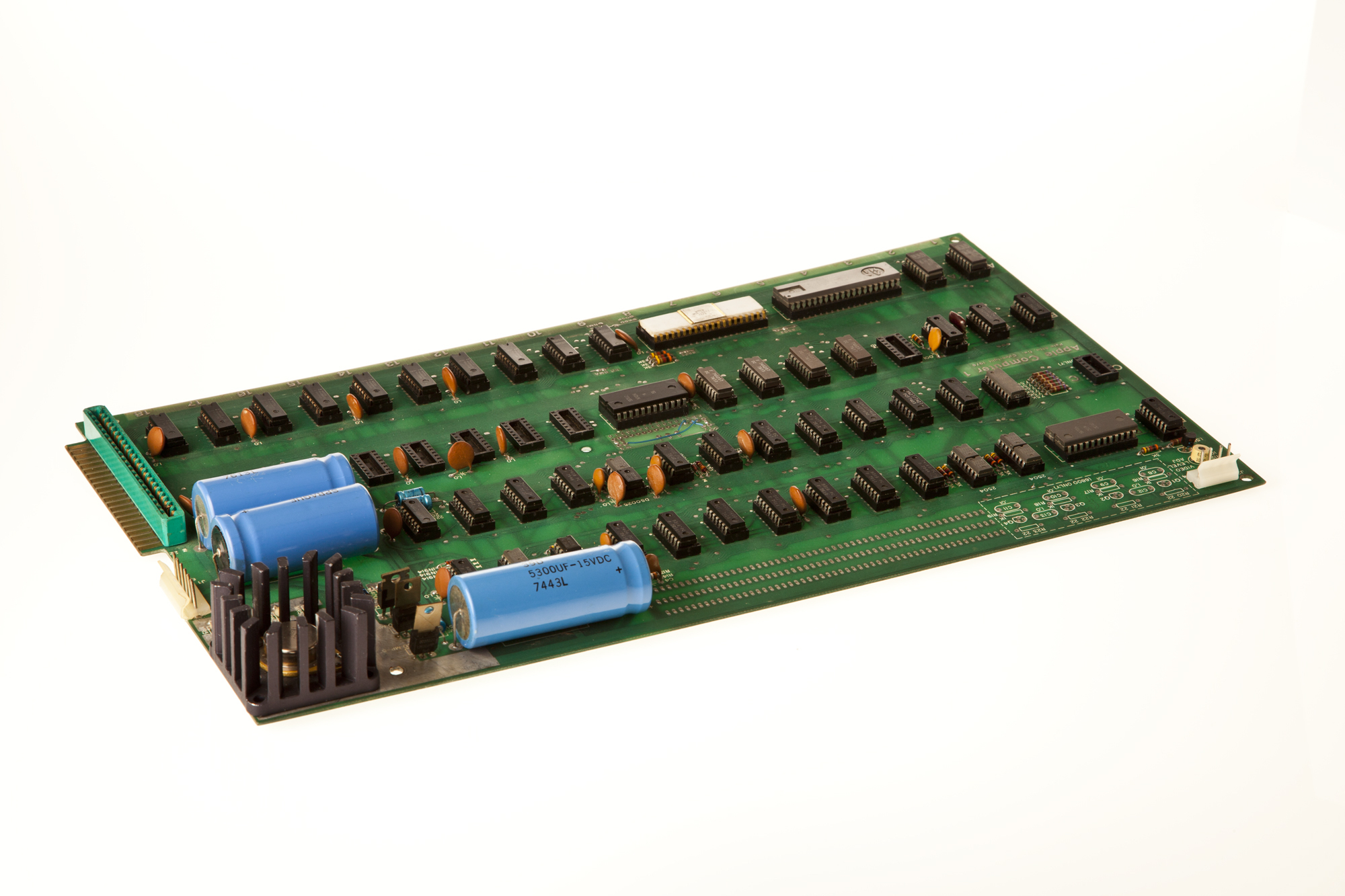 Image via The RetroMacCast
While this BASIC-running machine seems incredibly simple today, it sparked the personal computer revolution. It showed that computing didn’t have to involve punch cards and machines you couldn’t actually see or touch. While it was a hobbyist device and the Apple II would turn the corner toward the consumer market, we owe a lot to this little logic board.