
Confession: I have a disproportionate, bordering on irrational, adoration for iPod Socks! I couldn’t really explain to you why. Maybe the iPod Socks got wrapped up in the halo of the early days of owning my first iPod, with all the nostalgia and delight of discovering & enjoying new music while having all my favourite tracks all on one beautiful device. Or maybe they’re just cute, and I’m obsessively weird about it. Who knows? There are loads of cute things in the world, but few are on par with iPod socks.
Category: Apple
Apple’s Self Service Repair Program Expanded⇢
The program now covers the M1 iMac, M1 Mac mini, Mac Studio and Studio Display.
With this comes a new batch of Repair Manuals, which I naturally downloaded and looked through. I love this exploded view of my beloved Mac Studio:
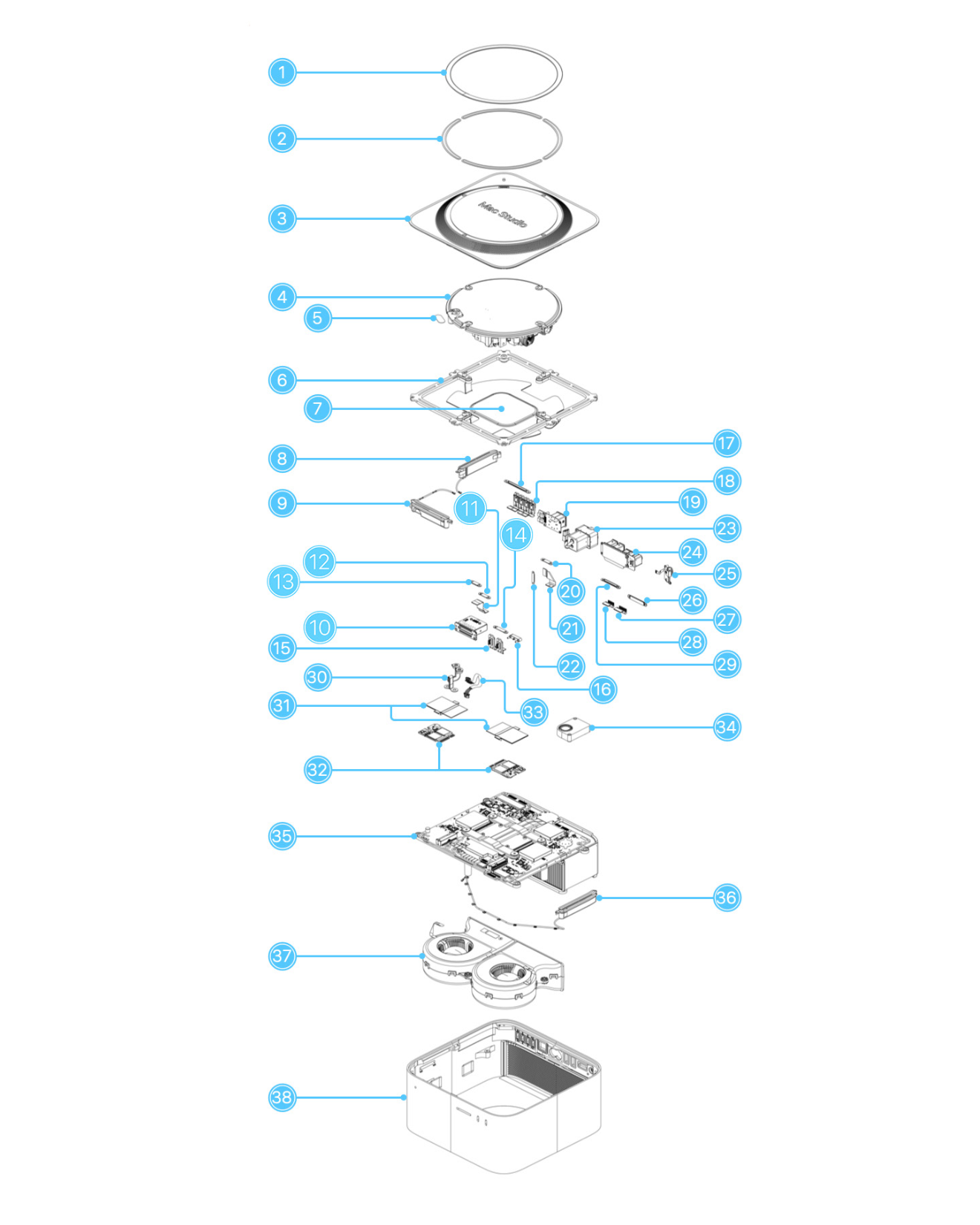
Here’s what all of those parts are:
- Bottom cover screw pad
- Bottom cover screw pad adhesive strips
- Bottom cover
- Power supply
- Bus bar insulator cover
- Internal frame
- Internal frame plate
- Antenna 2
- Antenna 3
- SDXC card slot board
- SDXC card slot board flex cable
- SDXC card slot board connector cowling
- SDXC card slot board connector cowling
- Front USB-C ports connector cowling
- Front USB-C ports
- Front USB-C ports bracket
- Back Thunderbolt 4 ports connector cowling
- Back Thunderbolt 4 ports (2)
- Ethernet board
- Ethernet board connector cowling 1
- Ethernet board flex cable
- Ethernet board connector cowling 2
- Power cord port
- Combination input/output board
- Power button
- Combination input/output board connector cowling
- HDMI flex cable
- USB-A flex cable
- Combination input/output board connector cowling
- Bus bar
- SSD module cover included with a replacement SSD module
- SSD modules (flash storage)
- Power supply signal cable
- Speaker
- Logic board
- Antenna 1
- Fan
- Housing
Compared to this thing, the inside of the Mac mini is downright simple.
Ross Young Reports 15.5-inch MacBook Air in Works for Spring 2023⇢
I’ve been saying this for a long time now, but this computer makes a ton of sense. Having two notebook familes — each with two sizes — would be nice and clean:
- 13-inch MacBook Air
- 15-inch MacBook Air
- 14-inch MacBook Pro
- 16-inch MacBook Pro
As a nice bonus, I think this arrangment would let Apple finally put the 13-inch MacBook Pro with Touch Bar out to pasture.
Tesla Rolls Out Apple Music Support⇢
Now we know what Elon Musk and Tim Cook were really talking about.
Bonus Kbase Article of the Week: How to turn on Advanced Data Protection for iCloud⇢
Advanced Data Protection for iCloud is an optional setting that offers Apple’s highest level of cloud data security. If you choose to enable Advanced Data Protection, the majority of your iCloud data — including iCloud Backup, Photos, Notes, and more — is protected using end-to-end encryption. No one else can access your end-to-end encrypted data, not even Apple, and this data remains secure even in the case of a data breach in the cloud. Before you turn on Advanced Data Protection, you can learn more about how your data is protected with standard data protection and if you enable Advanced Data Protection.
Changes Are Coming for the App Store⇢
There’s no secret that the EU and other governments are looking at Apple’s control over the App Store with an increasingly critical eye. Even with that in mind, this report from Mark Gurman is still wild:
Software engineering and services employees are engaged in a major push to open up key elements of Apple’s platforms, according to people familiar with the efforts. As part of the changes, customers could ultimately download third-party software to their iPhones and iPads without using the company’s App Store, sidestepping Apple’s restrictions and the up-to-30% commission it imposes on payments.
Nintendo Wii with M1⇢
Apple Announces Security Changes for iCloud, Expanding End-to-End Encryption for 23 Services⇢
Apple today introduced three advanced security features focused on protecting against threats to user data in the cloud, representing the next step in its ongoing effort to provide users with even stronger ways to protect their data. With iMessage Contact Key Verification, users can verify they are communicating only with whom they intend. With Security Keys for Apple ID, users have the choice to require a physical security key to sign in to their Apple ID account. And with Advanced Data Protection for iCloud, which uses end-to-end encryption to provide Apple’s highest level of cloud data security, users have the choice to further protect important iCloud data, including iCloud Backup, Photos, Notes, and more.
Recreating Apple News with ChatGPT
The folks behind OpenAI have opened up a new AI tool that can return text when given a prompt. Naturally, I asked it to write about Apple products.
Prompt #1: Write 5 paragraphs in the style of a news article written by about Apple’s new iMac computer, complete with quotes from experts
Apple has released a new iMac computer, bringing updated hardware and a renewed focus on performance to the iconic all-in-one desktop. The new iMac features the latest Intel processors, with options up to a 10-core Core i9 chip, along with AMD Radeon Pro 5000 series graphics, delivering up to 55 percent faster performance than the previous generation.
Man Stranded in Alaska Saved via Emergency SOS⇢
It was a matter of time before an iPhone 14 popped up in a story like this. Joe Wituschek has details over on iMore:
As reported by the Department of Public Safety, on December 1st around two o’clock in the morning, Alaskan State Troopers were notified that “an adult male traveling via snowmachine from Noorvik to Kotzebue had activated an Apple iPhone Emergency SOS via satellite on his iPhone after becoming stranded.”
iFixit Tears Down 10th Generation iPad⇢
It’s as we expected: the new landscape camera interfers with the interior components needed to charge the Pencil 2. Hopefully Apple can resolve this for future models.
Apple Announces 2022 Podcast, App Winners
Apple Newsroom has been busy. Today, the company announced the first-ever Apple Podcasts Award winner:
Apple today announced the Apple Podcasts Award honoring a Show of the Year and its team for outstanding quality, innovation, and impact. Inspired by the signature app icon, the Apple Podcasts Award represents Apple’s decades-long commitment to supporting creators as they share their voices with the world and helping listeners to discover the best podcasts.
The recipient of the Apple Podcasts Award is Slate’s critically acclaimed narrative history series, Slow Burn, for its latest season, Roe v. Wade, hosted by Slate executive editor Susan Matthews. Published throughout June 2022, the four-episode season explores the events leading up to the landmark 1973 Supreme Court decision, offering listeners an in-depth perspective on this universal and timely human rights issue.