
Every model in the iPhone 14 lineup — iPhone 14, iPhone 14 Plus, iPhone 14 Pro, and iPhone 14 Pro Max — can connect directly to a satellite through a combination of custom-designed components and deeply integrated software. Emergency SOS via satellite builds on existing features vital to iPhone users, including Emergency SOS, Medical ID, emergency contacts, and Find My location sharing, offering the ability to connect to a satellite for a more 360-degree approach to sharing critical information with emergency services, family, and friends. This game-changing service allows Public Safety Answering Points (PSAPs) — or emergency services call centers — to connect to even more users in emergency situations, and requires no additional software or protocols to enable communications. Users will be connected directly to emergency services that are equipped to receive text messages, or to relay centers with Apple-trained emergency specialists who are ready to contact PSAPs that cannot receive text messages on the user’s behalf.
Category: Apple
Weather.app Getting News in iOS 16.2⇢
This is a real bummer, given how good the new version of Weather is. I guess we’re just one step away from ads for weight loss apps showing up when looking at the weather while packing for the beach.
Meet the New Mail.app, Same as the Old Mail
As a long-time Mail.app user, I was excited to see Apple giving new features to the app in this year’s crop of OS releases.
Some of these additions are great; I particularly like the ability to schedule a message to be sent at a later time, as well as the ability to “unsend” a message. Sure, that second one is really just a 30 second timer set in the Outbox before a message heads off to the recipient, but it’s a really nice tool for those of us who are prone to typos.
On Downloading Ventura
Like many pervious versions of macOS, you can create a USB install disk with in just a few steps. I like having these on hand for troubleshooting or quicker installations.

As before, creating a USB Installer requires downloading a full copy of macOS Ventura from Apple. This can be done via the Mac App Store if you are already running Ventura. If not, your Mac may only download the delta update. As of the initial version of macOS Ventura, the full installer is about 12 GB.
Joz and Craig Interviewed at WSJ Tech Live⇢
You’ve probably seen all the USB-C iPhone headlines that came out of this interview, but the whole thing is worth a watch, or a listen if you’re like me and ripped the audio then uploaded it to your Overcast account to listen to later when you go for a walk.
Ventura’s Volume Layout⇢
At first sight, it might appear that boot volume groups and overall disk layout in Ventura are exactly the same as those in Big Sur and Monterey. This article shows their similarity, and how they differ significantly.
Kbase Article of the Week: What’s New in the Updates for macOS Ventura⇢
macOS Ventura makes the things you do most on Mac even better, with big updates to the apps you use everyday, including Mail, Messages, and Safari. You can use your iPhone as a webcam for your Mac with Continuity Camera. There’s also an entirely new way to automatically organize your windows with Stage Manager. And when you upgrade, you get the latest security and privacy protections for your Mac.
macOS Ventura Launched
A very happy macOS Ventura Day to all who celebrate. If you have a Mac from 2016 or older, you are unfortunately not invited to the party.
While I did not write a review, a couple of my buddies have:
On the next episode of Mac Power Users, David and I will be getting into the weeds on this release of macOS.
Tech Haiku #4: A Review of Stage Manager
a new iPad mode
moving windows overlap
until it crashes
For a lot more detail, go read Viticci’s article on the topic.
The Tale of Two iPads
Reviews of the M2 iPad Pro and the 10th-generation iPad are out.
Here’s Federico Viticci:
These are relatively easy iPads to review with a fairly straightforward narrative around them. The new iPad Pro is an iterative update that shows us Apple has seemingly hit a plateau in terms of innovation with this particular design – save for one feature that truly surprised me. The new base model iPad is a massive update compared to its predecessor, adding an all-new, iPad Pro-inspired design and a brand new accessory – the Magic Keyboard Folio – that has turned out to be one of my favorite accessories Apple has launched in recent years. I’ve had a ton of fun playing around and working with the new iPad over the weekend; if you’re in the market for an 11" tablet, you shouldn’t sleep on this one.
Aperture Script Still Included as Template in Script Editor
Script Editor, the built-in macOS app for creating and dealing with AppleScript and JavaScript automation, comes with a handful of example templates, including this gem for importing files into Aperture:
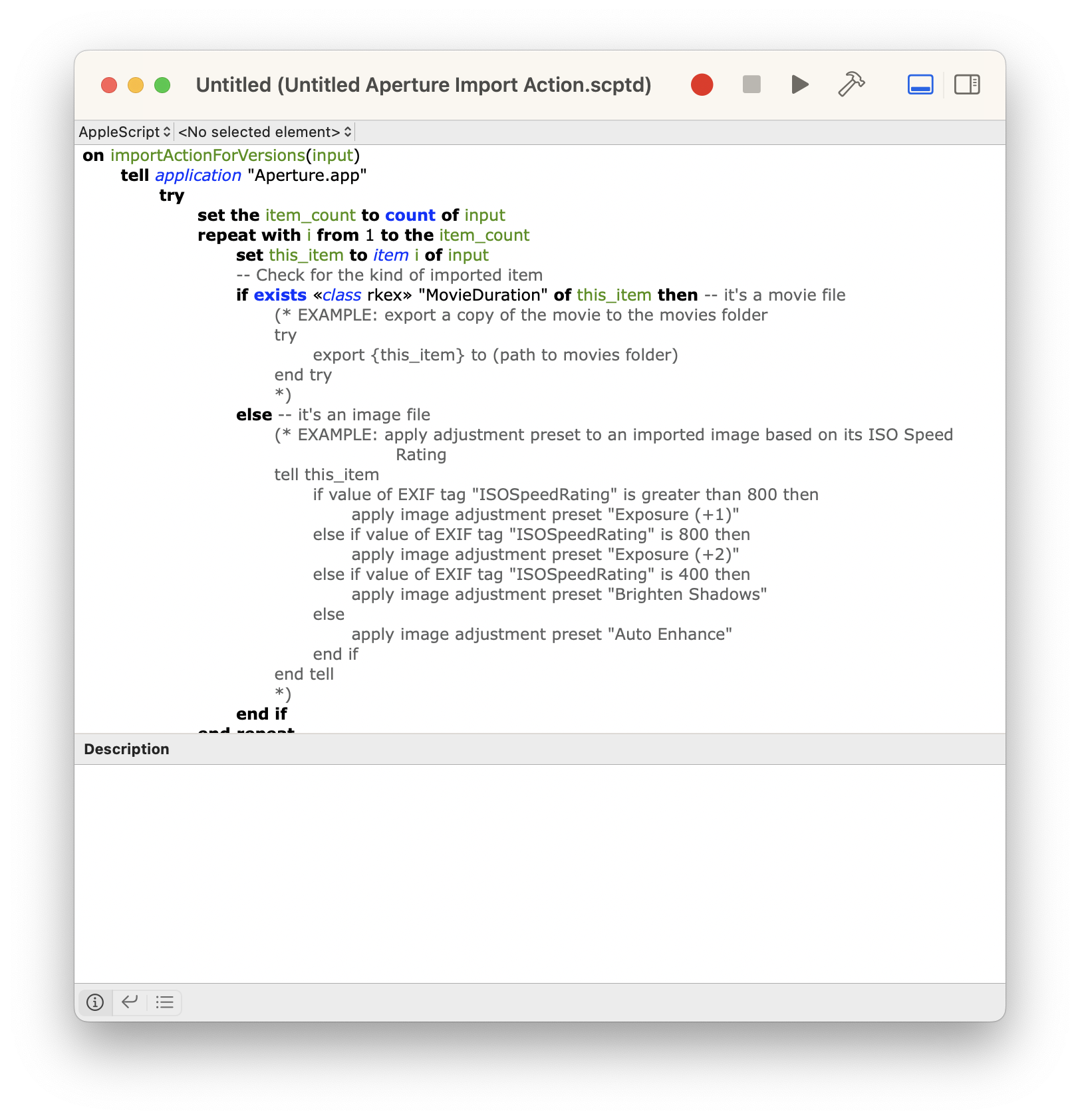
Aperture was discontinued some eight years ago, but this template is still included in the version of Script Editor bundled with macOS Ventura.
Evans Hankey Leaving Apple⇢
Evans Hankey has been in charge of Apple’s hardware design for three years, but she is now leaving the company according to a new report from Mark Gurman:
The departure was announced inside the Cupertino, California-based technology giant this week, with Hankey telling colleagues that she will remain at Apple for the next six months. The company hasn’t named a replacement. Hankey oversees dozens of industrial designers.
Her pending exit marks the first time that Apple will be without a de facto design chief since Apple co-founder Steve Jobs retook control of the company in the late 1990s and appointed Ive to the job. Richard Howarth, a key designer on both Ive and Hankey’s teams, briefly held the role of head of industrial design, reporting to Ive, between 2015 and 2017.