Dropping the Beats: A Review of the HTC Rezound

This is not a review of the Galaxy Nexus, Droid RAZR or other super-new Android phone.

Released late last year, the HTC Rezound for Verizon is getting old in the fast-paced Android world. That doesn’t mean it’s forgettable, though. Still on sale at stores across the country, the phone is still considered top-tier for most users.

The Rezound runs Android 2.3 “Gingerbread” with HTC’s Sense skin on top of it. The phone is slated to get Ice Cream Sandwich this year. Sense is a heavy-handed Android UI — HTC’s widgets are comically huge, and there are lots of unnecessary animations, for example. That said, HTC’s done a great job at unifying the OS under one consistent look and feel. It may feel comical in places, but at least it’s more polished than the Gingerbread running beneath it.
Continue reading ⇢

Digitizing Life: the Doxie Go

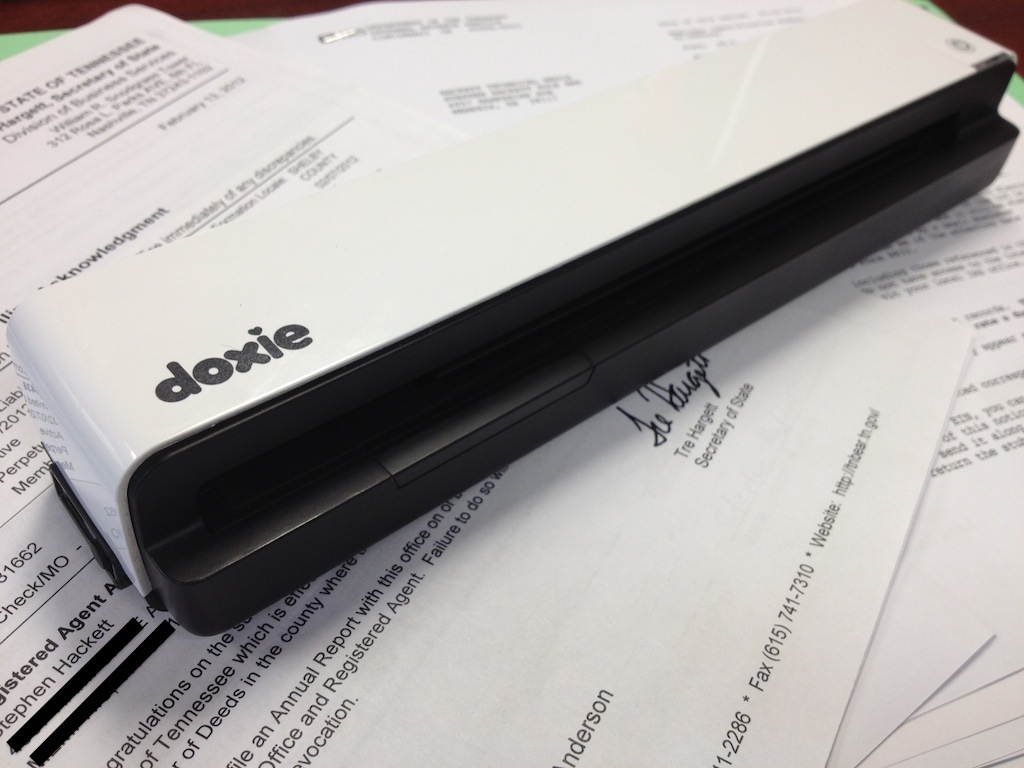
While at Macworld, I ran in to the guys behind the Doxie Go portable scanner. A few weeks later, I had one sitting on my desk from them.

At first, I wasn’t sure how much I’d use the thing. It turns out that not a day goes by without me running something through the machine.

I’m nearing the end of the process in creating an LLC to wrap around the site and some other work I do. It seems that forming an LLC in the state of Tennessee takes roughly one million sheets of paper. Thanks to the Doxie Go, scanning is easy and quick. This device has great battery life, and with the built-in storage, I can scan a bunch of papers and import them all at once.

Continue reading ⇢

App Recommendation: ReaddleDocs for iPad

At $4.99 in the App Store, some might think its pricey, but ReaddlDocs scratches me right where I itch, so to speak.

For my day job, I have to carry (and be familiar with) hundreds of PDFs worth of building plans, schematics, cut sheets and service contracts.

Now, I have a 13-inch MacBook Pro which, while being ridiculed by some, is the perfect machine for me. However, my iPad 2 is obviously much more portable, with better battery life.

Continue reading ⇢

Google Analytics On The Go

I use Google Analytics to track traffic to (and on) this site. I — like most cool indie hipster bloggers — dislike it, but understand that it is the tracking platform of choice for advertisers, etc., so I stick with it.

I used to use an app called Ego to keep an eye on traffic throughout the day. Ego on the iPhone just shows simple stats — page views, uniques and the like — which is perfect when you just want to monitor things.

Continue reading ⇢

App Recommendation: HelvetiCount

My favorite iPhone apps are usually the ones that are very limited in scope, but not limited in depth.

Today’s app recommendation falls in to that category.

HelvetiCount is a counter app for the iPhone. Fire it up, and your iPhone becomes one of those old-school thumb counter device thingie. You know, the kind you see old ladies using to count people entering a theatre before a play.

It is kind of hard to explain how this app works better than the developer did on the the website:

Continue reading ⇢

Review: The Motorola DPC

I’ve had bad luck trying to get review units of phones. The one place that has let me have a phone is my mother-in-law’s attic, so I present to you the Motorola Digital Personal Communicator for the BellSouth Mobility Network.

History

The DPC was introduced in 1989 as a lower-cost option for those not wanting to drop the change required for the 9800X.

Hardware

The DPC features a orange 7-character segment LED display, set in gray plastic above a back-on-white keypad. Beneath the standard layout, are the following feature keys:

Continue reading ⇢

App Recommendation: Launch Center

For as long as I can remember, I’ve had the same four apps in my iPhone’s dock:

  • Phone
  • Mail
  • Safari
  • Settings

This week, in a major upheaval in my life, Launch Center replaced Settings in the Dock.

Now, this app isn’t one for everyday users. It’s closest Mac cousin is Automator, really. Here’s how App Cubby describes it on its site:

Launch apps and trigger actions from a quick, easy to use app! Call a friend, start an email, send a text, post to Twitter, turn on a flashlight — get to where you’re going faster than ever before.

Continue reading ⇢

My Podcasting Rig

Since starting the Ungeniused podcast late last year, I’ve had numerous questions about my setup. So, here’s my gear:

  • The Blue Yeti USB Microphone is the heart of my rig. It’s a great vocal mic for the money. With its tri-capsule array, it’s easy to set this mic up for one or more voices. It’s plug-n-play with OS X, and includes built-in gain control, pattern selection and a headphone jack for monitoring your own voice.
  • The mic is mounted in a Blue Microphones Radius Microphone Shock Mount. This mount has totally changed the quality of my audio, isolating the mic from noises caused by me bumping the table, writing and even typing. If you are serious about isolating your voice from the environment, a shock mount is the only way to go.
  • The Nady MPF–6 6-Inch Clamp On Microphone Pop Filter is a little large, but I like to move around when I’m talking, and this gives me the freedom to do so. I have it clamped to my stand with the built-in hardware.
  • To be honest, I’m not super in love with my mic stand. While I hope to mount my rig on an arm in the future, right now, I record Ungeniused in an empty conference room at work. That said, I use the 8–13 inch Atlas Desk Stand. It’s well made, but I do wish it were heavier — or that the base were larger. It feels a tad wobbly with the heavy Yeti hanging out over the side of it.
  • I use the Sennheiser HD–280 PRO Headphones all the time — not just for podcasting. They’re closed-backed, so audio doesn’t leak, and comfortable, so I can wear them for hours without getting a headache.

On the software side of things, I record my local track in QuickTime X. The trick here is to make sure that the application is using the Yeti to record. 1

Continue reading ⇢

App Recommendation: WorldCard Mobile

I get handed tons of business cards in my professional life. I meet with vendors, contractors, sub-contractors, corporate representatives and more in a normal work week. They all have cards, and they all seem to want to give me as many as possible.

That’s where WorldCard Mobile comes in. I can take a photo of a business card, and the app will work some OCR magic to put the data into a new contact. Thankfully, it allows editing the data before saving it, in case the app didn’t get everything just right. Once edited, the card is “exported” to the iPhone and — in my case — is sent to iCloud within seconds

Continue reading ⇢

A Review of Phraseology: The iPad App for Writers

There are a lot of writing apps for the iPad. So many, in fact, I usually gloss over new releases, assuming they won’t offer much over my current setup of text files syncing with Dropbox and Notesy.

Enter Phraseology, by Agile Tortoise. While Dropbox syncing support is coming, this app is about far more than taking notes. It’s designed as a writing tool, from the ground up.

IMG 0068

Take re-rearranging paragraphs for example. When I’m working on a long piece (like this review), I often re-order my paragraphs more than once, to find the flow I want to portray in my writing.

Continue reading ⇢