As before, creating a USB Installer requires downloading a full copy of macOS Ventura from Apple. This can be done via the Mac App Store if you are already running Ventura. If not, your Mac may only download the delta update. As of the initial version of macOS Ventura, the full installer is about 12 GB.
These direct links point to a .pkg file, not the “Install macOS Ventura” application you may have expected. In Finder, a quick double-click will unpack it and put the installer application in your Applications folder.
You’ve probably seen all the USB-C iPhone headlines that came out of this interview, but the whole thing is worth a watch, or a listen if you’re like me and ripped the audio then uploaded it to your Overcast account to listen to later when you go for a walk.
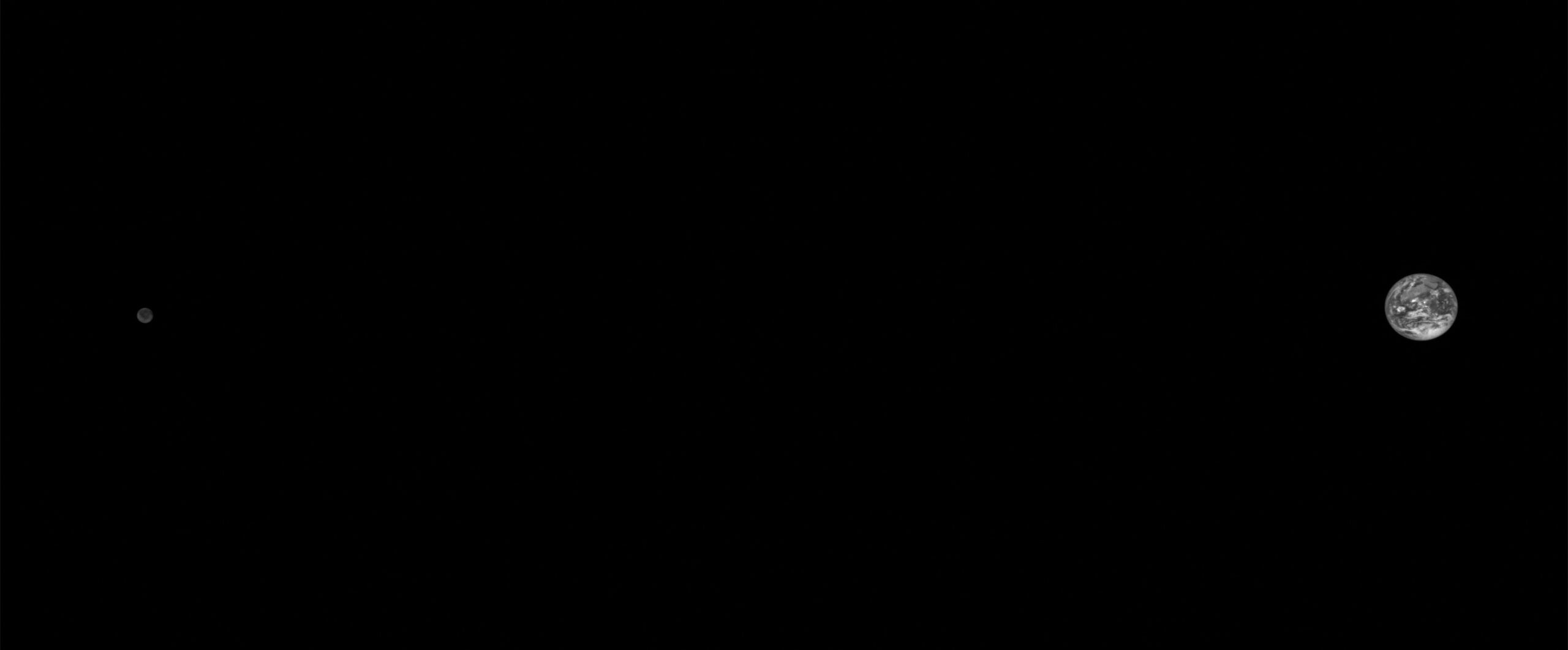
Lucy is the first mission to explore the Jupiter Trojan asteroids, an ancient population of asteroid “fossils” that orbit around the Sun at the same distance as Jupiter. To reach these distant asteroids, the Lucy spacecraft’s trajectory includes three Earth gravity assists to boost it on its journey to these enigmatic asteroids.
On October 13, 2022, NASA’s Lucy spacecraft captured this image of the Earth and the Moon from a distance of 890,000 miles (1.4 million km). The image was taken as part of an instrument calibration sequence as the spacecraft approached Earth for its first of three Earth gravity assists. These Earth flybys provide Lucy with the speed required to reach the Trojan asteroids — small bodies that orbit the Sun at the same distance as Jupiter. On its 12 year journey, Lucy will fly by a record breaking number of asteroids and survey their diversity, looking for clues to better understand the formation of the solar system.
Use the powerful camera system of your iPhone to do things never before possible with a webcam, including Center Stage, Portrait mode, Studio Light, and Desk View.
At first sight, it might appear that boot volume groups and overall disk layout in Ventura are exactly the same as those in Big Sur and Monterey. This article shows their similarity, and how they differ significantly.
macOS Ventura makes the things you do most on Mac even better, with big updates to the apps you use everyday, including Mail, Messages, and Safari. You can use your iPhone as a webcam for your Mac with Continuity Camera. There’s also an entirely new way to automatically organize your windows with Stage Manager. And when you upgrade, you get the latest security and privacy protections for your Mac.
On the next episode of Mac Power Users, David and I will be getting into the weeds on this release of macOS.
Lastly, I have updated my macOS Screenshot Library with images of Ventura — including its new mostly-bad System Settings application. You can explore those images over on this page, and if you want 6K versions of Ventura’s wallpaper, I’ve got you covered there as well:
These are relatively easy iPads to review with a fairly straightforward narrative around them. The new iPad Pro is an iterative update that shows us Apple has seemingly hit a plateau in terms of innovation with this particular design – save for one feature that truly surprised me. The new base model iPad is a massive update compared to its predecessor, adding an all-new, iPad Pro-inspired design and a brand new accessory – the Magic Keyboard Folio – that has turned out to be one of my favorite accessories Apple has launched in recent years. I’ve had a ton of fun playing around and working with the new iPad over the weekend; if you’re in the market for an 11" tablet, you shouldn’t sleep on this one.
It’s a real shame that the Magic Keyboard Folio is only available for this iPad. It’s also a shame that the best colors we’ve ever seen on an iPad are on the base model:
Over on Six Colors, Jason Snell wrote about this iPad’s Apple Pencil support in his review:
Unfortunately, if you’re a fan of the Apple Pencil, I don’t think I can really recommend this iPad. The 10th-generation iPad only supports the first-generation Apple Pencil, which was supplanted four years ago by the Apple Pencil 2. Since it charges via Lightning, and this iPad doesn’t have a Lightning port, Apple has ginned up an awkward $9 adapter that lets you charge the Pencil via a USB-C cable. It’s small and will be easy to lose, and if your Pencil runs out of battery when it’s not around, you’re mostly out of luck. (Though if you’ve got an iPhone, you can plug it into that, and it’ll suck some power and charge itself back up.)
This is a ridiculous situation, but Apple has painted itself into a corner thanks to its design decisions with the two Pencil models and its choice not to bite the bullet and add Pencil 2 compatibility on this iPad. If you don’t need pressure sensitivity in your stylus, consider using the $70 Logitech Crayon, which is compatible with most modern iPad models and charges via USB-C.
At its core, this iPad is an excellent tablet with fast performance, reliable battery life, and a vast library of optimized apps to make use of its large touchscreen.
But along with those upgrades comes a higher price: the 10th-gen iPad starts at $449, $120 more than the previous model, and can be kitted out to over $1,000 with storage, cellular, and accessory upgrades. This is for the entry-level iPad with no qualifier after its name, the one that you buy for casual use, kids, schoolwork, travel, and content consumption — it’s not really a device to replace your laptop with.
MarsEdit 4 is a native Mac interface to WordPress and other blogging systems that focuses on one thing: blogging! As WordPress gets increasingly complicated with an emphasis on BLOCKS and whole-site design, MarsEdit sticks to the classic idea that:
There would be an editor.
You could write in it.
You could publish it to your blog.
If you’re annoyed by the increasing complexity of WordPress’s browser-based editor, download MarsEdit and give it a try. It’s the “Cadillac” of classic editors. You’ll see why many of the best bloggers in the Apple ecosystem rely on MarsEdit’s native, reliable, intuitive Mac interface.
With Matter on the horizon, there has never been a better time to get into home automation. Stephen and David talk about how their HomeKit setups have evolved over time and what they hope Apple and others can add to the smart home in the future.