
Yes, even more on these weird machines.
512 Pixels
Sponsor: Soulver 3 for macOS⇢
Soulver 3 for macOS is a unique tool that brings the power of natural language processing, unit and currency conversions, calendar math and a whole lot more to the Mac in a native, rich application that integrates with system features including the command line, Automator, URL schemes and third-party services like Alfred.
I’ve been a Soulver user since … forever. It’s one of those Mac applications so wired into my workflow that I can’t imagine working without it. I use it for all sorts of administrative tasks, from verifying Relay FM membership payments to personal budgeting and more. The ability to bring in reference tokens from previous lines and setting up variables makes this work efficient and less error-prone, both of which are good things.
The best part for me is that I can simply type into Soulver, which makes tracking numbers visually really simple, without the overhead of creating a new spreadsheet every time I need to crunch some numbers.
Learn more and check out a 30-day trial over on the Soulver website.
Mac Power Users #578: Getting to Know Notion, with August Bradley⇢
David and Stephen are joined by August Bradley, an expert in Notion. They discuss the features of the app, as well as its pros and cons. August then explains Systems Thinking and runs through some favorite apps and services.
For More Power Users, we return to the well of Apple silicon rumors.
My thanks to our sponsors:
- 1Password: Have you ever forgotten a password? You don’t have to worry about that anymore.
- TextExpander from Smile: Get 20% off with this link and type more with less effort! Expand short abbreviations into longer bits of text, even fill-ins, with TextExpander from Smile.
- The Intrazone, by Microsoft SharePoint: Your bi-weekly conversation and interview podcast about SharePoint, OneDrive and related tech within Microsoft 365.
- Indeed: Get a free $75 credit to upgrade your job post.
iMac Pro For Sale ‘While Supplies Last’⇢
It appears that Apple is winding down production of the Xeon-powered iMac Pro. As of this writing, the machine is still for sale, but only in its base configuration, with all custom options disabled.
There’s been some debate as to the future of this machine in an Apple silicon world, and I gotta say, it doesn’t look good for our space gray friend.
Update: Apple has confirmed the news to MacRumors, saying that the 5k iMac is the “preferred choice” for pros wanting an iMac.
The Sad Story of the Centris
When you think about desktop Macs from the 90s, names like LC, Performa, Quadra and Power Macintosh come to mind.
That’s pretty understandable. Apple shipped a bunch of those models. Nine Macs bore the name LC, while there were 11 Quadras, 24 Power Macs and a whopping 44 Performas.1
Then there’s the Centris line of Macs. Here’s the list of models that wore that name:
- Centris 610
- Centris 650
- Centris 660AV
Yep, just three Macs, all for sale for less than a year in 1993. In fact, the 660AV was for sale for a mere three months in the fall of that year, making my example a real treasure.

Apple.com still hosts a page outlining the specs of these machines. For the sake of completeness — and in fear Apple will notice this page once I’ve linked to it and remove it — I’ve replicated it here:
| Feature | 610 | 650 | 660AV |
|---|---|---|---|
| CPU | 20 MHz 68LC040 | 25 MHz 68040 | 25 MHz 68040 |
| DRAM Expansion | 4 MB to 68 MB | 4 MB to 132 MB | 4 MB to 68 MB |
| DRAM Slots | 2 slots | 4 slots | 2 slots |
| DRAM Speed | 80 ns | 80 ns | 70 ns |
| DRAM Sizes | 4, 8, 16 & 32 MB | 4, 8, 16 & 32 MB | 4, 8, 16 & 32 MB |
| Ethernet | Optional | Optional | Standard |
| Floating Point Unit | None | Optional | Standard |
| ROM Size | 1 MB | 1 MB | 1 MB |
| Max. VRAM | 1 MB | 1 MB | 1 MB |
| VRAM Slots | 1 slot | 1 slot | 1 slot |
| VRAM Speed | 80 ns | 80 ns | 80 ns |
| NuBus Slots | 1 (optional) | 3 | 1 (optional) |
| PDS Slot | Yes | Yes | Yes |
| Price | $2,250 | $2,700 | $2,300 |
As the high-end model had the “AV” badge, it came with a few extra goodies:
- An on-board DSP (Digital Signal Processor) Chip
- GeoPort Communications Architecture
- Composite and S-Video input and output ports
- Sound input and output ports
It and the 610 both came in the “pizza box” form factor, while the more expandable Centris 650 lived in a recycled Macintosh IIvx case which was both taller and deeper. All three models came with System 7.1, and could run up to Mac OS 8.1 which shipped in early 1998.
Now that we’ve looked at the what of the Centris line, let’s look at the why. By this time, the LC line was anchoring the low end of the Mac product line, and the Performa was still mostly just rebadged LCs and Classic IIs. On the high end of things, the Macintosh II line had faded away, and Apple was replacing it with the 68040-powered Quadras. These machines were much more capable than the 68030-powered Macintosh II, and as the tech moved on, Apple put the 030 in service across the LC line.
All of this left a bit of a gap in the middle of things, and that’s where the Centris comes in, to the center of the Mac lineup. Apple put 040s in these machines, but they ran at slower clock speeds and ran with slower system busses. These machines also had lower RAM ceilings than the Quadras and two of the models shipped with fewer slots than the Quadra 800 that was for sale at the same time. With the Quadra 800 selling for $4,700, Apple had met its goal by clearly separating the two lines.
That said, there were similarities, as Russel Ito wrote in the October 1993 edition of MacUser, comparing the Centris 660AV and the Quadra 840AV, which shipped in July 1993:
As the Centris and Quadra monikers would indicate, Apple has built the AV machines on existing models, so some of what’s inside them is familiar. Each uses a 68040 (the 660AV has a 25-megahertz model and the 840AV has a 40-megahertz one), and both have the same expansion options as their predecessors, the Centris 610 and Quadra 800 - a single PDS that can accept an adapter for a 7-inch NuBus card in the 660Av and three NuBus slots in the 840AV.
Each machine ships with I megabyte of VRAM soldered onto the motherboard, enough to support as many as 16 bits of color (32,000 colors) on displays as large as 16 inches. The 840AV can accept an additional 1 megabyte of VRAM on SIMMs for 24-bit-color support on 16-inch displays.
He continues:
Although they’re the first in the AV line, the Centris 660Av and the Quadra 840Av aren’t just isolated examples of cool technology. Apple considers the audio visual technologies in these machines — telephony, video, and speech — to be core technologies and has promised to spread them throughout most of its desktop product line. Certainly future Centris-level — and higher level — Macs will provide audiovisual capabilities, and those technologies will also carry forward to the upcoming PowerPC Macs, due next year.
As impressive as these machines may have been, the Centris wasn’t destined to last very long. Here’s Adrian Mello, writing in the December 1993 edition of Macworld:
Apple has simplified its product lines and renamed some Macs to suit their distribution channels. Performas arc still sold by mass merchandisers; LCs, through education channels; and Quadras and PowerBooks, by computer dealers.
Over at MacUser the same month, Maggie Canon wrote:
The Mac product line now consists of Quadra, Performa, LCs and PowerBooks. Period. Apple has dropped the name Centris, the LC line will be for the education market only and the Classics are being phased out in the U.S. Apple is targeting the Quadras and the PowerBooks at business users and the Performas at the home market.
The Centris name may have been killed, but the machines lived on as the Quadra 610, Quadra 650 and the 660AV. With the name change, all three models received speed bumps, with the 610 also receiving an FPU. Here’s a chart from the December 1993 edition of MacUser showing the whole Quadra line:
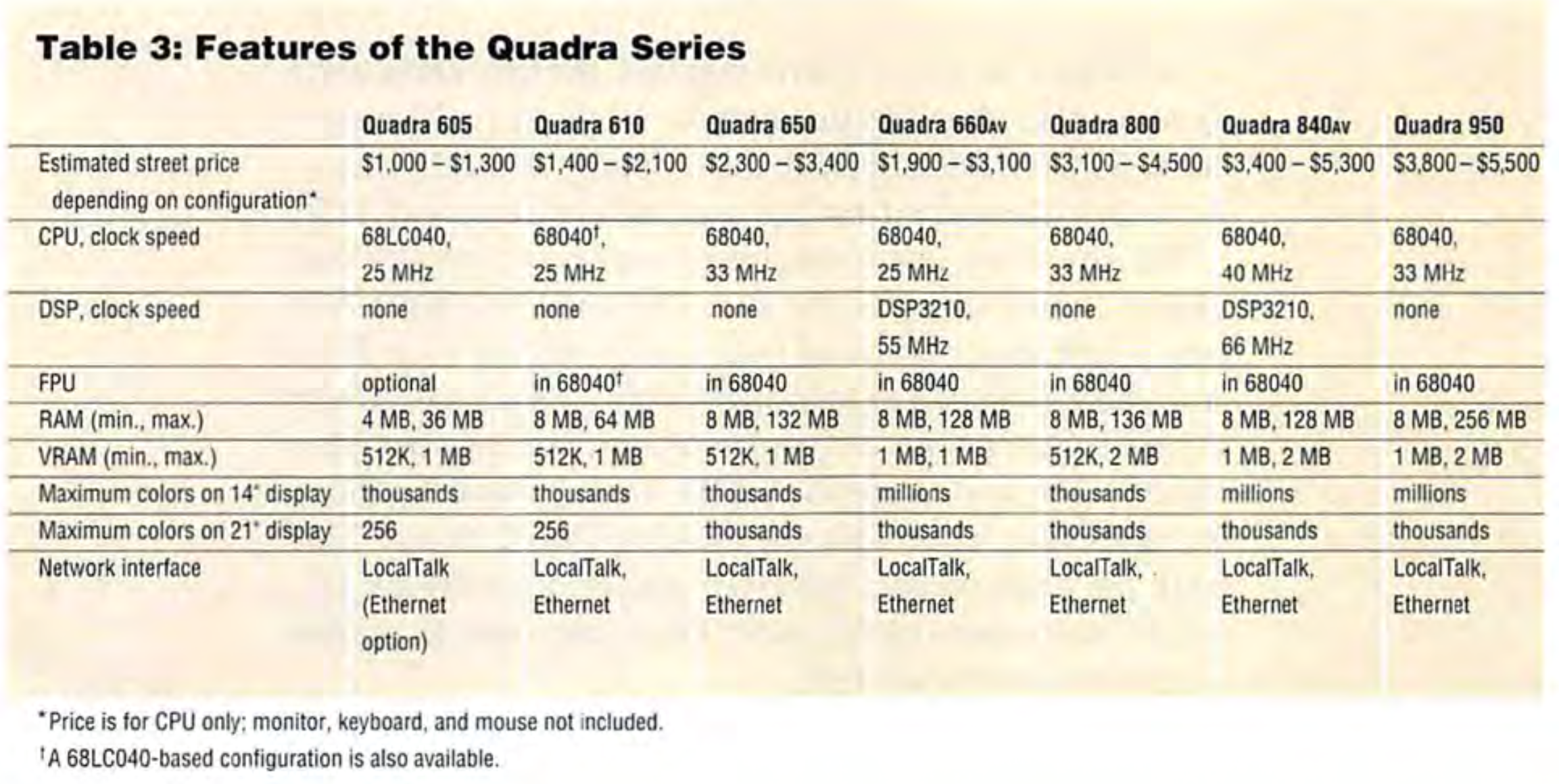
You can see our old Centris friends there in the middle, sitting above the newly-minted Quadra 605, which was on sale for just $1,000 and a bit of an outlier in the Quadra family.
So, in summary: The Centris line was the middle of the Mac line up in 1993, before being swallowed up by the up-market Quadra brand. That’s probably the most interesting thing about these three machines, but it’s a fun little story from the Mac’s dark years.
-
For this count, I relied on product listings that didn’t account for badge engineering. In reality, there was quite a bit of overlap. The LC II was also the Performa 400, 405, 401 and 430. Many models were actually their own little Mac family, such as the Performa 6400/6410/6420. The 90s were a weird time, but my overall point here is less about the exact number of machines sold, but that the Mac line was a big mess for a long time. ↩︎
micro.blog⇢
Start a new blog or migrate an existing blog to Micro.blog with your own domain name. Micro.blog is the blog you will actually use. My thanks to Micro.blog for sponsoring 512 Pixels this week!
Inside the Fitness+ Studio⇢
It’s a blue-sky December day in Santa Monica and Men’s Health is on an exclusive virtual tour of Apple’s new 23,000-square-foot, three-story Fitness+ Studio, led by Jay Blahnik, Apple’s senior director of fitness for health technologies. The interior is Apple-modern, all-white everything, wood accents, lots of glass, lots of screens. All the screens show whatever is going on in the wood-walled and wood-floored fitness studio, which has three sliding glass doors opened to reveal a verdant garden. Outside the door to the studio, there’s a quote that reads: “Please be responsible for the energy you bring into this space.” (A different team member selects a quote or mantra every month.) Blahnik opens the door, and inside, an instructor is warming up on a spin bike, about to start a cycling workout with two other trainers. Seven robotic cameras are focusing on the trainers from the front, the sides, and even directly above. Arrays of bulbs shine down, bathing the riders in warm, welcoming light. When Blahnik closes the door, the spinning—and shooting—will start.
Connected #335: A Shelf is the Perfect Object⇢
Myke tries to get through some iPhone rumors but the others keep joking around about model names. Meanwhile, there’s big news for a couple of iOS apps. Stephen needs to deal with the problem brewing in his photos library and Federico goes missing for a brief time.
On Connected Pro, The Big Brother and LinkedIn are both discussed.
My thanks to our sponsors:
- Squarespace: Make your next move. Enter offer code CONNECTED at checkout to get 10% off your first purchase.
- Baronfig: Do your best thinking. Use CONNECTED20 for 20% off the Idea Toolset.
- Impending: The team behind Head’s Up. Now hiring.
Mars Perseverance Rover Powered by PowerPC 750⇢
Joanna Nelius at Gizmodo, writing about the CPU at the heart of NASA’s newest rover:
The PowerPC 750 was a single-core, 233MHz processor, and compared to the multi-core, 5.0GHz-plus frequencies modern consumer chips can achieve, 233MHz is incredibly slow. But the 750 was the first to incorporate dynamic branch prediction, which is still used in modern processors today. Basically, the CPU architecture is making an educated guess on what instructions the CPU is going to process as a way to improve efficiency. The more information that’s processed, the better the chip gets at predicting what it needs to do next.
However, there’s a major difference between the iMac’s CPU and the one inside the Perseverance rover. BAE Systems manufactures the radiation-hardened version of the PowerPC 750, dubbed RAD750, which can withstand 200,000 to 1,000,000 Rads and temperatures between −55 and 125 degrees Celsius (-67 and 257 degrees Fahrenheit). Mars doesn’t have the same type of atmosphere as Earth, which protects us from the the sun’s rays, so one flash of sunlight and it’s all over for the Mars rover before its adventure can begin. Each one costs more than $200,000, so some extra protection is necessary.
PowerPC chips have been included in several other spacecraft, but it’s always fun to talk about when it comes up every few years.
Kbase Article of the Week: Centris 610, 650 & 660AV: Differences⇢
What are the major differences between the Macintosh Centris 610, the Centris 650 and the Centris 660AV?
Sponsor: Micro.blog⇢
Micro.blog offers blog hosting and a welcoming community built around independent microblogs that can be used for short- and long-form writing. Start a microblog with your own domain name so your posts remain under your control. Add photos, videos, and even podcasts.
A clean timeline, without ads or algorithms. It’s a pleasure to read, write, and share online again.
Mac Power Users #577: Workflows with Shahid Kamal Ahmad⇢
This week on Mac Power Users, Shahid Kamal Ahmad drops by the show to tell us about his ever-growing displays, game development on the Mac and creating music with a computer.
My thanks to our sponsors of the episode:
- 1Password: Have you ever forgotten a password? You don’t have to worry about that anymore.
- Squarespace: Make your next move. Enter offer code MPU at checkout to get 10% off your first purchase.
- Pingdom: Start monitoring your website performance and availability today, and get instant alerts when an outage occurs or a site transaction fails. Use offer code MPU to get 30% off. Offer expires on January 31, 2022, and can be used only once.