512 Pixels

Bruce Blackburn, Designer of NASA’s Worm Logo and the American Revolution Bicentennial Star, Has Died⇢

Alex Vadukul, writing at The New York Times:

In 1974, his small New York-based design firm, Danne & Blackburn, was barely a year old and eager for a big project when he and his partner, Richard Danne, were approached by the Federal Graphics Improvement Program to rebrand NASA’s classic logo, which depicted a patriotic red chevron soaring across the stars. Known as “the meatball,” it wasn’t exactly cutting edge, instead evoking a vintage sensibility of space travel seen in science-fiction comics like Buck Rogers. With the eyes of the world suddenly upon the agency in 1969 after the moon landing, NASA wanted to embrace a modern image.

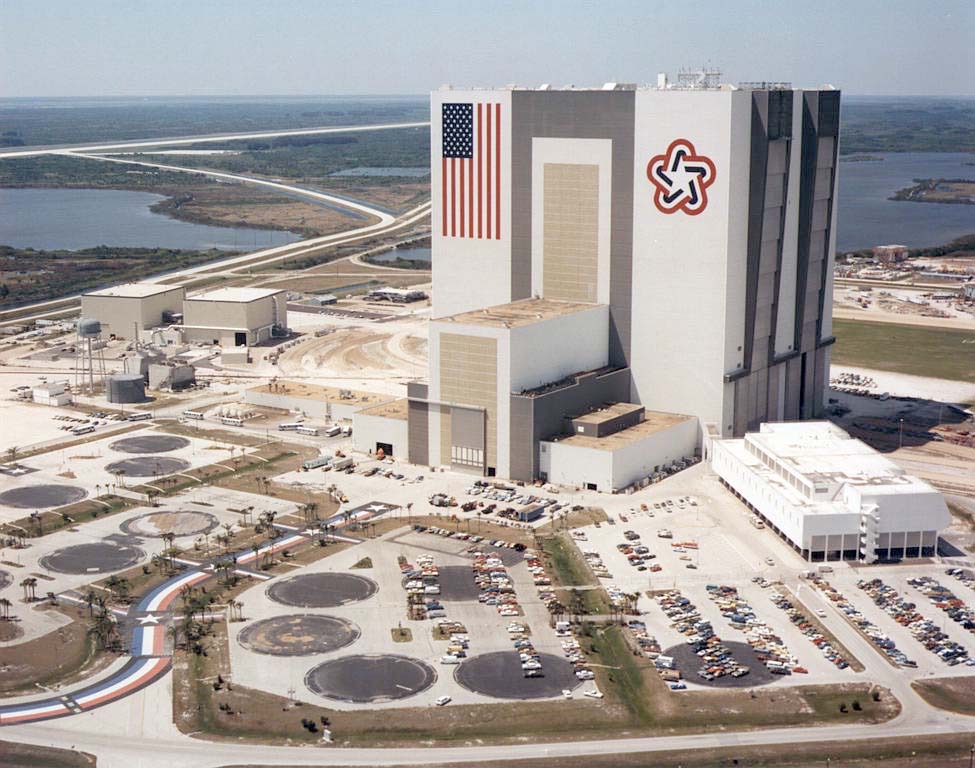
In addition to designing the worm, Mr. Blackburn worked on another big federal commission in the 1970s, creating the symbol for the American Revolution’s Bicentennial celebration. His design — a soft star composed of red, white, and blue stripes that combined a modern aesthetic with patriotic themes — was ubiquitous by 1976, appearing on everything from stamps to coffee mugs to government buildings.

While NASA switched back to the “meatball” logo in the late 1980s, the worm has shown up a bit recently and doesn’t seem to be going anywhere anytime soon.

Do not miss the Graphics Standards Manual, which dictated how the worm was to be used on everything from spacecraft and pickup trucks to patches and spacesuits.

Speaking of NASA, another one of Blackburn’s famous pieces of work adorned the side of the Vehicle Assembly Building for over 20 years before being painted over with — you guessed it — the meatball.

VAB

Connected #333: A Stack of Battery Pancakes⇢

This week on the show:

Stephen refuses to be pigeonholed, Federico talks about how MagSafe could be used on new accessories and Myke doesn’t want to talk about folding iPhones, but then does. Also on the list of topics: failing Apple watches, #GreenGate and blankets.

On Connected Pro, the fight between Apple and users who want to customize their home screens is discussed, then a name of an old website is lost to time.

My thanks to our sponsors:

  • Pingdom: Start monitoring your website performance and availability today, and get instant alerts when an outage occurs or a site transaction fails. Use offer code CONNECTED to get 30% off. Offer expires on January 31, 2022, and can be used only once.
  • ExpressVPN: High-Speed, Secure & Anonymous VPN Service. Get an extra three months free.

On watchOS 7.3.1 and Dead Apple Watches⇢

Jay Peters:

Apple released watchOS 7.3.1 on Monday, and it could help fix an issue that prevents some Apple Watch Series 5 or SE smartwatches from charging while in the battery-saving Power Reserve Mode. But even the software update might not fix the issue, according to Apple. If it doesn’t, the company will repair your watch for free.

Apple Support:

To check if your Apple Watch is affected by this issue, place your watch on the charger that you normally use, then wait at least 30 minutes.

If your Apple Watch still won’t charge, contact Apple Support to set up a mail-in repair free of charge. Your watch will be examined before service to verify that it’s eligible for free repair.

This comes on the heels of a charging issue with some MacBook Pros. I’m sure they aren’t actually related issues, but what a weird set of problems.

Kbase Article of the Week: Reduce Cable Strain on your MagSafe Power Adapter⇢

Apple Support:

While the MagSafe power adapter is designed to travel with your Mac notebook, some ways of using it can contribute to the fraying or breaking of cables. The MagSafe adapter, like any other metal wire or cable, is subject to becoming weak or brittle if repeatedly bent in the same spot. Follow these recommendations to reduce the likelihood of damaging the adapter.

I still really miss MagSafe. USB-C charging may be convenient, but it’s not as nice.

Newton Press⇢

25 years ago, Apple introduced software named Newton Press:

Using an easy drag-and-drop method, Newton Press users can create electronic reference documents or Newton books from files on a Mac OS-based personal computer. These books are created by simply dropping files onto the Newton Press icon on the Macintosh, which automatically formats the document so it can be viewed on a Newton Personal Digital Assistant (PDA) such as the MessagePad. Newton Press supports a variety of word processing, text, or graphics documents supported by the Claris XTND technology for the Mac OS.

“The availability of Newton Press is a significant milestone in our endeavor to continue the positive momentum generated by Newton 2.0,” said Sandy Benett, acting vice president of Apple’s Newton Systems Group. “The numerous positive reviews and comments we’re receiving are a testament to the genuine viability of the Newton platform and bring us another step closer to making Newton PDAs the ubiquitous device they were envisioned to be.”

With Newton Press, mobile professionals and corporate customers can take advantage of the combined power of personal computers, enterprise information, and Newton PDAs to easily publish and distribute electronic documents. Word processing files, email messages, graphics and text blocks from Mac OS-based personal computers now can be readily available to reference, annotate, fax or print from the Newton PDA. These electronic documents can even be distributed to other Newton users, making Newton Press a perfect solution for mobile professionals needing to exchange and distribute data.

If you want to take a trip through the User Manual for Newton Press, this link is for you.

Apple Launches ‘For All Mankind’ Podcast⇢

Apple has launched a new podcast to coincide with season two of For All Mankind, which debuts on AppleTV+ on Friday.1 It is hosted by Krys Marshall, who plays astronaut Danielle Poole on the show, and will offer a behind-the-scene look at the show. Oddly, the podcast is coming out every other week, even though the show will be weekly.

I’m really excited about this season of the show. Keep an eye on Liftoff, the space podcast I do with Jason Snell.. Later this week, we’ll be posting an interview with someone involved in the show.


  1. If Apple Podcasts isn’t your jam, there’s an RSS feed for the new podcast as well. ↩︎

Sponsor: Backblaze Unlimited Backup⇢

Backblaze offers unlimited computer backup for Macs and PCs for just $6 a month (no gimmicks or add-ons or gotchas included). This means they will back up your movies, music, photos, videos, projects, and all the data you have! You can restore files from anywhere in the world and directly download them from the web or their mobile apps. You can also have your backup sent to you via hard drive and have it overnighted right to your home! Never worry about finding lost versions or deleted files—you can extend your retention period to one year or forever!

Backblaze has over an exabyte of customer data backed up and counting — that’s 1,000,000,000 gigabytes. They have also restored well over 50+ billion files for customers and they come recommended by The New York Times, Inc., Macworld, Tom’s Guide, 9to5Mac, and more.

Get peace of mind knowing your files are backed up securely in the cloud. Start your free 15-day trial with Backblaze today by going to backblaze.com/512pixels.

Mac Power Users #575: Talking Parity with John Siracusa⇢

This week on Mac Power Users, David and I spoke with John Siracusa about the 2019 Mac Pro and what Apple silicon may mean for pro users. Then, John spoke about his pair of Mac apps and what he wants out of the future of macOS.

For More Power Users, we discussed the Pro Display XDR and window management techniques for larger screens.

My thanks to John for joining us, and to our sponsors:

  • TextExpander from Smile: Get 20% off with this link and type more with less effort! Expand short abbreviations into longer bits of text, even fill-ins, with TextExpander from Smile.
  • Squarespace: Make your next move. Enter offer code MPU at checkout to get 10% off your first purchase.
  • Pingdom: Start monitoring your website performance and availability today, and get instant alerts when an outage occurs or a site transaction fails. Use offer code MPU to get 30% off. Offer expires on January 31, 2022, and can be used only once.
  • DEVONthink: Get Organized — Unleash Your Creativity. Use this link for 10% off.