Riveting and saddening, all at once.
[via @mynameispj]

Riveting and saddening, all at once.
[via @mynameispj]
Whoever keeps leaking these photos will get fired in about 2 seconds when they get caught.
I love Instapaper. It makes reading web content enjoyable.
Instapaper generally works like a dream. However, it cannot pull all of the text from a story if that story is broken into several pages.
Take Ars Technica’s 5-page review of the 11.6" MacBook Air. Normally, I would just send the first page to Instapaper, and then up reading the rest of the story in the browser when I have time, since this is what Instapaper does normally in this situation:
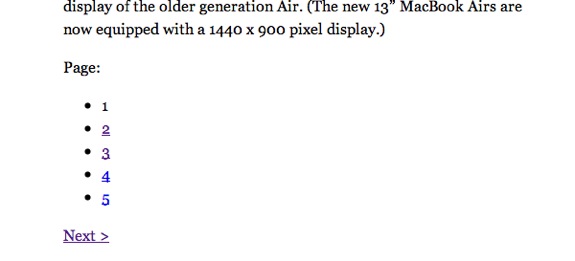
Clicking the pages on a Mac or PC will open that page in the browser. The iOS version of Instapaper will prompt you to Instapaper-ize each subsequent page.
I don’t see this as a fault of Instapaper’s at all. However, I do find it annoying. Thankfully, Safari 5’s Reader function offers a way around this.
If you activate Safari’s Reader function, and scroll all the way through the story, it will cache all of the story’s text — even over multiple pages. Once it’s all loaded up, hit the email button on Reader’s heads-up display and send the article to your Instapaper account via email:1
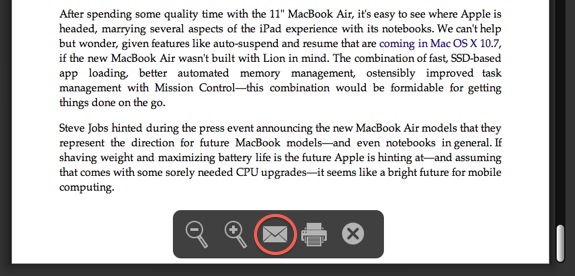
Your Inspaper account will now have the entire story’s text, ready to read at your leisure, without having to take you back to the browser. Brilliant, right?
You can get your account’s email address by looking at the “Extras” section of the Instapaper website. ↩︎
Be sure to check out this great collection of Dropbox tips and ticks over at App Storm.
[via swissmiss]
I don’t want to jump the gun and say that this is the best Mac I have ever owned – but this is my favorite Mac that I have ever owned. 10 The question though isn’t whether I like this machine 11 but whether or not one can use it as a primary Mac.
The short answer is absolutely.
If you send anything to Instapaper today, this should be it.
There’s no doubt that iOS is where the developer mojo is. Not just Apple’s developer mojo, but the industry’s. It’s the hottest platform in the world, period. And I do think Apple sees the upcoming Mac App Store as an opportunity for iOS developers who’ve never written apps for the Mac to start. But I don’t think iPad apps are ever going to run on the Mac as-is, without any change or adaptation to account for the very different input methods. This isn’t about ARM vs. x86 code generation, or development frameworks. It’s about the fact that direct manipulation on a touchscreen is fundamentally different than moving a mouse cursor via a touchpad.
Gruber’s right — running apps that are built for finger-based inputs on a system driven by a trackpad or mouse would suck. But can you imagine what will happen when developers figure out how to solve such issues?
Apple has made changes to its policy regarding the transferability of AppleCare Protection Plans, a source told BGR. Starting immediately, an Apple customer will have the ability to transfer AppleCare Protection Plan coverage to a new device without having to cancel the current plan and purchase a new one.
[…]
The policy change, which applies only to eligible purchases made within the 30-day period prior to a transfer request, simplifies the buying process for customers. AppleCare Protection Plans for the iPhone have been transferable since June of this year, and now the new policy will apply to all Apple products eligible to be covered by a protection plan.
Yet another reason to buy AppleCare.
All references to the service have been erased from the company’s Web site, and the Personal Shopping link now re-directs surfers to the main Retail page (former page). Individual stores pages and the Apple Store app have also been updated. According to sources, the change became effective yesterday and stems from the belief that every customer should receive the same attention and amount of service.
This program was a major pain when it was implemented several years ago, when I was still at Apple Retail. Glad to see it go.
Stuff like this makes the inevitable fact that the GOP will win back the House today just plain sad.
Jacqui Cheng explains the recent drama with the iOS version of VLC. This is another example of how “open” can mean “terribly confusing.”
After spending the last couple of days with the Galaxy Tab, we can confidently say it’s the best Android tablet on the market. Now, that’s not saying much given the state of the Android competition, but we can also assuredly say that the Tab is the first true competitor to Apple’s iPad. Its crisp display, compact form factor, touch-friendly software and dual cameras undoubtedly have what it takes to win over the average tablet seeker. However, we still have some reservations right now. Google hasn’t yet provided any direction on Android as a tablet platform, which means that the Tab is held back by lagging application support and software that doesn’t fully take advantage of the extra screen real estate. Remember, that when the iPad launched many developers were already working on tablet specific apps and Apple had an iPad app store in place. Put simply, without that ecosystem and support from Google, Samsung is left to its own devices – literally. Just today Samsung rolled out an emulator for the Tab that uses the Android SDK and the company says it’s working with Google and plans to use future iterations of Android, so we’ll have to see what happens – but for now it looks like the saga of the Samsung Galaxy Tab still has several chapters to go.
Stern hits the nail on the head here. The Galaxy Tab looks like a pretty decent device, yet it might get stranded in the middle between Google and Samsung. This is a potential issue anytime one company’s device is dependent on another’s software. Apple’s system may be “closed,” but at least the iPad’s operating system was designed to work on it, from the ground up.
Had Google simply focused on a few key features — lightning-fast browsing and perfect search results, for example — we’d have readily excused the missing pieces with the assumption that they’d soon arrive in an equally polished way. Indeed, the most disappointing thing about Google TV is the immediate realization that it could be so much more if only Google given itself some more time.
I feel like a lot of Google services and products have this half-done feel about them. Most of Google services can be greatly enhanced with some fine-tuning, but that isn’t something most consumers want to do. Of course, changing Gmail settings is one thing, but shipping a half-baked product that costs hundreds of dollars are two different things. People forgive a lot less when they are paying for something.
That’s a lesson Google has to learn, and quickly.