Apple’s Live Activity for Timers Already Needs a Refresh

UPDATE: This has been fixed as of iOS 17!

Apple’s Live Activity feature has begun to take off, with more and more apps doing interesting things with the new user interface. Sadly, one of Apple’s own uses for it doesn’t work the way it should.1

In this image, you can see the Live Activity on the lock screen, expanded from the Dynamic Island and a screenshot of Clock.app itself:
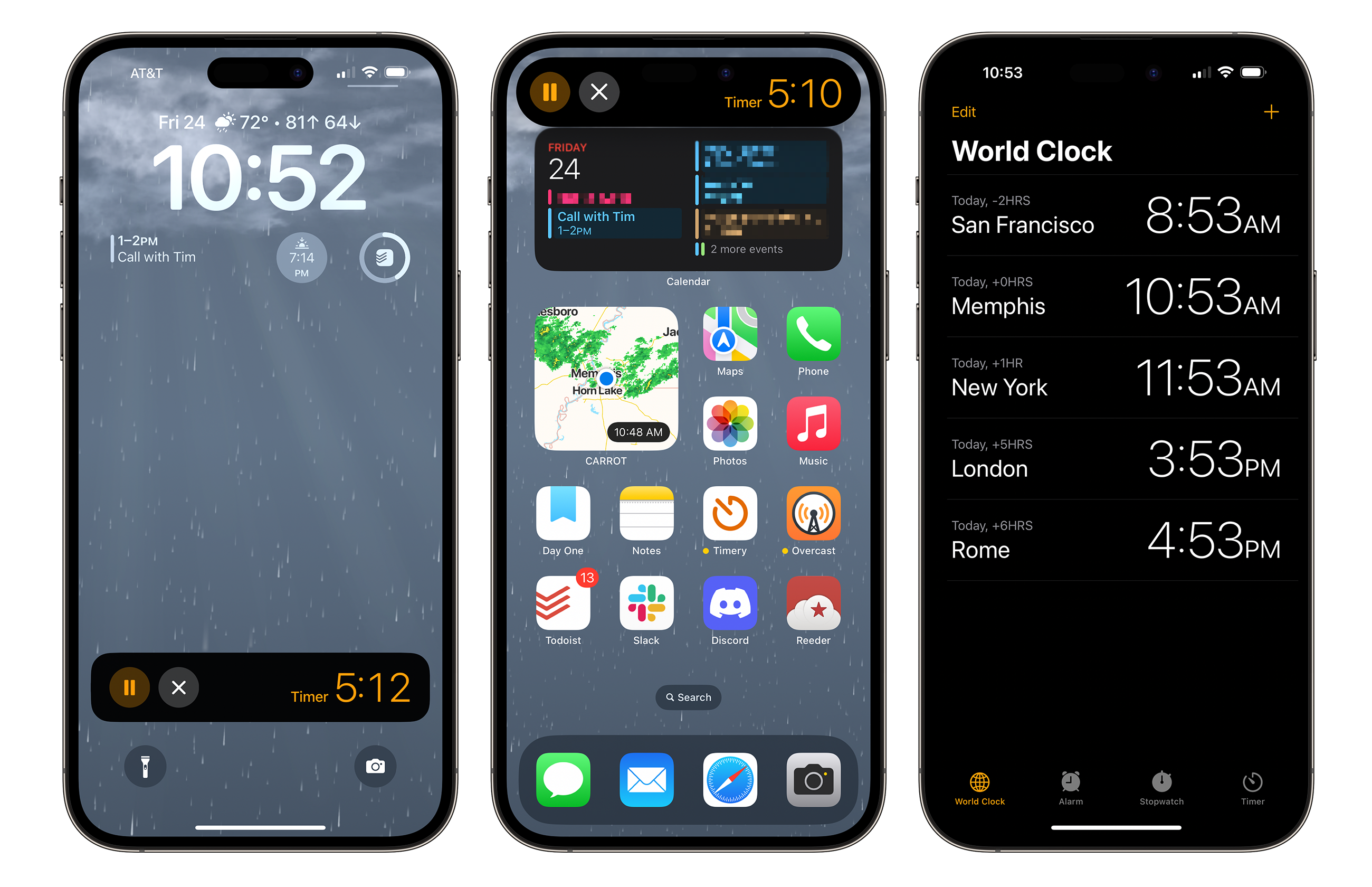
A Live Activity for a Timer running on iOS 16.4 RC1

Continue reading ⇢

Dan Moren Reviews Apple Maps’ Take on Boston Landmarks⇢

Writing on Six Colors:

Over the past couple years, Apple’s been rolling out its “Detailed City Experience” in Maps to cities across the world and finally, at long last, those improved maps and better landmarks have come to my hometown of Boston, as first noted by Frank McShan on Twitter.

These are really nice looking. The closest thing I’ve seen here in Memphis is the Bass Pro location inside the Pyramid, and it really doesn’t come close to these new Maps illustrations:

Continue reading ⇢

Report: Next iPhone to Drop Ringer Switch for Button⇢

Filipe Espósito, writing last week at 9to5Mac:

9to5Mac last month revealed a first look at the design of the entire iPhone 15 lineup based on CAD files used to build the phones and also compatible accessories. But one thing that remained unclear was the layout of the volume buttons, which reportedly will be capacitive rather than physical. 9to5Mac has heard from a source that iPhone 15 Pro will have new unified volume buttons, plus a “pressing type” mute button.

Continue reading ⇢

25 Years Ago, Apple Killed the Newton

When Steve Jobs made it back to Apple, the company had dozens of products that would not survive the company’s move to a much simpler product matrix. In a sea of forgettable Macs and accessories, the biggest loss was the Newton.

The Newton MessagePad 2100

Here is the announcement itself, in its entirety:

Apple Computer, Inc. today announced it will discontinue further development of the Newton operating system and Newton OS-based products, including the MessagePad 2100 and eMate 300.

Continue reading ⇢

Bluetooth Database Spills the Beans on New Macs⇢

Rumors about that new 15-inch MacBook Air and the future Mac Pro keep heating up, as Joe Rossignol reports:

Apple this week filed a new listing in the Bluetooth Launch Studio database, a move that sometimes foreshadows the launch of new products. The filing does not mention any specific products, but it lists the latest Bluetooth 5.3 standard and references a prior macOS-related listing, suggesting the filing could be related to upcoming Macs.

Continue reading ⇢

Considering the Next Mac Pro⇢

Jason Snell, writing at Macworld:

So what makes a Mac Pro a Mac Pro? If it’s a tower enclosure, Apple’s got a relatively fresh one from 2019 that it can just roll out again. (Gurman says that’s now the plan, which is also a little disconcerting when you consider that the original reports suggested a new, half-height enclosure and that quad-M2 chip.) But what’s inside the Mac Pro matters, and if it’s just an M2 Ultra chip, it’s hard not to consider the new Mac Pro just a Mac Studio that moved out of its apartment and into a mini-mansion.

Continue reading ⇢

On Login Items, Background Items and macOS Ventura⇢

Howard Oakley:

There was a time when the great majority of apps consisted of just an app bundle, created their own settings file in ~/Library/Preferences, and that was that. For various reasons, this became steadily more complicated, with some apps assembling arrays of files and folders in /Library/Application Support, and in recent years many apps have required helpers too. One common reason for this is that they need to perform certain functions with elevated privileges, such as root. To do that, they have become even more elaborate, with Login Items, property lists installed in folders like /Library/LaunchAgents, and more. This article explains how Ventura is trying to make things simpler again.

Continue reading ⇢

Microsoft Blesses Parallels as Official Way to Run Windows on Apple Silicon Macs⇢

Andrew Cunningham, writing at Ars Technica:

In the absence of a version of Boot Camp that runs on Apple Silicon Macs, the best way to run Windows on them has been to use a virtualization app like Parallels or (more recently) VMware Fusion. The problem is that, until now, the Arm version of Windows that runs on Apple Silicon Macs hasn’t technically been allowed to run on anything other than Arm PCs that come with it due to Microsoft’s licensing restrictions.

Continue reading ⇢