This week on Connected, Federico, Myke and I gathered to discuss Apple’s new Racial Equity and Justice Initiatives, some things at CES that caught their eyes and how they feel about the Apple Watch.
On Connected Pro, the 5-second rule is discussed as is Federico’s switch to Spotify.
My thanks to our sponsors:
Pingdom: Start monitoring your website performance and availability today, and get instant alerts when an outage occurs or a site transaction fails. Use offer code CONNECTED to get 30% off. Offer expires on January 31, 2022, and can be used only once.
Hover: Make a name for yourself. Get 10% off any domain name.
Mack Weldon: Reinventing men’s basics. Get 20% off your first order with promo code CONNECTED.
Apple today announced a set of major new projects as part of its $100 million Racial Equity and Justice Initiative (REJI) to help dismantle systemic barriers to opportunity and combat injustices faced by communities of color. These forward-looking and comprehensive efforts include the Propel Center, a first-of-its-kind global innovation and learning hub for Historically Black Colleges and Universities (HBCUs); an Apple Developer Academy to support coding and tech education for students in Detroit; and venture capital funding for Black and Brown entrepreneurs. Together, Apple’s REJI commitments aim to expand opportunities for communities of color across the country and to help build the next generation of diverse leaders.
“We are all accountable to the urgent work of building a more just, more equitable world — and these new projects send a clear signal of Apple’s enduring commitment,” said Tim Cook, Apple’s CEO. “We’re launching REJI’s latest initiatives with partners across a broad range of industries and backgrounds — from students to teachers, developers to entrepreneurs, and community organizers to justice advocates — working together to empower communities that have borne the brunt of racism and discrimination for far too long. We are honored to help bring this vision to bear, and to match our words and actions to the values of equity and inclusion we have always prized at Apple.”
As part of this, Apple is supporting the launch of the Propel Center, which is designed to support students of Historically Black Colleges and Universities across the country. The company is also opening an Apple Developer Academy in Detroit, as well as invest in venture capital firms working with entrepreneurs of color.
On this episode of Liftoff, Jason and I start 2021 by picking some things they are looking forward to in what promises to be a very busy year in space.
My thanks to our sponsor:
Squarespace: Make your next move. Enter offer code LIFTOFF at checkout to get 10% off your first purchase.
You’re unable to import an MPEG 1 video file into your iDVD project. QuickTime Player can read and play the file, and iDVD Help says: “You can add any video or image file supported by QuickTime to your iDVD project.”
iDVD 1.0 cannot read MPEG 1 video files. The Help file is in error. You may be able to convert your MPEG 1 video files to a different QuickTime format that iDVD can read by using the Cleaner 5 application from Terran.
Terran is definitely not around anymore, but you can read about Cleaner 5 here.
Backblaze offers unlimited computer backup for Macs and PCs for just $6 a month (no gimmicks or add-ons or gotchas included). This means they will back up your movies, music, photos, videos, projects, and all the data you have! You can restore files from anywhere in the world and directly download them from the web or their mobile apps. You can also have your backup sent to you via hard drive and have it overnighted right to your home! Never worry about finding lost versions or deleted files—you can extend your retention period to one year or forever!
Backblaze has over an exabyte of customer data backed up and counting—that’s 1,000,000,000 gigabytes. They have also restored well over 50+ billion files for customers and they come recommended by The New York Times, Inc., Macworld, Tom’s Guide, 9to5Mac, and more.
Get peace of mind knowing your files are backed up securely in the cloud. Start your free 15-day trial with Backblaze today by going to backblaze.com/512pixels.
From the beginning, Mac OS X was designed with security and privacy in mind, but over the years Apple has worked to make both the Mac’s software and hardware more even more so.
We spent the entire episode talking what’s what when it comes to Mac security, and how Apple continues to evolve and improve things over time.
My thanks to our sponsors:
TextExpander from Smile: Get 20% off with this link and type more with less effort! Expand short abbreviations into longer bits of text, even fill-ins, with TextExpander from Smile.
Squarespace: Make your next move. Enter offer code MPU at checkout to get 10% off your first purchase.
Indeed: Get a free $75 credit to upgrade your job post.
In my series 2001 Revisited, I’m covering Apple’s major announcements from 20 years ago. This month, we’re looking at Macworld San Francisco.
To kick off what would be a very busy year, Steve Jobs took to the Macworld stage in San Francisco, boasting that in addition to the 5,000 people in attendance, tens of thousands of people were watching via livestream around the world via QuickTime.
Mac OS X
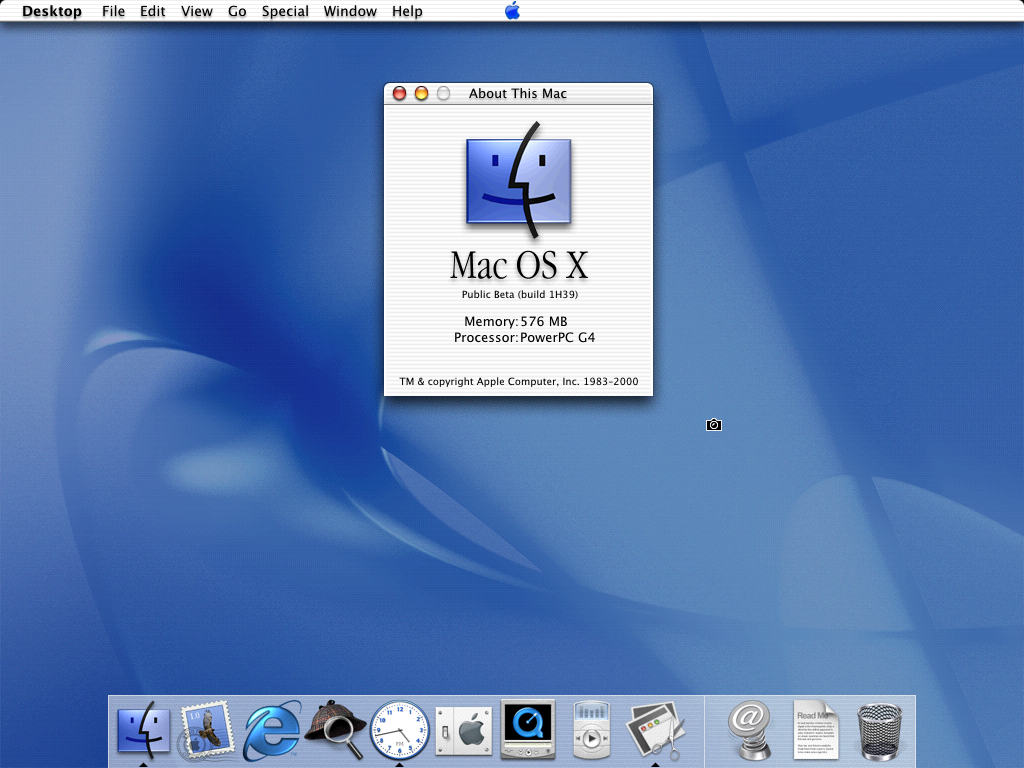
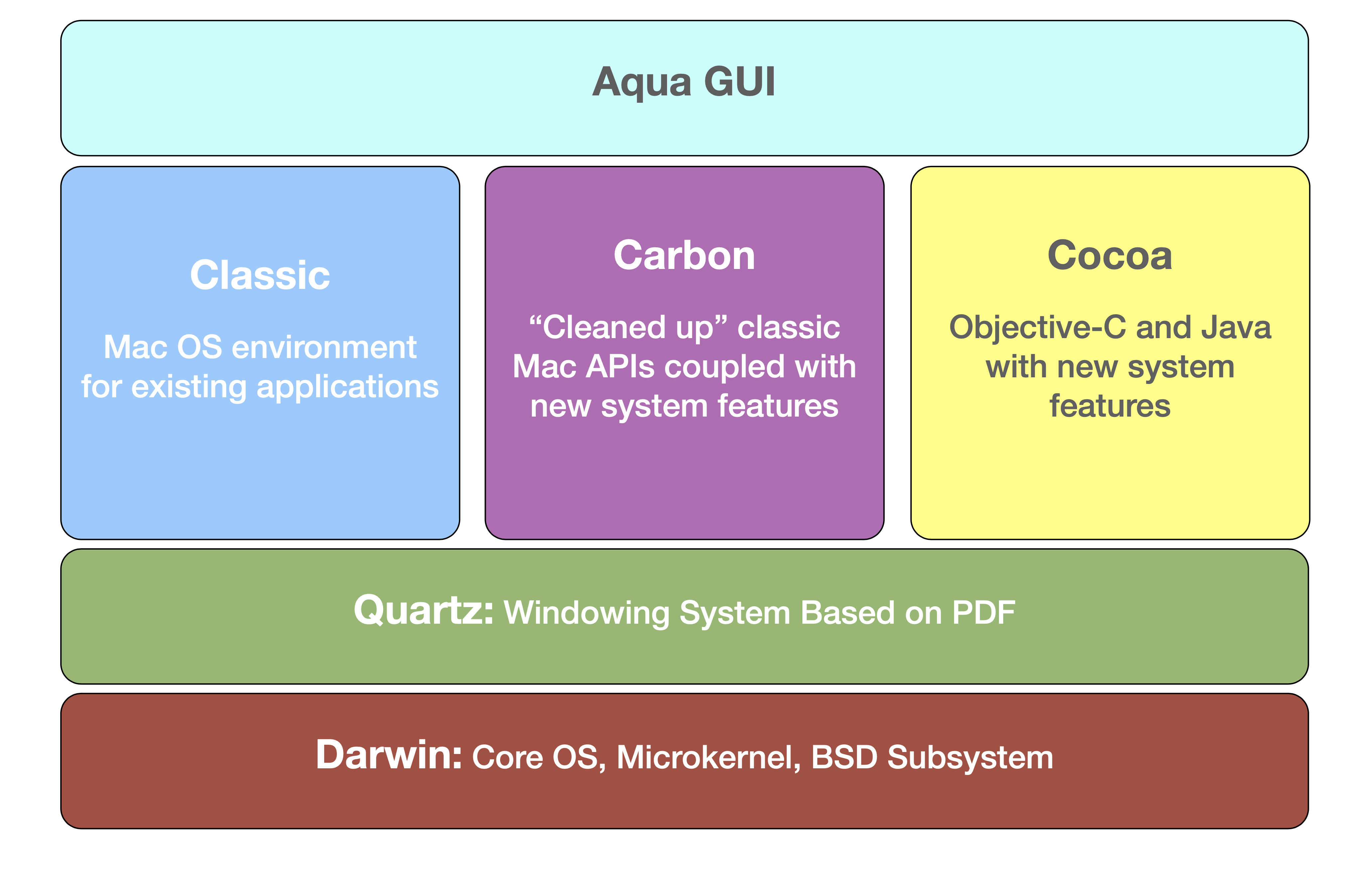
Jobs started by talking about Mac OS X, recapping the new operating system’s architecture, from the kernel on up all the way to the new UI, dubbed Aqua.
I ripped this graphic out of my book about the iMac G3 and the roots of Mac OS X. You should check it out.
He praised the Mac OS X Public Beta, which had on sale since September 2000. Some 100,000 people had purchased it, providing 75,000 feedback submissions.1
After thanking the community for their feedback and involvement, he outlined some common themes in the reports. The first was positive feedback, naturally:
“Far more stable”
“Aqua is incredible”
“Super easy to install”
“Classic really works”
“Mac + Unix is nirvana”
Then he tackled a list of features missing from the public beta:
AirPort support
Printing
Location manager
Dynamic network settings
PPP over Ethernet
After revealing that those features were all in the current build of the OS, Jobs shared some concerns they had been hearing from users:
The Apple menu was terrible
The lack of a clock in the Menu Bar
Disks and Trash on Desktop
No Control Strip
Toolbars were too big
The placement of the Apple logo in the Public Beta was centered in the menu bar, which was ridiculous:
To make matters worse, it was just a logo without any menu items, forgoing one of Mac OS’ more useful UI features.
Thankfully, Apple put it back in the correct place on the left and made it an actual menu again for system-level controls such as Sleep, Restart and Shutdown.
(In the classic Mac OS, these were under the Special menu, and were only available when in the Finder, which was a bit odd.)
To this, Apple added a list of recent items and a way to switch network locations without taking a trip to System Preferences. It wasn’t as flexible as the old Apple menu, but it was a big improvement over the beta.
Toolbars in Finder and other apps were made smaller and customizable, so users could put their own favorite commands and shortcuts where they wanted them. Finder also picked up the ability to spawn a new window for every folder and sub-folder moved through on a user’s way to their desired destination. While this may have looked like the classic Mac OS’ way of doing things, it missed the mark, according to John Siracusa:
The Mac OS X Finder needs a lot of work before it can fill the shoes of its predecessor. The addition of many useful and powerful features to the Mac OS experience (column view, browser mode, the toolbar, bundle manipulation, file mapping, and built-in network integration) does not outweigh the significant problems. Missing features, mis-features, and bugs render the new Finder unable to reproduce the spatial file manipulation environment that has been the defining characteristic of the Macintosh experience since 1984.
Speaking of features from Mac OS, the Control Strip wasn’t reintroduced, but its easy access to settings was shoved into “Docklets,” or icons in the Dock that managed these settings but didn’t launch applications.2 They were weird.
In the early days of Mac OS X, there were a handful of these, including:
Monitors: Manage screen resolution and color depth
Battery Monitor: Shows remaining battery levels on notebooks
Signal Strength: Displays the connection strength for a Wi-FI network
iTunes Dockling: Controls iTunes
Folders: Any folder put in the Dock by a user would show a pop-up of its content when clicked, just like today.
Mercifully, Docklets were killed off with Mac OS X 10.1 Puma, but that’s an operating system update for a different time.
Applications
After discussing Mac OS X itself, Jobs walked through the Carbon and Cocoa application environments. As a recap, early versions of Mac OS X could run classic apps inside a virtual OS 9 machine and apps that had been “carbonized” to run natively on OS X, accessing new features like protected memory and the updated user interface.
Lastly, there was Cocoa, which had its roots in NeXTSTEP, not Mac OS. This was to be a new generation of Mac applications, written in Objective-C.
Jobs boasted that some 400 developers had committed to Mac OS X, accounting for more than 1,200 software titles. While they would not all be out on day one, Jobs pitched a bright future, full of software for Apple’s new operating system.
After a demonstration of Maya on the new OS, the keynote turned to the schedule. Jobs announced that Mac OS X would go one sale on March 24, 2001 for $129. Starting in July, Mac OS X would be the bundled, default OS on new Apple hardware, Jobs said. He closed out this section saying:
We know that Mac OS X is really laying the foundation for the next decade to decade and a half of our software efforts. We think we’ve got something really, really good here. I hope you love it as much as we do.
Power Mac G4 Update
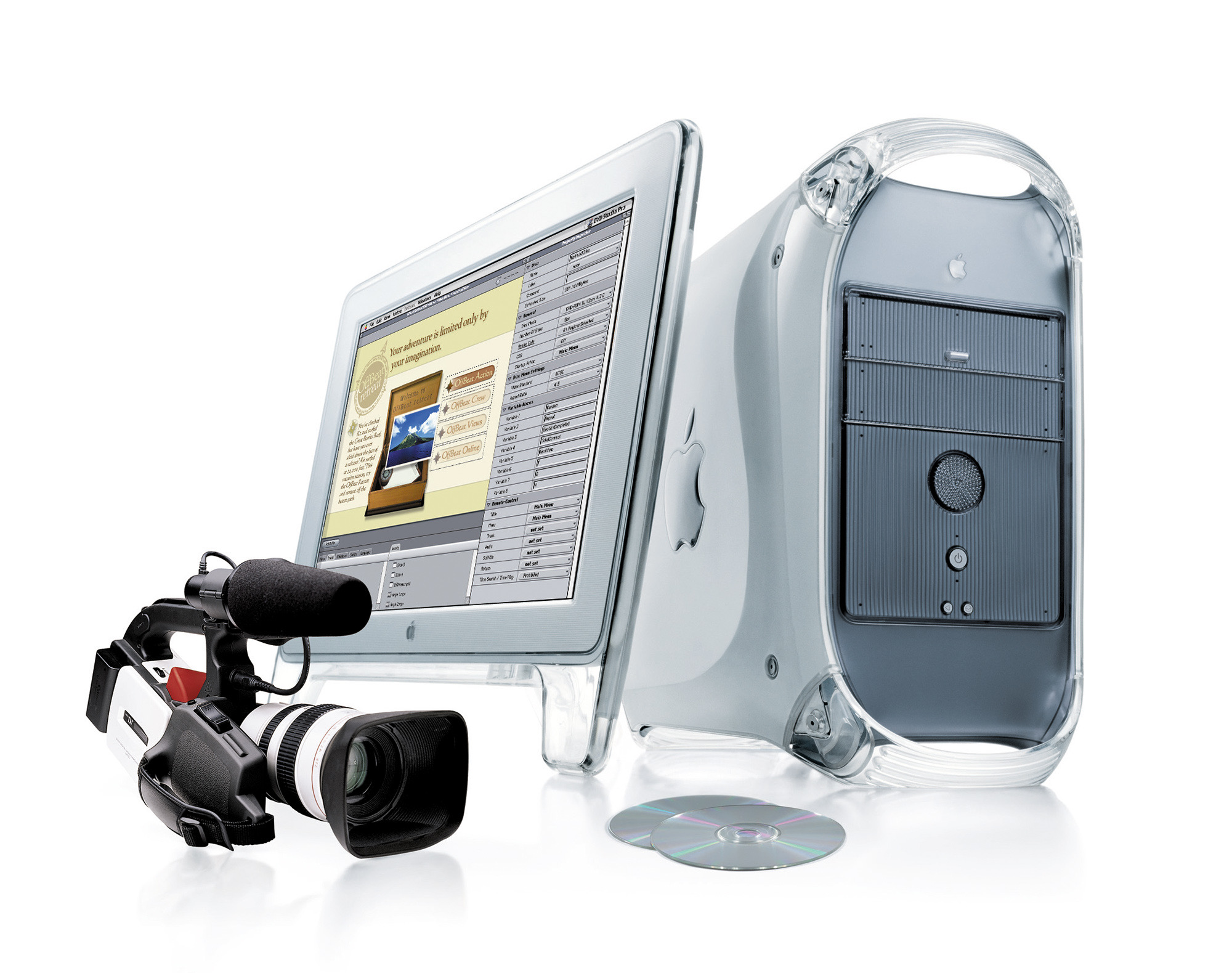
After thirty minutes of software talk, the keynote turned to hardware, starting with a new generation of Power Mac G4 towers. The last machines to use the original industrial design, these are known as the “Digital Audio” G4s.
The name came from the included built-in amplifier, which could be used with Apple’s USB Pro Speakers, also announced at Macworld 2001.
Jobs said the theme for this new generation of G4 was “Power to Burn,” before acknowledging that the Power Mac had topped out at 500 MHz a year and a half before this. These new machines could be ordered with up to a 733 MHz G4, delivering 5.5 gigaflops of computing power.
The processors in the four machines were clocked at 466 MHz, 533 MHz, 667 MHz and 773 MHz.3 The 533 could be custom ordered as a dual-processor system. The slower two machines used the PowerPC 7410 CPU, but the two faster models were built around the PPC 7450, complete with an on-chip 256 KB L2 Cache.
All four had that new digital amp, Gigabit Ethernet, five expansion slots, CD-RW drives, a faster 133 MHz system bus and AGP graphics with NVIDIA cards in the top three models.
Prices ranges from $1699 to $3499. That most expensive model came with a SuperDrive, which Jobs said was an industry first. It could read and write both CDs and DVDs. Those DVDs could be then played on a consumer DVD player. It was a big deal, as Jobs joked: The new G4 could burn CDs, DVDs and Pentiums.
This launched into one of many races Apple would hold between their slower-clocked PowerPC Macs and Windows machines running faster-on-paper Intel CPUs. This time, Phil Schiller came out to show that a 733 MHz Power Mac G4 could run circles around the new 1.5 GHz Pentium 4, at least in Photoshop 6.
The 466 and 533 MHz models were on sale immediately, with the faster SKUs coming the next month.
To make burning CDs on Mac OS 9 and Mac OS X easier, Jobs showed that Finder had been updated to treat blank optical media as a folder. A user could drag files and folders to it, then tell the system to burn the disc when they were ready.
Power Mac Accessories
I’ve already mentioned the Pro Speakers that Apple announced with these machines. Designed in conjunction with Harman/Kardon, they were clear spherical speakers, each roughly the size of the HomePod mini. They sold for $59 a set.
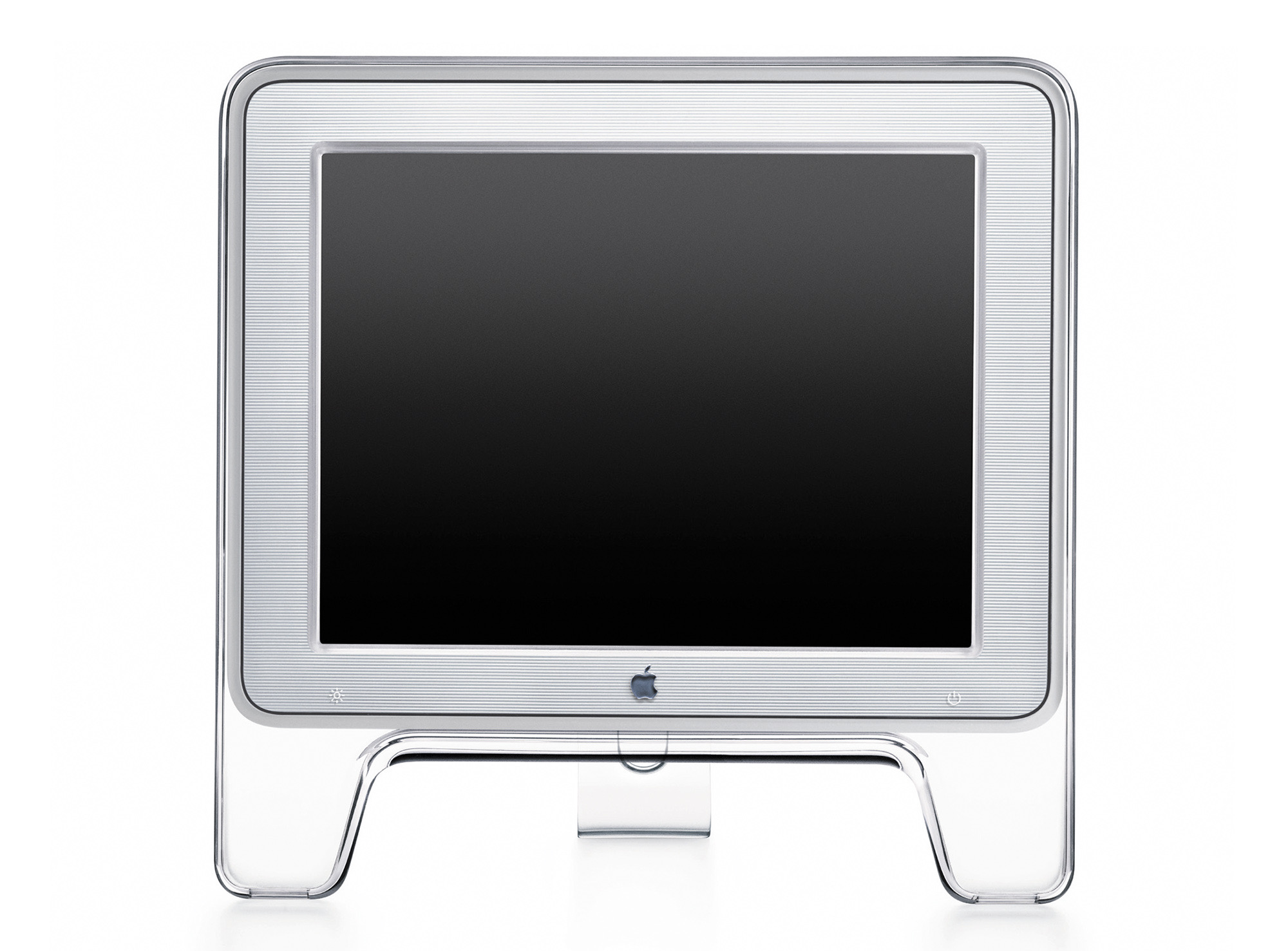
Then, Jobs showed the company’s 15-inch Studio Display, a smaller, less-expensive sibling to the 22-inch variant pictured above with the Power Mac. It used Apple Display Connector (ADC) for power, video and USB all over one cable. It had been for sale at $999, but got a price cut here to $799.
The Digital Hub.
Jobs opened the next section, referencing the downturn in the PC industry. While some were closing up shop on the personal computer, Jobs said Apple saw things differently. The PC wasn’t dying; it was evolving. He laid out his interpretation of the personal computer industry’s history:
1980-1994: The first Golden Age, thanks to productivity tools like word processors, spreadsheets and digital publishing applications.
1995-2000: The second Golden Age, thanks to the rise of the Internet. It added to the productivity tools, making the personal computer more valuable than ever.
Jobs then said the PC industry was about to enter its third great era — the age of the Digital Lifestyle.
Here’s how he laid out this vision:
We are living in a new digital lifestyle with an explosion of digital devices. It’s huge. And we believe the PC, or more importantly the Mac, can become the digital hub of our new emerging digital lifestyle, with the ability to add tremendous value to these other digital devices.
I wrote about the advent and evolution of the Digital Hub over on iMore if you want to read more. Needless to say, Jobs’ words were prophetic and over the subsequent years, Apple would flesh out this vision with products like the iPod for mobile music listening and iPhoto for managing digital photos.
The news at Macworld 2001 was all about digital music. He explained how MP3s worked, and how this was a revolution already underway. In fact, in 2000 alone, 320 million blank CD-Rs had been sold in the United States, and portable MP3 players were becoming popular.4
Jobs walked the crowd through the current music applications and showed how they were just too complex to use, and often came with restrictions on encoding and burning unless the user paid up.
Enter iTunes.
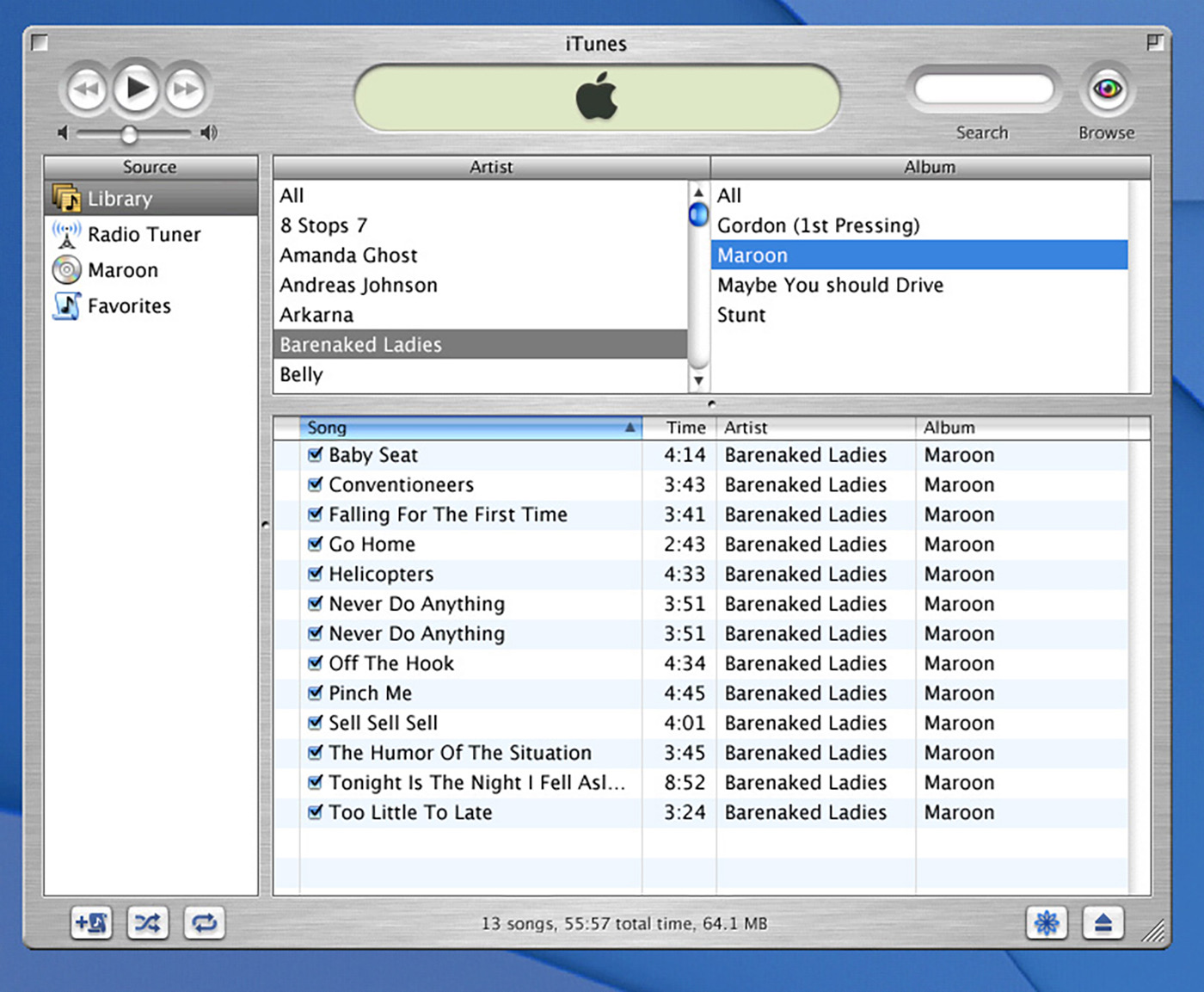
While it’s hard to believe given what would happen to iTunes over the next two decades, but this version of the product was clean and simple.5 Users could import CDs, organize their music into playlists and then burn those playlists onto CD-Rs to take with them. It even had a visualizer and a hip design.
iDVD
After talking about iTunes, Jobs changed gears to talk about the explosion of DVD usage in households and businesses around the world. The dream, he said, was to make your own DVDs, with your own movies on them — and play them on consumer-grade DVD players.
iMovie, which had been around since 1999 let uses edit home video, but that’s as far as it went. By 2001, Apple was ready, thanks to the SuperDrive to burn the discs, and the power of the Power Mac G4’s Velocity Engine to encode the data in software at just 2x real time, a huge increase from the 25x real time that was required before this breakthrough.
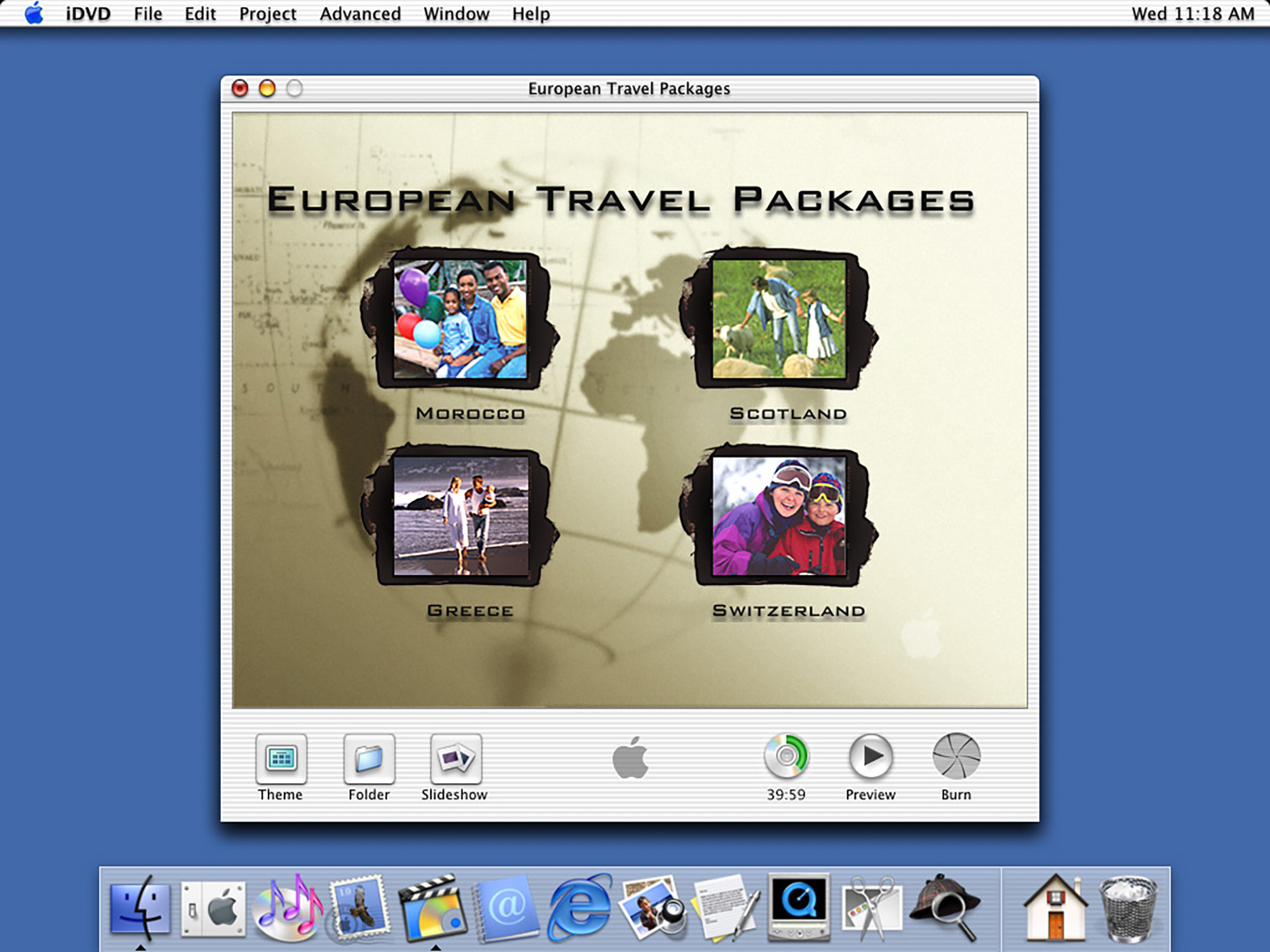
This was all building to iDVD, a new application for laying out DVDs with menus.
Jobs demoed the new title on one of the just-announced Power Mac G4s running Mac OS 9. He quickly added titles, menus and the media for playback, thanks to iDVD’s built-in collection of themes, templates and layout tools.6
In just a few short years, this technology would show up in cheaper desktop and even notebooks, but this was a big deal, and along with iTunes and iMovie, formed the foundation that would later become iLife, complete with iPhoto and even later, iWeb.
Titanium PowerBook
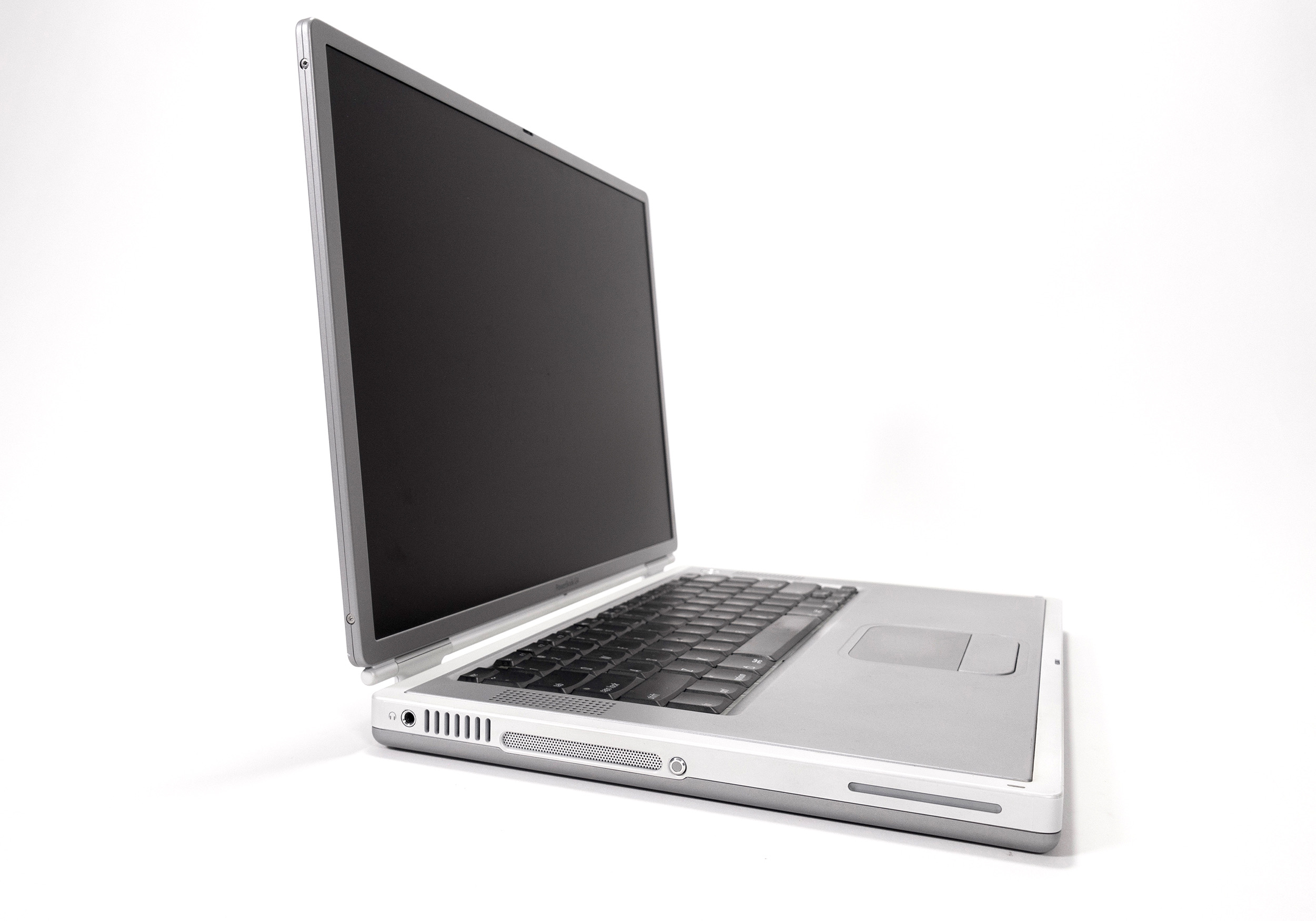
While the Power Mac G4 was great, the real hardware star of this event was my all-time favorite Apple notebook: the Titanium PowerBook G4. It was Job’s One More Thing, after 90 minutes on stage.
I’ve covered this machine a lot over the years, but in short, it was a huge departure from the PowerBook G3 series of machines. It was thin and made of metal, and brought the G4 to a notebook for the first time, with either a 400 or 500 MHz G4 in a chassis that was just one inch thick, weighing 5.2 pounds. It boasted a 15.2-inch widescreen display and slot-loading optical drive, all housed in a Titanium chassis.
Apple was very proud of this machine, as you can tell from the press release:
“The all new Titanium PowerBook G4 is the most revolutionary portable computer ever created,” said Steve Jobs, Apple’s CEO. “Its a supercomputer to go’ in terms of performance, yet it’s thinner and sexier than the best subnotebooks.”
As it would turn out, this would be a short-lived design, as it had rather weak hinges and the paint used on parts of the case would often chip and flake off, making the expensive laptop look like a beater.
…and of course my video on the machine from a few years ago:
In Conclusion
This Macworld keynote is jam-packed with stuff that would really change Apple’s trajectory for years to come. Mac OS X would spin off other operating systems to power things from the iPhone to the Apple Watch. iTunes has since been replaced,7 but music is still near and dear to Apple. Most people haven’t thought about iDVD in years, but we all use Apple devices to shoot and share video. And, of course, Apple is still in the business of making fast and capable Macs.
Jobs joked that some of these feedback submissions were quite long. I assume at least one of them was about a spatial Finder.↩︎
Jobs didn’t show these off on stage, but I wanted to include them here for the sake of completeness. ↩︎
I believe Apple’s tech spec page for these machines has an error on it. The keynote video includes a 667 MHz G4, but it’s not listed here. Instead, Apple published that machine as having a 773 MHz processor. ↩︎
Remember, this is some ten months before the iPod was introduced. ↩︎
There was also a professional-grade DVD authoring program announced named DVD Studio Pro, designed to work perfectly with Final Cut Pro, which Apple had purchased from Macromedia in 1998. ↩︎
My thanks to The Sweet Setup for sponsoring 512 Pixels this week. Their 2021 Digital Planner is built for the iPad and based on a proven system for clarity, margin, and focus. Download now, and see for yourself. Comes with a 30-day, money-back guarantee.
No spoilers, but on yesterday’s episode of Connected, we had to contend with how big the iPhone’s notch is, and how it may have changed sizes over the years since the introduction of Face ID in 2017.
Just looking at a pile of iPhones isn’t that helpful when trying to investigate such minutiae. What you need is detailed documentation.
The document is for companies creating chargers, cases and just about anything else that can be clipped on, paired to or used with an iPhone. Thankfully, it also works for podcasters with ridiculous jobs, as it includes detailed drawings of every iPhone going back to the iPhone 5.
Using that information, I put together these charts showing the size of the notch1 on various iPhones:
Right off the bat, it’s easy to see that the LCD panel used on the iPhone XR and 11 resulted in a larger notch. At the time, Apple made a big deal of being able to use an LCD panel for a design with rounded edges, but this was a trade-off of that work. As you can see, the iPhone 12’s move to OLED brought the mainstream iPhone more in line with its more expensive siblings.
The thing that really surprised me was how much the notch has changed over the years. Side-by-side, notches on OLED iPhones all look the same, but clearly Apple has done a fair bit of tinkering over the years to the design. In fact, the notches on the iPhone 12 line are taller than any other models.
I wonder what that means when it comes to vastly shrinking the notch, which I think Apple really wants to do at some point in the future…
Please note that the last chart showing area doesn’t account for the radiuses found on the notch. I’m not a mathematician. ↩︎
2020 is over. Products have been released, notches have been measured and an Annual Chairman has been named. As if that wasn’t enough, the 2021 Rickies have been etched into a Google Doc for all time.
On Connected Pro, Myke decides to install macOS Big Sur and Federico explores Alfred.
This is one of my favorite episodes each year.
My thanks to our sponsors:
Squarespace: Make your next move. Enter offer code CONNECTED at checkout to get 10% off your first purchase.
TextExpander, from Smile: Recall your best words. Instantly, repeatedly. Get 20% off your first year.
Pingdom: Start monitoring your website performance and availability today, and get instant alerts when an outage occurs or a site transaction fails. Use offer code CONNECTED to get 30% off. Offer expires on January 31, 2022, and can be used only once.
Thanks to Todoist’s annual reporting, I have found a lot of information about how I worked last year. In total, I completed 4,362 tasks in 2020, which breaks down to these averages:
11 tasks per day
82 tasks per week
363 tasks per month
April was my most productive month, as you can see from these numbers showing how many tasks I completed by month. You can see that March wasn’t very good, and that I put my head down in April to work through the panic:
January: 388
February: 362
March: 192
April: 449
May: 398
June: 400
July: 376
August: 373
September: 400
October: 330
November: 336
December: 358
By far, I tend to do the most work on Tuesdays. I have no idea why, but here we are:
Sunday: 245
Monday: 553
Tuesday: 899
Wednesday: 629
Thursday: 565
Friday: 789
Saturday: 682
My most productive time is 5 PM, but I defer more tasks around 6:30 PM than any other time, especially on Fridays.

 I ripped this graphic out of