
A lot of news in a quick video:
512 Pixels
Apple Watch Series 4 Slightly Larger Than Series 3
Per some sleuthing by Mikah Sargent, 1 here are the new case sizes:
- Series 3 38mm — Height: 38.6mm / Width: 33.3mm / Depth: 11.4mm
- Series 4 40mm — Height: 40mm / Width: 34mm / Depth: 10.7mm
- Series 3 42mm — Height: 42.5mm / Width: 36.4mm / Depth: 11.4mm
- Series 4 44mm — Height: 44mm / Width: 38mm / Depth: 10.7mm
Apple says all old bands are compatible across the new generation of watches, which is great.
-
He had to compare Apple’s webpages for the bands themselves, as the “Compare Apple Watch Models” page doesn’t list dimensions for some reason. ↩︎
NASA Completes Orion Parachute Testing⇢
NASA’s new crew capsule is one step closer to flying, as Chris Bergin reports:
The Orion Program has concluded its drop test series for the spacecraft’s parachute system, with a successful return to terra firma on Wednesday. The three chutes will allow Orion to conclude its mission with a gentle splashdown in the Pacific Ocean. Ensuring the system was safe, including during the loss of a chute, has been the main goal of the test series that has been ongoing for around a decade.
Orion will fly atop NASA’s new SLS rocket, which is currently being developed. The first flight of the new stack, dubbed EM-1, will be without a crew, but the second flight will have astronauts aboard, marking the start of a new era of NASA spaceflight in the post-shuttle world.
Sitemap Spoils Apple’s iPhone, Apple Watch Keynote
Liftoff #80: Little Caesars Mars Probe⇢
Recent space news is all weird: Elon Musk’s questionable podcast appearance, NASA looking into selling naming rights on its hardware, and a leak on the ISS.
My thanks to our sponsors:
- Squarespace: Make your next move. Enter offer code LIFTOFF at checkout to get 10% off your first purchase.
- eero: Never think about WiFi again. Use code LIFTOFF for free overnight shipping.
10 Years of 512 Pixels
Tomorrow marks the 10th anniversary of this blog.1 Excuse me while I catch my breath after writing that.
The original name of the site was ForkBombr. I bought the domain from a friend for a couple of slices of pizza. That name may seems weird, but its a programming term that I thought was clever. The idea was that a single interest could spin up into an obsession, and as it was 2008, I had to drop the e from the name.
I started the site after leaving my job at my local Apple Store, where I worked as the Lead Genius. I left that job to run the service shop at a now-defunct Apple-Authorized Service Provider. I figured my experience gave me a fairly unique perspective on things. Over the years, my time at Apple has become less and less relevant, but it still shapes how I think about the company and its products.
My first post on the site was named “Dear Reader(s).” Here’s a bit from it:
Don’t suck.
With that phrase, one of my mentors has repeatedly set me straight. And with that phrase, I’m launching ForkBombr.
ForkBombr is going to focus on the things I focus on. Seems easy enough. So be prepared to see a lot on photography, internet journalism and Mac geekery.
My pitch was pretty simple, and drew heavily from this post by Merlin Mann about blogging.
Scrolling through a decade of writing is really weird and uncomfortable at times. I have some posts that haven’t stood the test of time very well. I have others that I consider some of the best writing I have ever published.
Regardless of how a single post has aged, overall, I’m proud of what the nearly 8,000 posts in my WordPress database represent: thoughtful consideration (and some jokes) about the things that interest me. Those interests have changed over time, but they are why I keep this site going. I want to share my ideas and things I find with readers who will find them just as cool or thought-provoking as I do.
The biggest example of a new topic in the 512 Venn diagram this is my passion for Apple history. I wasn’t in that world a decade ago, but 512 Pixels has grown into a major resource for the topic as I have gone further down the rabbit hole.
In 2010 or so, I made a real push at turning 512 Pixels into an Apple news site. I published a bunch of stuff, hoping to grow the site into something I could do full-time. That didn’t work, and I got pretty cranky about having a blog, but I stuck with after rediscovering the foundation on which it is built.
512 Pixels has never paid my bills; The Age of Blogging for Profit is mostly behind us, but in a way, I find that freeing. I’d much rather have a site like this be member supported, as I want it to be a hub for nerds like me.
Thanks for an amazing ten years. Let’s keep this party going for another decade or four.
-
As tomorrow is going to be very busy with the Apple keynote, I wanted to share this today. ↩︎
Ungeniused #62: The 11 foot 8 Bridge⇢
The Norfolk Southern–Gregson Street Overpass is Internet famous for destroying the trucks of oblivious drivers.
My thanks to our sponsor for this episode:
- Casper: The Internet’s favourite mattress. Get $50 off select mattresses with the code ‘UNGENIUSED’.
Apple Surveying iMac Pro Users⇢
I’m going to keep refreshing my email until this comes in, Apple.
Love Not Lost⇢
Perhaps the most heartbreaking thing about childhood cancer is the loss of the future. Danny Thomas, the founder of St. Jude believed that no child should die in the dawn of life.
Nine and a half years ago, my wife and I faced this as young parents. Thanks to the work of St. Jude, today our son is in third grade. This morning, he ate breakfast, got dressed and went to school. He has a dentist appointment this afternoon and got a haircut a couple of weeks ago. He loves music and is a huge people person.
St. Jude kids are special. They bring joy to everyone they meet, and I think a lot of that has to do with what they represent. Kids who have survived cancer are time travelers. They show that the future isn’t certain, and that sometimes, just sometimes, we can defeat the darkness it promises.
I was reminded of this when I read this article in The New York Times. Written by Vincent M. Mallozzi, it speaks to this idea of losing the future to cancer, and how we can reclaim it. Mallozzi shares the story of Lindsey Wilkerson and Joel Alsup, who were married on the St. Jude campus last week. Go read it, then go donate to St. Jude, where doctors and researchers and nurses and chefs and child life specialists and therapists and teachers and fundraisers and IT people and surgeons and nutritionists and more work tirelessly to redeem the future for kids like mine.
The Return of c
With just a couple of days to go before Apple’s iPhone event, we’re in the thick of it with leaks and hot takes. Naturally, this blog post combines those two things.
Over the weekend, a purported China Mobile presentation revealed that the upcoming slight-lower-cost-by-using-an-LCD-instead-of-an-OLED 6.1-inch iPhone will be named “iPhone XC,” as Benjamin Mayo reported at 9to5Mac:
This presentation says that the name of the 6.5-inch model is iPhone XS Plus. The name of the cheaper 6.1-inch phone has been more elusive. Various names have circled around including ‘Xr’, ‘XC’ and others. This supposed ‘leak’ says the name is iPhone XC.
Given the 6.1-inch iPhone is launching in several color options, C suffix would be sensible. Apple’s naming is never guaranteed to follow logic though.
Ah yes, the C suffix.1 Remember this phone?
The iPhone 5c is a really interesting chapter in iPhone history. It was introduced at the same time as the iPhone 5s. Inside, it was basically an iPhone 5, but an all-new, candy-colored exterior:
The technology inside the iPhone 5c was important, because Apple didn’t knock the 5 down a price slot that year; the iPhone 5c replaced the iPhone 5 in the line-up. Rumor has it that manufacturing the iPhone 5 cost too much for Apple to absorb the price cut required for it to be the second-tier iPhone.
This 6.1-inch iPhone doesn’t quite fit that mold. While I do believe the 2017 iPhone X will be discontinued this year, Apple can (and will) use the iPhone 8 and 8 Plus to occupy the lower price points, while the new iPhone Xc seems like it’s going to be a flagship device.
The iPhone 5c wasn’t a huge hit, while I think this new iPhone will be. There are a bunch of reasons why.
Before it was announced, many people believed the 5c was going to mark a huge change in Apple’s iPhone strategy, as rumors said it was going to be a new low-cost iPhone for the masses. In reality, it was just a new mid-tier iPhone that came in some cool colors.
Here are some responses once that became clear:
My assumption going into this, sixth iteration, of the iPhone was that we would see the expansion of the iPhone into two distinctly positioned products: a low-end C and a high-end S. The assumption was based on what what we saw with the iPad: the regular iPad and the mini iPad.
By using the iPad as a template, my exercise in August was to forecast what the pricing might turn out to be for such a split-personality product.
I got this one wrong.
I fixed my thinking by this week, but as of a month ago, I had it wrong when I wrote “The Case for a New Lower-Cost iPhone”.
Here’s the thing. The iPhone 5C has nothing to do with price. It probably does have something to do with manufacturing costs (which are lower for Apple), but not price. Apple’s years-long strategy hasn’t really changed.
The “c” in the iPhone 5c title doesn’t stand for “cheap”. It stands for “clueless”.
As in, we were all clueless in our speculation on Apple’s motivations for creating this device.
This is why I maintain the iPhone 5c is one of the most interesting iPhones ever sold.
Of course, we have to talk about colors. The iPhone 5c holds the title for the most colorful iPhone, and ever since, I have wanted Apple to revisit this. Over the weekend, four colors were shown off, but there’s nothing here that Apple hasn’t done in recent years. I’m still hoping for something more bold out of this new 6.1-inch iPhone, but I’m not willing to put any money down over it.
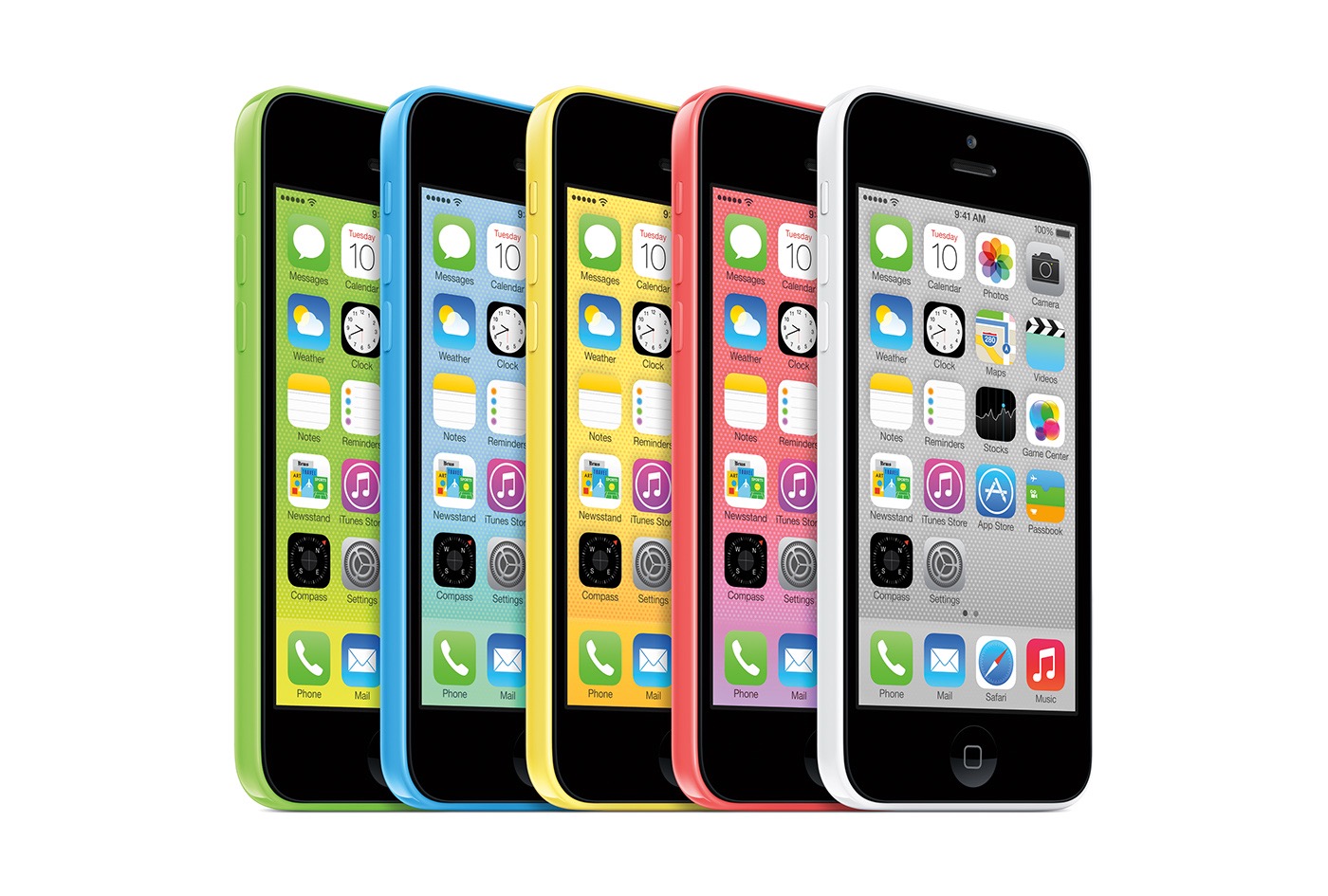
A lot of people say the iPhone 5c’s sales numbers were affected by the colors. While it was fun to pick a color and matching (or contrasting) case, a bright yellow or blue or green or pink iPhone screamed to the world “I bought the less-expensive one!”. In some parts of the world, I’m sure that was absolutely true.
Of course, there’s another argument to make here, too. Many would say that some customers would pick the cheaper iPhone just to have something more colorful.
I don’t know which one of these arguments is more correct, but I do think that Apple should make all of its products available in more colors. It is fun, and the iPhone 7 showed Apple can do it at scale, even on its flagship phone.
If this year’s iPhones line up with rumors, the biggest visual difference between the LCD and OLED phones will be the single camera used on the former, in comparison with the latter. I’m not sure how many people will spot that out in the world, but perhaps Apple thinks that highlighting the difference in color is a bridge too far.
Whatever happens on Wednesday, if Apple does ship an iPhone with the letter c in the name, expect to hear a lot more about this. Maybe that’s reason enough not to use it…
-
Of course, Mark Gurman says this phone may be called the iPhone Xr, so who knows. This article only works if the name is Xc, so I’m embracing it. ↩︎
September is National Childhood Cancer Awareness Month⇢
Every September, I donate all 512 Pixels revenue to highlight and raise money for a cause that is very close to my heart: St. Jude Children’s Research Hospital.
It’s a month that is of vital importance to my family. As some of you may know, our oldest son was diagnosed in May 2009 with a malignant brain tumor. In the blink of an eye, we went from a young family with a seemingly-healthy six month old baby to a young family facing the reality that our son was gravely sick.
Today, our son is in third grade. This week, he’s had library and computer class at school, run through the sprinklers with his two younger siblings and has forgotten to clean up his room before dinner as requested.
That may just sound like another September to you, but to my wife Merri and I, it’s nothing short of a miracle.
His particular type of brain cancer is rare in children, and almost unheard of in infants. To beat it — to save his life — would take the very best science and medicine had to offer. Thank God for St. Jude Children’s Research Hospital. I’d love if you would donate today to St. Jude’s live-saving work.
Josiah turns ten years old in November. To honor his birthday, and the amazing care he has been given at St. Jude, my goal is to raise $20,000 this month for the hospital — a symbolic $2,000 for every year.
For the last two years, Josiah and his sister Allison took part of St. Jude Race Weekend, each completing the Kids Marathon.
This year, our youngest son Jude will be participating as well, and the kids have asked that Merri and I run with them. Together, as a complete family, we’ll run their final mile through downtown Memphis.
In doing so, we take an active part in caring for our “St. Jude friends,” and will spend time talking about and remembering the friends who didn’t win their fight against this terrible foe. Please help us reach our goal again this year, and as is true each September, we are deeply humbled and thankful for the support this nerdy community continues to show our family and St. Jude.
CleanMyMac X⇢
If you’re looking for an easy way to clean up cruft on your Mac, the new version of CleanMyMac is a great app to check out.
CleanMyMac has worked reliably for me for years, and I’m glad to see MacPaw continue to refine it. The new features and the redesign should help broaden the app’s appeal, especially to new users, but I’m also pleased to see that CleanMyMac X is focused on the fundamentals like running its scans faster because as a utility app, that counts as much anything else as far as I’m concerned.
Agreed.